

編輯:關於 Android 程式設計
用 Eclipse 開發 Android 介面時,呼叫 findViewById 取樣式元素卻拿到 null,是幾乎每個人都會踩一次的坑。原因主要可以歸成兩類。
這是最常見的一種。假設 main.xml 長這樣,裡頭有個 id 為 lv_contactbook 的 ListView:
<?xml version="1.0" encoding="utf-8"?>
<LinearLayout xmlns:android="https://schemas.android.com/apk/res/android"
    android:orientation="vertical"
    android:layout_width="fill_parent"
    android:layout_height="fill_parent">
    <EditText
        android:id="@+id/et_search"
        android:layout_width="fill_parent"
        android:layout_height="wrap_content"
        android:text="" />
    <ListView
        android:id="@+id/lv_contactbook"
        android:layout_width="fill_parent"
        android:layout_height="wrap_content" />
</LinearLayout>
如果在 Activity 裡寫成這樣:
@Override
public void onCreate(Bundle savedInstanceState) {
    super.onCreate(savedInstanceState);
    ListView lv = (ListView) findViewById(R.id.lv_contactbook);
    setContentView(R.layout.main);
    // ...
}
那麼 lv 必然是 null。原因很簡單:setContentView 還沒執行,版面配置根本還沒被載入到 Activity 上,控制項自然不存在。把這行搬到 setContentView 之後就正常了。
第二種情況通常出現在用 LayoutInflater.inflate 把 XML 轉成物件時,例如自訂 Adapter 裡作為 ListView 單行內容的 rowview.xml:
<?xml version="1.0" encoding="utf-8"?>
<LinearLayout xmlns:android="https://schemas.android.com/apk/res/android"
    android:orientation="horizontal"
    android:layout_width="fill_parent"
    android:layout_height="wrap_content">
    <TextView
        android:id="@+id/tv_contact_id"
        android:layout_width="0px"
        android:layout_height="0px"
        android:visibility="invisible"
        android:gravity="center_vertical" />
    <TextView
        android:id="@+id/tv_contactname"
        android:layout_width="wrap_content"
        android:layout_height="36dip"
        android:textSize="16dip"
        android:layout_marginTop="10dip"
        android:textColor="#FFFFFFFF" />
</LinearLayout>
接著在自訂 Adapter 的 getView 中:
View rowview = (View) inflater.inflate(R.layout.rowview, parent, false);
TextView tv_contact_id = (TextView) rowview.findViewById(R.id.tv_contact_id);
TextView tv_contactname = (TextView) rowview.findViewById(R.id.tv_contactname);
有時會遇到很離奇的現象:rowview 明明不是 null,兩個 TextView 卻都是 null。逐行檢查怎麼看都沒錯。這種狀況多半是 Eclipse 的資源 id 產生不同步造成的,處理方式是做一次專案清理(Project 選單 → Clean),問題通常就消失了。
第一種是邏輯順序錯誤,看程式碼就能推敲出來;第二種則隱蔽得多,因為程式碼本身完全正確,一時想不到 Clean 這招就會白白耗掉大量時間。遇到「程式碼明明沒錯卻拿到 null」時,別忘了把建置快取列入嫌疑名單。
 Android 清理快取功能實作(含反射呼叫與 AIDL)
光看 Android 設定 → 應用程式 → 選擇某個 App,裡頭就有「清除快取」這個按鈕。這個功能要怎麼自己實作?答案藏在 Setting 的原始碼裡。 核心:g
 為 Android 應用提供資源的完整指南
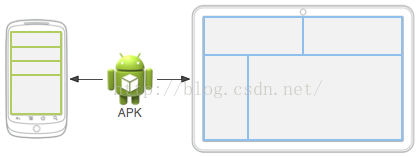
你應該始終把應用資源(如圖片、字串)外部化,這樣便於單獨維護。此外,還應為特定裝置配置提供備用資源,方法是將它們分組到專門命名的資源目錄中。執行時,Android 會依當
 Android 倒計時功能實作:Timer 與 CountDownTimer 兩種寫法
倒計時是相當常見的需求——限時答題、活動倒數、驗證碼有效期限等等。Android 提供了 CountDownTimer 這個現成類別可以直接使用,但仍有不少人習慣用 Ti
 Android 自定義軟鍵盤:打造屬於你的安全輸入面板
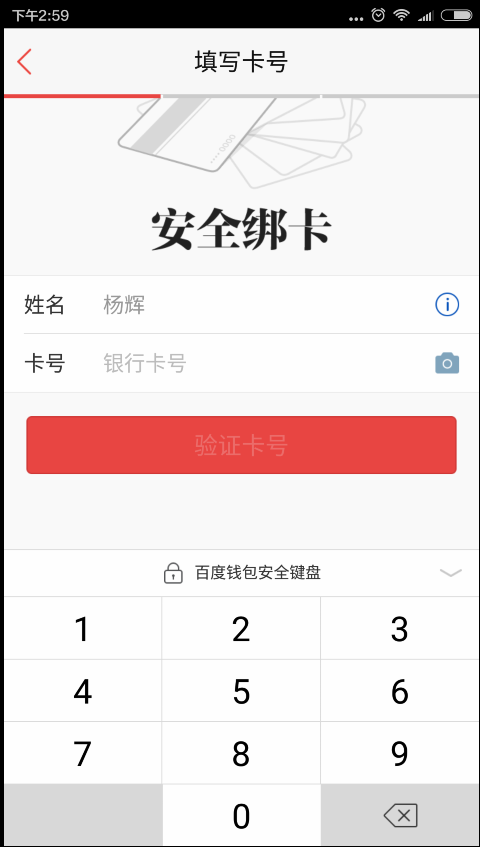
前不久項目需要一個自定義軟鍵盤,我上網翻了翻,覺得大多數方案都偏繁瑣,於是決定自己動手實現一個以備不時之需。這裡參考的是百度錢包的軟鍵盤,看著還不錯: 一、SoftIn