

編輯:關於 Android 程式設計
這樣一段程式碼:
LinearLayout groupPollingAddress = (LinearLayout) findViewById(R.layout.fragment_field_list);
回傳值卻是 null。
一開始我參考了几篇資料,包括 Stack Overflow 上關於 getActivity().findViewById(...) 回傳 null 的討論,以及介紹 inflate 與 findViewById 差異的文章,但都沒能解決問題。
後來換了關鍵字搜尋,才找到真正的線索:inflate 與 findViewById 是兩件不同的事。於是把寫法改成:
LayoutInflater inflater = (LayoutInflater) tabContext.getSystemService(Context.LAYOUT_INFLATER_SERVICE);
LinearLayout groupPollingAddress = (LinearLayout) inflater.inflate(R.layout.fragment_field_list, null);
問題立刻解決。
同類的情況還有一處:
TextView tab1AllGroupPollingAddressLabel = (TextView) findViewById(R.id.lblVariable);
一樣回傳 null,改成從剛剛載入的父容器往下找就正常了:
TextView tab1AllGroupPollingAddressLabel =
        (TextView) groupPollingAddress.findViewById(R.id.lblVariable);
其實我犯的錯誤很基礎:拿 R.layout 當成 R.id 用。findViewById 的參數必須是控制項的 id,傳入版面配置 id 當然找不到東西。
更普遍的原則是:findViewById 只會在「呼叫它的那個 View 的子樹」裡搜尋。如果你要的 View 不在 Activity 的主版面裡,而是透過 inflate 動態載入的,就必須先取得那個根 View,再從它往下找。
標準寫法如下:
LayoutInflater inflater = (LayoutInflater) tabContext.getSystemService(Context.LAYOUT_INFLATER_SERVICE);
LinearLayout groupPollingAddress = (LinearLayout) inflater.inflate(R.layout.fragment_field_list, null);
先取得系統的 LayoutInflater,把 XML 實體化成真正的 View 物件,之後所有的子控制項都能從這個根節點往下取得。
網路上常說自訂 View 裡 findViewById 拿到 null 是因為少了 super(context, attrs),但其實原因不只這一個。理解 View 生命週期的人應該知道:在自訂 View 的建構子裡呼叫 findViewById,幾乎必然為空——此時 View 還在初始化階段,尚未被附加到 Activity 的版面配置上,怎麼找都不會有結果。
正確做法是把這段邏輯搬到生命週期更晚的階段,例如:
protected void onAttachedToWindow() {
    super.onAttachedToWindow();
}
我就是把初始化程式碼移到這個回呼裡,問題才真正解決。
 拆解 Android Launcher 桌面與抽屜的切換動畫
版本:1.0 日期:2014.11.10 版權:© 2014 kince(轉載請註明出處) 一、為什麼要研究這個動畫 在桌面與抽屜之間切換,是使用者每天會觸發數十次的操
 Android 滑動菜單的簡潔實作(SlidingPaneLayout 入門)
SlidingPaneLayout 是 Android 團隊在 2013 年 Google I/O 大會上隨 Support V4 庫一同推出的進階佈局控制項。它能讓開發
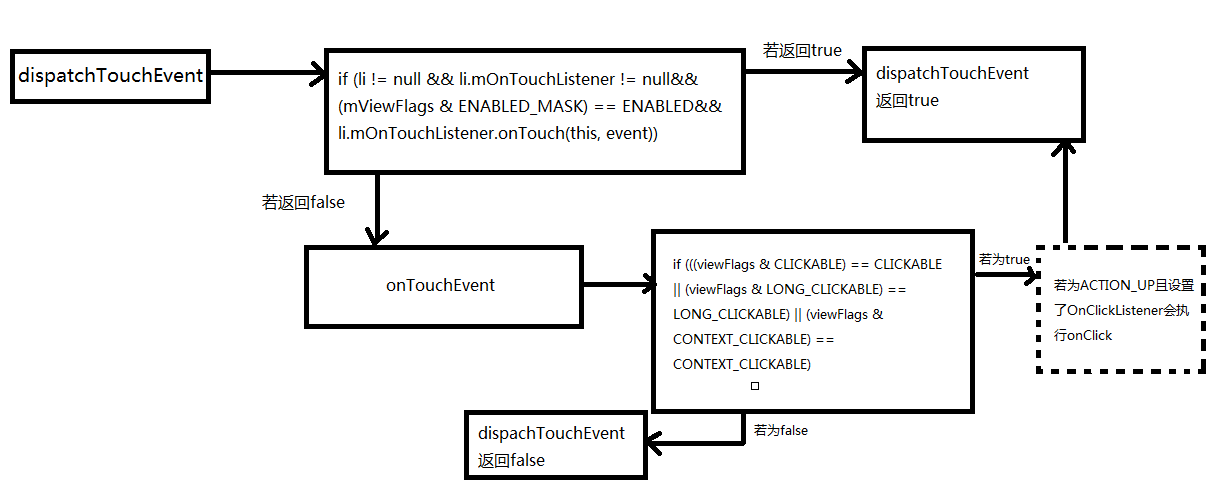 深入 Android onTouch 事件傳遞機制:從 dispatchTouchEvent 源碼說起
onTouch 是什麼 onTouch 是整個 Android 事件體系的基礎,onClick、onLongClick 這些我們更熟悉的事件,都是建立在它之上的。 它描述
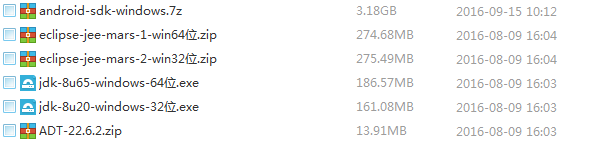 Android 快速开发环境搭建(Eclipse 版,附完整资源)
对很多新手来说,自己从零搭建一套开发环境并不轻松;即便是有经验的开发者,折腾环境也常常是件耗时费力的事。不过只要把相关资源都整理到位,快的话半小时到一小时就能搞定。我这篇