

編輯:關於 Android 程式設計
倒計時是相當常見的需求——限時答題、活動倒數、驗證碼有效期限等等。Android 提供了 CountDownTimer 這個現成類別可以直接使用,但仍有不少人習慣用 Timer + Handler 自己實作。這篇把兩種思路都走一遍。

讓使用者輸入分與秒,按下開始鈕後把時間透過 Intent 傳給倒數頁。
package com.example.mytime;

import java.util.ArrayList;

import android.app.Activity;
import android.content.Intent;
import android.os.Bundle;
import android.view.View;
import android.view.View.OnClickListener;
import android.view.Window;
import android.widget.Button;
import android.widget.EditText;

public class MainActivity extends Activity {

    Button startButton;
    EditText minuteText;
    EditText secondText;
    int minute;
    int second;

    @Override
    public void onCreate(Bundle savedInstanceState) {
        super.onCreate(savedInstanceState);
        requestWindowFeature(Window.FEATURE_NO_TITLE);
        setContentView(R.layout.main);

        startButton = (Button) findViewById(R.id.button_start);
        minuteText  = (EditText) findViewById(R.id.minute);
        secondText  = (EditText) findViewById(R.id.second);

        startButton.setOnClickListener(new OnClickListener() {
            @Override
            public void onClick(View v) {
                if (!minuteText.getText().toString().equals("")) {
                    minute = Integer.parseInt(minuteText.getText().toString());
                }
                if (!secondText.getText().toString().equals("")) {
                    second = Integer.parseInt(secondText.getText().toString());
                }

                if (minute != 0 || second != 0) {
                    ArrayList<Integer> list = new ArrayList<Integer>();
                    list.add(minute);
                    list.add(second);

                    Intent intent = new Intent();
                    intent.setAction("com.example.mytime.StartActivity");
                    intent.putIntegerArrayListExtra("times", list);
                    startActivity(intent);
                }
            }
        });
    }

    @Override
    protected void onResume() {
        minute = 0;
        second = 0;
        super.onResume();
    }
}
package com.example.mytime;

import java.util.ArrayList;
import java.util.Timer;
import java.util.TimerTask;

import android.app.Activity;
import android.content.Intent;
import android.os.Bundle;
import android.os.Handler;
import android.os.Message;
import android.view.Window;
import android.widget.TextView;

public class StartActivity extends Activity {

    static int minute = -1;
    static int second = -1;

    TextView timeView;
    Timer timer;
    TimerTask timerTask;

    Handler handler = new Handler() {
        public void handleMessage(Message msg) {
            if (minute == 0) {
                if (second == 0) {
                    timeView.setText("Time out !");
                    if (timer != null) {
                        timer.cancel();
                        timer = null;
                    }
                    if (timerTask != null) {
                        timerTask = null;
                    }
                } else {
                    second--;
                    if (second >= 10) {
                        timeView.setText("0" + minute + second);
                    } else {
                        timeView.setText("0" + minute + "0" + second);
                    }
                }
            } else {
                if (second == 0) {
                    second = 59;
                    minute--;
                    timeView.setText(format(minute) + ":" + format(second));
                } else {
                    second--;
                    timeView.setText(format(minute) + ":" + format(second));
                }
            }
        }

        // 補零用的輔助方法
        private String format(int value) {
            return value >= 10 ? String.valueOf(value) : "0" + value;
        }
    };

    @Override
    protected void onCreate(Bundle savedInstanceState) {
        requestWindowFeature(Window.FEATURE_NO_TITLE);
        super.onCreate(savedInstanceState);
        setContentView(R.layout.start);

        timeView = (TextView) findViewById(R.id.myTime);

        if (minute == -1 && second == -1) {
            Intent intent = getIntent();
            ArrayList<Integer> times = intent.getIntegerArrayListExtra("times");
            minute = times.get(0);
            second = times.get(1);
        }
        timeView.setText(minute + ":" + second);

        timerTask = new TimerTask() {
            @Override
            public void run() {
                Message msg = new Message();
                msg.what = 0;
                handler.sendMessage(msg);
            }
        };

        timer = new Timer();
        timer.schedule(timerTask, 0, 1000);   // 立刻啟動,每 1000ms 觸發一次
    }

    @Override
    protected void onDestroy() {
        if (timer != null) {
            timer.cancel();
            timer = null;
        }
        if (timerTask != null) {
            timerTask = null;
        }
        minute = -1;
        second = -1;
        super.onDestroy();
    }
}
上面那版的問題不少:用 static 變數傳遞狀態、時間格式化邏輯散落各處、時間到才取消 Timer。用 CountDownTimer 可以寫得乾淨得多:
public class CountdownActivity extends Activity {

    private TextView timeView;
    private CountDownTimer timer;

    @Override
    protected void onCreate(Bundle savedInstanceState) {
        super.onCreate(savedInstanceState);
        setContentView(R.layout.start);
        timeView = (TextView) findViewById(R.id.myTime);

        long totalMillis = getIntent().getLongExtra("total_millis", 60_000L);

        timer = new CountDownTimer(totalMillis, 1000) {
            @Override
            public void onTick(long millisUntilFinished) {
                long totalSeconds = millisUntilFinished / 1000;
                long minutes = totalSeconds / 60;
                long seconds = totalSeconds % 60;
                timeView.setText(String.format(Locale.getDefault(),
                        "%02d:%02d", minutes, seconds));
            }

            @Override
            public void onFinish() {
                timeView.setText("Time out !");
            }
        };
        timer.start();
    }

    @Override
    protected void onPause() {
        super.onPause();
        // 視需求決定暫停或取消
        if (timer != null) {
            timer.cancel();
        }
    }
}
CountDownTimer 內部同樣靠 Handler 實作,但把「總時長、間隔、剩餘毫秒」都封裝好了,onTick() 直接給你剩餘時間,不必自己算進位。Timer 的排程精度依賴單一背景線程,若某次任務執行過久會造成後續延遲;CountDownTimer 以「剩餘毫秒」為基準,累積誤差較小。onPause() 或 onDestroy() 中終止,否則會造成記憶體洩漏——匿名內部類別持有 Activity 引用,Activity 被回收不掉。AlarmManager 或 Foreground Service,而不是上述任何一種。結論:單純的畫面倒數用 CountDownTimer 就夠了;需要精準或長時間的背景計時,則要換一層架構。
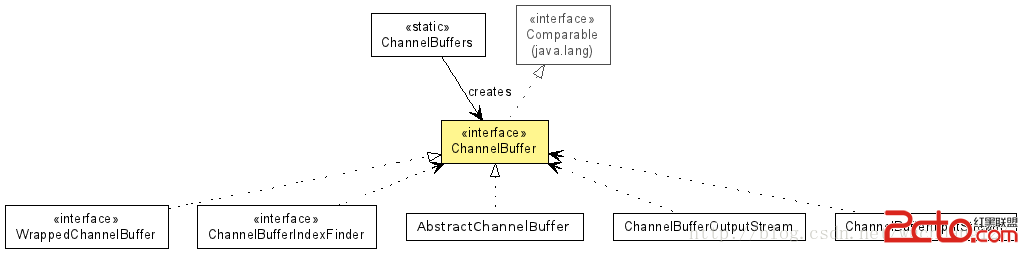 Android 基於 Netty 的消息推送之字符串收發(三)
在上一篇《Android 基於 Netty 的消息推送方案之概念和工作原理(二)》中,我們介紹了一些 Netty 的概念與工作原理。今天先來認識一個關鍵角色——Chann
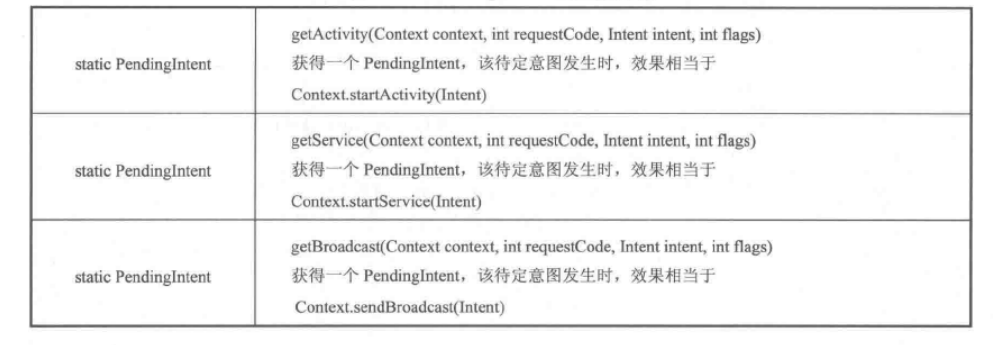 安卓學習筆記:深入掌握 RemoteViews 的原理與應用
一、RemoteViews 的兩種應用 1. 桌面 Widget 小部件;2. 通知欄通知信息。 通知欄通知示例 if (android.os.Build.VERSIO
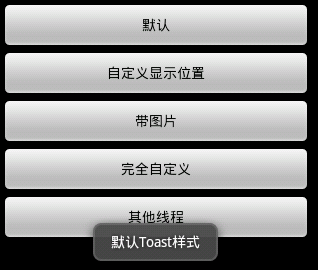 Android Toast 五大用法整理:樣式、自訂版面與跨執行緒
Toast 大家都不陌生,這裡不囉嗦,直接上圖上程式碼,把常見的五種用法一次收齊。 版面配置:五顆按鈕對應五種用法 main.xml: <LinearLa
 仿即刻首頁垂直滾動圖:自訂 ViewGroup 動畫實作
專案地址:https://github.com/JeasonWong/JikeGallery 話不多說,先看效果。 這個效果是在即刻 App 上看到的,覺得很不錯,於是