

編輯:關於 Android 程式設計
先來看看效果:
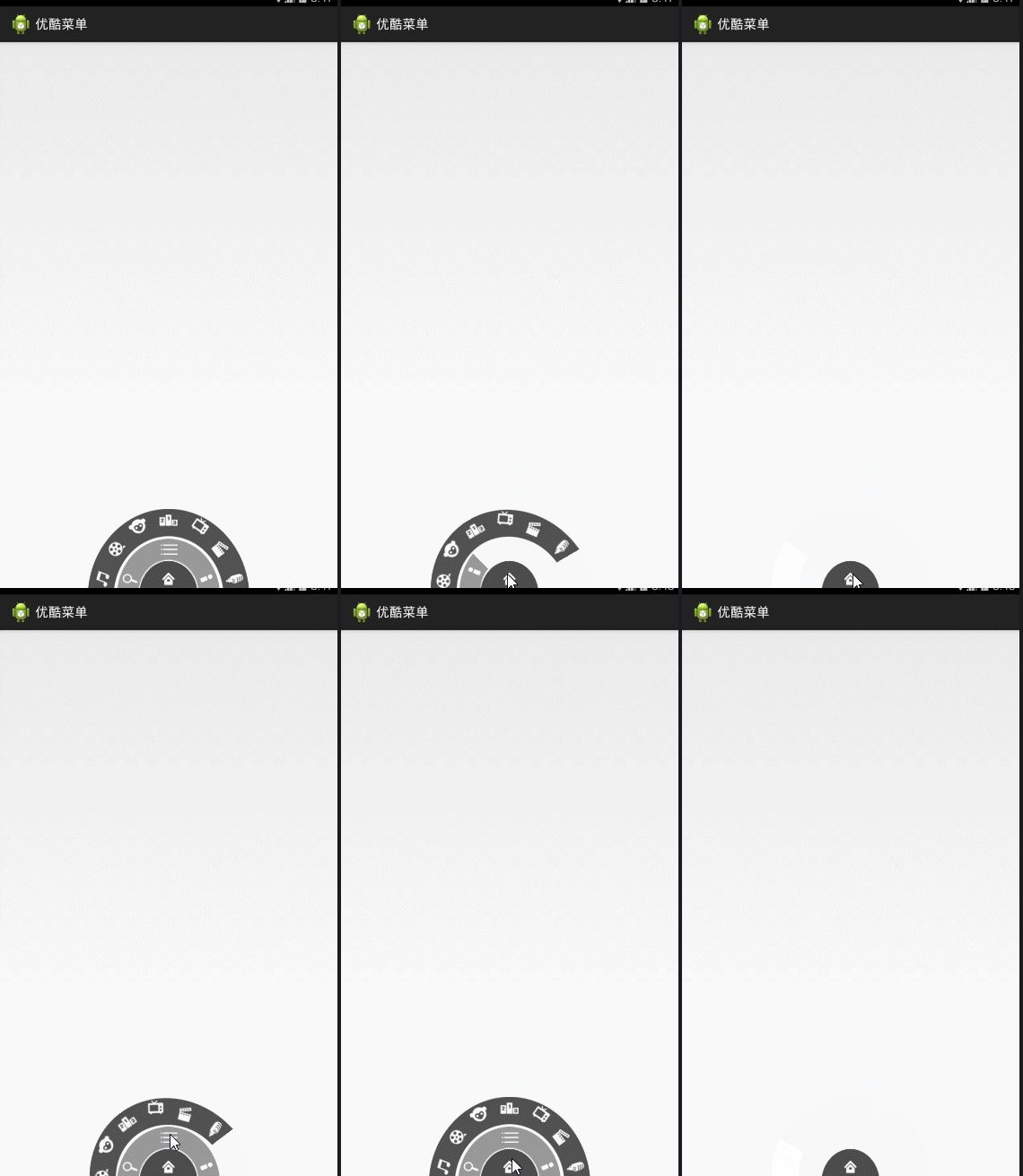
先分析一下:這個菜單可以分成三層:
1. 一級菜單(最內圈)
2. 二級菜單(中間圈)
3. 三級菜單(最外圈)
一級菜單只有一個按鈕(即 home),用來控制二級與三級菜單;二級菜單有三個按鈕(即 menu),中間那個按鈕可控制三級菜單;三級菜單則有七個按鈕。可以將這三層菜單各用一個相對布局來實現,先把布局寫出來:
<RelativeLayout xmlns:android="https://schemas.android.com/apk/res/android" xmlns:tools="https://schemas.android.com/tools" android:layout_width="match_parent" android:layout_height="match_parent" tools:context="com.example.youkumenu.MainActivity" > <!-- 三級菜單 --> <RelativeLayout android:id="@+id/level3_Rl" android:layout_width="220dp" android:layout_height="110dp" android:layout_alignParentBottom="true" android:layout_centerHorizontal="true" android:background="@drawable/level3" > <ImageView android:id="@+id/channel1" android:layout_marginLeft="5dp" android:layout_alignParentBottom="true" android:layout_width="wrap_content" android:layout_height="wrap_content" android:src="@drawable/channel1"/> <ImageView android:id="@+id/channel2" android:layout_marginBottom="10dp" android:layout_marginLeft="25dp" android:layout_above="@id/channel1" android:layout_width="wrap_content" android:layout_height="wrap_content" android:src="@drawable/channel2"/> <ImageView android:layout_marginBottom="1dp" android:layout_marginLeft="52dp" android:layout_above="@id/channel2" android:layout_width="wrap_content" android:layout_height="wrap_content" android:src="@drawable/channel3"/> <ImageView android:layout_centerHorizontal="true" android:layout_width="wrap_content" android:layout_height="wrap_content" android:src="@drawable/channel4"/> <ImageView android:id="@+id/channel7" android:layout_marginRight="5dp" android:layout_alignParentRight="true" android:layout_alignParentBottom="true" android:layout_width="wrap_content" android:layout_height="wrap_content" android:src="@drawable/channel7"/> <ImageView android:id="@+id/channel6" android:layout_alignParentRight="true" android:layout_marginBottom="10dp" android:layout_marginRight="25dp" android:layout_above="@id/channel7" android:layout_width="wrap_content" android:layout_height="wrap_content" android:src="@drawable/channel6"/> <ImageView android:layout_marginBottom="1dp" android:layout_marginRight="52dp" android:layout_alignParentRight="true" android:layout_above="@id/channel6" android:layout_width="wrap_content" android:layout_height="wrap_content" android:src="@drawable/channel5"/> </RelativeLayout> <!-- 二級菜單 --> <RelativeLayout android:id="@+id/level2_Rl" android:layout_width="140dp" android:layout_height="70dp" android:layout_alignParentBottom="true" android:layout_centerHorizontal="true" android:background="@drawable/level2" > <ImageView android:layout_marginLeft="3dp" android:layout_alignParentBottom="true" android:layout_width="wrap_content" android:layout_height="wrap_content" android:src="@drawable/icon_search"/> <ImageView android:id="@+id/menu_Iv" android:layout_centerHorizontal="true" android:layout_width="wrap_content" android:layout_height="wrap_content" android:src="@drawable/icon_menu"/> <ImageView android:id="@+id/myyouku_Iv" android:layout_marginRight="3dp" android:layout_alignParentBottom="true" android:layout_alignParentRight="true" android:layout_width="wrap_content" android:layout_height="wrap_content" android:src="@drawable/icon_myyouku"/> </RelativeLayout> <!-- 一級菜單 --> <RelativeLayout android:layout_width="80dp" android:layout_height="40dp" android:layout_alignParentBottom="true" android:layout_centerHorizontal="true" android:background="@drawable/level1" > <ImageView android:id="@+id/home_Iv" android:layout_centerInParent="true" android:layout_width="wrap_content" android:layout_height="wrap_content" android:src="@drawable/icon_home" /> </RelativeLayout> </RelativeLayout>
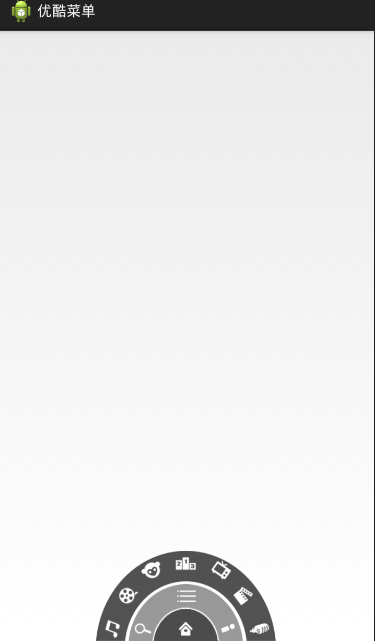
布局寫好後就能看到這樣的效果,只不過現在是靜態的,還沒加邏輯:
接著分析邏輯。先看 home(一級菜單中間那個按鈕),點擊它有兩種考量方向、共三種情況:
情況 1. 二級、三級菜單都顯示時,就把它們隱藏掉;
情況 2. 二、三級菜單都不顯示時,就顯示二級菜單;
情況 3. 二級顯示且三級不顯示時,就隱藏二級菜單。
要知道菜單顯示或隱藏,設個標記位即可。至於如何隱藏或顯示,當然是用動畫——可用補間動畫或屬性動畫,這裡我用補間動畫。
再看 menu(二級菜單中間那個按鈕),點擊它有兩種情況:
情況 1. 三級顯示時,就隱藏三級菜單;
情況 2. 三級隱藏時,就顯示三級菜單。
這個比較簡單,就兩種情況。
public class MainActivity extends Activity implements OnClickListener{ //一級菜單中的home按鈕 private ImageView home_Iv; //二級菜單中的Menu按鈕 private ImageView menu_Iv; //用於判斷二級菜單的顯示狀況,true為顯示,false為隱藏 private boolean level2ListPlay = true; //用於判斷二級菜單的顯示狀況,true為顯示,false為隱藏 private boolean level3ListPlay = true; //二級和三級菜單 private RelativeLayout level2_Rl,level3_Rl; @Override protected void onCreate(Bundle savedInstanceState) { super.onCreate(savedInstanceState); setContentView(R.layout.activity_main); initView(); } //初始化組件 private void initView() { home_Iv = (ImageView) findViewById(R.id.home_Iv); home_Iv.setOnClickListener(this); level2_Rl = (RelativeLayout) findViewById(R.id.level2_Rl); level3_Rl = (RelativeLayout) findViewById(R.id.level3_Rl); menu_Iv = (ImageView) findViewById(R.id.menu_Iv); menu_Iv.setOnClickListener(this); } @Override public void onClick(View v) { switch (v.getId()) { case R.id.home_Iv: //點擊home按鈕的邏輯代碼 clickHomeIv(); break; case R.id.menu_Iv: clickMenuIv(); //點擊二級菜單中的menu按鈕的邏輯代碼 break; default: break; } } //點擊二級菜單中的menu按鈕的邏輯代碼 private void clickMenuIv() { //分情況考慮 //1.三級顯示的時候,就將三級菜單隱藏 if (level3ListPlay) { hideMenu(level3_Rl,0); level3ListPlay = false; return; } //2.三級隱藏的時候,就將三級菜單顯示 if (!level3ListPlay) { showMenu(level3_Rl); level3ListPlay = true; return; } } //點擊一級菜單中的home按鈕的邏輯代碼 private void clickHomeIv() { //分情況考慮 //1.二級、三級菜單都顯示,就將二、三級菜單隱藏掉 if (level2ListPlay && level3ListPlay) { //將二三級菜單隱藏,並改變標記 hideMenu(level2_Rl,300); hideMenu(level3_Rl,500); level2ListPlay = false; level3ListPlay = false; return; } //2.二、三級菜單都不顯示的時候,就將二級菜單顯示 if (!level2ListPlay && !level3ListPlay) { showMenu(level2_Rl); level2ListPlay = true; return; } //3.二級菜單顯示且三級菜單不顯示的時候,就將二級菜單隱藏 if (level2ListPlay && !level3ListPlay) { hideMenu(level2_Rl,0); level2ListPlay = false; return; } } /** * 顯示菜單 * @param view 要顯示的菜單 */ private void showMenu(RelativeLayout view) { // view.setVisibility(View.VISIBLE); //旋轉動畫 RotateAnimation animation = new RotateAnimation(-180, 0, Animation.RELATIVE_TO_SELF, 0.5f, Animation.RELATIVE_TO_SELF, 1.0f); animation.setDuration(500); //設置動畫持續的時間 animation.setFillAfter(true); //動畫停留在動畫結束的位置 view.startAnimation(animation); } /** * 隱藏菜單 * @param view 要隱藏的菜單 ,startOffset 動畫延遲執行的時間 */ private void hideMenu(RelativeLayout view,long startOffset) { // view.setVisibility(View.GONE); /** * 旋轉動畫 * RotateAnimation(fromDegrees, toDegrees, pivotXType, pivotXValue, pivotYType, pivotYValue) * fromDegrees 開始旋轉角度 * toDegrees 旋轉的結束角度 * pivotXType X軸 參照物 (X軸的伸縮模式,可以取值為ABSOLUTE、RELATIVE_TO_SELF) * pivotXValue x軸 旋轉的參考點(x坐標的伸縮值) * pivotYType Y軸 參照物 (Y軸的伸縮模式,可以取值為ABSOLUTE、RELATIVE_TO_SELF) * pivotYValue Y軸 旋轉的參考點 ((Y坐標的伸縮值) ) */ RotateAnimation animation = new RotateAnimation(0, -180, Animation.RELATIVE_TO_SELF, 0.5f, Animation.RELATIVE_TO_SELF, 1.0f); animation.setDuration(500); animation.setFillAfter(true); //動畫停留在動畫結束的位置 animation.setStartOffset(startOffset); //設置動畫的延遲執行 view.startAnimation(animation); } }
寫到這裡差不多能看到效果了,但細心的朋友會發現兩個 bug:
第一:快速點擊一級菜單 home 或二級菜單 menu 時,會發現前一次動畫還沒執行完,第二次動畫又開始了,看起來像在晃。(原因:動畫都設定了執行時間,你點擊的頻率快於動畫執行的時間)
解決辦法:對動畫進行監聽,在動畫開始與結束時做處理。你可能會想到用標記位,但一個標記位只能判斷兩種狀態,而這裡有顯示與隱藏兩種動畫,一個不夠用,可以改用一個 Int 值來控制。
//用於記錄有多少個動畫在執行 private int annimationCount = 0; //對動畫進行監聽的時候 animation.setAnimationListener(new AnimationListener() { @Override public void onAnimationStart(Animation animation) { // menu_Iv.setOnClickListener(null); // home_Iv.setOnClickListener(null); annimationCount ++; } @Override public void onAnimationRepeat(Animation animation) { } @Override public void onAnimationEnd(Animation animation) { // menu_Iv.setOnClickListener(MainActivity.this); // home_Iv.setOnClickListener(MainActivity.this); annimationCount --; } //當點擊的時候就可以進行判斷,只要annimationCount值大於0,說明還有動畫在執行 if (annimationCount > 0) { return ; }
第二:當二級菜單隱藏時,你若點擊二級菜單中的 menu 按鈕(雖然現在看不見),會驚訝地發現三級菜單居然顯示了。(原因:補間動畫沒有真正改變組件的屬性,而屬性動畫就不一樣,有時間可以試試屬性動畫)
解決辦法:只要二級菜單隱藏時,就讓它的所有選項按鈕都不可點。因為二級菜單可能有多個按鈕,所以拿到父容器,讓它的子控件失去焦點即可。
//如果要顯示菜單,那麼就將相應的控件設為有焦點 //獲取父容器中有幾個子控件 int childCount = view.getChildCount(); for (int i = 0; i < childCount; i++) { view.getChildAt(i).setEnabled(true); }
寫到這裡就差不多了,大家可以試試。以下把完整程式碼貼出來:
public class MainActivity extends Activity implements OnClickListener{ //一級菜單中的home按鈕 private ImageView home_Iv; //二級菜單中的Menu按鈕 private ImageView menu_Iv; //用於判斷二級菜單的顯示狀況,true為顯示,false為隱藏 private boolean level2ListPlay = true; //用於判斷二級菜單的顯示狀況,true為顯示,false為隱藏 private boolean level3ListPlay = true; //二級和三級菜單 private RelativeLayout level2_Rl,level3_Rl; //用於記錄有多少個動畫在執行 private int annimationCount = 0; @Override protected void onCreate(Bundle savedInstanceState) { super.onCreate(savedInstanceState); setContentView(R.layout.activity_main); initView(); } //初始化組件 private void initView() { home_Iv = (ImageView) findViewById(R.id.home_Iv); home_Iv.setOnClickListener(this); level2_Rl = (RelativeLayout) findViewById(R.id.level2_Rl); level3_Rl = (RelativeLayout) findViewById(R.id.level3_Rl); menu_Iv = (ImageView) findViewById(R.id.menu_Iv); menu_Iv.setOnClickListener(this); } @Override public void onClick(View v) { switch (v.getId()) { case R.id.home_Iv: //點擊home按鈕的邏輯代碼 clickHomeIv(); break; case R.id.menu_Iv: clickMenuIv(); //點擊二級菜單中的menu按鈕的邏輯代碼 break; default: break; } } //點擊二級菜單中的menu按鈕的邏輯代碼 private void clickMenuIv() { //當點擊的時候就可以進行判斷,只要annimationCount值大於0,說明還有動畫在執行 if (annimationCount > 0) { return ; } //分情況考慮 //1.三級顯示的時候,就將三級菜單隱藏 if (level3ListPlay) { hideMenu(level3_Rl,0); level3ListPlay = false; return; } //2.三級隱藏的時候,就將三級菜單顯示 if (!level3ListPlay) { showMenu(level3_Rl); level3ListPlay = true; return; } } //點擊一級菜單中的home按鈕的邏輯代碼 private void clickHomeIv() { //當點擊的時候就可以進行判斷,只要annimationCount值大於0,說明還有動畫在執行 if (annimationCount > 0) { return ; } //分情況考慮 //1.二級、三級菜單都顯示,就將二、三級菜單隱藏掉 if (level2ListPlay && level3ListPlay) { //將二三級菜單隱藏,並改變標記 hideMenu(level2_Rl,300); hideMenu(level3_Rl,500); level2ListPlay = false; level3ListPlay = false; return; } //2.二、三級菜單都不顯示的時候,就將二級菜單顯示 if (!level2ListPlay && !level3ListPlay) { showMenu(level2_Rl); level2ListPlay = true; return; } //3.二級菜單顯示且三級菜單不顯示的時候,就將二級菜單隱藏 if (level2ListPlay && !level3ListPlay) { hideMenu(level2_Rl,0); level2ListPlay = false; return; } } /** * 顯示菜單 * @param view 要顯示的菜單 */ private void showMenu(RelativeLayout view) { // view.setVisibility(View.VISIBLE); //如果要顯示菜單,那麼就將相應的控件設為有焦點 //獲取父容器中有幾個子控件 int childCount = view.getChildCount(); for (int i = 0; i < childCount; i++) { view.getChildAt(i).setEnabled(true); } //旋轉動畫 RotateAnimation animation = new RotateAnimation(-180, 0, Animation.RELATIVE_TO_SELF, 0.5f, Animation.RELATIVE_TO_SELF, 1.0f); animation.setDuration(500); //設置動畫持續的時間 animation.setFillAfter(true); //動畫停留在動畫結束的位置 view.startAnimation(animation); animation.setAnimationListener(new AnimationListener() { @Override public void onAnimationStart(Animation animation) { //動畫開始的時候回調 // menu_Iv.setOnClickListener(null); // home_Iv.setOnClickListener(null); annimationCount ++; } @Override public void onAnimationRepeat(Animation animation) { //動畫執行過程調用 } @Override public void onAnimationEnd(Animation animation) { //動畫結束的時候調用 // menu_Iv.setOnClickListener(MainActivity.this); // home_Iv.setOnClickListener(MainActivity.this); annimationCount --; } }); } /** * 隱藏菜單 * @param view 要隱藏的菜單 ,startOffset 動畫延遲執行的時間 */ private void hideMenu(RelativeLayout view,long startOffset) { // view.setVisibility(View.GONE); //如果要隱藏菜單,那麼就將相應的控件設為沒有焦點 //獲取父容器中有幾個子控件 int childCount = view.getChildCount(); for (int i = 0; i < childCount; i++) { view.getChildAt(i).setEnabled(false); } /** * 旋轉動畫 * RotateAnimation(fromDegrees, toDegrees, pivotXType, pivotXValue, pivotYType, pivotYValue) * fromDegrees 開始旋轉角度 * toDegrees 旋轉的結束角度 * pivotXType X軸 參照物 (X軸的伸縮模式,可以取值為ABSOLUTE、RELATIVE_TO_SELF) * pivotXValue x軸 旋轉的參考點(x坐標的伸縮值) * pivotYType Y軸 參照物 (Y軸的伸縮模式,可以取值為ABSOLUTE、RELATIVE_TO_SELF) * pivotYValue Y軸 旋轉的參考點 ((Y坐標的伸縮值) ) */ RotateAnimation animation = new RotateAnimation(0, -180, Animation.RELATIVE_TO_SELF, 0.5f, Animation.RELATIVE_TO_SELF, 1.0f); animation.setDuration(500); animation.setFillAfter(true); //動畫停留在動畫結束的位置 animation.setStartOffset(startOffset); //設置動畫的延遲執行 view.startAnimation(animation); animation.setAnimationListener(new AnimationListener() { @Override public void onAnimationStart(Animation animation) { // menu_Iv.setOnClickListener(null); // home_Iv.setOnClickListener(null); annimationCount ++; } @Override public void onAnimationRepeat(Animation animation) { } @Override public void onAnimationEnd(Animation animation) { // menu_Iv.setOnClickListener(MainActivity.this); // home_Iv.setOnClickListener(MainActivity.this); annimationCount --; } }); } }
布局檔:
<RelativeLayout xmlns:android="https://schemas.android.com/apk/res/android" xmlns:tools="https://schemas.android.com/tools" android:layout_width="match_parent" android:layout_height="match_parent" tools:context="com.example.youkumenu.MainActivity" > <!-- 三級菜單 --> <RelativeLayout android:id="@+id/level3_Rl" android:layout_width="220dp" android:layout_height="110dp" android:layout_alignParentBottom="true" android:layout_centerHorizontal="true" android:background="@drawable/level3" > <ImageView android:id="@+id/channel1" android:layout_marginLeft="5dp" android:layout_alignParentBottom="true" android:layout_width="wrap_content" android:layout_height="wrap_content" android:src="@drawable/channel1"/> <ImageView android:id="@+id/channel2" android:layout_marginBottom="10dp" android:layout_marginLeft="25dp" android:layout_above="@id/channel1" android:layout_width="wrap_content" android:layout_height="wrap_content" android:src="@drawable/channel2"/> <ImageView android:layout_marginBottom="1dp" android:layout_marginLeft="52dp" android:layout_above="@id/channel2" android:layout_width="wrap_content" android:layout_height="wrap_content" android:src="@drawable/channel3"/> <ImageView android:layout_centerHorizontal="true" android:layout_width="wrap_content" android:layout_height="wrap_content" android:src="@drawable/channel4"/> <ImageView android:id="@+id/channel7" android:layout_marginRight="5dp" android:layout_alignParentRight="true" android:layout_alignParentBottom="true" android:layout_width="wrap_content" android:layout_height="wrap_content" android:src="@drawable/channel7"/> <ImageView android:id="@+id/channel6" android:layout_alignParentRight="true" android:layout_marginBottom="10dp" android:layout_marginRight="25dp" android:layout_above="@id/channel7" android:layout_width="wrap_content" android:layout_height="wrap_content" android:src="@drawable/channel6"/> <ImageView android:layout_marginBottom="1dp" android:layout_marginRight="52dp" android:layout_alignParentRight="true" android:layout_above="@id/channel6" android:layout_width="wrap_content" android:layout_height="wrap_content" android:src="@drawable/channel5"/> </RelativeLayout> <!-- 二級菜單 --> <RelativeLayout android:id="@+id/level2_Rl" android:layout_width="140dp" android:layout_height="70dp" android:layout_alignParentBottom="true" android:layout_centerHorizontal="true" android:background="@drawable/level2" > <ImageView android:layout_marginLeft="3dp" android:layout_alignParentBottom="true" android:layout_width="wrap_content" android:layout_height="wrap_content" android:src="@drawable/icon_search"/> <ImageView android:id="@+id/menu_Iv" android:layout_centerHorizontal="true" android:layout_width="wrap_content" android:layout_height="wrap_content" android:src="@drawable/icon_menu"/> <ImageView android:id="@+id/myyouku_Iv" android:layout_marginRight="3dp" android:layout_alignParentBottom="true" android:layout_alignParentRight="true" android:layout_width="wrap_content" android:layout_height="wrap_content" android:src="@drawable/icon_myyouku"/> </RelativeLayout> <!-- 一級菜單 --> <RelativeLayout android:layout_width="80dp" android:layout_height="40dp" android:layout_alignParentBottom="true" android:layout_centerHorizontal="true" android:background="@drawable/level1" > <ImageView android:id="@+id/home_Iv" android:layout_centerInParent="true" android:layout_width="wrap_content" android:layout_height="wrap_content" android:src="@drawable/icon_home" /> </RelativeLayout> </RelativeLayout>
以上就是本文的全部內容,希望對大家的學習有所幫助,也歡迎繼續關注本站的更多精彩內容!
 Android 設定頁實作:Preference Screen 與 PreferenceFragment 兩種寫法
如果沒有特殊的客製需求,我們可以直接用 Android 提供的框架來建立系統風格的設定畫面(Preference Screen)。它內部可以包含 PreferenceCa
 Android 圖片異步加載實踐:用多線程打造不錯位、不閃動的列表
從最直白的做法開始 所謂異步,說到底就是多任務、多線程。而多線程向來伴隨各種坑,我們一步步踩過去。 先建一個類 ImageLoaderWithoutCaches——顧名思
 我的選單我做主:用 onKeyDown 搭配 PopupWindow 打造自訂選單
Android SDK 本身提供了建立選單的預設機制。這種機制在功能上相當完整,但外觀實在有點「土」。一個畫面絢麗的程式
 Android BottomBar + ViewPager + Fragment 底部導覽實作
BottomBar 與 ViewPager 搭配 這個範例使用 BottomBar、ViewPager 與 Fragment 建立底部導覽。BottomBar 是 Git