

編輯:關於 Android 程式設計
做通訊錄、好友列表或搜尋框時,經常需要把中文姓名濃縮成一個字母來當索引,例如「張三」對應 Z、「李四」對應 L。Android 並沒有現成的中文轉拼音 API,但只需要一張對照表加上一點編碼知識,就能自己算出一個漢字的拼音首字母。
早期的 GB2312 国标碼把常用漢字排成一張二維表格,行號叫「區」,列號叫「位」,合稱區位碼。国标碼的兩個位元組,其實就是區位碼各自加上 160(0xA0)之後的結果。所以反推很簡單:把兩個位元組各自減掉 160,再組合成十進位數字,就得到區位碼。
以「你」為例,它的 GBK 編碼是 0xC4 / 0xE3,兩者各減去 0xA0 得到 0x24 / 0x43,換成十進位就是 36 與 67,區位碼即 3667。由於國標一級漢字(3755 字)本身就是按拼音排序的,只要預先記下每個声母的起訖位置,用區位碼去查表,就能判斷它屬於哪個字母。
<LinearLayout xmlns:android="https://schemas.android.com/apk/res/android" xmlns:tools="https://schemas.android.com/tools" android:layout_width="match_parent" android:layout_height="match_parent" android:orientation="vertical" tools:context=".MainActivity" >
    <EditText android:id="@+id/edit" android:layout_width="fill_parent" android:layout_height="wrap_content" android:hint="輸入漢字" >
    </EditText>
    <Button android:id="@+id/button" android:layout_width="fill_parent" android:layout_height="wrap_content" android:text="button" >
    </Button>
    <TextView android:id="@+id/textView" android:layout_width="fill_parent" android:layout_height="wrap_content" >
    </TextView>
</LinearLayout>
public class MainActivity extends Activity {
    static final int GB_SP_DIFF = 160;

    // 國標一級漢字各声母的起始區位碼
    static final int[] secPosValueList = { 1601, 1637, 1833, 2078, 2274, 2302, 2433, 2594, 2787, 3106, 3212, 3472, 3635, 3722, 3730, 3858, 4027, 4086, 4390, 4558, 4684, 4925, 5249, 5600 };

    // 與上表一一對應的讀音
    static final char[] firstLetter = { 'a', 'b', 'c', 'd', 'e', 'f', 'g', 'h', 'j', 'k', 'l', 'm', 'n', 'o', 'p', 'q', 'r', 's', 't', 'w', 'x', 'y', 'z' };

    private EditText edit;
    private TextView text;
    private Button button;

    @Override
    protected void onCreate(Bundle savedInstanceState) {
        super.onCreate(savedInstanceState);
        setContentView(R.layout.activity_main);
        edit = (EditText) this.findViewById(R.id.edit);
        text = (TextView) this.findViewById(R.id.textView);
        button = (Button) this.findViewById(R.id.button);
        button.setOnClickListener(buttonListener);
        text.setText("拼音");
    }

    private View.OnClickListener buttonListener = new View.OnClickListener() {
        @Override
        public void onClick(View v) {
            if (v == button) {
                String characters = edit.getText().toString();
                text.setText(getSpells(characters));
            }
        }
    };

    /** 逐字取出首字母,非漢字則原樣保留 */
    public static String getSpells(String characters) {
        StringBuffer buffer = new StringBuffer();
        for (int i = 0; i < characters.length(); i++) {
            char ch = characters.charAt(i);
            if ((ch >> 7) == 0) {
                // 高位為 0, ASCII 範圍內的字元,不是漢字
                buffer.append(ch);
            } else {
                Character spell = getFirstLetter(ch);
                buffer.append(spell == null ? ch : spell);
            }
        }
        return buffer.toString();
    }

    /** 取得單一漢字的拼音首字母 */
    public static Character getFirstLetter(char ch) {
        byte[] uniCode = null;
        try {
            uniCode = String.valueOf(ch).getBytes("GBK");
        } catch (UnsupportedEncodingException e) {
            e.printStackTrace();
            return null;
        }
        if (uniCode[0] < 128 && uniCode[0] > 0) {
            return null; // 非漢字
        }
        return convert(uniCode);
    }

    /**
     * GB 碼的兩個位元組各減去 160 後組合成區位碼,再查表得出首字母。
     * 例:「你」的 GBK 為 0xC4 / 0xE3,各減 0xA0 得 0x24 / 0x43,
     * 換算成十進位即 36 與 67,區位碼 3667,對照後讀音為 n。
     */
    static char convert(byte[] bytes) {
        char result = '-';
        for (int i = 0; i < bytes.length; i++) {
            bytes[i] -= GB_SP_DIFF;
        }
        int secPosValue = bytes[0] * 100 + bytes[1];
        for (int i = 0; i < secPosValueList.length - 1; i++) {
            if (secPosValue >= secPosValueList[i] && secPosValue < secPosValueList[i + 1]) {
                result = firstLetter[i];
                break;
            }
        }
        return result;
    }
}
這個做法只涵蓋國標一級漢字,生僻字、繁體字或注音符號會落到預設值。另外它依賴 GBK 編碼,而 Android 內部字串一律是 UTF-16,所以務必在取得位元組時明確指定編碼。若專案對準確度要求高,建議改用 pinyin4j 這類開源轉換庫,用規則計算的方式只適合索引與排序這類可以容忍誤差的場景。
 OpenGL ES 星空動畫踩坑記:顏色陣列與紋理同時啟用導致黑屏閃退
照著《Android 應用開發揭秘》第 13 章的範例做 OpenGL 星空時,遇到了典型的「版本不一致」症狀:Android 2.2 模擬器一片黑、什麼都沒畫出來;An
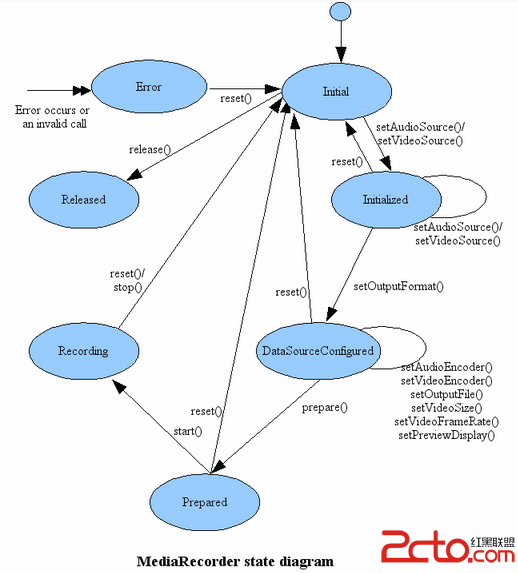 Android MediaRecorder 音訊與影片錄製
MediaRecorder 是 Android 提供的錄製元件,可用來錄製音訊或影片。使用時必須依序設定來源、輸出格式、編碼器與檔案路徑,再執行 prepare 與 st
 Android 側滑菜單手勢優化與平滑開闔實作
從生硬拖拽到自然側滑 早期的側滑菜單實作,常常只是讓主面板跟著手指移動,缺少慣性與吸附效果,操作起來會比較生硬。要貼近 QQ6.0 的體驗,就必須加入手勢判斷、平滑動畫與
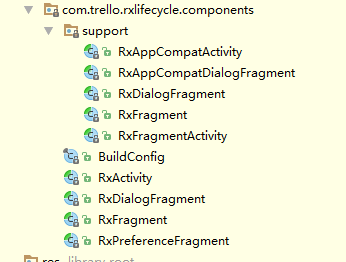 Android 記憶體洩漏優化:用 RxLifecycle 管理 RxJava 生命週期
RxJava 的鏈式寫法雖然方便,但若訂閱在 Activity 或 Fragment 銷毀後仍未解除,可能造成記憶體洩漏。RxLifecycle 的用途,就是把 RxJa