

編輯:關於 Android 程式設計
很多應用首次啟動時會自動在手機桌面生成一個快捷圖標,方便用戶快速進入。本文就來看看如何在 Android 程序中實現這一功能。

<uses-permission android:name="com.android.launcher.permission.INSTALL_SHORTCUT" />
為閃屏頁 Activity 添加 intent-filter,指定一個自定義的 action:
<activity android:name="com.myself.news.activity.GuideActivity" android:label="@string/title_activity_guide" > <intent-filter> <action android:name="com.myself.news.ACTION_HOME" /> <category android:name="android.intent.category.DEFAULT" /> </intent-filter> </activity>
在閃屏頁 Activity 的 onCreate 方法中調用 installShortcut():
// 創建快捷方式 // com.android.launcher.permission.INSTALL_SHORTCUT private void installShortcut() { // 判斷有沒有創建過快捷方式 boolean isCreated = SharedPreferencesUtils.getBoolean(this, GlobalConstantsUtils.PREF_IS_SHORTCUT_INTALLED, false); // 判斷是否已經創建過 if (!isCreated) { // 發廣播 Intent intent = new Intent(); intent.setAction("com.android.launcher.action.INSTALL_SHORTCUT"); // 圖標 intent.putExtra(Intent.EXTRA_SHORTCUT_ICON, BitmapFactory.decodeResource(getResources(), R.drawable.ic_launcher)); // 名稱 intent.putExtra(Intent.EXTRA_SHORTCUT_NAME, "手機安全衛士"); // 動作 Intent actionIntent = new Intent(); actionIntent.setAction(GlobalConstantsUtils.ACTION_HOME); intent.putExtra(Intent.EXTRA_SHORTCUT_INTENT, actionIntent); sendBroadcast(intent); // 標記已經創建過快捷方式,下次不再創建 SharedPreferencesUtils.setBoolean(this, GlobalConstantsUtils.PREF_IS_SHORTCUT_INTALLED, true); } }
public static final String PREF_IS_SHORTCUT_INTALLED = "is_shortcut_intalled";// 是否已經創建快捷方式 public static final String ACTION_HOME = "com.myself.news.ACTION_HOME";// 跳轉到主頁面的 ACTION
透過發送 INSTALL_SHORTCUT 廣播,並用 SharedPreferences 記錄是否已創建過,就能避免重複生成快捷方式。以上就是本功能的完整實現思路。
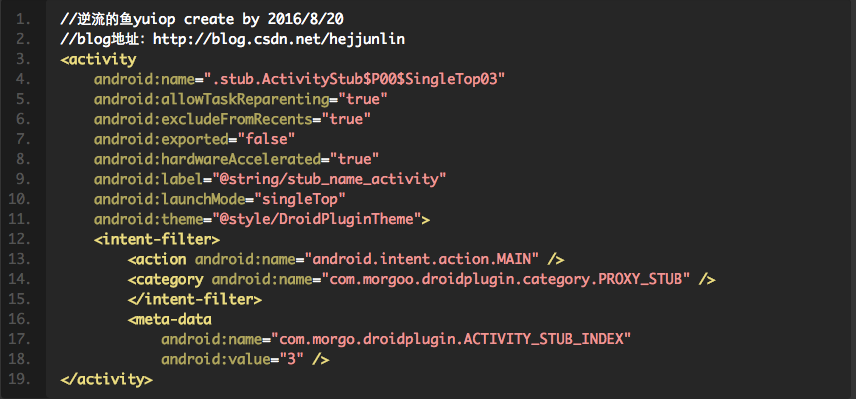 插件開發之 360 DroidPlugin 源碼分析(四):Activity 預註冊占坑
前言 在了解系統 Activity、Service 與 BroadcastReceiver 的啟動過程後,可以進一步觀察 360 DroidPlugin 如何透過預註冊占
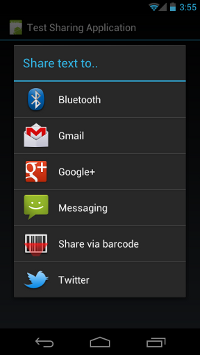 Android 官方文檔譯讀:用 Intent 在應用之間分享簡單數據
Sharing Simple Data Android 應用最迷人的一點,是它們彼此之間能通信、能整合。既然某個功能已經有別的 app 做好了,為什麼還要在自己的 app
 Android 裡那些容易被忽略的 UI 細節:從游標、滾動條到點九圖
做 Android 專案久了會發現,真正拉開產品質感差距的往往不是什麼高階架構,而是一堆不起眼的細節:輸入框游標的顏色、選字時那個小水滴手柄、滾動條的粗細與位置、滑到底部
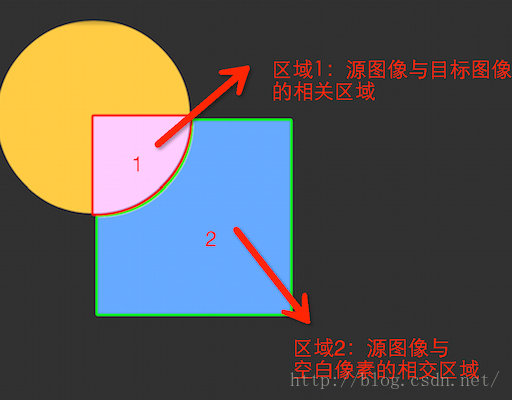 自定義控件繪圖篇(十一):Paint 之 setXfermode 混合模式全解(下)
本文將逐一講解 PorterDuff.Mode 中剩餘各模式的含義。理解了這些模式後,回過頭再看 setColorFilter(new PorterDuffColorFi