

編輯:關於 Android 程式設計
Android 應用最迷人的一點,是它們彼此之間能通信、能整合。既然某個功能已經有別的 app 做好了,為什麼還要在自己的 app 裡再造一遍?
這篇文章講幾種常見做法:用 Intent API 和 ActionProvider 在應用之間收發簡單數據。
構造 Intent 時,必須指定你希望它「觸發」哪個 action。Android 預定義了若干 action,其中 ACTION_SEND 顧名思義就是「我要把數據從一個 Activity 發到另一個 Activity」,甚至可以跨進程。要發送數據,你只需要給出數據本身和它的類型,系統會找出所有能接收的 Activity:只有一個就直接啟動,有多個就讓用戶挑。反過來,你也可以在自己的 manifest 裡聲明本 app 支持接收哪些類型的數據。
用 Intent 在應用之間收發數據,最常見的場景就是社交分享。Intent 讓用戶能借自己最順手的 app,快速便捷地把信息傳出去。
提示:往 ActionBar 上加分享入口,最佳做法是使用 ShareActionProvider,它從 API level 14 開始提供,會在「Adding an Easy Share Action」一節詳細討論。
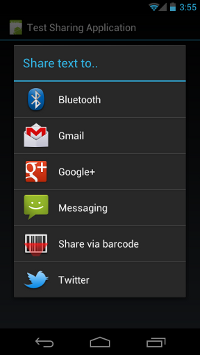
最直觀也最常用的用法就是分享文本。比如內置瀏覽器可以把當前頁面的 URL 以文本形式分享給任何感興趣的應用,這在把文章或網站推薦給朋友(發郵件、發社交網絡)時非常順手。
Intent sendIntent = new Intent();
sendIntent.setAction(Intent.ACTION_SEND);
sendIntent.putExtra(Intent.EXTRA_TEXT, "This is my text to send.");
sendIntent.setType("text/plain");
startActivity(sendIntent);
如果機上裝了某個 app,它的 intent-filter 同時匹配 ACTION_SEND 和 MIME 類型 text/plain,系統就會把它拉起來;若有多個候選,系統會彈一個消歧對話框(也就是 chooser)讓用戶選。
不過,如果你改用 Intent.createChooser() 把自己的 Intent 包一層,就能每次都強制彈出 chooser。這麼做有三個好處:
Intent sendIntent = new Intent();
sendIntent.setAction(Intent.ACTION_SEND);
sendIntent.putExtra(Intent.EXTRA_TEXT, "This is my text to send.");
sendIntent.setType("text/plain");
startActivity(Intent.createChooser(sendIntent, getResources().getText(R.string.send_to)));
另外還可以掛一些約定俗成的 extras:EXTRA_EMAIL、EXTRA_CC、EXTRA_BCC、EXTRA_SUBJECT。接收方如果沒打算用,直接忽略即可,不會報錯。
注意:部分郵件客戶端(比如 Gmail)期望 EXTRA_EMAIL、EXTRA_CC 這類字段是 String[],這時要用 putExtra(String, String[]) 來塞。
分享二進制數據需要同時滿足三個條件:使用 ACTION_SEND、設置合適的 MIME 類型、把指向數據的 URI 放進名為 EXTRA_STREAM 的 extra。最典型的用途是分享圖片,但任何二進制內容都能這麼發。
Intent shareIntent = new Intent();
shareIntent.setAction(Intent.ACTION_SEND);
shareIntent.putExtra(Intent.EXTRA_STREAM, uriToImage);
shareIntent.setType("image/jpeg");
startActivity(Intent.createChooser(shareIntent, getResources().getText(R.string.send_to)));
有幾點要留意:
"*/*",但這樣只能匹配那些願意處理通用數據流的 Activity,命中率反而更低。FileProvider 這個 helper 類。MediaStore.Files)。用 scanFile() 把文件插入 MediaStore 後,一個適合分享的 content:// 風格 URI 會通過 onScanCompleted() 回調交回來。注意:一旦進了系統 MediaStore,設備上任何 app 都能訪問這份內容。要一次分享多份內容,用 ACTION_SEND_MULTIPLE,並把一組指向內容的 URI 一併帶上。MIME 類型要看你分享的是什麼組合:分享 3 張 JPEG,類型仍是 "image/jpeg";混合的多種圖片類型,寫 "image/*" 以匹配能處理任意圖片的 app;只有當你分享的東西五花八門時,才該用 "*/*"。數據最終怎麼解析,是接收方說了算。
ArrayList<Uri> imageUris = new ArrayList<Uri>();
imageUris.add(imageUri1);   // 把要分享的圖片 URI 都加進來
imageUris.add(imageUri2);

Intent shareIntent = new Intent();
shareIntent.setAction(Intent.ACTION_SEND_MULTIPLE);
shareIntent.putParcelableArrayListExtra(Intent.EXTRA_STREAM, imageUris);
shareIntent.setType("image/*");
startActivity(Intent.createChooser(shareIntent, "Share images to.."));
同樣地,確保這些 URI 指向的數據是接收方拿得到的。
你的 app 能往外發,自然也能輕鬆接收別人發來的東西。設計時先想清楚:用戶會怎麼在你的 app 裡被打斷?你希望收到什麼類型的信息?比如一個社交 app 大概會對文本感興趣——特別是別人分享過來的有趣網址。Google+ 的 Android 客戶端同時接受文本和單張/多張圖片,於是用戶能直接從系統圖庫 app 起一篇帶圖的 Google+ 動態。
Intent filter 的作用就是告訴系統:這個組件願意接受哪些 intent。就像前面構造 ACTION_SEND intent 那樣,為了接收這類 intent,你需要在 manifest 裡用 <intent-filter> 聲明。假設你的 app 想接收文本、任意類型的單張圖片、以及任意類型的多張圖片:
<activity android:name=".ui.MyActivity" android:label="@string/app_name">
    <intent-filter>
        <action android:name="android.intent.action.SEND" />
        <category android:name="android.intent.category.DEFAULT" />
        <data android:mimeType="text/plain" />
    </intent-filter>
    <intent-filter>
        <action android:name="android.intent.action.SEND" />
        <category android:name="android.intent.category.DEFAULT" />
        <data android:mimeType="image/*" />
    </intent-filter>
    <intent-filter>
        <action android:name="android.intent.action.SEND_MULTIPLE" />
        <category android:name="android.intent.category.DEFAULT" />
        <data android:mimeType="image/*" />
    </intent-filter>
</activity>
注意:關於 intent filter 和 intent resolution 的更多內容,參見官方章節 Intents and Intent Filters。
這樣配置之後,當別的 app 構造 intent 並調用 startActivity() 分享上述內容時,你的 app 就會出現在 chooser 列表裡。用戶選中它,對應的 Activity(上例中是 .ui.MyActivity)就被啟動,接下來怎麼處理數據,全看你的代碼和 UI 怎麼寫。
第一步永遠是 getIntent() 拿到 Intent 對象,然後檢查它的內容再決定下一步。要記住:這個 Activity 不一定只由分享流程啟動,它也可能從 launcher 等系統其它入口被拉起來,所以判斷時必須把這種情況考慮進去。
void onCreate(Bundle savedInstanceState) {
    ...
    // 取出 intent、action 與 MIME 類型
    Intent intent = getIntent();
    String action = intent.getAction();
    String type = intent.getType();

    if (Intent.ACTION_SEND.equals(action) && type != null) {
        if ("text/plain".equals(type)) {
            handleSendText(intent);       // 處理文本
        } else if (type.startsWith("image/")) {
            handleSendImage(intent);      // 處理單張圖片
        }
    } else if (Intent.ACTION_SEND_MULTIPLE.equals(action) && type != null) {
        if (type.startsWith("image/")) {
            handleSendMultipleImages(intent);   // 處理多張圖片
        }
    } else {
        // 處理其它 intent,比如從主屏幕點進來
    }
    ...
}

void handleSendText(Intent intent) {
    String sharedText = intent.getStringExtra(Intent.EXTRA_TEXT);
    if (sharedText != null) {
        // 更新 UI 展示共享文本
    }
}

void handleSendImage(Intent intent) {
    Uri imageUri = (Uri) intent.getParcelableExtra(Intent.EXTRA_STREAM);
    if (imageUri != null) {
        // 更新 UI 展示共享圖片
    }
}

void handleSendMultipleImages(Intent intent) {
    ArrayList<Uri> imageUris = intent.getParcelableArrayListExtra(Intent.EXTRA_STREAM);
    if (imageUris != null) {
        // 更新 UI 展示多張共享圖片
    }
}
警告:對傳進來的數據要多留一份心眼——你永远不知道別的 app 會塞什麼給你。MIME 類型可能標錯,圖片可能有幾十兆。另外,二進制數據的處理務必放在獨立線程,不要壓在主線程(UI 線程)上。
後續更新 UI 可簡可繁:簡單到往 EditText 裡填一段文字,複雜到給圖片套一層有趣的濾鏡。這完全取決於你的 app 想做什麼。
Android 4.0(API Level 14)引入的 ActionProvider,讓在 ActionBar 裡做一個既有效又對用戶友好的分享入口變得更輕鬆。ActionProvider 一旦關聯到某個菜單項,就同時接管了這個項的外觀和行為。以 ShareActionProvider 為例:你只要給它一個分享 intent,剩下的它自己搞定。
注意:ShareActionProvider 從 API Level 14 起可用。
在 Gallery app 中的效果:
更新菜單聲明
開始使用之前,先在菜單資源文件裡為對應的菜單項加上 android:actionProviderClass 屬性。
 Android 6.0 動態權限踩坑實錄:應對「不再提示」後的權限申請
Android 6.0 之後,一類被稱為「危險權限」的能力不再靠清單文件一聲招呼就能拿到,必須在用戶真正用到時,於運行期動態申請。 在此之前,用戶安裝應用時會看到一大串「
 RatingBar 評分條入門:屬性、樣式與自訂圖樣
電商 App 裡那排可以點擊打星的評分條,背後就是 RatingBar,多數時候只是換了張圖而已。這篇從最基礎的屬性講起,再說明怎麼把它改成自己想要的樣子。 一、最基礎
 自製 ClearEditText:為 Android 輸入框加上一鍵清除功能
這次要分享一個實用的小元件 ClearEditText:在 Android 輸入框右側放上一個小圖示,點一下就能清空輸入內容。iOS 只要設定某個屬性就能做到,但 And
 Android 使用 Face++ SDK 實現人臉識別功能詳解
點開案例可以看到,眾多我們熟知的軟件都在使用這家公司提供的 SDK。然後在開發者中心的「開發工具與 SDK 下載」中下載所需 SDK。接著在「我的應用」中創建應用,它會給