

編輯:關於 Android 程式設計
Fragment 是 Android 自 Honeycomb 3.0 起才新增的概念。Fragment 雖名為「碎片」,卻和 Activity 十分相似,下面就來介紹一下 Android Fragment 的作用與用法。Fragment 用來描述一些行為或一部分使用者介面在一個 Activity 中,你可以把多個 Fragment 合併到一個單獨的 Activity 中建立多個 UI 面板,同時也能在多個 Activity 中複用 Fragment。你可以把 Fragment 理解為一個 Activity 中的一節模塊:Fragment 擁有自己的生命週期,接收自己的輸入事件,你可以隨時從運行中的 Activity 里添加或移除它。
一個 Fragment 必須總是嵌入在一個 Activity 中,同時 Fragment 的生命週期受 Activity 影響。舉個例子,當 Activity 暫停時,那麼所有在這個 Activity 裡的 Fragment 將被 destroy 釋放;然而當一個 Activity 處於運行狀態(比如 resume)時,你卻可以單獨地操控每個 Fragment,比如添加或刪除。
Fragment 作為 Android 3.0 的新特性,有些功能還是相當強大的,比如合併兩個 Activity,如圖
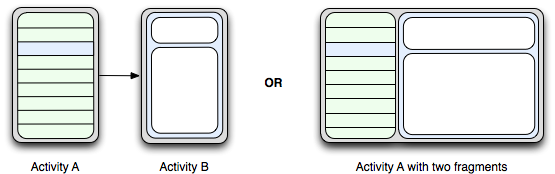
如上圖所示,用 Activity A 表示文章標題清單,Activity B 表示文章具體內容。我們可以看到,兩個 Activity 透過兩個 Fragment 合併到了一個 Activity 的佈局方式,對於平板等大螢幕設備來說,有著相當出色的展示面板。不過因為 Fragment 和 Activity 的生命週期都比較複雜,下圖展示的就是 Fragment 的生命週期:
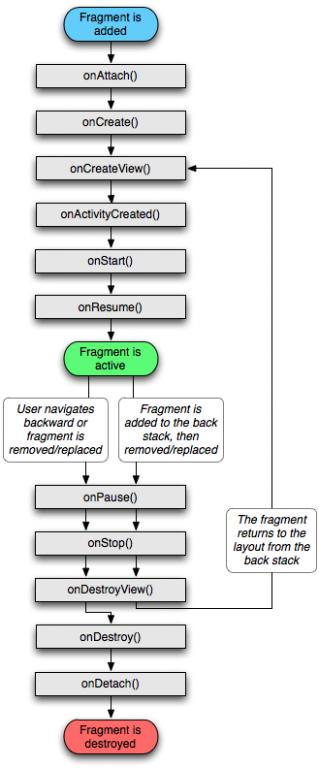
Activity、Fragment 分別對比如下:
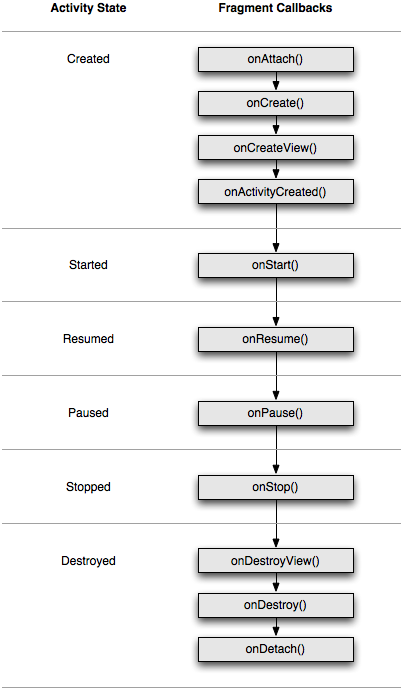
兩者的生命週期十分相似,而且息息相關。
創建一個 Fragment,你必須創建一個 Fragment 的子類或已有的子類,就像類似下面的程式碼
public static class AndroidFragment extends Fragment { @Override public View onCreateView(LayoutInflater inflater, ViewGroup container, Bundle savedInstanceState) { return inflater.inflate(R.layout.android_fragment, container, false); } }
onCreate()
當 Fragment 創建時被調用,你應該初始化一些實用的組件,比如在 Fragment 暫停或停止時需要恢復的那些。
onCreateView()
當系統呼叫 Fragment 首次繪製使用者介面時被調用。如果你要在 Fragment 上畫一個 UI,就必須返回一個 View;當然,你也可以返回 null,代表這個 Fragment 沒有 UI。
那麼如何添加一個 Fragment 到 Activity 中呢?Activity 的佈局可以這樣寫
<?xml version="1.0" encoding="utf-8"?> <LinearLayout xmlns:android="https://schemas.android.com/apk/res/android" android:orientation="horizontal" android:layout_width="match_parent" android:layout_height="match_parent"> <fragment android:name="com.android.cwj.ArticleListFragment" android:id="@+id/list" android:layout_weight="1" android:layout_width="0dp" android:layout_height="match_parent" /> <fragment android:name="com.android.cwj.ArticleReaderFragment" android:id="@+id/viewer" android:layout_weight="2" android:layout_width="0dp" android:layout_height="match_parent" /> </LinearLayout>
通常地,Fragment 作為宿主 Activity UI 的一部分,會作為 Activity 整個 view hierarchy 的一部分被嵌入。有兩種方法你可以把 Fragment 添加到 Activity 的 layout 中:
一、在 Activity 的 layout 檔案中聲明 Fragment
你可以像為 View 那樣,為 Fragment 指定 layout 屬性(sdk 3.0 以後)。
例子是一個有兩個 Fragment 的 Activity:
<?xml version="1.0" encoding="utf-8"?> <LinearLayout xmlns:android="https://schemas.android.com/apk/res/android" android:orientation="horizontal" android:layout_width="match_parent" android:layout_height="match_parent"> <fragment android:name="com.example.news.ArticleListFragment" android:id="@+id/list" android:layout_weight="1" android:layout_width="0dp" android:layout_height="match_parent" /> <fragment android:name="com.example.news.ArticleReaderFragment" android:id="@+id/viewer" android:layout_weight="2" android:layout_width="0dp" android:layout_height="match_parent" /> </LinearLayout>
<fragment> 中的 android:name 屬性指定了在 layout 中實例化的 Fragment 類。
當系統創建這個 Activity layout 時,它會實例化每一個在 layout 中指定的 Fragment,並呼叫每一個上的 onCreateView() 方法,以取得每一個 Fragment 的 layout。系統會把 Fragment 返回的 View 直接插入到 <fragment> 元素所在的地方。
注意:每一個 Fragment 都需要一個唯一的標識,這樣當 Activity 重啟時,系統才能用它來恢復 Fragment(並且你也可以用它來捕獲 Fragment 來處理事務,例如移除它。)
有三種方法來為一個 Fragment 提供一個標識:
二、使用 FragmentManager 把 Fragment 添加到一個已存在的 ViewGroup。
當 Activity 運行的任何時候,都可以把 Fragment 添加到 Activity 的 layout。只需簡單地指定一個需要放置 Fragment 的 ViewGroup。為了在你的 Activity 中操作 Fragment 事務(例如添加、移除,或代替一個 Fragment),必須使用來自 FragmentTransaction 的 API。
可以按如下方法,從你的 Activity 取得一個 FragmentTransaction 的實例:
FragmentManager fragmentManager = getFragmentManager();
FragmentTransaction fragmentTransaction = fragmentManager.beginTransaction();
然後你可以使用 add() 方法添加一個 Fragment,指定要添加的 Fragment,和要插入的 view。
ExampleFragment fragment = new ExampleFragment(); fragmentTransaction.add(R.id.fragment_container, fragment); fragmentTransaction.commit();
add() 的第一個參數是 Fragment 要放入的 ViewGroup,由 resource ID 指定;第二個參數是需要添加的 Fragment。一旦用 FragmentTransaction 做了改變,為了使改變生效,必須呼叫 commit()。
 Android 移植 FFmpeg(二):測試用例與 NDK 編譯
本文說明如何在 Android 專案中整合 FFmpeg 測試用例,並透過 Android Studio 與 NDK 完成編譯與執行。範例以 android-ffmpeg
 Android 軟體自動更新功能的完整實作
幾乎所有 App 都有「發現新版本,請更新」的功能。本文將一步步實作這樣一套自動更新機制:檢測更新、提示使用者、下載 APK、並在完成后自動跳轉安裝。 步驟一:建
 第三方授權登錄與分享的安全隱患:AppId 明文暴露帶來的連鎖風險
隨著作為社交媒體的普及,第三方登錄成了快捷註冊的標配,社會化分享也成為內容傳播的主要渠道。移動端幾乎每款應用都接入了微信、QQ、微博的登錄或分享組件,這三家也都提供了開放
 深度解析 Android 開發中的 MVP 架構模式
近來翻閱了不少介紹 MVP 架構的文章,也讓我停下腳步回顧了自己過往的開發歷程。在早期撰寫的眾多 Android 應用中,幾乎每一個專案都帶著「快速交付」的壓力,因此從最