

編輯:關於 Android 程式設計
先釐清一個常見困惑:setTextColor(int color) 傳入的是「顏色實際值」,例如紅色就是 0xff0000。若直接寫 R.color.red,傳進去的只是一個資源 ID 整數,並不會得到紅色——必須先透過 getResources().getColor() 取出真正的色值再傳入:
tv.setTextColor(this.getResources().getColor(R.color.red));
整體來說,TextView 的文字顏色有兩條路:透過 XML 設定檔,或在 Activity 中用程式碼設定。
適合靜態或初始顏色,寫法如下:
main.xml
<?xml version="1.0" encoding="utf-8"?> <LinearLayout xmlns:android="https://schemas.android.com/apk/res/android" android:orientation="vertical" android:layout_width="fill_parent" android:layout_height="fill_parent" android:background="@drawable/white" > <TextView android:id="@+id/tv01" android:layout_width="fill_parent" android:layout_height="wrap_content" android:text="@string/hello" android:autoLink="all" android:textColor="@color/red" /> </LinearLayout>
color.xml
<?xml version="1.0" encoding="utf-8"?> <resources> <drawable name="white">#FFFFFF</drawable> <drawable name="dark">#000000</drawable> <drawable name="red">#FF0000</drawable> </resources>
strings.xml
<?xml version="1.0" encoding="utf-8"?> <resources> <string name="hello">地址:https://yahaitt.javaeye.com</string> <string name="app_name">丫梨的筆記本</string> </resources>
上面刻意把資源拆成三個檔案,純粹是為了清楚;實際上你也可以只建一個 XML 放在 res 目錄下,檔名自訂即可。
這裡有兩個關鍵點:
1. main.xml 中寫 android:textColor="@color/red"
2. color.xml 中定義 <color name="red">#FF0000</color>
@color 表示從資源檔(res 目錄下所有 XML)中取 <color> 標籤,/red 則是找出 name 為 red 的那一項,其值為 #FF0000。依此類推,寫成 @drawable/red 就是取 <drawable> 標籤下的 red,字串資源也是同樣道理。
先把 main.xml 中的 android:textColor 屬性移除:
<?xml version="1.0" encoding="utf-8"?> <LinearLayout xmlns:android="https://schemas.android.com/apk/res/android" android:orientation="vertical" android:layout_width="fill_parent" android:layout_height="fill_parent" android:background="@drawable/white" > <TextView android:id="@+id/tv01" android:layout_width="fill_parent" android:layout_height="wrap_content" android:text="@string/hello" android:autoLink="all" /> </LinearLayout>
接著在 onCreate 中取得 TextView 並設定顏色,共三種寫法:
第 1 種:tv.setTextColor(android.graphics.Color.RED); 使用系統內建的顏色類。
第 2 種:tv.setTextColor(0xffff00ff); 直接給 int 值。可以拆解成 0x | ff | ff00ff 來理解:0x 是顏色整數的標記,接著兩位 ff 是透明度(alpha),最後六位是 RGB。要注意這裡必須是完整的 8 位寫法,只寫 ff00ff 這種 6 位是行不通的。
第 3 種:tv.setTextColor(this.getResources().getColor(R.color.red)); 透過資源檔取值。依情況也可以是 R.string.red 或 R.drawable.red,前提是對應的資源文件中已有相應定義:
<color name="red">#FF0000</color> <drawable name="red">#FF0000</drawable> <string name="red">#FF0000</string>
完整程式碼:
package yahaitt.study03_01; import android.app.Activity; import android.content.res.Resources; import android.graphics.Color; import android.os.Bundle; import android.widget.TextView; public class Study03_01 extends Activity { private TextView tv; @Override public void onCreate(Bundle savedInstanceState) { super.onCreate(savedInstanceState); setContentView(R.layout.main); tv = (TextView)this.findViewById(R.id.tv01); //tv.setTextColor(Color.RED); //tv.setTextColor(0xff000000); } }
實務建議:靜態顏色優先放在 XML,方便設計與主題維護;需要依狀態動態切換時再用程式碼處理,避免把色值硬寫在 Java 裡。
延伸閱讀可參考本站《Android 開發入門與進階教程》《Android 通信方式總結》《Android 基本組件用法總結》《Android 視圖 View 技巧總結》《Android 布局 layout 技巧總結》與《Android 控件用法總結》等專題。
 Android RecyclerView 入門教程
在 Google I/O 大會上,RecyclerView 與 CardView 一同亮相。作為 support-library 發布的 RecyclerView,可以向
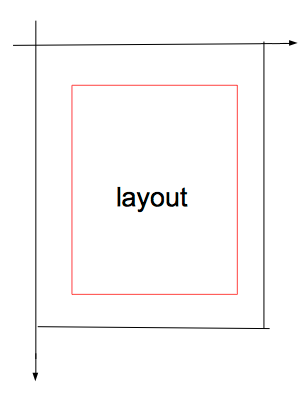 Android 滑動機制全解析:從座標系到七種位移實作
重點導覽 本文重新整理 Android 滑動效果的核心概念,從座標系、觸控事件到七種常見位移方式,幫助讀者建立完整的實作脈絡。 一、滑動效果如何產生 所謂滑動,本質上是根
 Android 實現圖片圓角的程式碼
下圖為圓角效果示意: 透過 Bitmap、Canvas 與 PorterDuff 混合模式,可以將圖片的四角處理成圓角。核心思路是:先建立一張與原圖相同尺寸並帶透明通道
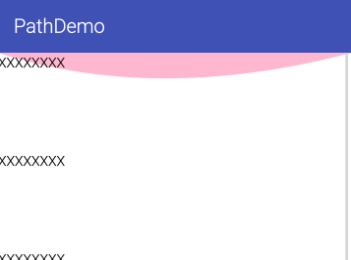 用貝塞爾曲線做 ScrollView 頂部下拉陰影回饋
本文記錄一個小效果:當 ScrollView 滑到頂部後,手指繼續下拉時出現的陰影回饋。實作難度不高,僅供學習參考,若要放進正式專案還請三思。 技術點一:用 Path 畫