

編輯:關於 Android 程式設計
因為工作關係,常在文件裡看到「POI」這個縮寫,卻一直沒認真研究過它的含義。POI 是英文 Point of Interest 的縮寫,直譯就是「興趣點」。這個詞最早來自導航地圖廠商:為了提供盡可能多的位置資訊,他們投入大量心力蒐集加油站、餐館、酒店、景點等目的地——這些目的地,就是一個一個的 POI。
POI 除了記錄目的地本身(名稱、電話、評價等),還包含經緯度座標,並能在電子地圖上標示出來。以 Google 地圖為例,搜尋「北京天安門」時,地圖上會出現一個別針形狀的標記,點擊後顯示更多資訊——這就是一個興趣點。
為什麼 POI 如此重要?電子地圖普及率越高,使用者就越依賴它找路。沒有成千上萬的 POI,我們根本無法方便地搜尋想去的地方。POI 已成為電子商務與 O2O 不可或缺的一環。
在地理信息系統(GIS)中,一個 POI 可以是一棟房子、一家商鋪、一個郵筒或一座公車站。百度地圖 SDK 提供三種 POI 檢索方式:
此外還有 POI 詳情檢索(依 POI 的 UID 取得該地點的詳細資訊)與線上建議查詢(依部分關鍵詞聯想出完整名稱)。自 v3.6.1 起,城市 POI 檢索的結果新增了「門址類」列表資料:搜尋「上地十街1號」時,除了包含該字串的 POI,也會回傳地址明確符合的門址結果,可透過 PoiResult.GetAllAddr() 取得,並以 isHasAddrInfo() 判斷是否存在。
關於線上建議查詢的兩個注意事項:
本範例示範:關鍵詞查詢、suggestion 聯想查詢,以及查看餐飲類 Place 詳情頁。
具體功能:
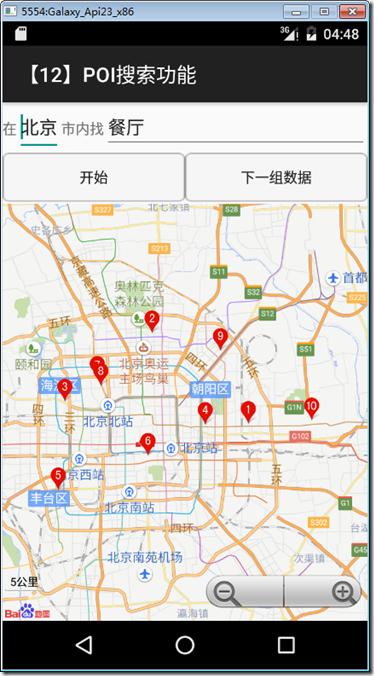
在 Layout 資料夾下新增此檔案,內容如下:
<?xml version="1.0" encoding="utf-8"?>
<LinearLayout xmlns:android="https://schemas.android.com/apk/res/android"
    android:layout_width="fill_parent"
    android:layout_height="fill_parent"
    android:orientation="vertical">

    <LinearLayout
        android:layout_width="fill_parent"
        android:layout_height="50dip"
        android:orientation="horizontal">

        <TextView android:layout_width="wrap_content" android:layout_height="wrap_content"
            android:text="在" />

        <EditText
            android:id="@+id/city"
            android:layout_width="wrap_content"
            android:layout_height="match_parent"
            android:text="北京" />

        <TextView android:layout_width="wrap_content" android:layout_height="wrap_content"
            android:text="市內找" />

        <AutoCompleteTextView
            android:id="@+id/searchkey"
            android:layout_width="wrap_content"
            android:layout_height="wrap_content"
            android:layout_weight="0.88"
            android:text="餐廳" />
    </LinearLayout>

    <LinearLayout
        android:layout_width="fill_parent"
        android:layout_height="50dip"
        android:orientation="horizontal">

        <Button
            android:id="@+id/search"
            android:layout_width="fill_parent"
            android:layout_height="wrap_content"
            android:layout_weight="12"
            android:background="@drawable/button_style"
            android:padding="10dip"
            android:text="開始" />

        <Button
            android:id="@+id/map_next_data"
            android:layout_width="fill_parent"
            android:layout_height="wrap_content"
            android:layout_weight="12"
            android:background="@drawable/button_style"
            android:padding="10dip"
            android:text="下一組數據" />
    </LinearLayout>

    <fragment
        android:id="@+id/map"
        android:layout_width="match_parent"
        android:layout_height="match_parent"
        class="com.baidu.mapapi.map.TextureMapFragment" />
</LinearLayout>
先建立 SrcOverlayUtil 資料夾,再在其中新增此檔案。
說明:SrcOverlayUtil 下的檔案用於封裝「以基礎覆蓋物組合而成的高級覆蓋物」,包含顯示 POI 資料、規劃路線、公車詳情路線等。
using Com.Baidu.Mapapi.Map;
using Com.Baidu.Mapapi.Model;
using System.Collections.Generic;

namespace BdMapV371Demos.SrcOverlayUtil
{
    /// <summary>
    /// 提供一個能顯示並管理多個 Overlay 的基底類別。
    /// 必須把覆蓋物點擊事件傳給 OverlayManager,它才能響應點擊。
    /// 實際處理請在 OnMarkerClick / OnPolylineClick 中覆寫。
    /// </summary>
    public abstract class OverlayManager : Java.Lang.Object,
            BaiduMap.IOnMarkerClickListener, BaiduMap.IOnPolylineClickListener
    {
        BaiduMap mBaiduMap = null;
        private List<OverlayOptions> mOverlayOptionList = null;
        protected List<Overlay> mOverlayList = null;

        public OverlayManager(BaiduMap baiduMap)
        {
            mBaiduMap = baiduMap;
            mBaiduMap.SetOnMarkerClickListener(this);
            if (mOverlayOptionList == null)
                mOverlayOptionList = new List<OverlayOptions>();
            if (mOverlayList == null)
                mOverlayList = new List<Overlay>();
        }

        /// <summary>
        /// 覆寫此方法以設定要管理的 Overlay 清單
        /// </summary>
        public abstract List<OverlayOptions> GetOverlayOptions();

        /// <summary>
        /// 把所有 Overlay 加入地圖
        /// </summary>
        public void AddToMap()
        {
            if (mBaiduMap == null) return;
            RemoveFromMap();
            List<OverlayOptions> overlayOptions = GetOverlayOptions();
            if (overlayOptions != null)
                mOverlayOptionList.AddRange(overlayOptions);
            foreach (OverlayOptions option in mOverlayOptionList)
            {
                mOverlayList.Add(mBaiduMap.AddOverlay(option));
            }
        }

        /// <summary>
        /// 把所有 Overlay 從地圖移除
        /// </summary>
        public void RemoveFromMap()
        {
            if (mBaiduMap == null) return;
            foreach (Overlay marker in mOverlayList)
            {
                marker.Remove();
            }
            mOverlayOptionList.Clear();
            mOverlayList.Clear();
        }

        /// <summary>
        /// 縮放地圖使所有 Overlay 都在視野內
        /// 註:此方式只對 Marker 類型有效
        /// </summary>
        public void ZoomToSpan()
        {
            if (mBaiduMap == null) return;
            if (mOverlayList.Count > 0)
            {
                LatLngBounds.Builder builder = new LatLngBounds.Builder();
                foreach (Overlay overlay in mOverlayList)
                {
                    // polyline 節點可能過多,只依 marker 縮放
                    if (overlay is Marker)
                    {
                        builder.Include(((Marker)overlay).Position);
                    }
                }
                mBaiduMap.SetMapStatus(
                    MapStatusUpdateFactory.NewLatLngBounds(builder.Build()));
            }
        }

        public virtual bool OnMarkerClick(Marker marker) { return false; }
        public virtual bool OnPolylineClick(Polyline polyline) { return false; }
    }
}
using Android.OS;
using Android.Widget;
using Com.Baidu.Mapapi;
using Com.Baidu.Mapapi.Map;
using Com.Baidu.Mapapi.Search.Poi;
using System.Collections.Generic;

namespace BdMapV371Demos.SrcOverlayUtil
{
    /// <summary>
    /// 顯示 POI 結果的 Overlay
    /// </summary>
    public class PoiOverlay : OverlayManager
    {
        private static readonly int MaxPoiSize = 10;
        private PoiResult mPoiResult = null;

        public PoiOverlay(BaiduMap baiduMap) : base(baiduMap) { }

        /// <summary>
        /// 設定 POI 資料
        /// </summary>
        public void SetData(PoiResult poiResult)
        {
            this.mPoiResult = poiResult;
        }

        public override List<OverlayOptions> GetOverlayOptions()
        {
            if (mPoiResult == null || mPoiResult.AllPoi == null)
                return null;

            List<OverlayOptions> markerList = new List<OverlayOptions>();
            int markerSize = 0;

            for (int i = 0; i < mPoiResult.AllPoi.Count && markerSize < MaxPoiSize; i++)
            {
                // 部分結果(如公車、地鐵路線)沒有座標,需跳過
                if (mPoiResult.AllPoi[i].Location == null) continue;
                markerSize++;

                Bundle bundle = new Bundle();
                bundle.PutInt("index", i);
                markerList.Add(new MarkerOptions()
                    .InvokeIcon(BitmapDescriptorFactory.FromAssetWithDpi("Icon_mark" + markerSize + ".png"))
                    .InvokeExtraInfo(bundle)
                    .InvokePosition(mPoiResult.AllPoi[i].Location));
            }
            return markerList;
        }

        /// <summary>
        /// 取得本 Overlay 的 POI 資料
        /// </summary>
        public PoiResult GetPoiResult()
        {
            return mPoiResult;
        }

        /// <summary>
        /// 覆寫此方法可改變預設的點擊行為
        /// </summary>
        /// <param name="i">被點擊的 POI 在 AllPoi 中的索引</param>
        public virtual bool OnPoiClick(int i)
        {
            if (mPoiResult.AllPoi != null && mPoiResult.AllPoi[i] != null)
            {
                Toast.MakeText(BMapManager.Context,
                    mPoiResult.AllPoi[i].Name, ToastLength.Long).Show();
            }
            return false;
        }

        public override bool OnMarkerClick(Marker marker)
        {
            if (!mOverlayList.Contains(marker)) return false;
            if (marker.ExtraInfo != null)
            {
                return OnPoiClick(marker.ExtraInfo.GetInt("index"));
            }
            return false;
        }

        public override bool OnPolylineClick(Polyline polyline) { return false; }
    }
}
using Android.App;
using Android.Content.PM;
using Android.OS;
using Android.Support.V4.App;
using Android.Widget;
using BdMapV371Demos.SrcOverlayUtil;
using Com.Baidu.Mapapi.Map;
using Com.Baidu.Mapapi.Search.Core;
using Com.Baidu.Mapapi.Search.Poi;
using Com.Baidu.Mapapi.Search.Sug;

namespace BdMapV371Demos.SrcSdkDemos
{
    /// <summary>
    /// 示範 POI 搜尋功能
    /// </summary>
    [Activity(Label = "@string/demo_name_poi",
        ConfigurationChanges = ConfigChanges.Orientation | ConfigChanges.KeyboardHidden,
        ScreenOrientation = ScreenOrientation.Sensor)]
    public class Demo12PoiSearch : FragmentActivity
    {
        private PoiSearch mPoiSearch = null;
        private SuggestionSearch mSuggestionSearch = null;
        private BaiduMap mBaiduMap = null;

        private AutoCompleteTextView keyWorldsView = null;   // 關鍵字輸入框
        private ArrayAdapter<string> sugAdapter = null;
        private int load_Index = 0;

        protected override void OnCreate(Bundle savedInstanceState)
        {
            base.OnCreate(savedInstanceState);
            SetContentView(Resource.Layout.demo12_poisearch);

            // 初始化 POI 搜尋模組並註冊監聽
            mPoiSearch = PoiSearch.NewInstance();
            mPoiSearch.GetPoiResult += (s, e) =>
            {
                var result = e.P0;
                if (result == null || result.Error == SearchResult.ERRORNO.ResultNotFound)
                    return;

                if (result.Error == SearchResult.ERRORNO.NoError)
                {
                    mBaiduMap.Clear();
                    PoiOverlay overlay = new MyPoiOverlay(this, mBaiduMap);
                    mBaiduMap.SetOnMarkerClickListener(overlay);
                    overlay.SetData(result);
                    overlay.AddToMap();
                    overlay.ZoomToSpan();
                    return;
                }

                if (result.Error == SearchResult.ERRORNO.AmbiguousKeyword)
                {
                    // 本市查無結果,但其他城市有,回傳城市清單
                    string strInfo = "在";
                    foreach (CityInfo cityInfo in result.SuggestCityList)
                    {
                        strInfo += cityInfo.City;
                        strInfo += ",";
                    }
                    strInfo += "找到結果";
                    Toast.MakeText(this, strInfo, ToastLength.Long).Show();
                }
            };

            mPoiSearch.GetPoiDetailResult += (s, e) =>
            {
                var result = e.P0;
                if (result.Error != SearchResult.ERRORNO.NoError)
                {
                    Toast.MakeText(this, "抱歉,未找到結果", ToastLength.Short).Show();
                }
                else
                {
                    Toast.MakeText(this, "成功,查看詳情頁面", ToastLength.Short).Show();
                }
            };

            // 初始化建議(聯想)查詢
            mSuggestionSearch = SuggestionSearch.NewInstance();
            mSuggestionSearch.GetSuggestionResult += (s, e) =>
            {
                var res = e.P0;
                if (res == null || res.AllSuggestions == null) return;
                sugAdapter.Clear();
                foreach (SuggestionResult.SuggestionInfo info in res.AllSuggestions)
                {
                    if (info.Key != null) sugAdapter.Add(info.Key);
                }
                sugAdapter.NotifyDataSetChanged();
            };

            keyWorldsView = FindViewById<AutoCompleteTextView>(Resource.Id.searchkey);
            sugAdapter = new ArrayAdapter<string>(this, Android.Resource.Layout.SimpleDropDownItem1Line);
            keyWorldsView.Adapter = sugAdapter;

            TextureMapFragment map1 =
                FragmentManager.FindFragmentById<TextureMapFragment>(Resource.Id.map);
            mBaiduMap = map1.BaiduMap;

            // 輸入變動時更新建議清單(實務建議加上 debounce)
            keyWorldsView.AfterTextChanged += (sender, e) => { };
            keyWorldsView.BeforeTextChanged += (sender, e) => { };
            keyWorldsView.TextChanged += (sender, e) =>
            {
                string s = e.Text.ToString();
                if (s.Length <= 0) return;
                string city = (FindViewById<EditText>(Resource.Id.city)).Text;
                mSuggestionSearch.RequestSuggestion(
                    new SuggestionSearchOption().Keyword(s).City(city));
            };

            Button btnSearch = FindViewById<Button>(Resource.Id.search);
            btnSearch.Click += delegate { SearchButtonProcess(); };

            Button btnNext = FindViewById<Button>(Resource.Id.map_next_data);
            btnNext.Click += delegate { load_Index++; SearchButtonProcess(); };
        }

        protected override void OnPause() { base.OnPause(); }
        protected override void OnResume() { base.OnResume(); }

        protected override void OnDestroy()
        {
            mPoiSearch.Destroy();
            mSuggestionSearch.Destroy();
            base.OnDestroy();
        }

        protected override void OnSaveInstanceState(Bundle outState)
        {
            base.OnSaveInstanceState(outState);
        }

        protected override void OnRestoreInstanceState(Bundle savedInstanceState)
        {
            base.OnRestoreInstanceState(savedInstanceState);
        }

        public void SearchButtonProcess()
        {
            EditText editCity = FindViewById<EditText>(Resource.Id.city);
            EditText editSearchKey = FindViewById<EditText>(Resource.Id.searchkey);
            mPoiSearch.SearchInCity(new PoiCitySearchOption()
                .City(editCity.Text)
                .Keyword(editSearchKey.Text)
                .PageNum(load_Index));
        }

        /// <summary>
        /// 自訂 Overlay:點擊有餐飲詳情的 POI 時查詢詳情頁
        /// </summary>
        private class MyPoiOverlay : PoiOverlay
        {
            Demo12PoiSearch poiSearchDemo;

            public MyPoiOverlay(Demo12PoiSearch poiSearchDemo, BaiduMap baiduMap)
                : base(baiduMap)
            {
                this.poiSearchDemo = poiSearchDemo;
            }

            public override bool OnPoiClick(int index)
            {
                base.OnPoiClick(index);
                PoiInfo poi = GetPoiResult().AllPoi[index];
                if (poi.HasCaterDetails)
                {
                    poiSearchDemo.mPoiSearch.SearchPoiDetail(
                        new PoiDetailSearchOption().PoiUid(poi.Uid));
                }
                return true;
            }
        }
    }
}
在 MainActivity.cs 的 demos 欄位定義中,把「示例 12」下面的註解取消即可。
OnDestroy() 中必須呼叫 mPoiSearch.Destroy() 與 mSuggestionSearch.Destroy(),否則會有記憶體洩漏。TextChanged 每按一個鍵就觸發一次,建議加 debounce,否則很快就會撞到服務配額。BdMapV371Demos),API 名稱與後續版本並不相同。若使用較新版本的 SDK,請以官方文件的介面名稱為準。以上就是本文的全部內容,希望對你的開發有所幫助。
 Android Studio 使用 android-pdf-viewer 的問題與解法
需求背景 在 Android 中顯示 PDF,常見做法是先用 DownloadManager 下載檔案,再透過 PDFView 元件渲染。本文以 Android Stud
 Android 直播服務端入門:Nginx 與 RTMP 環境搭建
搭建 Android 直播服務端時,Nginx 搭配 RTMP 模組是常見且成本較低的方案。本文說明如何準備源碼、編譯安裝、設定 RTMP,並以 FFmpeg 與 VLC
 Android 4.x 中「變相」攔截 HOME 鍵的一種思路
項目中遇到了需要屏蔽 HOME 鍵的需求。項目本身的要求是:按下 HOME 鍵後程序不做任何響應,就像按下返回鍵那樣,在 onBackPressed 方法裡直接 retu
 踩坑筆記:Android Service 中 Toast 不顯示的原因與解法
做 Service 練習時,我在 onCreate、onStart、onDestroy 三個方法裡都像 Activity 那樣呼叫了 Toast.makeText,並用兩