

編輯:關於 Android 程式設計
字符串和十六進制之間來回轉換,純英文數字時一切正常,一到中文就亂碼——這是很多人寫工具類時遇到的問題。根源通常在於編碼環節:中文字符在字節層面佔多個字節,如果編碼與解碼用了不一致的字符集,或者把字節直接當字符處理,結果必然錯位。下面給出兩個可直接複用的工具類。
import java.io.ByteArrayOutputStream;

/**
 * 十六進制與字符串互轉,適用於所有字符(含中文)
 * 關鍵在於 encode 與 decode 使用同一套字符集
 */
public class StringToHexUtils {

    private static final String HEX = "0123456789abcdef";

    /** 將字符串編碼成十六進制數字,適用於所有字符(包括中文) */
    public static String encode(String str) {
        // 按默認字符集獲取字節數組,中文會佔多個字節
        byte[] bytes = str.getBytes();
        StringBuilder sb = new StringBuilder(bytes.length * 2);
        // 把每個字節拆成兩位十六進制
        for (int i = 0; i < bytes.length; i++) {
            sb.append(HEX.charAt((bytes[i] & 0xf0) >> 4));
            sb.append(HEX.charAt(bytes[i] & 0x0f));
        }
        return sb.toString();
    }

    /** 將十六進制數字解碼成字符串,適用於所有字符(包括中文) */
    public static String decode(String hex) {
        ByteArrayOutputStream baos = new ByteArrayOutputStream(hex.length() / 2);
        // 每兩位十六進制組裝成一個字節
        for (int i = 0; i < hex.length(); i += 2) {
            baos.write((HEX.indexOf(hex.charAt(i)) << 4)
                    | HEX.indexOf(hex.charAt(i + 1)));
        }
        // 用同一套字符集還原,中文才不會亂碼
        return new String(baos.toByteArray());
    }
}
兩個細節值得留意:bytes[i] & 0xf0 中的掩碼不可省略,因為 Java 的 byte 是有符號的,高位為 1 時直接右移會得到負數;解碼時用 ByteArrayOutputStream 累積字節再一次性 new String,比逐個 char 拼接更可靠。
如果場景是協議解析、BCD 碼處理,往往需要直接在十六進制字符串和 byte[] 之間轉換:
public class NumberChange {

    /** 十六進制字符串轉字節數組 */
    public static byte[] hexStringToByte(String hex) {
        int len = hex.length() / 2;
        byte[] result = new byte[len];
        char[] achar = hex.toCharArray();
        for (int i = 0; i < len; i++) {
            int pos = i * 2;
            result[i] = (byte) (toByte(achar[pos]) << 4 | toByte(achar[pos + 1]));
        }
        return result;
    }

    private static byte toByte(char c) {
        return (byte) "0123456789ABCDEF".indexOf(c);
    }

    /** 字節數組轉十六進制字符串 */
    public static String bytesToHexString(byte[] bArray) {
        StringBuffer sb = new StringBuffer(bArray.length * 2);
        for (int i = 0; i < bArray.length; i++) {
            String sTemp = Integer.toHexString(0xFF & bArray[i]);
            // 不足兩位時補零,否則 "0A" 會變成 "A",長度對不上
            if (sTemp.length() < 2) {
                sb.append(0);
            }
            sb.append(sTemp.toUpperCase());
        }
        return sb.toString();
    }
}
這裡最容易出錯的是補零。字節值小於 0x10 時,toHexString 只會返回一位,如果直接把結果拼起來,最終字符串長度會與原始字節數失配,解析時整段數據全部錯位。另外 0xFF & bArray[i] 的掩碼同樣是為了消除符號擴展的影響。
public static void main(String[] args) {
    // 對應 GBK 編碼下的 "你好"
    String[] str = {"C4", "E3", "BA", "C3"};
    byte[] b = new byte[str.length];
    for (int i = 0; i < str.length; i++) {
        b[i] = hexStringToByte(str[i])[0];
    }
    System.out.println(new String(b));

    String strC = "你好";
    System.out.println(bytesToHexString(strC.getBytes()));
}
需要特別說明的是,中文能否正確還原告決定於編解碼兩端字符集是否一致。上面的示例依託 GBK 環境,若在純 UTF-8 項目中使用,應把 getBytes() 與 new String() 都顯式指定為 "UTF-8",否則同樣會亂碼。與其事後猜測,不如從一開始就把字符集寫明確。
以上內容圍繞 Android/Java 中字符串與十六進制互轉的亂碼成因及解決方案,希望對排查類似問題有所幫助。
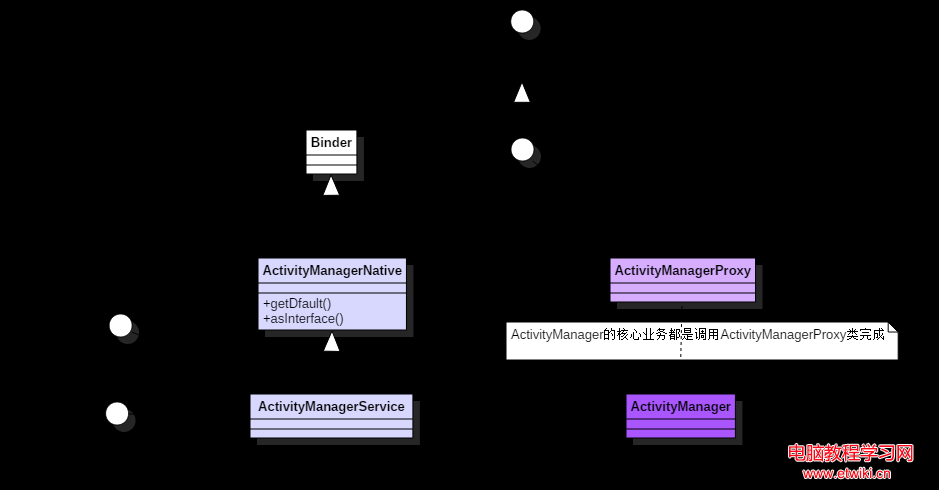 startService 啟動過程源碼全解析(Android 6.0)
本文基於 Android 6.0 原始碼,剖析 startService() 背後 ActivityManagerService 所扮演的角色,並釐清 Binder、So
 Android 自訂標題欄背景圖的完整實作教學
想讓 App 的標題欄更有質感?除了單純的純色背景,我們還可以為標題欄設定具有凹凸感的背景圖片。本文將一步步示範如何自訂標題欄背景。 設定標題欄背景 1> 準備背景
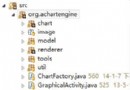 AChartEngine 源碼框架解讀:圖表庫是怎麼搭起來的
自從把 AChartEngine 的源碼 checkout 下來,折騰了差不多一週,總算把「它怎麼用」和「底層怎麼實現」這兩件事摸出點頭緒。這裡先記錄下來,一方面是給自己
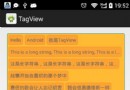 Android 流式標籤佈局:自定義 TagView 與 TagGroup
流式標籤佈局常用於標籤、分類、關鍵字與篩選條件。它能在有限寬度中自動換行,讓畫面更有彈性。要實作這類效果,可以將單個標籤設計為 TagView,並用 TagGroup 負