

編輯:關於 Android 程式設計
先看一下實作完成的樣子:

UniversalImageLoader 的官方特色大致如下:
GitHub 上同類專案不少,但這個用的人最多。第三方庫雖然省事,卻也容易讓人跳過底層細節,久了反而不利於掌握核心技術,所以建議用之前至少把初始化與緩存概念看一遍。
一、佈局。這裡自訂了一個 MyGridView 來顯示商品。之所以要自訂,是因為 GridView 放在 ScrollView 裡時,高度會被壓成很小,需要改寫 onMeasure 撐開:
二、引入 jar 包。使用 universal-image-loader-1.8.6-with-sources。使用前務必先初始化,否則會出現 java.lang.IllegalStateException: ImageLoader must be init with configuration before using,顧名思義就是「使用前要先初始化」。
三、撰寫 Adapter。在 getView 中載入商品圖。
四、開子執行緒拉資料。在背景執行緒抓 JSON,回到 Handler 解析後更新介面。
package com.demo.content; import android.content.Context; import android.util.AttributeSet; import android.widget.GridView; public class MyGridView extends GridView { public MyGridView(Context context, AttributeSet attrs) { super(context, attrs); } public MyGridView(Context context) { super(context); } public MyGridView(Context context, AttributeSet attrs, int defStyle) { super(context, attrs, defStyle); } @Override public void onMeasure(int widthMeasureSpec, int heightMeasureSpec) { int expandSpec = MeasureSpec.makeMeasureSpec(Integer.MAX_VALUE >> 2, MeasureSpec.AT_MOST); super.onMeasure(widthMeasureSpec, expandSpec); } } <?xml version="1.0" encoding="utf-8"?> <LinearLayout xmlns:android="https://schemas.android.com/apk/res/android" android:layout_width="match_parent" android:layout_height="match_parent" android:orientation="vertical" > <ScrollView android:layout_width="match_parent" android:layout_height="match_parent" > <LinearLayout android:layout_width="match_parent" android:layout_height="wrap_content" android:background="#eee" android:orientation="vertical" > <Button android:layout_width="match_parent" android:layout_height="wrap_content" android:text="@string/app_name" android:textColor="#000" /> <View android:layout_width="match_parent" android:layout_height="5dp" android:background="@drawable/btn_normal" /> <com.demo.content.MyGridView android:id="@+id/gg_mygridview" android:layout_width="match_parent" android:layout_height="match_parent" android:horizontalSpacing="7dp" android:numColumns="2" android:verticalSpacing="7dp" /> </LinearLayout> </ScrollView> </LinearLayout>
package com.demo.activity; import java.util.ArrayList; import java.util.List; import org.json.JSONArray; import org.json.JSONObject; import com.demo.content.MyGridView; import com.demo.entity.Product; import com.demo.pullrefresh.R; import com.demo.util.GetThread; import com.nostra.universalimageloader.core.DisplayImageOptions; import com.nostra.universalimageloader.core.ImageLoader; import com.nostra.universalimageloader.core.ImageLoaderConfiguration; import com.nostra.universalimageloader.core.assist.ImageScaleType; import com.nostra.universalimageloader.core.display.FadeInBitmapDisplayer; import android.annotation.SuppressLint; import android.app.Activity; import android.graphics.Bitmap; import android.os.Bundle; import android.os.Handler; import android.util.Log; import android.view.View; import android.view.ViewGroup; import android.widget.BaseAdapter; import android.widget.ImageView; import android.widget.TextView; public class MyMainActivity extends Activity { // 定義的布局 private MyGridView myGridView; private DisplayImageOptions options; // 產品 private List<Product> products; // 地址 private String url = "" + "Product/GetProductsByProType//"; @Override protected void onCreate(Bundle arg) { // TODO Auto-generated method stub super.onCreate(arg); setContentView(R.layout.mymainactivity); options = new DisplayImageOptions.Builder() .showImageForEmptyUri(R.drawable.ic_empty) // image連接地址為空時 .showImageOnFail(R.drawable.ic_error) // image加載失敗 .resetViewBeforeLoading(true).cacheOnDisc(true) .imageScaleType(ImageScaleType.EXACTLY) .bitmapConfig(Bitmap.Config.RGB_) .displayer(new FadeInBitmapDisplayer())// 設置用戶加載圖片task(這裡是漸現圖片顯示) .build(); // 創建默認的ImageLoader的參數 不加回報java.lang.IllegalStateException // 但不是每次用到ImageLoader都要加 ImageLoader.getInstance().init( ImageLoaderConfiguration.createDefault(this)); myGridView = (MyGridView) findViewById(R.id.gg_mygridview); // 開啟線程 new GetThread(url, handler).start(); } @SuppressLint("HandlerLeak") private Handler handler = new Handler() { public void handleMessage(android.os.Message msg) { switch (msg.what) { case GetThread.SUCCESS: String jsonString = (String) msg.obj; // 用JSON來解析數據 products = getJsonProducts(jsonString); Log.d("jiejie", "DDDDDDD" + products); // 創建個適配器 Adapter adapter = new Adapter(); myGridView.setAdapter(adapter); break; default: break; } }; }; protected List<Product> getJsonProducts(String jsonString) { List<Product> resultTempList = new ArrayList<Product>(); try { JSONArray array = new JSONArray(jsonString); for (int i = ; i < array.length(); i++) { Product temProductSimple = new Product(); JSONObject object = array.getJSONObject(i); temProductSimple.setId(object.getInt("id")); temProductSimple.setProType(object.getInt("ProType")); temProductSimple.setProOrder(object.getInt("ProOrder")); temProductSimple.setAddTime(object.getString("AddTime")); temProductSimple.setTitle(object.getString("Title")); temProductSimple.setSmallPic(object.getString("SmallPic")); temProductSimple.setPrice(object.getDouble("Price")); temProductSimple.setSalePrice(object.getDouble("SalePrice")); temProductSimple.setZhishubi(object.getString("Zhishubi")); temProductSimple.setProNo(object.getString("ProNo")); temProductSimple.setContens(object.getString("Contens")); temProductSimple.setBuyCount(object.getInt("BuyCount")); temProductSimple.setReadCount(object.getInt("ReadCount")); temProductSimple.setProImg(object.getString("ProImg")); temProductSimple.setShopFlag(object.getString("ShopFlag")); temProductSimple.setBrandId(object.getInt("BrandId")); temProductSimple.setStartTime(object.getString("StartTime")); if (object.get("Score") == null || object.get("Score").toString() == "null") { temProductSimple.setScore(); } else { temProductSimple.setScore(object.getInt("Score")); } temProductSimple.setProductOrigin(object .getString("ProductOrigin")); if (object.get("kucun").toString() == "null") { temProductSimple.setKucun(); } else { temProductSimple.setKucun(object.getInt("kucun")); } resultTempList.add(temProductSimple); } } catch (Exception e) { // TODO: handle exception e.printStackTrace(); System.out.println(e.toString()); } return resultTempList; } private View arrView[]; private class Adapter extends BaseAdapter { @Override public int getCount() { // TODO Auto-generated method stub // return products.size(); if (arrView == null) { arrView = new View[products.size()]; } return products.size(); } @Override public Object getItem(int arg) { // TODO Auto-generated method stub return products.get(arg); } @Override public long getItemId(int arg) { // TODO Auto-generated method stub return arg; } @Override public View getView(int arg, View arg, ViewGroup arg) { if (arrView[arg] == null) { Product info = products.get(arg); Holder holder = null; if (null == arg) { holder = new Holder(); arg = View.inflate(MyMainActivity.this, R.layout.product_item, null); holder.product_cost = (TextView) arg .findViewById(R.id.product_cost); holder.product_title = (TextView) arg .findViewById(R.id.product_title); holder.product_img = (ImageView) arg .findViewById(R.id.product_img); holder.buy_count = (TextView) arg .findViewById(R.id.buy_count); arg.setTag(holder); } else { holder = (Holder) arg.getTag(); } holder.product_cost.setText(products.get(arg).getSalePrice() + ""); holder.product_title.setText(products.get(arg).getTitle()); holder.buy_count.setText(products.get(arg).getBuyCount() + ""); String urlString = "https://**/UploadImages/ProductImages/" + products.get(arg).getSmallPic(); Log.d("jiejie", "dddddd___ " + arg); Log.d("jiejie", "_________" + info.getTitle()); Log.d("jiejie", "ProducteGridAdapter--" + urlString); ImageLoader.getInstance().displayImage(urlString, holder.product_img, options); arrView[arg] = arg; } return arrView[arg]; // return arg; } } static class Holder { ImageView product_img; TextView product_title; TextView product_cost; TextView buy_count; } }
package com.demo.util; import java.io.IOException; import org.apache.http.HttpResponse; import org.apache.http.HttpStatus; import org.apache.http.client.ClientProtocolException; import org.apache.http.client.HttpClient; import org.apache.http.client.methods.HttpGet; import org.apache.http.impl.client.DefaultHttpClient; import org.apache.http.util.EntityUtils; import android.os.Handler; import android.os.Message; import android.util.Log; public class GetThread extends Thread { public static final int SUCCESS = 10, FAIL = -11; private String url; private Handler handler; public GetThread(String url, Handler handler) { this.url = url; this.handler = handler; } @Override public void run() { // TODO Auto-generated method stub super.run(); HttpClient httpClient = new DefaultHttpClient(); HttpGet httpGet = new HttpGet(url); try { HttpResponse httpResponse = httpClient.execute(httpGet); Message msg = Message.obtain(); Log.v("asdf", httpResponse.getStatusLine().getStatusCode() + "返回碼 " + url); if (httpResponse.getStatusLine().getStatusCode() == HttpStatus.SC_OK) { String jsonString = EntityUtils.toString(httpResponse .getEntity()); msg.what = SUCCESS; msg.obj = jsonString; handler.sendMessage(msg); } else { msg.what = FAIL; handler.sendMessage(msg); } } catch (ClientProtocolException e) { e.printStackTrace(); } catch (IOException e) { e.printStackTrace(); } } }
上面用 arrView[] 快取 View 的做法,是為了迴避 Adapter 在捲動時重複觸發同一筆資料載入的問題。不過這並不是通用解法——更標準的做法是在 Adapter 中做好 ViewHolder 重用,並把「是否已開始載入」的狀態記在資料物件上,而不是用陣列把 View 永久留住,否則圖片增多時反而容易吃記憶體。
另外,DisplayImageOptions 建議在 Activity 建立時就初始化一次並重複使用,不必每張圖都重新建。搭配 cacheInMemory(true) 與 cacheOnDisk(true),同一張圖在捲回來時就能直接從緩存取用,省下大量網路請求。
以上就是 ImageLoader 在 GridView 場景下的基本用法,搭配背景執行緒抓 JSON 就能完成一個完整的商品列表。
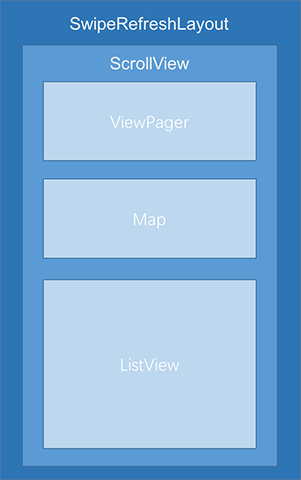 Android ScrollView 內嵌滑動衝突的處理思路
在複雜頁面中,經常會遇到多個可滑動元件共存的情況,例如 ViewPager、MapView、ListView 與 ScrollView 同時出現。當畫面高度超過螢幕時,若
 Android 自訂處理崩潰異常並回報
不論是使用者還是開發者,都常遇到程式異常退出的情況。對開發者而言,不可能在每一台手機上測試所有情境,因此最好的做法是:當使用者遇到崩潰時,讓應用自動收集錯誤資訊並回報到伺
 【Android】任意形狀顯示圖片:android-anyshape 原理與用法
問題從哪裡來 Android 開發中經常需要把圖片以特殊形狀呈現,圓角矩形、圓形是最常見的兩種。網上已有大量方案,比如自定義 View 重寫 onDraw(),用 can
 從已 Root 的 Android 手機匯出 App 的 DB 檔
前提 若要從 Android 裝置匯出 App 的 SQLite 資料庫,通常需要裝置已 Root,並能透過 adb 取得權限。此操作只應在自己擁有的裝置或已獲授權的測試