

編輯:關於 Android 程式設計
本文分享一個在 Android 中取得狀態列(通知欄)高度的實例,供大家參考。
這裡透過反射機制來取得通知欄高度。通知欄高度其實被定義在 dimen 檔案中,因此只要讀取對應的資源值再換算成像素即可。
public static int getStatusBarHeight(Context context){ Class<?> c = null; Object obj = null; Field field = null; int x = 0, statusBarHeight = 0; try { c = Class.forName("com.android.internal.R$dimen"); obj = c.newInstance(); field = c.getField("status_bar_height"); x = Integer.parseInt(field.get(obj).toString()); statusBarHeight = context.getResources().getDimensionPixelSize(x); } catch (Exception e1) { e1.printStackTrace(); } return statusBarHeight; } 希望本文所述能對大家的 Android 程式設計有所幫助。
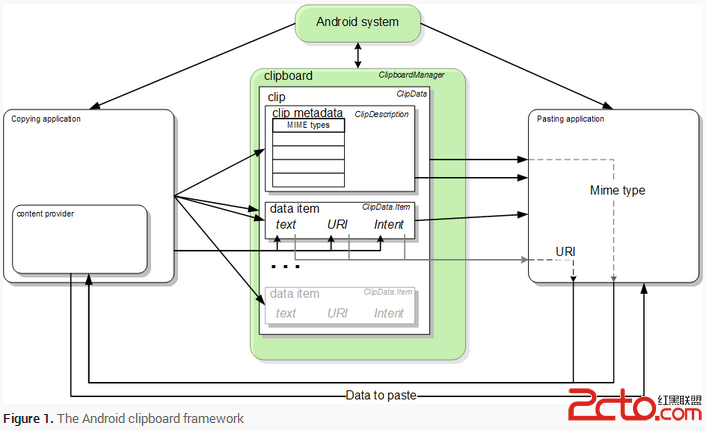 Android 中的複製粘貼:Clipboard 框架詳解
複製粘貼是移動應用中非常基礎卻又必不可少的能力,Android 為此提供了一套完整的剪貼板框架。下面我們系統地梳理一下它的核心概念與用法。 剪貼板框架(The Clipb
 Android 餐飲管理 App 實作筆記(二):用 SlidingMenu 搭出側滑菜單
這個專案要做的,是一套跑在 Android 平板或手機上的小型餐飲管理系統:錄入菜品、點餐開單、數據統計,還要能連小米或佳博的藍牙小票機。功能不少,但整個 App 幾乎都
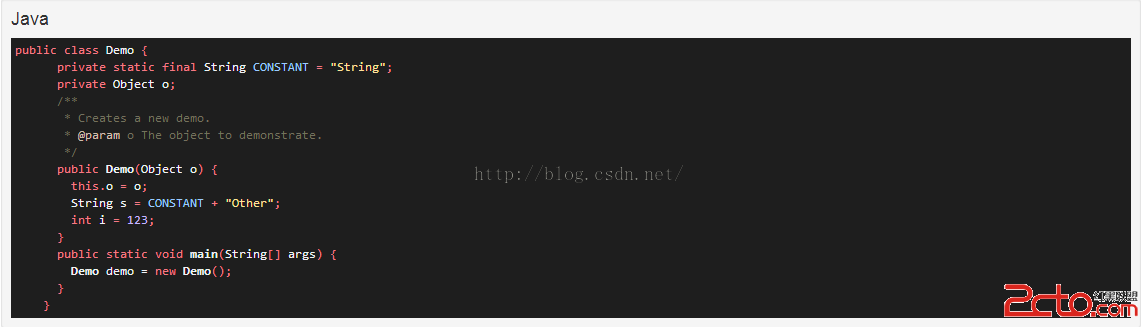 Android Studio 代碼著色主題插件推薦
前言:將近半個月沒寫部落格了,放個假回來整個人都鬆懈下來,懶得動彈,這才真正體會到「玩物喪志」的意思。好在公司項目趕得緊,不想幹活都不行,硬是把自己拉回正軌。正因為日以繼
 Android 自定義控件 NumberCircleProgressBar:圓形進度條的兩種玩法
前陣子在 GitHub 上看到 daimajia 寫的 NumberProgressBar,覺得思路很不錯,於是在它的基礎上做了延伸與擴展,寫出了圓形版本的 Number