

編輯:關於 Android 程式設計
Android 系統 API 裡有兩個名為 Camera 的類別:
後者負責手機硬體相機的相關操作,而本文要談的是前者——用它來做以中軸為中心的 3D 翻牌效果。開始之前,先來看 Android 的座標系:
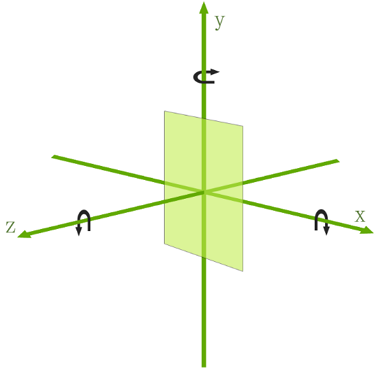
對應三維空間的三個方向,Camera 提供了三種旋轉方法:
呼叫時傳入角度參數,就能讓 View 沿著指定座標軸旋轉。本文的中軸 3D 效果,走的就是 Y 軸旋轉。
Android 的 API Demos 裡已經附了一個很好用的 3D 旋轉動畫工具類,可以直接拿來用:
package com.feng.androidtest; import android.graphics.Camera; import android.graphics.Matrix; import android.util.Log; import android.view.animation.Animation; import android.view.animation.Transformation; /** * An animation that rotates the view on the Y axis between two specified angles. * This animation also adds a translation on the Z axis (depth) to improve the effect. */ public class Rotate3dAnimation extends Animation { private final float mFromDegrees; private final float mToDegrees; private final float mCenterX; private final float mCenterY; private final float mDepthZ; private final boolean mReverse; private Camera mCamera; /** * Creates a new 3D rotation on the Y axis. The rotation is defined by its * start angle and its end angle. Both angles are in degrees. The rotation * is performed around a center point on the 2D space, definied by a pair * of X and Y coordinates, called centerX and centerY. When the animation * starts, a translation on the Z axis (depth) is performed. The length * of the translation can be specified, as well as whether the translation * should be reversed in time. * * @param fromDegrees the start angle of the 3D rotation * @param toDegrees the end angle of the 3D rotation * @param centerX the X center of the 3D rotation * @param centerY the Y center of the 3D rotation * @param reverse true if the translation should be reversed, false otherwise */ public Rotate3dAnimation(float fromDegrees, float toDegrees, float centerX, float centerY, float depthZ, boolean reverse) { mFromDegrees = fromDegrees; mToDegrees = toDegrees; mCenterX = centerX; mCenterY = centerY; mDepthZ = depthZ; mReverse = reverse; } @Override public void initialize(int width, int height, int parentWidth, int parentHeight) { super.initialize(width, height, parentWidth, parentHeight); mCamera = new Camera(); } @Override protected void applyTransformation(float interpolatedTime, Transformation t) { final float fromDegrees = mFromDegrees; float degrees = fromDegrees + ((mToDegrees - fromDegrees) * interpolatedTime); final float centerX = mCenterX; final float centerY = mCenterY; final Camera camera = mCamera; final Matrix matrix = t.getMatrix(); Log.i("interpolatedTime", interpolatedTime+""); camera.save(); if (mReverse) { camera.translate(0.0f, 0.0f, mDepthZ * interpolatedTime); } else { camera.translate(0.0f, 0.0f, mDepthZ * (1.0f - interpolatedTime)); } camera.rotateY(degrees); camera.getMatrix(matrix); camera.restore(); matrix.preTranslate(-centerX, -centerY); matrix.postTranslate(centerX, centerY); } }
歸納起來,Rotate3dAnimation 只做了兩件事:在建構子裡儲存動畫參數,以及覆寫父類別 Animation 的 applyTransformation()。各參數含義如下:
<?xml version="1.0" encoding="utf-8"?> <RelativeLayout xmlns:android="https://schemas.android.com/apk/res/android" xmlns:tools="https://schemas.android.com/tools" android:layout_width="fill_parent" android:layout_height="fill_parent" android:background="@android:color/white" > <Button android:id="@+id/btn_open" android:layout_width="match_parent" android:layout_height="wrap_content" android:layout_margin="16dp" android:onClick="onClickView" android:text="打開" android:textColor="@android:color/black" android:textSize="16sp" /> <RelativeLayout android:id="@+id/rl_content" android:layout_width="match_parent" android:layout_height="match_parent" android:layout_below="@id/btn_open" android:layout_marginTop="16dp" android:background="@android:color/black"> <ImageView android:id="@+id/iv_logo" android:layout_width="match_parent" android:layout_height="match_parent" android:contentDescription="@null" android:src="@drawable/ic_qrcode" android:scaleType="centerInside"/> <TextView android:id="@+id/tv_desc" android:layout_width="wrap_content" android:layout_height="wrap_content" android:padding="16dp" android:text="本站。" android:textColor="@android:color/white" android:textSize="18sp" android:visibility="gone"/> </RelativeLayout> </RelativeLayout>
布局中放了卡牌正面的圖片、背面的文字,以及它們的共同父容器——也就是動畫的作用對象。
package com.feng.androidtest; import android.app.Activity; import android.os.Bundle; import android.view.View; import android.view.animation.AccelerateInterpolator; import android.view.animation.Animation; import android.view.animation.Animation.AnimationListener; import android.view.animation.DecelerateInterpolator; import android.widget.Button; import android.widget.ImageView; import android.widget.RelativeLayout; import android.widget.TextView; import com.example.androidtest.R; public class MainActivity extends Activity { private RelativeLayout mContentRl; private ImageView mLogoIv; private TextView mDescTv; private Button mOpenBtn; private int centerX; private int centerY; private int depthZ = 400; private int duration = 600; private Rotate3dAnimation openAnimation; private Rotate3dAnimation closeAnimation; private boolean isOpen = false; @Override protected void onCreate(Bundle savedInstanceState) { super.onCreate(savedInstanceState); setContentView(R.layout.activity_main); mContentRl = (RelativeLayout) findViewById(R.id.rl_content); mLogoIv = (ImageView) findViewById(R.id.iv_logo); mDescTv = (TextView) findViewById(R.id.tv_desc); mOpenBtn = (Button) findViewById(R.id.btn_open); } /** * 卡牌文本介紹打開效果:注意旋轉角度 */ private void initOpenAnim() { //從0到90度,順時針旋轉視圖,此時reverse參數為true,達到90度時動畫結束時視圖變得不可見, openAnimation = new Rotate3dAnimation(0, 90, centerX, centerY, depthZ, true); openAnimation.setDuration(duration); openAnimation.setFillAfter(true); openAnimation.setInterpolator(new AccelerateInterpolator()); openAnimation.setAnimationListener(new AnimationListener() { @Override public void onAnimationStart(Animation animation) { } @Override public void onAnimationRepeat(Animation animation) { } @Override public void onAnimationEnd(Animation animation) { mLogoIv.setVisibility(View.GONE); mDescTv.setVisibility(View.VISIBLE); //從270到360度,順時針旋轉視圖,此時reverse參數為false,達到360度動畫結束時視圖變得可見 Rotate3dAnimation rotateAnimation = new Rotate3dAnimation(270, 360, centerX, centerY, depthZ, false); rotateAnimation.setDuration(duration); rotateAnimation.setFillAfter(true); rotateAnimation.setInterpolator(new DecelerateInterpolator()); mContentRl.startAnimation(rotateAnimation); } }); } /** * 卡牌文本介紹關閉效果:旋轉角度與打開時逆行即可 */ private void initCloseAnim() { closeAnimation = new Rotate3dAnimation(360, 270, centerX, centerY, depthZ, true); closeAnimation.setDuration(duration); closeAnimation.setFillAfter(true); closeAnimation.setInterpolator(new AccelerateInterpolator()); closeAnimation.setAnimationListener(new AnimationListener() { @Override public void onAnimationStart(Animation animation) { } @Override public void onAnimationRepeat(Animation animation) { } @Override public void onAnimationEnd(Animation animation) { mLogoIv.setVisibility(View.VISIBLE); mDescTv.setVisibility(View.GONE); Rotate3dAnimation rotateAnimation = new Rotate3dAnimation(90, 0, centerX, centerY, depthZ, false); rotateAnimation.setDuration(duration); rotateAnimation.setFillAfter(true); rotateAnimation.setInterpolator(new DecelerateInterpolator()); mContentRl.startAnimation(rotateAnimation); } }); } public void onClickView(View v) { //以旋轉對象的中心點為旋轉中心點,這裡主要不要再onCreate方法中獲取,因為視圖初始繪制時,獲取的寬高為0 centerX = mContentRl.getWidth()/2; centerY = mContentRl.getHeight()/2; if (openAnimation == null) { initOpenAnim(); initCloseAnim(); } //用作判斷當前點擊事件發生時動畫是否正在執行 if (openAnimation.hasStarted() && !openAnimation.hasEnded()) { return; } if (closeAnimation.hasStarted() && !closeAnimation.hasEnded()) { return; } //判斷動畫執行 if (isOpen) { mContentRl.startAnimation(closeAnimation); }else { mContentRl.startAnimation(openAnimation); } isOpen = !isOpen; mOpenBtn.setText(isOpen ? "關閉" : "打開"); } }
程式碼中已對關鍵處加了註解。真正需要搞懂的是 Rotate3dAnimation 建構參數裡的 fromDegrees、toDegrees、depthZ 與 reverse:翻開時先從 0 轉到 90 度並在結束時切換正反面內容,再從 270 轉到 360 度完成後半段;關閉時把角度反向跑一遍即可。
另外要注意中心點座標必須在點擊時才取得,因為在 onCreate 中視圖尚未繪製,寬高會是 0。動畫前後半段分別套用 AccelerateInterpolator 與 DecelerateInterpolator,讓加減速更自然,體驗也更順。
以上就是本文的全部內容,希望對大家學習 Android 程式設計有所幫助。
 Android Notification 通知機制完整解析
Notification 的基本概念 Notification 是 Android 中常見的全域提示機制,通常透過 NotificationManager 發送。開發時多
 Android 介面編程:日期與時間控制項完全指南(五)
2.6 日期與時間控制項 2.6.1 TextClock TextClock 以文字方式顯示系統日期與時間,並可自訂格式,是 Android 4.2(API Level
 Android ActionBar 入門:Toolbar、Action View 與導航
ActionBar 是什麼 ActionBar 是 Android 3.0 之後加入的導航欄功能。它通常用來標示目前所在位置,並提供操作入口與導航能力。ActionBar
 夏天手機太燙怎麼辦?七個降溫做法與三個該避免的動作
悶熱季節裡,手機也同樣怕熱。使用時電池與儲存元件都會發熱,熱量積聚不只會讓系統變慢,嚴重時電池內部可能變形、甚至導致螢幕與機身分離。外部環境已經炎熱、散熱更困難的夏天,確