

編輯:關於 Android 程式設計
Activity 啟動時畫面先閃一片白(或黑),然後介面才慢慢畫出來,是使用者很容易察覺的粗糙感來源。本文分享一個用主題設定消除這個空窗期的做法。
問題根源在於:系統預設會先把視窗背景塗成白色,再進行版面配置與繪製。版面越複雜、 inflate 的 view 越多,這段時間就越長,而使用者看到的正是這段空白。
解法是在 Activity 的主題中調整視窗相關屬性,讓視窗在內容就緒前保持透明,白屏自然就不見了。
<style name="AppTheme" parent="android:Theme.Light.NoTitleBar">
    <item name="android:windowIsTranslucent">true</item>
    <item name="android:windowNoTitle">true</item>
    <item name="android:windowActionBar">false</item>
    <item name="android:windowBackground">@android:color/transparent</item>
</style>
幾個屬性的作用分別是:windowIsTranslucent 讓視窗支援半透明;windowBackground 設為透明色,避免系統先鋪一層白底;windowNoTitle 與 windowActionBar 一併關掉標題列,因為透明視窗下殘留標題列會相當突兀。
接著在 AndroidManifest.xml 中把這個主題掛到 application 或個別 Activity 上:
<application
    android:name="com.skymobi.moposns.MyApplication"
    android:allowBackup="true"
    android:icon="@drawable/ic_launcher"
    android:label="@string/app_name"
    android:theme="@style/AppTheme" >

    <activity
        android:name="com.skymobi.moposns.MainActivity"
        android:label="@string/app_name"
        android:screenOrientation="portrait" >
        <intent-filter>
            <action android:name="android.intent.action.MAIN" />
            <category android:name="android.intent.category.LAUNCHER" />
        </intent-filter>
    </activity>
實務上有兩點值得留意。第一,掛在 application 上會影響所有 Activity,若只有啟動頁需要這個效果,建議只掛在該 Activity 上,避免其他頁面出現不必要的透明閃現。第二,透明主題解決的是「視覺上的空白」,並不能加快版面本身的載入速度;如果白屏嚴重到影響操作,真正該做的是精簡啟動頁的版面層級、把重活延後或移到背景執行。
希望這份說明對大家的 Android 開發有所幫助。
 Android 塗鴉功能的最佳實踐
在 Android 中實現手勢作畫,一般來說有兩種方式:一是直接在 View 上繪製,二是使用 SurfaceView。兩者各有千秋,先簡單比較一下。 View 是顯示用
 Android ListView 分頁載入資料實作教學
當 ListView 需要顯示大量資料時,一次載入全部內容往往不是最好的做法。分頁載入可以讓使用者逐步瀏覽資料,也能改善整體使用體驗。本文示範如何在 ListView 底
 讓 Gallery 永不斷頭:循環顯示圖片的實作拆解
Gallery 天生用於橫向排列圖片,但依慣例它只能有限顯示指定數量的圖像——指定十張,滑到第十張就到盡頭了。多數情況這沒問題,可有時我們就是希望滑到最後一張後能回到第一
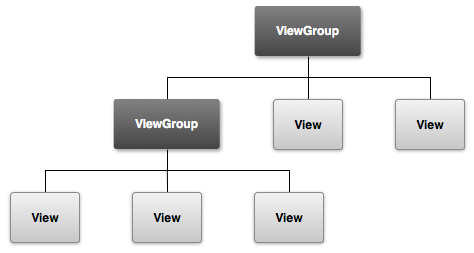 深入理解 Android 事件分發機制
Android 事件分發機制是理解 UI 互動的核心。當使用者點擊螢幕時,系統會產生 ACTION_DOWN、ACTION_MOVE、ACTION_UP 等事件,並依序傳