

編輯:關於 Android 程式設計
在 Android 應用開發中,很多時候我們需要將處理後的資料保存下來,以便後續再次讀取。Android 常見的資料保存方式包括檔案、SharedPreferences、SQLite 資料庫、ContentProvider 以及網路儲存。
Activity 提供了 openFileOutput() 方法,可用來將資料輸出到檔案中,其概念與 Java SE 中將資料寫入檔案的方式類似。
public class FileActivity extends Activity {
    @Override
    protected void onCreate(Bundle savedInstanceState) {
        super.onCreate(savedInstanceState);
        try {
            FileOutputStream outStream = openFileOutput("ljq.txt", Context.MODE_PRIVATE);
            outStream.write("我叫林計欽".getBytes());
            outStream.close();
        } catch (Exception e) {
            e.printStackTrace();
        }
    }
}
第一個參數用於指定檔案名稱,不能包含路徑分隔符「/」。如果檔案不存在,Android 會自動建立它。檔案通常會保存在 /data/data/<packagename>/files 目錄下。
第二個參數用於指定操作模式:
若要讀取應用程式自己的私有檔案,可以使用 Activity 提供的 openFileInput() 方法。
FileInputStream inStream = openFileInput("ljq.txt");
為了讓檔案讀寫更清楚,可以將常見操作封裝成 FileService 類別。
public class FileService {
    public static void save(OutputStream outputStream, String content) throws Exception {
        outputStream.write(content.getBytes());
        outputStream.close();
    }

    public static String read(InputStream inputStream) throws Exception {
        ByteArrayOutputStream byteArrayOutputStream = new ByteArrayOutputStream();
        byte[] buffer = new byte[1024];
        int len = -1;
        while ((len = inputStream.read(buffer)) != -1) {
            byteArrayOutputStream.write(buffer, 0, len);
        }
        byte[] data = byteArrayOutputStream.toByteArray();
        byteArrayOutputStream.close();
        inputStream.close();
        return new String(data);
    }
}
透過這種方式,開發者可以將小型資料保存為應用程式私有檔案,並在需要時重新讀取。
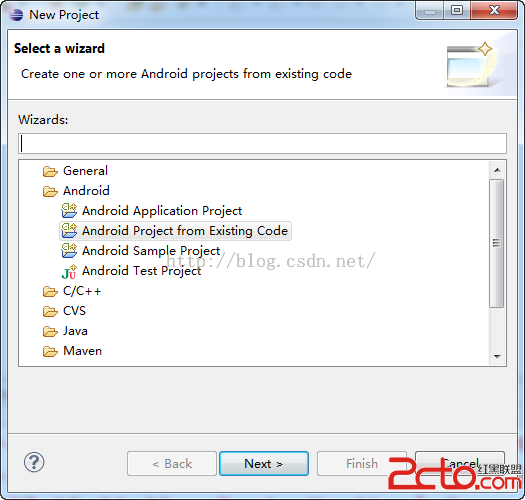 Eclipse 導入 Android Sample 範例專案教學
在 Eclipse 中載入 Android Sample 專案,可以作為學習官方 API 與 UI 模式的起點。操作重點如下: 開啟 New,選擇 Android Sa
 SwipeRefreshLayout 下拉刷新控件源碼解析
下拉刷新是 Android 應用中常見的互動模式。本文以 Google 提供的 SwipeRefreshLayout 為例,從 CircleImageView、Mater
 GridView 網格視圖的基本使用
一、相關屬性 先來看看 GridView 的一些常用屬性: android:columnWidth:設置列的寬度 android:gravity:組件對齊方式 andr
 Android Service 綁定流程解析
為什麼需要綁定 ServiceService 除了可以透過 startService 啟動,也可以透過 bindService 進行綁定。綁定後,客戶端可以取得一個 Bi