

編輯:關於 Android 程式設計
系統內建的載入轉圈樣子實在乏善可陳,想換一張自己的圖片其實不難。先來看最終效果:
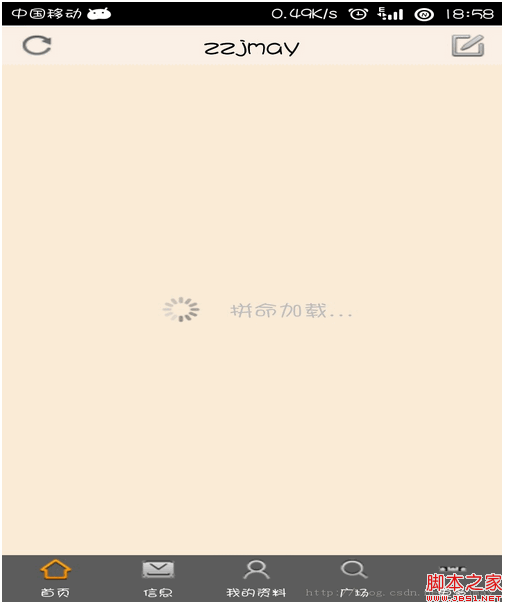
這個載入畫面專案裡到處都會用到,所以值得抽成獨立 XML。版面只需要兩個元件:一個 ProgressBar 負責轉,一個 TextView 負責顯示提示文字。
<?xml version="1.0" encoding="utf-8"?>
<LinearLayout xmlns:android="https://schemas.android.com/apk/res/android"
android:layout_width="match_parent"
android:layout_height="match_parent"
android:orientation="horizontal"
android:gravity="center">

<ProgressBar
android:id="@+id/progressBar1"
android:layout_width="wrap_content"
android:layout_height="wrap_content"
/>

<TextView
android:id="@+id/processhint"
android:layout_width="wrap_content"
android:layout_height="wrap_content"
android:layout_marginLeft="10dp"
android:text="@string/prohint"
android:textSize="18sp" />

</LinearLayout>
抽成獨立檔案之後,其他版面要引用時寫一行 include 即可,寫法與 JSP 的 include 概念相當接近:
<include android:id="@+id/layout_process" layout="@layout/processbar" />
準備一張 PNG 作為進度條的主體圖形,它會被持續旋轉。
在 res/values 下新增 process_style.xml,把 ProgressBar 的 indeterminateDrawable 換成我們的圖片:
<?xml version="1.0" encoding="utf-8"?>
<resources xmlns:android="https://schemas.android.com/apk/res/android">
<style name="process_bar_style">
<item name="android:indeterminateDrawable">@drawable/processstyle</item>
</style>
</resources>
光是換圖還不會動,這只是把靜態的圖放上去。
在 res/drawable 下建立 process.xml:
<?xml version="1.0" encoding="utf-8"?>

<animated-rotate xmlns:android="https://schemas.android.com/apk/res/android"
android:drawable="@drawable/process"
android:pivotX="50%"
android:pivotY="50%"
/>
這段是整個效果的關鍵。animated-rotate 會持續以 pivotX、pivotY 指定的軸心點旋轉 drawable 指定的圖片;寫成 50% 就是繞著圖片正中心轉。前面 style 裡引用的 @drawable/processstyle,實際上就該指向這個 animated-rotate 定義檔。
上述四步完成後,還需要在使用處把 style 套上去,兩種常見寫法:
// 寫法一:XML 中直接引用
<ProgressBar
    style="@style/process_bar_style"
    android:layout_width="wrap_content"
    android:layout_height="wrap_content" />

// 寫法二:程式碼中套用
ProgressBar pb = (ProgressBar) findViewById(R.id.progressBar1);
pb.setIndeterminateDrawable(getResources().getDrawable(R.drawable.processstyle));
另外提醒,animated-rotate 的旋轉速度無法直接設定,轉太快或太慢時,可以在圖片本身多留一些透明邊距來調整視覺上的轉速感受,或者改用 AnimationDrawable 搭配逐格動畫,取得更精細的控制。
 Android 網路通訊入門:HttpURLConnection 與 HttpClient 實戰
在 Android 平台上發送 HTTP 請求,常見的做法有兩種:HttpURLConnection 與 HttpClient。本文將透過一個完整的範例,帶你分別掌握這兩
 Android NFC 開發入門:標籤讀寫與 Android Beam 資料傳輸
NFC(近場通訊)是行動裝置上相當實用的短距離資料交換技術。本文將帶你了解如何在 Android 平台上執行 NFC 的基本操作,重點說明如何以 NDEF 訊息的形式收發
 Android AppWidget 進階範例:動手做一個擲骰子的桌面小工具
繼 AppWidget 基礎篇之後,這次做一個「進階版」的小練習來驗收學習成果——一個點一下就擲骰子的桌面 Widget。 先看成品的樣子: 提醒一下,drawab
 Android 三種菜單:OptionsMenu、ContextMenu 與 PopupMenu
Android 的菜單體系有三套,觸發方式和適用場景各不相同。下面逐一動手實作。 OptionsMenu(選項菜單) 接入步驟: 1. 覆寫 Activity 的 onC