

編輯:關於 Android 程式設計
離線閱讀是很實用的功能:把一篇含有圖片的網頁下載下來,之後在沒有網路的環境也能翻閱。這裡示範的實作使用 AQuery 函式庫處理非同步下載,核心邏輯可以套用到任何 HTTP 客戶端上。
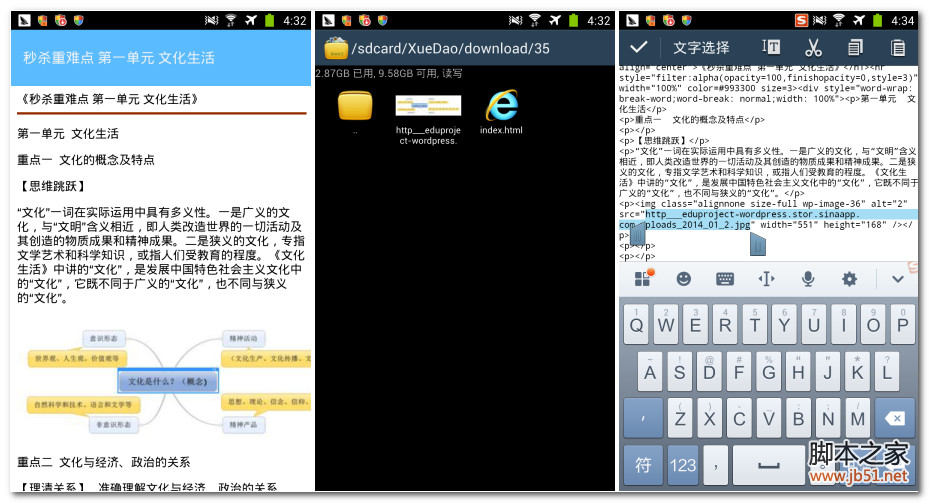
src="..." 的圖片位址。第 4 步是最容易被忽略但最關鍵的一步——不改寫路徑,離線時開啟仍會去抓網路圖片,結果是一片空白。
package com.nekocode.xuedao.utils;

import java.io.File;
import java.io.FileOutputStream;
import java.util.ArrayList;
import java.util.regex.Matcher;
import java.util.regex.Pattern;

import android.content.ContentValues;
import android.content.Context;
import android.database.Cursor;
import android.database.sqlite.SQLiteDatabase;

import com.androidquery.AQuery;
import com.androidquery.callback.AjaxCallback;
import com.androidquery.callback.AjaxStatus;
import com.nekocode.xuedao.PublicData;
import com.nekocode.xuedao.PublicData.Subscribe;

public class HtmlStorageHelper {
    private String URL = "https://eduproject.sinaapp.com/fetchurl.php/getcontent/";
    private PublicData pd;
    private AQuery aq;
    private SQLiteDatabase mDB;
    private String mDownloadPath;

    public HtmlStorageHelper(Context context) {
        pd = PublicData.getInstance();
        aq = new AQuery(context);
        mDB = context.openOrCreateDatabase("data.db", Context.MODE_PRIVATE, null);
        mDB.execSQL("create table if not exists download_html(_id INTEGER PRIMARY KEY AUTOINCREMENT, content_id TEXT NOT NULL, title TEXT NOT NULL)");

        mDownloadPath = pd.mAppPath + "download/";
        File dir_file = new File(pd.mAppPath + "download/");
        if (!dir_file.exists())
            dir_file.mkdir();
    }

    public void saveHtml(final String id, final String title) {
        if (isHtmlSaved(id))
            return;

        aq.ajax(URL + id, String.class, new AjaxCallback<String>() {
            @Override
            public void callback(String url, String html, AjaxStatus status) {
                File dir_file = new File(mDownloadPath + id);
                if (!dir_file.exists())
                    dir_file.mkdir();

                // 抓出所有 src="..." 中的圖片網址
                Pattern pattern = Pattern.compile("(?<=src=\")[^\"]+(?=\")");
                Matcher matcher = pattern.matcher(html);
                StringBuffer sb = new StringBuffer();
                while (matcher.find()) {
                    downloadPic(id, matcher.group(0));
                    // 把網路路徑替換成本地路徑
                    matcher.appendReplacement(sb, formatPath(matcher.group(0)));
                }
                matcher.appendTail(sb);
                html = sb.toString();

                writeHtml(id, title, html);
            }
        });
    }

    private void downloadPic(String id, String url) {
        File pic_file = new File(mDownloadPath + id + "/" + formatPath(url));
        aq.download(url, pic_file, new AjaxCallback<File>() {
            @Override
            public void callback(String url, final File file, AjaxStatus status) {
            }
        });
    }

    private void writeHtml(String id, String title, String html) {
        File html_file = new File(mDownloadPath + id + "/index.html");
        FileOutputStream fos = null;
        try {
            fos = new FileOutputStream(html_file);
            fos.write(html.getBytes());
        } catch (Exception e) {
            e.printStackTrace();
        } finally {
            try {
                fos.close();
            } catch (Exception e2) {
                e2.printStackTrace();
            }
        }

        ContentValues values = new ContentValues();
        values.put("content_id", id);
        values.put("title", title);
        mDB.insert("download_html", "_id", values);
    }

    public boolean isHtmlSaved(String id) {
        File file = new File(mDownloadPath + id);
        if (file.exists()) {
            file = new File(mDownloadPath + id + "/index.html");
            if (file.exists())
                return true;
        }
        deleteHtml(id);
        return false;
    }

    public String getTitle(String id) {
        Cursor c = mDB.rawQuery("select * from download_html where content_id=?", new String[]{id});
        if (c.getCount() == 0)
            return null;

        c.moveToFirst();
        int index1 = c.getColumnIndex("title");
        return c.getString(index1);
    }

    public ArrayList<Subscribe> getHtmlList() {
        Cursor c = mDB.rawQuery("select * from download_html", null);
        ArrayList<Subscribe> list = new ArrayList<Subscribe>();
        if (c.getCount() != 0) {
            c.moveToFirst();
            int index1 = c.getColumnIndex("content_id");
            int index2 = c.getColumnIndex("title");

            while (!c.isAfterLast()) {
                String id = c.getString(index1);
                if (isHtmlSaved(id)) {
                    Subscribe sub = new Subscribe(
                            id,
                            c.getString(index2),
                            Subscribe.FILE_DOWNLOADED
                            );
                    list.add(sub);
                }
                c.moveToNext();
            }
        }
        return list;
    }

    public void deleteHtml(String id) {
        mDB.delete("download_html", "content_id=?", new String[]{id});
        File dir_file = new File(mDownloadPath + id);
        deleteFile(dir_file);
    }

    private void deleteFile(File file) {
        if (file.exists()) {
            if (file.isFile()) {
                file.delete();
            } else if (file.isDirectory()) {
                File files[] = file.listFiles();
                for (int i = 0; i < files.length; i++) {
                    this.deleteFile(files[i]);   // 遞迴刪除
                }
            }
            file.delete();
        }
    }

    // 把網址轉成合法的檔名
    private String formatPath(String path) {
        if (path != null && path.length() > 0) {
            path = path.replace("\\", "_");
            path = path.replace("/", "_");
            path = path.replace(":", "_");
            path = path.replace("*", "_");
            path = path.replace("?", "_");
            path = path.replace("\"", "_");
            path = path.replace("<", "_");
            path = path.replace("|", "_");
            path = path.replace(">", "_");
        }
        return path;
    }
}
正則表達式的零寬斷言:(?<=src=")[^"]+(?=") 用 lookbehind 與 lookahead 只抓取引號「中間」的內容,而不把引號本身吃進來。這比先比對整個標籤再做 substring 乾淨得多。
格式化的檔名策略:formatPath() 把 URL 中的 \ / : * ? " < | > 全部換成底線。這些字元在 Windows 與部分檔案系統中是不合法或具特殊意義的,不處理會導致建立檔案失敗。注意它並沒有把「不同 URL 轉出同一檔名」的碰撞問題解決——若兩張圖片路徑只差在這些字元上,就會互相覆蓋,正式環境建議改用 URL 的雜湊值當檔名。
遞迴刪除:deleteFile() 遇到目錄時會列出內容逐一遞迴,最後才刪自己。這是刪除非空目錄的必要寫法,因為 File.delete() 只能刪空目錄。
先驗證再回報成功:isHtmlSaved() 不只查資料庫,還會確認 index.html 檔案真的存在;若檔案不見了就順手把資料庫的髒記錄清掉。這避免了「列表顯示已下載、點進去卻 404」的尷尬情況。
getHtmlList() 與 getTitle() 都沒有關閉 Cursor,是明顯的資源洩漏)。pd.mAppPath 這種自組路徑在 Android 10 之後的分區儲存制度下會失效,請改用 context.getFilesDir() 或 getExternalFilesDir()。downloadPic() 沒有等待結果,使用者可能看到「下載完成」但圖片還在抓。 Android 自製影片播放器:MediaPlayer + SurfaceView 完整實作
要在 Android 上播放一段本機 MP4,最經典的組合是 MediaPlayer 負責解碼與播放,SurfaceView 負責提供畫面輸出的位置,再用 SeekBa
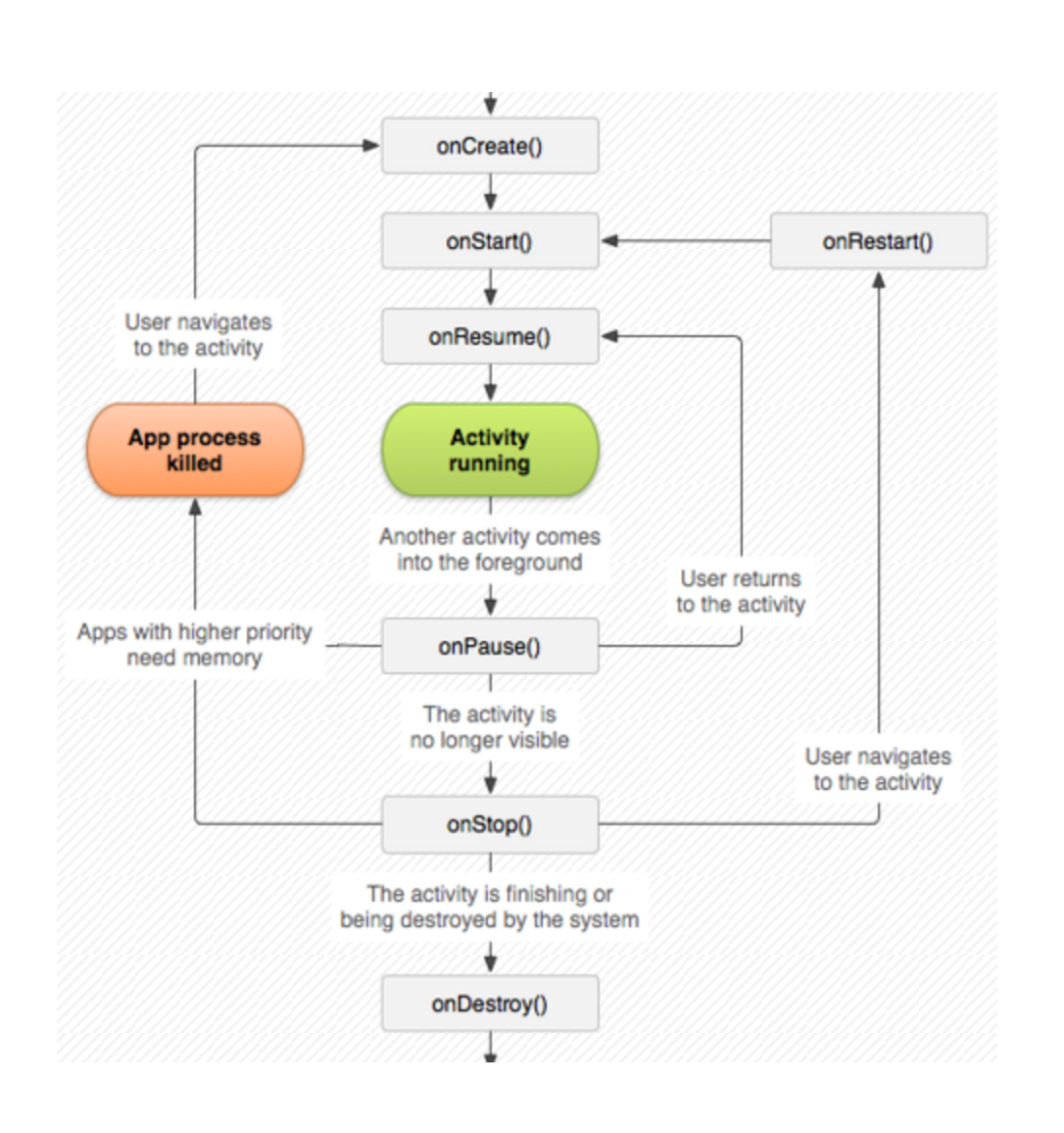 Android 開發藝術探索學習筆記(一):Activity 生命週期與啟動模式
學習章節:第一章 Activity 的生命週期與啟動模式。 1. 正常情況下 Activity 的生命週期分析 先上一張經典圖片鎮樓: 驗證生命週期的測試程式碼: pu
 Android 底部彈出全屏 Dialog 實作教學:從佈局到進出動畫
專案裡「從底部彈出一個橫向滿屏的 Dialog」幾乎是標配需求,分享面板、操作選單都靠它。這裡整理一套自己用起來最順手的寫法,從佈局、動畫到呼叫方式一次交代清楚。 先看
 GeekBand 第十一周學習筆記:Gradle、NDK、依賴管理與 Git
本週主要內容包括 Gradle、NDK、依賴管理以及 Git 這幾個主題。 一、Gradle Gradle 是一款基於 Apache Ant 和 Apache Maven