

編輯:關於 Android 程式設計
本文將一步步演示如何在一個應用中實現發送短信,並借助兩個模擬器完成互相發送的測試。
Project name:SendMessage
Build Target:Android 2.2
Application name:發送短信
Package name:com.sms.Activity
Create Activity:SendMessage
Min SDK Version:8
字符串 strings.xml:
<?xml version="1.0" encoding="utf-8"?>
<resources>
<string name="hello">請輸入手機號碼:</string>
<string name="app_name">發送短信</string>
<string name="content">請輸入信息內容:</string>
<string name="send">發送</string>
</resources>
布局文件 main.xml:
<?xml version="1.0" encoding="utf-8"?>
<LinearLayout xmlns:android="https://schemas.android.com/apk/res/android"
android:orientation="vertical" android:layout_width="fill_parent"
android:layout_height="fill_parent">
<TextView android:layout_width="fill_parent" android:layout_height="wrap_content" android:text="@string/hello" />
<EditText android:layout_width="fill_parent" android:layout_height="wrap_content" android:id="@+id/mobile" />
<TextView android:layout_width="fill_parent" android:layout_height="wrap_content" android:text="@string/content" />
<EditText android:layout_width="fill_parent" android:layout_height="wrap_content" android:minLines="3" android:id="@+id/message" />
<Button android:layout_width="wrap_content" android:layout_height="wrap_content" android:text="@string/send" android:id="@+id/send"/>
</LinearLayout>
這裡為輸入框添加了 android:id 屬性。以號碼輸入框為例,android:id="@+id/mobile" 中,@ 表示引用 R.java,+id 表示在 id 靜態內部類中新增常量,mobile 即常量名,ADT 會自動為其生成常量值。android:minLines 則用於設置信息輸入框的最小行數。
核心 Java 代碼 SendMessage.java:
public class SendMessage extends Activity {
@Override
public void onCreate(Bundle savedInstanceState) {
super.onCreate(savedInstanceState);
setContentView(R.layout.main);
Button button = (Button) this.findViewById(R.id.send);
button.setOnClickListener(new OnClickListener() {
public void onClick(View v) {
EditText mobileText = (EditText) findViewById(R.id.mobile);
String mobile = mobileText.getText().toString();
EditText messageText = (EditText) findViewById(R.id.message);
String message = messageText.getText().toString();
if (message != null) {
SmsManager sms = SmsManager.getDefault();
List<String> texts = sms.divideMessage(message);
for (String text : texts) {
sms.sendTextMessage(mobile, null, text, null, null);
Log.i("sms", "send a message");
}
}
}
});
}
}
sms.sendTextMessage(destinationAddress, scAddress, text, sentIntent, deliveryIntent) 各參數含義:
destinationAddress:接收方手機號碼;
scAddress:短信中心號碼,測試時可不填;
text:信息內容;
sentIntent:發送是否成功的回執;
deliveryIntent:接收是否成功的回執。
由於运营商對單次短信長度有限制,這裡先用 divideMessage 將長短信拆分為多段,再逐段發送。Log.i() 則用於寫入日誌,方便調試。
AndroidManifest.xml 中必須註冊發送短信的權限,否則將無法調用系統短信功能:
<uses-permission android:name="android.permission.SEND_SMS" />
我們需要啟動兩個模擬器,用一個給另一個發短信。啟動前要確保模擬器能「接收到信號」:若機器联网,主界面信號強度旁會顯示 3G 字樣;若無法联网,可將 IP 地址、網關和 DNS 設置為相同值(如 192.168.0.100),或在局域網下將網關與 DNS 指向路由器 IP(通常為 192.168.0.1)。
啟動後可看到模擬器窗口標題欄上有 5554、5556 字樣,這是模擬器監聽的端口(即 127.0.0.1:5554)。右鍵工程 Run As Android Application,選擇端口為 5554 的模擬器加載程序。然後在號碼框中輸入 5556(接收端模擬器端口),點擊發送——此時 5556 模擬器主界面便會提示收到新短信。
若機器性能有限,無法同時啟動兩個模擬器,可以只啟動一個,然後透過菜單 Windows -> Show View -> Other -> Android -> Emulator Control 打開面板。在 Telephony Actions 分組中,Voice 為呼叫,SMS 為發送短信;Incoming number 填寫模擬器端口號,即可給模擬器撥打電話或發送短信。
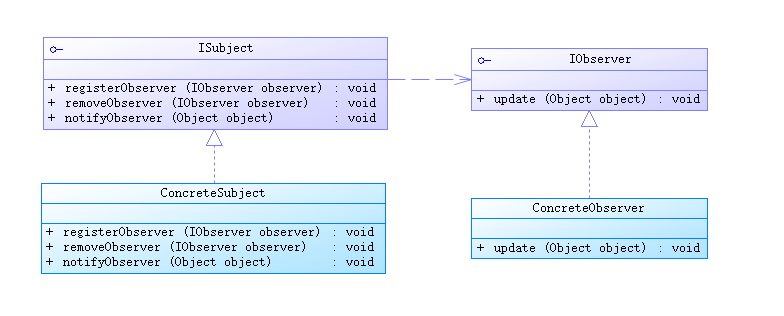 java/android 設計模式學習筆記(2):觀察者模式
觀察者模式是行為型設計模式中的經典方案,它定義了一對多的依賴關係:當主題對象的狀態發生變化時,所有依賴它的觀察者都會自動收到通知並更新。在 Android 開發中,這一模
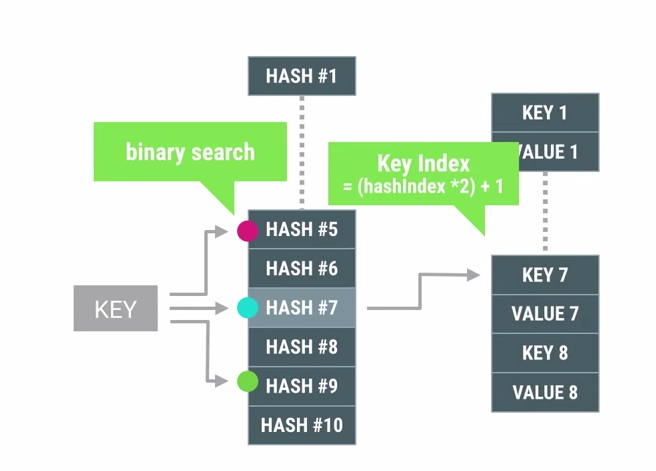 Android 優化之 ArrayMap:原理、比較與適用場景
ArrayMap 是 Android 中常見的輕量級鍵值對容器。它並不是用來取代所有 HashMap 場景,而是在特定資料量與記憶體考量下,提供另一種取捨。 官方文件提醒
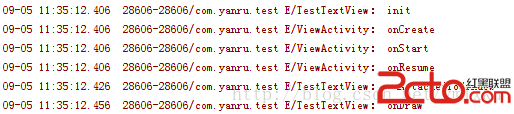 android——View / ViewGroup 的「生命週期」調用順序
自定義控件的很多奇怪問題,根源都出在「方法調用順序沒搞清楚」。把 View 與 ViewGroup 的關鍵回調串起來看,會清晰很多。 完整調用鏈 1. Activity
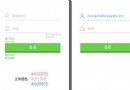 自訂 EditText 下劃線實戰:可變色底線、狀態圖示與靈敏刪除鈕的兩版演進
做過某個專案後,我對它的登入介面印象特別深刻。互動設計師給了一份非常「作」的規格:一個能依狀態變色的下劃線、左側會換圖的圖示、右側還要有會變色的刪除標誌。如下圖: 第