

編輯:關於 Android 程式設計
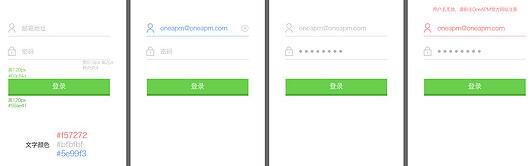
做過某個專案後,我對它的登入介面印象特別深刻。互動設計師給了一份非常「作」的規格:一個能依狀態變色的下劃線、左側會換圖的圖示、右側還要有會變色的刪除標誌。如下圖:
public class LineEditText extends EditText { private Paint mPaint; private int color; public static final int STATUS_FOCUSED = 1; public static final int STATUS_UNFOCUSED = 2; public static final int STATUS_ERROR = 3; private int status = 2; private Drawable del_btn; private Drawable del_btn_down; private int focusedDrawableId = R.drawable.user_select;// 默認的 private int unfocusedDrawableId = R.drawable.user; private int errorDrawableId = R.drawable.user_error; Drawable left = null; private Context mContext; public LineEditText(Context context) { super(context); mContext = context; init(); } public LineEditText(Context context, AttributeSet attrs) { super(context, attrs); mContext = context; init(); } public LineEditText(Context context, AttributeSet attrs, int defStryle) { super(context, attrs, defStryle); mContext = context; TypedArray a = context.obtainStyledAttributes(attrs, R.styleable.lineEdittext, defStryle, 0); focusedDrawableId = a.getResourceId( R.styleable.lineEdittext_drawableFocus, R.drawable.user_select); unfocusedDrawableId = a.getResourceId( R.styleable.lineEdittext_drawableUnFocus, R.drawable.user); errorDrawableId = a.getResourceId( R.styleable.lineEdittext_drawableError, R.drawable.user_error); a.recycle(); init(); } /** * 2014/7/31 * * @author Aimee.ZHANG */ private void init() { mPaint = new Paint(); // mPaint.setStyle(Paint.Style.FILL); mPaint.setStrokeWidth(3.0f); color = Color.parseColor("#bfbfbf"); setStatus(status); del_btn = mContext.getResources().getDrawable(R.drawable.del_but_bg); del_btn_down = mContext.getResources().getDrawable(R.drawable.del_but_bg_down); addTextChangedListener(new TextWatcher() { @Override public void onTextChanged(CharSequence arg0, int arg1, int arg2, int arg3) { } @Override public void beforeTextChanged(CharSequence arg0, int arg1, int arg2, int arg3) { } @Override public void afterTextChanged(Editable arg0) { setDrawable(); } }); setDrawable(); } @Override protected void onDraw(Canvas canvas) { super.onDraw(canvas); mPaint.setColor(color); canvas.drawLine(0, this.getHeight() - 1, this.getWidth(), this.getHeight() - 1, mPaint); } // 刪除圖片 private void setDrawable() { if (length() < 1) { setCompoundDrawablesWithIntrinsicBounds(left, null, del_btn, null); } else { setCompoundDrawablesWithIntrinsicBounds(left, null, del_btn_down,null); } } // 處理刪除事件 @Override public boolean onTouchEvent(MotionEvent event) { if (del_btn_down != null && event.getAction() == MotionEvent.ACTION_UP) { int eventX = (int) event.getRawX(); int eventY = (int) event.getRawY(); Log.e("eventXY", "eventX = " + eventX + "; eventY = " + eventY); Rect rect = new Rect(); getGlobalVisibleRect(rect); rect.left = rect.right - 50; if (rect.contains(eventX, eventY)) setText(""); } return super.onTouchEvent(event); } public void setStatus(int status) { this.status = status; if (status == STATUS_ERROR) { try { left = getResources().getDrawable(errorDrawableId); } catch (NotFoundException e) { e.printStackTrace(); } setColor(Color.parseColor("#f57272")); } else if (status == STATUS_FOCUSED) { try { left = getResources().getDrawable(focusedDrawableId); } catch (NotFoundException e) { e.printStackTrace(); } setColor(Color.parseColor("#5e99f3")); } else { try { left = getResources().getDrawable(unfocusedDrawableId); } catch (NotFoundException e) { e.printStackTrace(); } setColor(Color.parseColor("#bfbfbf")); } if (left != null) { // left.setBounds(0, 0, 30, 40); // this.setCompoundDrawables(left, null, null, null); setCompoundDrawablesWithIntrinsicBounds(left,null,del_btn,null); } postInvalidate(); } public void setLeftDrawable(int focusedDrawableId, int unfocusedDrawableId, int errorDrawableId) { this.focusedDrawableId = focusedDrawableId; this.unfocusedDrawableId = unfocusedDrawableId; this.errorDrawableId = errorDrawableId; setStatus(status); } @Override protected void onFocusChanged(boolean focused, int direction, Rect previouslyFocusedRect) { super.onFocusChanged(focused, direction, previouslyFocusedRect); if (focused) { setStatus(STATUS_FOCUSED); } else { setStatus(STATUS_UNFOCUSED); } } @Override protected void finalize() throws Throwable { super.finalize(); }; public void setColor(int color) { this.color = color; this.setTextColor(color); invalidate(); } }
效果:
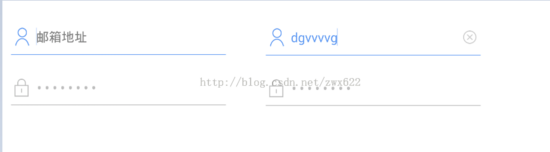
關鍵程式碼說明:STATUS_FOCUSED/STATUS_UNFOCUSED/STATUS_ERROR 對應三種狀態,分別是藍色、灰色、紅色;focusedDrawableId、unfocusedDrawableId、errorDrawableId 存放三種狀態的左側圖示。畫底線靠 canvas.drawLine(0, getHeight()-1, getWidth(), getHeight()-1, mPaint),左右圖示則用 setCompoundDrawablesWithIntrinsicBounds(left, null, del_btn, null)(參數依序是左、上、右、下,等同 XML 的 drawableLeft/drawableRight)。onTouchEvent 是點擊時最先進入的函式,用來攔截右側刪除圖示的點擊並清空文字;setStatus 則負責依狀態切換左側圖示。
不足:功能雖然能做,但不符合設計稿。設計要求「輸入框內沒有文字時不顯示刪除鈕」,且刪除鈕平時應為灰色,只有按下瞬間才變藍。
public class LineEditText extends EditText implements TextWatcher, <br /> OnFocusChangeListener{ private Paint mPaint; private int color; public static final int STATUS_FOCUSED = 1; public static final int STATUS_UNFOCUSED = 2; public static final int STATUS_ERROR = 3; private int status = 2; private Drawable del_btn; private Drawable del_btn_down; private int focusedDrawableId = R.drawable.user_select;// 默認的 private int unfocusedDrawableId = R.drawable.user; private int errorDrawableId = R.drawable.user_error; Drawable left = null; private Context mContext; /** * 是否獲取焦點,默認沒有焦點 */ private boolean hasFocus = false; /** * 手指抬起時的X坐標 */ private int xUp = 0; public LineEditText(Context context) { super(context); mContext = context; init(); } public LineEditText(Context context, AttributeSet attrs) { super(context, attrs); mContext = context; init(); } public LineEditText(Context context, AttributeSet attrs, int defStryle) { super(context, attrs, defStryle); mContext = context; TypedArray a = context.obtainStyledAttributes(attrs, R.styleable.lineEdittext, defStryle, 0); focusedDrawableId = a.getResourceId( R.styleable.lineEdittext_drawableFocus, R.drawable.user_select); unfocusedDrawableId = a.getResourceId( R.styleable.lineEdittext_drawableUnFocus, R.drawable.user); errorDrawableId = a.getResourceId( R.styleable.lineEdittext_drawableError, R.drawable.user_error); a.recycle(); init(); } /** * 2014/7/31 * * @author Aimee.ZHANG */ private void init() { mPaint = new Paint(); // mPaint.setStyle(Paint.Style.FILL); mPaint.setStrokeWidth(3.0f); color = Color.parseColor("#bfbfbf"); setStatus(status); del_btn = mContext.getResources().getDrawable(R.drawable.del_but_bg); del_btn_down = mContext.getResources().getDrawable(R.drawable.del_but_bg_down); addListeners(); setCompoundDrawablesWithIntrinsicBounds(left, null, null, null); } @Override protected void onDraw(Canvas canvas) { super.onDraw(canvas); mPaint.setColor(color); canvas.drawLine(0, this.getHeight() - 1, this.getWidth(), this.getHeight() - 1, mPaint); } // 刪除圖片 // private void setDrawable() { // if (length() < 1) { // setCompoundDrawablesWithIntrinsicBounds(left, null, null, null); // } else { // setCompoundDrawablesWithIntrinsicBounds(left, null, del_btn,null); // } // } // 處理刪除事件 @Override public boolean onTouchEvent(MotionEvent event) { if (del_btn != null && event.getAction() == MotionEvent.ACTION_UP) { // 獲取點擊時手指抬起的X坐標 xUp = (int) event.getX(); Log.e("xUp", xUp+""); /*Rect rect = new Rect(); getGlobalVisibleRect(rect); rect.left = rect.right - 50;*/ // 當點擊的坐標到當前輸入框右側的距離小於等於 getCompoundPaddingRight() 的距離時,則認為是點擊了刪除圖標 if ((getWidth() - xUp) <= getCompoundPaddingRight()) { if (!TextUtils.isEmpty(getText().toString())) { setText(""); } } }else if(del_btn != null && event.getAction() == MotionEvent.ACTION_DOWN && getText().length()!=0){ setCompoundDrawablesWithIntrinsicBounds(left,null,del_btn_down,null); }else if(getText().length()!=0){ setCompoundDrawablesWithIntrinsicBounds(left,null,del_btn,null); } return super.onTouchEvent(event); } public void setStatus(int status) { this.status = status; if (status == STATUS_ERROR) { try { left = getResources().getDrawable(errorDrawableId); } catch (NotFoundException e) { e.printStackTrace(); } setColor(Color.parseColor("#f57272")); } else if (status == STATUS_FOCUSED) { try { left = getResources().getDrawable(focusedDrawableId); } catch (NotFoundException e) { e.printStackTrace(); } setColor(Color.parseColor("#5e99f3")); } else { try { left = getResources().getDrawable(unfocusedDrawableId); } catch (NotFoundException e) { e.printStackTrace(); } setColor(Color.parseColor("#bfbfbf")); } if (left != null) { // left.setBounds(0, 0, 30, 40); // this.setCompoundDrawables(left, null, null, null); setCompoundDrawablesWithIntrinsicBounds(left,null,null,null); } postInvalidate(); } public void setLeftDrawable(int focusedDrawableId, int unfocusedDrawableId, int errorDrawableId) { this.focusedDrawableId = focusedDrawableId; this.unfocusedDrawableId = unfocusedDrawableId; this.errorDrawableId = errorDrawableId; setStatus(status); } private void addListeners() { try { setOnFocusChangeListener(this); addTextChangedListener(this); } catch (Exception e) { e.printStackTrace(); } } @Override protected void onFocusChanged(boolean focused, int direction, Rect previouslyFocusedRect) { super.onFocusChanged(focused, direction, previouslyFocusedRect); this.hasFocus=focused; if (focused) { setStatus(STATUS_FOCUSED); } else { setStatus(STATUS_UNFOCUSED); setCompoundDrawablesWithIntrinsicBounds(left,null,null,null); } } @Override protected void finalize() throws Throwable { super.finalize(); }; public void setColor(int color) { this.color = color; this.setTextColor(color); invalidate(); } @Override public void afterTextChanged(Editable arg0) { // TODO Auto-generated method stub postInvalidate(); } @Override public void beforeTextChanged(CharSequence arg0, int arg1, int arg2, int arg3) { // TODO Auto-generated method stub if (TextUtils.isEmpty(arg0)) { // 如果為空,則不顯示刪除圖標 setCompoundDrawablesWithIntrinsicBounds(left, null, null, null); } else { // 如果非空,則要顯示刪除圖標 setCompoundDrawablesWithIntrinsicBounds(left, null, del_btn, null); } } @Override public void onTextChanged(CharSequence s, int start, int before, int after) { if (hasFocus) { if (TextUtils.isEmpty(s)) { // 如果為空,則不顯示刪除圖標 setCompoundDrawablesWithIntrinsicBounds(left, null, null, null); } else { // 如果非空,則要顯示刪除圖標 setCompoundDrawablesWithIntrinsicBounds(left, null, del_btn, null); } } } @Override public void onFocusChange(View arg0, boolean arg1) { // TODO Auto-generated method stub try { this.hasFocus = arg1; } catch (Exception e) { e.printStackTrace(); } } }
這版最關鍵的是 onTouchEvent:手指按下(ACTION_DOWN)時換上藍色圖示,抬起(ACTION_UP)時判斷 X 座標是否落在 getCompoundPaddingRight() 的範圍內,若是則清空文字;同時搭配 TextWatcher 的 beforeTextChanged/onTextChanged,讓刪除鈕依「是否有文字」與「是否有焦點」自動顯示或隱藏。
第二版仍有問題:當輸入內容長度超過輸入框寬度時,畫出來的線不會跟著延伸。
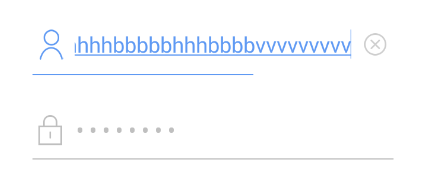
原因是 onDraw 中用的是 getWidth(),那是可見寬度;一旦內容捲動,實際繪製區域已經位移。修正方式是把 scrollX 加回來:
@Override protected void onDraw(Canvas canvas) { super.onDraw(canvas); mPaint.setColor(color); int x=this.getScrollX(); int w=this.getMeasuredWidth(); canvas.drawLine(0, this.getHeight() - 1, w+x, this.getHeight() - 1, mPaint); }
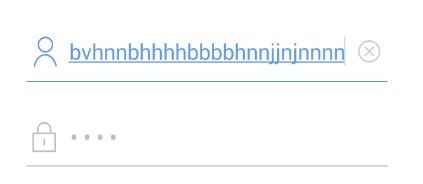
w 是控件本身的長度,x 則是捲動後產生的位移量,兩者相加才能讓底線永遠貼齊內容末端。
最終效果:
這個案例也說明了一件事:自訂 View 的過程,多半不是一次到位,而是「做得出來 → 對得上設計 → 扛得住邊界情況」的三段演進。把每一版遇到的問題記下來,下次遇到類似互動就能少走很多彎路。
 Android 列表懸停效果:WindowManager 與滾動監聽
懸停效果常見於分類列表或日曆列表中。當列表滾動到某個位置時,一個標題或提示布局會固定在頂部,形成懸停感。這種效果可以通過 ListView 的滾動監聽與 WindowMa
 一步一步優化 ListView(二):用 DiskLruCache 打造本地圖片緩存
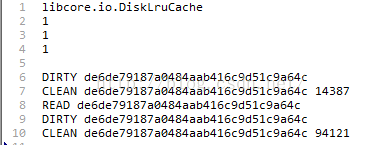
上一篇介紹了我們通常優化 ListView 的方式,但對於需要加載大量圖片的 ListView 來說,這顯然還不夠。因為我們知道,無論是本地還是網絡的圖片,獲取時的性能都
 Android 廣播接收器監聽電話狀態與來電攔截
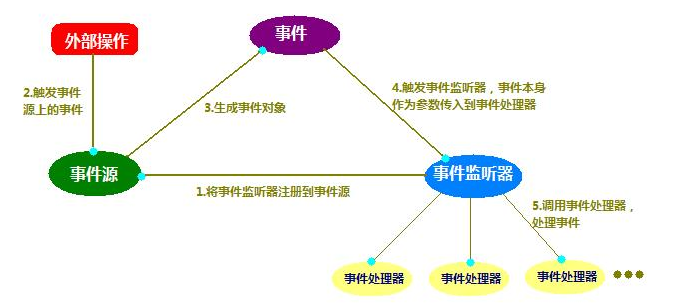
監聽機制的概念Android 的事件處理有監聽與回呼兩種常見模式。若要監聽電話狀態,通常會使用 BroadcastReceiver。系統在撥打電話、來電、接聽與掛斷時,會
 Android 面試準備(一):Java 與 Android 基礎知識梳理
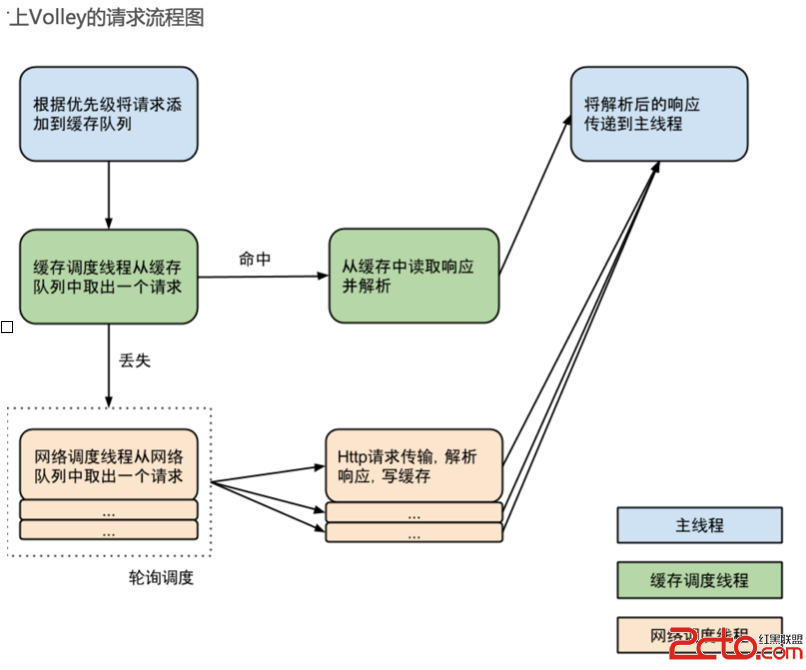
面試準備重點 本文整理 Android 面試中常見的 Java 與 Android 基礎題,適合在衝刺階段快速複習。 1. Volley Volley 是 Google