

編輯:關於 Android 程式設計
做天氣類 App,如果不想依賴第三方服務,中國氣象局提供的公開介面是最直接的來源。它一共提供三種資料格式,位址分別是:
https://www.weather.com.cn/data/sk/101010100.html
https://www.weather.com.cn/data/cityinfo/101010100.html
https://m.weather.com.cn/data/101010100.html
其中第三組(行動版)回傳的欄位最完整,也是實務上最值得使用的一組。
{"weatherinfo":{"city":"北京","cityid":"101010100","temp":"-2","WD":"西北風",
"WS":"3級","SD":"241%","WSE":"3","time":"10:61",
"isRadar":"1","Radar":"JC_RADAR_AZ9010_JB"}}{"weatherinfo":{"city":"北京","cityid":"101010100","temp1":"3℃","temp2":"-8℃",
"weather":"晴","img1":"d0.gif","img2":"n0.gif","ptime":"11:00"}}{
"weatherinfo": {
"city": "北京", "city_en": "beijing",
"date_y": "2013年1月17日", "date": "", "week": "星期四", "fchh": "11",
"cityid": "101010100",
"temp1": "3℃~-8℃", "temp2": "3℃~-5℃", "temp3": "3℃~-3℃",
"temp4": "1℃~-5℃", "temp5": "3℃~-6℃", "temp6": "2℃~-5℃",
"tempF1": "37.4℉~17.6℉", "tempF2": "37.4℉~23℉", "tempF3": "37.4℉~26.6℉",
"tempF4": "33.8℉~23℉", "tempF5": "37.4℉~21.2℉", "tempF6": "35.6℉~23℉",
"weather1": "晴", "weather2": "晴", "weather3": "多雲轉陰",
"weather4": "陰轉多雲", "weather5": "多雲轉晴", "weather6": "晴轉多雲",
"img1": "0", "img2": "99", "img3": "0", "img4": "99",
"img5": "1", "img6": "2", "img7": "2", "img8": "1",
"img9": "1", "img10": "0", "img11": "0", "img12": "1",
"img_single": "0",
"img_title1": "晴", "img_title2": "晴", "img_title3": "晴",
"img_title4": "晴", "img_title5": "多雲", "img_title6": "陰",
"img_title7": "陰", "img_title8": "多雲", "img_title9": "多雲",
"img_title10": "晴", "img_title11": "晴", "img_title12": "多雲",
"img_title_single": "晴",
"wind1": "微風", "wind2": "微風", "wind3": "微風",
"wind4": "微風", "wind5": "微風", "wind6": "微風",
"fx1": "微風", "fx2": "微風",
"fl1": "小於3級", "fl2": "小於3級", "fl3": "小於3級",
"fl4": "小於3級", "fl5": "小於3級", "fl6": "小於3級",
"index": "冷",
"index_d": "天氣冷,建議著棉衣、皮夾克加羊毛衫等冬季服裝。年老體弱者宜著厚棉衣或冬大衣。",
"index48": "冷",
"index48_d": "天氣冷,建議著棉衣、皮夾克加羊毛衫等冬季服裝。年老體弱者宜著厚棉衣或冬大衣。",
"index_uv": "弱", "index48_uv": "弱",
"index_xc": "適宜", "index_tr": "較適宜", "index_co": "較不舒適",
"st1": "2", "st2": "-6", "st3": "2", "st4": "-3", "st5": "3", "st6": "-4",
"index_cl": "適宜", "index_ls": "基本適宜", "index_ag": "極不易發"
}
}{"weatherinfo":{
// 基本資訊
"city":"北京","city_en":"beijing",
"date_y":"2013年1月17日","date":"辛卯年","week":"星期三","fchh":"18","cityid":"101010100",
// 攝氏溫度(六天)
"temp1":"24℃~33℃","temp2":"24℃~32℃","temp3":"25℃~31℃",
"temp4":"23℃~30℃","temp5":"22℃~30℃","temp6":"21℃~32℃",
// 華氏溫度(六天)
"tempF1":"75.2℉~91.4℉","tempF2":"75.2℉~89.6℉","tempF3":"77℉~87.8℉",
"tempF4":"73.4℉~86℉","tempF5":"71.6℉~86℉","tempF6":"69.8℉~89.6℉",
// 天氣描述(六天)
"weather1":"多雲","weather2":"晴轉多雲","weather3":"陰",
"weather4":"晴轉陣雨","weather5":"陣雨","weather6":"多雲",
// 天氣圖示序號
"img1":"1","img2":"99","img3":"0","img4":"1","img5":"2","img6":"99",
"img7":"0","img8":"3","img9":"3","img10":"99","img11":"1","img12":"99",
"img_single":"1",
// 圖示對應名稱
"img_title1":"多雲","img_title2":"多雲","img_title3":"晴","img_title4":"多雲",
"img_title5":"陰","img_title6":"陰","img_title7":"晴","img_title8":"陣雨",
"img_title9":"陣雨","img_title10":"陣雨","img_title11":"多雲","img_title12":"多雲",
"img_title_single":"多雲",
// 風力描述
"wind1":"微風","wind2":"微風","wind3":"微風","wind4":"微風","wind5":"微風","wind6":"微風",
// 風向與風級
"fx1":"微風","fx2":"微風",
"fl1":"小於3級","fl2":"小於3級","fl3":"小於3級","fl4":"小於3級","fl5":"小於3級","fl6":"小於3級",
// 今日穿衣指數
"index":"炎熱",
"index_d":"天氣炎熱,建議著短衫、短裙、短褲、薄型T恤衫、敞領短袖棉衫等清涼夏季服裝。",
// 48 小時穿衣指數
"index48":"炎熱",
"index48_d":"天氣炎熱,建議著短衫、短裙、短褲、薄型T恤衫、敞領短袖棉衫等清涼夏季服裝。",
// 紫外線指數與 48 小時紫外線
"index_uv":"中等","index48_uv":"弱",
// 洗車指數
"index_xc":"適宜",
// 旅遊指數
"index_tr":"較適宜",
// 舒適指數
"index_co":"較不舒適",
// 溫度相關數值
"st1":"33","st2":"24","st3":"32","st4":"25","st5":"32","st6":"24",
// 晨練指數
"index_cl":"適宜",
// 晾曬指數
"index_ls":"適宜",
// 過敏指數
"index_ag":"極易發"}}把欄位歸類之後會發現結構相當清楚:城市中文名、英文名、日期、農曆、星期、預報時間、城市代碼;接著是六組溫度(華氏與攝氏各一)、六組天氣描述與風力;最後是一批生活氣象指數。同一類別的欄位都以數字 1~6 後綴區分第幾天,因此解析時用迴圈搭配動態拼欄位名會比逐一 get 來得簡潔。
這類公開介面回傳的是明文 HTTP,Android 9 之後預設禁止非加密流量,需要在 manifest 明確開啟或改用 https。此外,介面提供的是城市代碼而非地名查詢,實務上通常會搭配城市代碼表做本地對照,避免每次定位都打一次網路請求。最後,介面的欄位與可用性由官方單方面決定,正式產品建議加上快取與解析失敗的降級處理,不要假設它永遠可用。
 Android 本地數據存儲之 IO 流:用一個登陸 Demo 記住密碼與回顯
Android 開發繞不開本地存儲。SharedPreferences 適合鍵值對,資料庫適合結構化數據,而最基礎的 IO 檔案讀寫則是理解一切存儲方案的地基。本文用一個
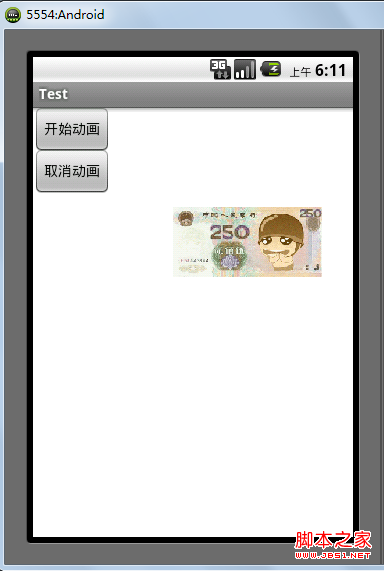 Android 動畫之 TranslateAnimation 應用詳解
Android 中提供了四種基本動畫:AlphaAnimation(透明度)、ScaleAnimation(縮放)、TranslateAnimation(位移)與 Rot
 仿微信清理內存圖表動畫:SurfaceView 屏幕閃爍問題解決方案詳解
最近接了一個項目,其中需要實現清理內存功能,效果要和微信一致,於是想到用 SurfaceView 而非繼承 View。下面為大家解析實現思路。 SurfaceView 採
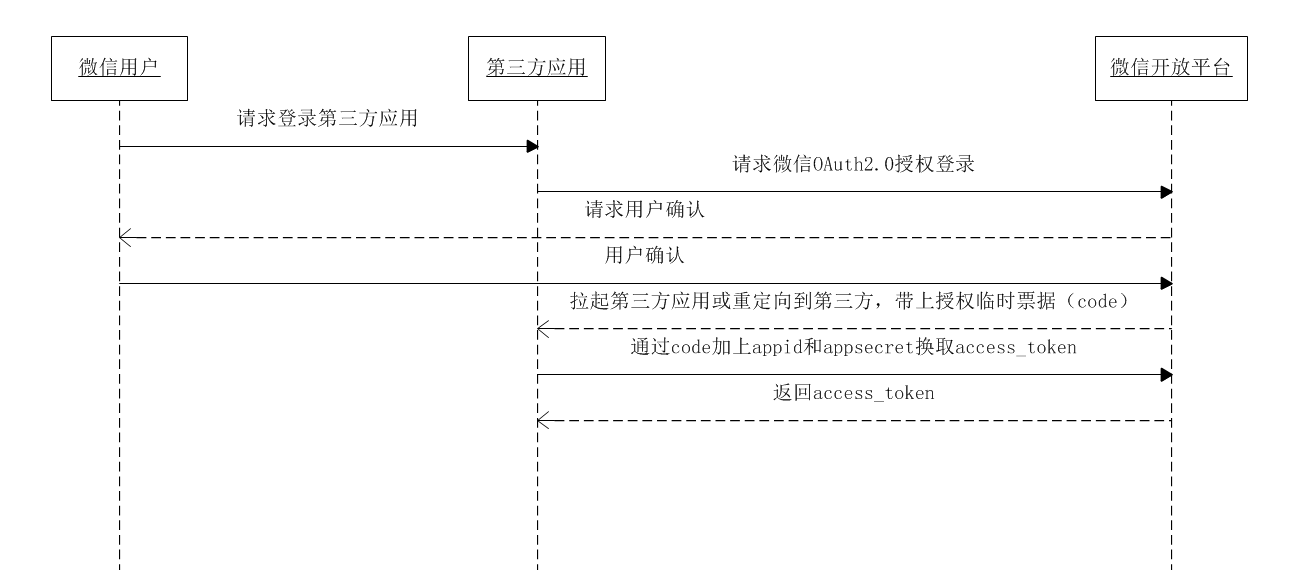 微信網頁第三方登錄原理詳解:OAuth2.0 全流程拆解
微信開放平台與公眾平台的區別1. 公眾平台面向普通用戶,如自媒體、媒體與企業官方帳號的運營人員。若團隊有開發能力,也能調用自定義菜單、自動回覆、查詢等接口,目前多數通過認