

編輯:關於 Android 程式設計
在 Android 中调用其他程序进行相关处理,几乎都使用的是 Intent,Email 也不例外。通过 Intent,我们可以轻松唤起系统邮件客户端来完成邮件的发送。
在 Android 中,调用 Email 有三种类型的 Intent:
Intent.ACTION_SENDTO        无附件的发送
Intent.ACTION_SEND          带附件的发送
Intent.ACTION_SEND_MULTIPLE 带多附件的发送
当然,所谓的调用 Email,只是说 Email 可以接收 Intent 并做这些事情,可能也有其他应用程序实现了相关功能,所以执行时会出现选择框供用户选择。
Intent data = new Intent(Intent.ACTION_SENDTO);
data.setData(Uri.parse("mailto:way.ping.li@gmail.com"));
data.putExtra(Intent.EXTRA_SUBJECT, "这是标题");
data.putExtra(Intent.EXTRA_TEXT, "这是内容");
startActivity(data);
通过向 Intent 中 putExtra 来设定邮件的各项参数。
Intent intent = new Intent(Intent.ACTION_SEND);
String[] tos = { "way.ping.li@gmail.com" };
String[] ccs = { "way.ping.li@gmail.com" };
String[] bccs = { "way.ping.li@gmail.com" };
intent.putExtra(Intent.EXTRA_EMAIL, tos);
intent.putExtra(Intent.EXTRA_CC, ccs);
intent.putExtra(Intent.EXTRA_BCC, bccs);
intent.putExtra(Intent.EXTRA_TEXT, "body");
intent.putExtra(Intent.EXTRA_SUBJECT, "subject");

intent.putExtra(Intent.EXTRA_STREAM, Uri.parse("file:///mnt/sdcard/a.jpg"));
intent.setType("image/*");
intent.setType("message/rfc882");
Intent.createChooser(intent, "Choose Email Client");
startActivity(intent);
很简单,发送邮件中有收件者、抄送者、密送者,分别通过 Intent.EXTRA_EMAIL、Intent.EXTRA_CC、Intent.EXTRA_BCC 来 putExtra 设定;而单个附件的发送,则使用 Intent.EXTRA_STREAM 来设置附件的地址 Uri。
Intent intent = new Intent(Intent.ACTION_SEND_MULTIPLE);
String[] tos = { "way.ping.li@gmail.com" };
String[] ccs = { "way.ping.li@gmail.com" };
intent.putExtra(Intent.EXTRA_EMAIL, tos);
intent.putExtra(Intent.EXTRA_CC, ccs);
intent.putExtra(Intent.EXTRA_TEXT, "body");
intent.putExtra(Intent.EXTRA_SUBJECT, "subject");

ArrayList<Uri> imageUris = new ArrayList<Uri>();
imageUris.add(Uri.parse("file:///mnt/sdcard/a.jpg"));
imageUris.add(Uri.parse("file:///mnt/sdcard/b.jpg"));
intent.putParcelableArrayListExtra(Intent.EXTRA_STREAM, imageUris);
intent.setType("image/*");
intent.setType("message/rfc882");
Intent.createChooser(intent, "Choose Email Client");
startActivity(intent);
发送多个附件,最关键的地方在于通过 putParcelableArrayListExtra 将多个附件的 Uri 地址 List 设置进去就可以了。总的来说,借助 Intent 调用系统邮件客户端还是非常简单的。
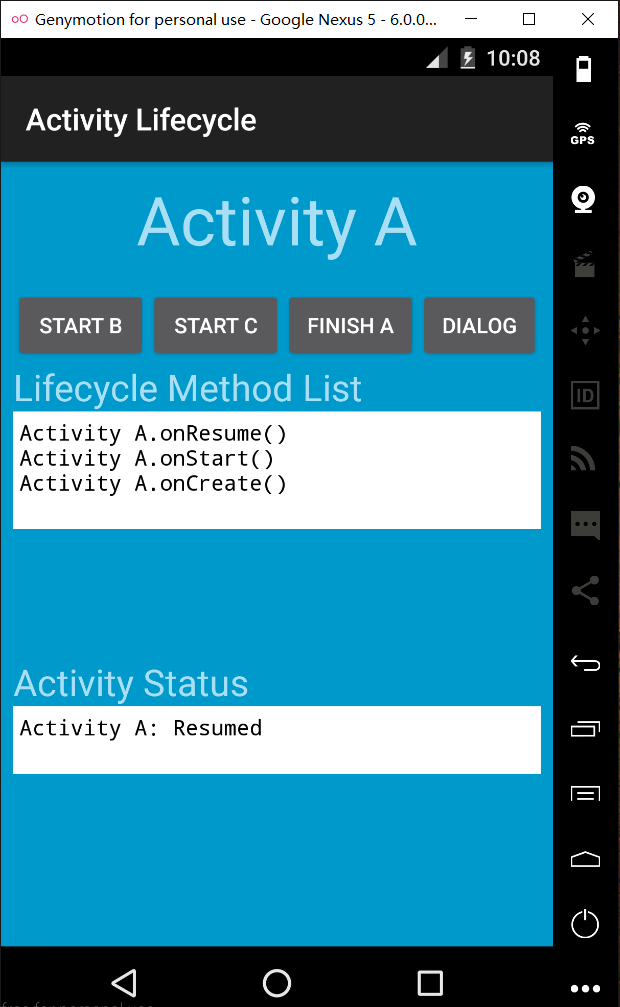 動手讀懂 Google 官方範例:Activity 生命週期其實可以「看」見
前幾天終於把 Google Training 裡的 Manage the Activity Lifecycle 這一節認真看完。過去翻書、看影片,對生命週期各個回呼該做什
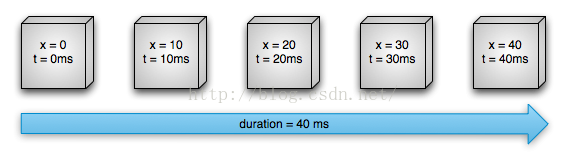 Android 動畫總結(4):屬性動畫完整整理
一、概述 1.1 為什麼要用屬性動畫 Android 提供三大動畫方案:補間動畫(Tween)、屬性動畫(Property Animation)與 Frame 動畫。三者
 Android 短信收发實作:BroadcastReceiver 攔截簡訊與發送狀態回呼
短信的接收處理已有不少成熟應用,最典型的就是驗證碼自動填寫——手機收到驗證碼簡訊後,App 直接攔下內容並跳過輸入步驟。至於發送,API 本身很直白,難點反而在於「怎麼知
 Android 6.0 來電(MT)流程源碼全解析
本文基於對 telephony 模塊的研究,結合網上資料與個人理解,總結了 Android 6.0 中 MT(Mobile Terminated,移動主叫被叫,即來電)的