

編輯:關於 Android 程式設計
在 TextView 中添加可点击的超链接,主要有两种实现思路:一种是通过 HTML 格式化网址,另一种是设置 autoLink 让系统自动识别。下面分别来看。
public class MainActivity extends Activity {
    @Override
    protected void onCreate(Bundle savedInstanceState) {
        super.onCreate(savedInstanceState);
        LinearLayout layout = new LinearLayout(this);
        LayoutParams params = new LayoutParams(LayoutParams.MATCH_PARENT, LayoutParams.MATCH_PARENT);
        TextView textView = new TextView(this);
        String html = "有问题:\n";
        html += "<a href='https://www.baidu.com'>百度一下</a>"; // 注意这里必须加上协议号,即 https://
        // 否则,系统会以为该链接是 activity,而实际这个 activity 不存在,程序就崩溃。
        CharSequence charSequence = Html.fromHtml(html);
        textView.setText(charSequence);
        textView.setMovementMethod(LinkMovementMethod.getInstance());
        layout.addView(textView);
        this.setContentView(layout, params);
    }
}public class MainActivity extends Activity {
@Override
protected void onCreate(Bundle savedInstanceState) {
super.onCreate(savedInstanceState);
LinearLayout layout = new LinearLayout(this);
LayoutParams params = new LayoutParams(LayoutParams.MATCH_PARENT, LayoutParams.MATCH_PARENT);
TextView textView = new TextView(this);
String html = "有问题:\n";
html += "www.baidu.com"; // 这里即使不加协议号 https://,也能被系统自动识别出来。
textView.setText(html);
textView.setAutoLinkMask(Linkify.ALL);
textView.setMovementMethod(LinkMovementMethod.getInstance());
layout.addView(textView);
this.setContentView(layout, params);
}
}总结一下:用 HTML 方式显示超链接时,必须写完整的 url(含 https://);而用 setAutoLinkMask(Linkify.ALL) 则不用写全,系统也能自动识别出来。
需要注意的是,这两种方法都得设置一下 setMovementMethod,链接才会真正跳转。另外 setAutoLinkMask 不仅能识别超链接,还能识别电话号码之类的文本内容。
 Android 倒計時按鈕怎麼做?CountDownTimer 與自定義 TimeButton 比較
發送驗證碼、限制重試間隔等功能,常會用到倒計時按鈕。最直覺的做法是使用 CountDownTimer,在 onTick 中更新文字,在 onFinish 中恢復按鈕狀態。
 從實測日志理解 Android View 事件分發機制
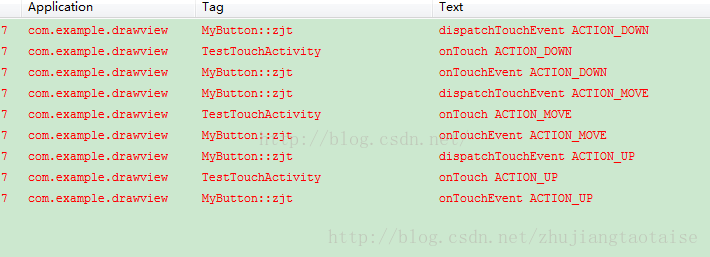
起因是專案裡遇到一件怪事:一個水平 LinearLayout 裡放著 TextView 和 Button,對 LinearLayout 設定的點擊事件,點 TextVie
 EventBus 3.0 使用指南與源碼深度解析
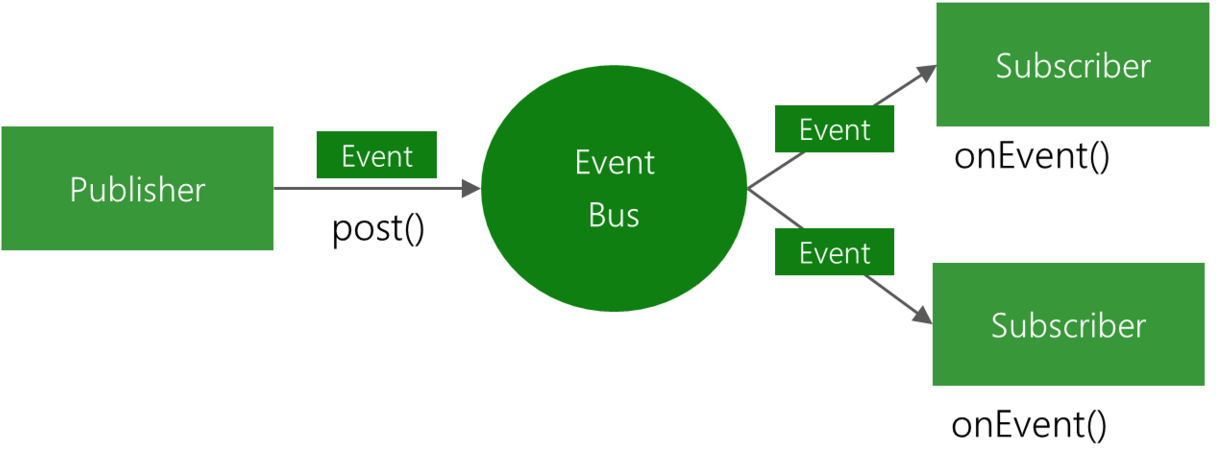
最近忙於換工作的一堆瑣事,搞得焦頭爛額,也沒能靜下心來學新東西,心裡頗為愧疚。剛好新專案用到了 EventBus 3.0,過去只聽過它的大名,卻一直沒認真研究過。趁著週末
 九宮格切圖(.9.png)完全指南:讓背景自適應又不失真
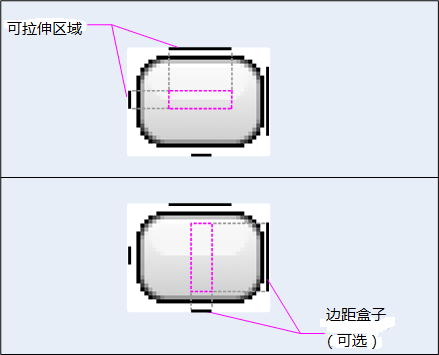
自適應且失真的背景圖,是 UI 開發中最常見的痛點之一,也是介面設計師最希望被解決的問題。本文把 .9.png 的原理、製作流程與進階技巧一次整理清楚。 一、問題從哪裡