

編輯:關於 Android 程式設計
網路圖片載入這個主題網上文章不少,核心思路歸結起來就是「執行緒 + 快取」。但如果只停在這八個字,實作時還是會遇到記憶體爆掉、清單圖片錯位、二次捲動重新下載等實際問題。本文把可落地的優化拆成四個要點,並給出完整的類別結構。
SoftReference 依賴 GC 回收,但回收時機不可控;本文示範用可用堆的 1/4 作為硬性上限,並以 LRU 策略淘汰。public class MemoryCache {
private static final String TAG = "MemoryCache";
// 同步包裝,避免多執行緒同時寫入
// LinkedHashMap 第三個參數 true 代表依「最近使用」排序(由少到多),即 LRU
private Map<String, Bitmap> cache = Collections.synchronizedMap(
new LinkedHashMap<String, Bitmap>(10, 1.5f, true));
private long size = 0; // 目前佔用的位元組數
private long limit = 1000000;
public MemoryCache() {
setLimit(Runtime.getRuntime().maxMemory() / 4); // 上限為可用堆的 1/4
}
public void setLimit(long new_limit) {
limit = new_limit;
Log.i(TAG, "MemoryCache will use up to " + limit / 1024. / 1024. + "MB");
}
public Bitmap get(String id) {
try {
if (!cache.containsKey(id)) return null;
return cache.get(id);
} catch (NullPointerException ex) {
return null;
}
}
public void put(String id, Bitmap bitmap) {
try {
if (cache.containsKey(id))
size -= getSizeInBytes(cache.get(id));
cache.put(id, bitmap);
size += getSizeInBytes(bitmap);
checkSize();
} catch (Throwable th) {
th.printStackTrace();
}
}
/** 超過上限時,由 iterator 由頭淘汰最近最少使用的那張圖 */
private void checkSize() {
if (size > limit) {
Iterator<Entry<String, Bitmap>> iter = cache.entrySet().iterator();
while (iter.hasNext()) {
size -= getSizeInBytes(iter.next().getValue());
iter.remove();
if (size <= limit) break;
}
}
}
public void clear() { cache.clear(); }
long getSizeInBytes(Bitmap bitmap) {
if (bitmap == null) return 0;
return bitmap.getRowBytes() * bitmap.getHeight();
}
}若不想自己算容量,改用 SoftReference 也可以,程式碼短很多:
public class MemoryCache {
    private Map<String, SoftReference<Bitmap>> cache = Collections
            .synchronizedMap(new HashMap<String, SoftReference<Bitmap>>());

    public Bitmap get(String id) {
        if (!cache.containsKey(id)) return null;
        return cache.get(id).get();
    }

    public void put(String id, Bitmap bitmap) {
        cache.put(id, new SoftReference<Bitmap>(bitmap));
    }

    public void clear() { cache.clear(); }
}
兩者取捨在於「可控性」:SoftReference 交給 GC,程式碼簡單但何時被回收說不準;自訂 LRU 則能精準掌握記憶體曲線,個人較推薦後者。
public class FileCache {
    private File cacheDir;

    public FileCache(Context context) {
        // 有 SD 卡就在卡上開 LazyList 目錄,沒有則退回 app 的 cache 目錄
        if (android.os.Environment.getExternalStorageState()
                .equals(android.os.Environment.MEDIA_MOUNTED))
            cacheDir = new File(android.os.Environment
                    .getExternalStorageDirectory(), "LazyList");
        else
            cacheDir = context.getCacheDir();
        if (!cacheDir.exists()) cacheDir.mkdirs();
    }

    public File getFile(String url) {
        String filename = String.valueOf(url.hashCode());  // hashCode 當檔名
        return new File(cacheDir, filename);
    }

    public void clear() {
        File[] files = cacheDir.listFiles();
        if (files == null) return;
        for (File f : files) f.delete();
    }
}public class ImageLoader {
MemoryCache memoryCache = new MemoryCache();
FileCache fileCache;
// 記錄 ImageView 目前對應的 url,用來防止清單捲動時的圖片錯位
private Map<ImageView, String> imageViews = Collections
.synchronizedMap(new WeakHashMap<ImageView, String>());
ExecutorService executorService;
public ImageLoader(Context context) {
fileCache = new FileCache(context);
executorService = Executors.newFixedThreadPool(5);
}
final int stub_id = R.drawable.stub; // 載入中的預設佔位圖
public void DisplayImage(String url, ImageView imageView) {
imageViews.put(imageView, url);
Bitmap bitmap = memoryCache.get(url);
if (bitmap != null)
imageView.setImageBitmap(bitmap);
else {
queuePhoto(url, imageView);
imageView.setImageResource(stub_id);
}
}
private void queuePhoto(String url, ImageView imageView) {
executorService.submit(new PhotosLoader(new PhotoToLoad(url, imageView)));
}
private Bitmap getBitmap(String url) {
File f = fileCache.getFile(url);
Bitmap b = decodeFile(f); // 1. 檔案快取
if (b != null) return b;
try { // 2. 網路下載
URL imageUrl = new URL(url);
HttpURLConnection conn = (HttpURLConnection) imageUrl.openConnection();
conn.setConnectTimeout(30000);
conn.setReadTimeout(30000);
conn.setInstanceFollowRedirects(true);
InputStream is = conn.getInputStream();
OutputStream os = new FileOutputStream(f);
CopyStream(is, os);
os.close();
os.flush();
return decodeFile(f);
} catch (Exception ex) {
ex.printStackTrace();
return null;
}
}
// 先只讀尺寸算出 inSampleSize,再實際解碼,避免大圖直接進記憶體
private Bitmap decodeFile(File f) {
try {
BitmapFactory.Options o = new BitmapFactory.Options();
o.inJustDecodeBounds = true;
BitmapFactory.decodeStream(new FileInputStream(f), null, o);
final int REQUIRED_SIZE = 70;
int width_tmp = o.outWidth, height_tmp = o.outHeight, scale = 1;
while (true) {
if (width_tmp / 2 < REQUIRED_SIZE || height_tmp / 2 < REQUIRED_SIZE)
break;
width_tmp /= 2;
height_tmp /= 2;
scale *= 2;
}
BitmapFactory.Options o2 = new BitmapFactory.Options();
o2.inSampleSize = scale;
return BitmapFactory.decodeStream(new FileInputStream(f), null, o2);
} catch (FileNotFoundException e) { }
return null;
}
private class PhotoToLoad {
public String url;
public ImageView imageView;
public PhotoToLoad(String u, ImageView i) { url = u; imageView = i; }
}
class PhotosLoader implements Runnable {
PhotoToLoad photoToLoad;
PhotosLoader(PhotoToLoad photoToLoad) { this.photoToLoad = photoToLoad; }
@Override
public void run() {
if (imageViewReused(photoToLoad)) return;
Bitmap bmp = getBitmap(photoToLoad.url);
memoryCache.put(photoToLoad.url, bmp);
if (imageViewReused(photoToLoad)) return;
Activity a = (Activity) photoToLoad.imageView.getContext();
a.runOnUiThread(new BitmapDisplayer(bmp, photoToLoad)); // 回主執行緒更新
}
}
/** 若 ImageView 已被回收再利用給別的 url,就放棄這次結果 */
boolean imageViewReused(PhotoToLoad photoToLoad) {
String tag = imageViews.get(photoToLoad.imageView);
return tag == null || !tag.equals(photoToLoad.url);
}
class BitmapDisplayer implements Runnable {
Bitmap bitmap;
PhotoToLoad photoToLoad;
BitmapDisplayer(Bitmap b, PhotoToLoad p) { bitmap = b; photoToLoad = p; }
public void run() {
if (imageViewReused(photoToLoad)) return;
if (bitmap != null) photoToLoad.imageView.setImageBitmap(bitmap);
else photoToLoad.imageView.setImageResource(stub_id);
}
}
public void clearCache() {
memoryCache.clear();
fileCache.clear();
}
public static void CopyStream(InputStream is, OutputStream os) {
final int buffer_size = 1024;
try {
byte[] bytes = new byte[buffer_size];
for (;;) {
int count = is.read(bytes, 0, buffer_size);
if (count == -1) break;
os.write(bytes, 0, count);
}
} catch (Exception ex) { }
}
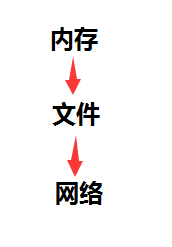
}先查記憶體快取 → 未命中則丟入線程池 → 查檔案快取 → 都沒有才走網路下載並寫檔 → 解碼時按比例縮圖 → 最後透過 runOnUiThread 回到主執行緒更新 ImageView。這條鏈路同時解決了「慢」、「爆記憶體」與「清單圖片錯位」三個痛點。
ImageLoader imageLoader = new ImageLoader(context);
imageLoader.DisplayImage(url, imageView);
最常見的擺放位置是 ListView/GridView 的 adapter 的 getView() 裡,一行就能完成異步載入與快取。
 Android與JavaScript的雙向溝通:WebView互動完全解析
手機時代最重要的標誌是什麼?答案無疑是「便利地接入互聯網」。而互聯網最常見的呈現形式就是網頁,網頁裡又幾乎少不了JavaScript。正因如此,Android對JavaS
 小米手機音量鍵喚醒怎麼開?夜間操作更方便
小米手機可啟用音量鍵喚醒。進入系統設定、進階設定,找到按鍵音量鍵喚醒螢幕並開啟。 之後按音量鍵即可亮屏,夜間查看時間或通知時更方便。
 Android TCP客戶端Service與廣播通信實作
在Android中,若需要長期維持TCP連線並持續接收服務端訊息,通常會把網路邏輯放在Service中。這樣即使畫面切換,連線與接收任務仍能繼續運行。 Service中的
 動手打造 Android 圖片三級緩存加載框架:原理與實作全解析
提到圖片加載的三級緩存,不少人第一反應就是「好難」。但其實只要靜下心來把流程拆開來看,親手寫上一兩遍,就會發現其中的邏輯相當清晰。本文就帶你從零梳理三級緩存的運作原理,並