

編輯:關於 Android 程式設計
本文要介紹的是如何利用 RotateAnimation 讓圖片持續旋轉。Android 平台提供了兩類動畫:一類是 Tween 動畫,透過對場景中的物件不斷做圖形變換(平移、縮放、旋轉)產生動畫;另一類是 Frame 動畫,即順序播放事先做好的圖片,類似電影的原理。本文聚焦於 Tween 動畫中的 rotate 旋轉效果。
在新浪微博客戶端中,每當執行某項操作時,Activity 右上角都會有個不停旋轉的圖標,類似刷新的效果,用以提示使用者「操作中」。這種非模態的提示方式相當值得推薦,下面就來分享如何實現它。
先定義一個 ImageView 來裝載要被旋轉的圖片(其他 View 亦可):
<ImageView android:id="@+id/infoOperating" android:layout_width="wrap_content" android:layout_height="wrap_content" android:src="@drawable/operating" android:scaleType="center"></ImageView>
其中 android:src 為圖片內容。接著在 Java 中取得這個 View:
ImageView infoOperatingIV = (ImageView) findViewById(R.id.infoOperating);
在 res/anim 資料夾下新建 tip.xml 檔:
<set xmlns:android="https://schemas.android.com/apk/res/android"> <rotate android:fromDegrees="0" android:toDegrees="359" android:duration="500" android:repeatCount="-1" android:pivotX="50%" android:pivotY="50%" /></set>
其含義是從 0 到 359 度循環旋轉(設為 360 反而會在停止時出現停頓),旋轉中心位於 view 的正中心,每次旋轉耗時 500ms。Java 中載入並設定插值器:
Animation operatingAnim = AnimationUtils.loadAnimation(this, R.anim.tip);LinearInterpolator lin = new LinearInterpolator();operatingAnim.setInterpolator(lin);
· android:fromDegrees:起始角度。
· android:toDegrees:結束角度,負數為逆時針、正數為順時針。
· android:pivotX / pivotY:旋轉中心的 X/Y 座標,設為 50% 即為物件中心。
· android:duration:旋轉所花的時間(毫秒),可據此計算速度。
· android:interpolator:變化率,可設為加速、減速等,LinearInterpolator 為勻速。
· android:repeatCount:重複次數,-1 表示無限循環。
· android:repeatMode:重複模式,restart(重頭開始)或 reverse(反向重播)。
運行速度 = 運行時間 ÷ 角度差。例如 duration 為 1000、toDegrees 為 360、fromDegrees 為 0,即表示每秒轉一圈。而 android:repeatCount="-1" 搭配 0 到 360 度,就能實現不間斷的循環旋轉。
在操作開始前啟動動畫:
if (operatingAnim != null) { infoOperatingIV.startAnimation(operatingAnim);}
在操作完成時清除動畫:
infoOperatingIV.clearAnimation();
許多朋友不知道如何停止旋轉動畫,於是強行設定轉動圈數來表示操作,卻無法與實際進度匹配。其實只要像上面這樣清除 animation 即可。
最後補充一個實用技巧:當橫屏切換(且 Activity 被設為不重繪)時,可能出現旋轉中心偏移的問題。可以透過重寫 onConfigurationChanged 重新啟動動畫來解決:
@Overridepublic void onConfigurationChanged(Configuration newConfig) { super.onConfigurationChanged(newConfig); if (operatingAnim != null && infoOperatingIV != null && operatingAnim.hasStarted()) { infoOperatingIV.clearAnimation(); infoOperatingIV.startAnimation(operatingAnim); }}
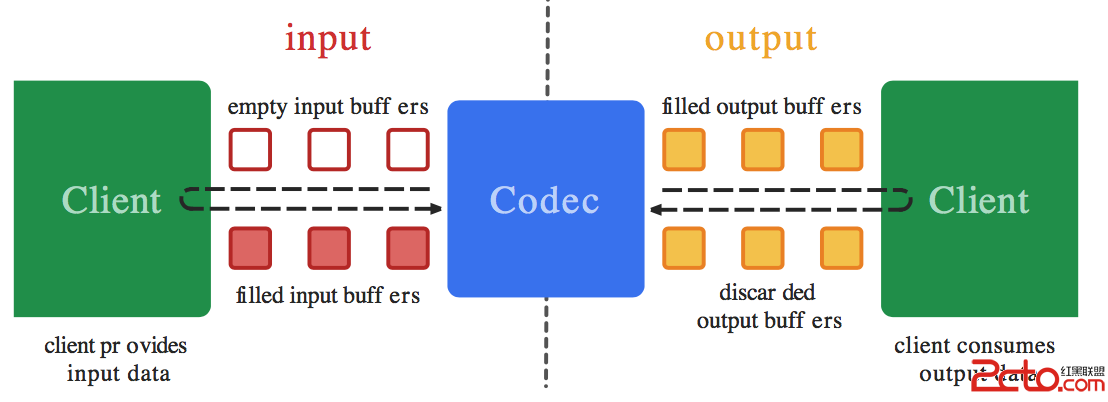 Android 音頻開發:MediaCodec 編解碼原理與第三方庫選擇
MediaCodec 基本介紹 MediaCodec 是 Android 4.1 以後提供的音視頻編解碼 API。它提供存取 Android 底層多媒體模組的介面,可讓應
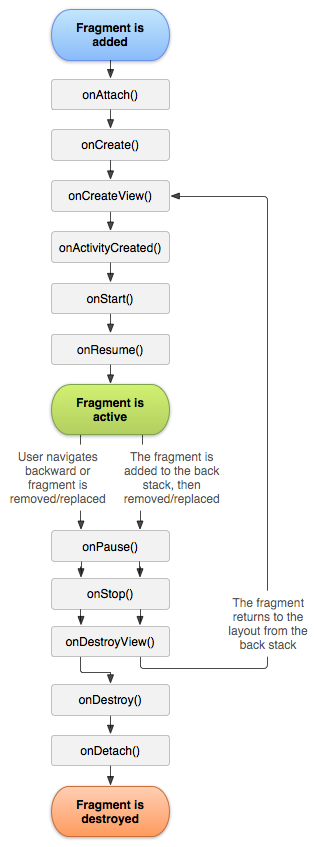 Fragment 管理與重疊怪象:add/hide 與 replace 該怎麼選
一、Fragment 是什麼 自從 3.0 引入 Fragment 之後,專案裡用到它的比例越來越高,最典型的場景就是底部 tab 切換內容。首頁的每一個 navigat
 Android 記住密碼與自動登入實作:SharedPreferences 用法完整解析
幾乎每一款需要帳號的 App,都會在登入頁放兩個勾選框:「記住密碼」和「自動登入」。這兩個功能聽起來簡單,卻牽涉到資料的持久化、狀態的還原,以及頁面之間的跳轉時機。本文以
 Android NDK 環境搭建與第一個 JNI 實例
一、NDK 與 JNI 簡介 NDK 全稱 Native Development Kit,即本地語言(C/C++)開發包。與之對應的是我們更常接觸的 Android SD