

編輯:關於 Android 程式設計
圖片處理是 Android 開發中常見且實用的技能,無論是美化界面還是實現相機類應用,都離不開對 Bitmap 的操作。本文整理了幾種經典的圖片處理效果,並附上完整代碼,方便直接參考使用。
復制代碼 代碼如下:
/**
* 轉換成圓角
*
* @param bmp
* @param roundPx
* @return
*/
public static Bitmap convertToRoundedCorner(Bitmap bmp, float roundPx) {
Bitmap newBmp = Bitmap.createBitmap(bmp.getWidth(), bmp.getHeight(),
Config.ARGB_8888);
// 得到畫布
Canvas canvas = new Canvas(newBmp);
final int color = 0xff424242;
final Paint paint = new Paint();
final Rect rect = new Rect(0, 0, bmp.getWidth(), bmp.getHeight());
final RectF rectF = new RectF(rect);
paint.setAntiAlias(true);
canvas.drawARGB(0, 0, 0, 0);
paint.setColor(color);
// 第二個和第三個參數一樣則畫的是正圓的一角,否則是橢圓的一角
canvas.drawRoundRect(rectF, roundPx, roundPx, paint);
paint.setXfermode(new PorterDuffXfermode(Mode.SRC_IN));
canvas.drawBitmap(bmp, rect, rect, paint);
return newBmp;
}

復制代碼 代碼如下:
/**
* 將彩色圖轉換為黑白圖
*
* @param 位圖
* @return 返回轉換好的位圖
*/
public static Bitmap convertToBlackWhite(Bitmap bmp) {
int width = bmp.getWidth(); // 獲取位圖的寬
int height = bmp.getHeight(); // 獲取位圖的高
int[] pixels = new int[width * height]; // 通過位圖的大小創建像素點數組
bmp.getPixels(pixels, 0, width, 0, 0, width, height);
int alpha = 0xFF << 24;
for (int i = 0; i < height; i++) {
for (int j = 0; j < width; j++) {
int grey = pixels[width * i + j];
int red = ((grey & 0x00FF0000) >> 16);
int green = ((grey & 0x0000FF00) >> 8);
int blue = (grey & 0x000000FF);
grey = (int) (red * 0.3 + green * 0.59 + blue * 0.11);
grey = alpha | (grey << 16) | (grey << 8) | grey;
pixels[width * i + j] = grey;
}
}
Bitmap newBmp = Bitmap.createBitmap(width, height, Config.RGB_565);
newBmp.setPixels(pixels, 0, width, 0, 0, width, height);
return newBmp;
}

復制代碼 代碼如下:
/**
* 高斯模糊
*
* @param bmp
* @return
*/
public static Bitmap convertToBlur(Bitmap bmp) {
// 高斯矩陣
int[] gauss = new int[] { 1, 2, 1, 2, 4, 2, 1, 2, 1 };
int width = bmp.getWidth();
int height = bmp.getHeight();
Bitmap newBmp = Bitmap.createBitmap(width, height,
Bitmap.Config.RGB_565);
int pixR = 0;
int pixG = 0;
int pixB = 0;
int pixColor = 0;
int newR = 0;
int newG = 0;
int newB = 0;
int delta = 16; // 值越小圖片會越亮,越大則越暗
int idx = 0;
int[] pixels = new int[width * height];
bmp.getPixels(pixels, 0, width, 0, 0, width, height);
for (int i = 1, length = height - 1; i < length; i++) {
for (int k = 1, len = width - 1; k < len; k++) {
idx = 0;
for (int m = -1; m <= 1; m++) {
for (int n = -1; n <= 1; n++) {
pixColor = pixels[(i + m) * width + k + n];
pixR = Color.red(pixColor);
pixG = Color.green(pixColor);
pixB = Color.blue(pixColor);
newR = newR + pixR * gauss[idx];
newG = newG + pixG * gauss[idx];
newB = newB + pixB * gauss[idx];
idx++;
}
}
newR /= delta;
newG /= delta;
newB /= delta;
newR = Math.min(255, Math.max(0, newR));
newG = Math.min(255, Math.max(0, newG));
newB = Math.min(255, Math.max(0, newB));
pixels[i * width + k] = Color.argb(255, newR, newG, newB);
newR = 0;
newG = 0;
newB = 0;
}
}
newBmp.setPixels(pixels, 0, width, 0, 0, width, height);
return newBmp;
}
復制代碼 代碼如下:
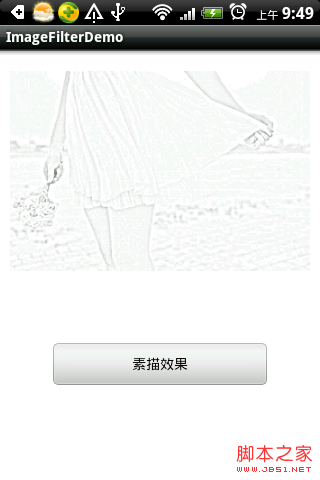
/**
* 素描效果
*
* @param bmp
* @return
*/
public static Bitmap convertToSketch(Bitmap bmp) {
int pos, row, col, clr;
int width = bmp.getWidth();
int height = bmp.getHeight();
int[] pixSrc = new int[width * height];
int[] pixNvt = new int[width * height];
// 先對圖象的像素處理成灰度顏色後再取反
bmp.getPixels(pixSrc, 0, width, 0, 0, width, height);
for (row = 0; row < height; row++) {
for (col = 0; col < width; col++) {
pos = row * width + col;
pixSrc[pos] = (Color.red(pixSrc[pos])
+ Color.green(pixSrc[pos]) + Color.blue(pixSrc[pos])) / 3;
pixNvt[pos] = 255 - pixSrc[pos];
}
}
// 對取反的像素進行高斯模糊, 強度可以設置,暫定為5.0
gaussGray(pixNvt, 5.0, 5.0, width, height);
// 灰度顏色和模糊後像素進行差值運算
for (row = 0; row < height; row++) {
for (col = 0; col < width; col++) {
pos = row * width + col;
clr = pixSrc[pos] << 8;
clr /= 256 - pixNvt[pos];
clr = Math.min(clr, 255);
pixSrc[pos] = Color.rgb(clr, clr, clr);
}
}
bmp.setPixels(pixSrc, 0, width, 0, 0, width, height);
return bmp;
}
private static int gaussGray(int[] psrc, double horz, double vert,
int width, int height) {
int[] dst, src;
double[] n_p, n_m, d_p, d_m, bd_p, bd_m;
double[] val_p, val_m;
int i, j, t, k, row, col, terms;
int[] initial_p, initial_m;
double std_dev;
int row_stride = width;
int max_len = Math.max(width, height);
int sp_p_idx, sp_m_idx, vp_idx, vm_idx;
val_p = new double[max_len];
val_m = new double[max_len];
n_p = new double[5];
n_m = new double[5];
d_p = new double[5];
d_m = new double[5];
bd_p = new double[5];
bd_m = new double[5];
src = new int[max_len];
dst = new int[max_len];
initial_p = new int[4];
initial_m = new int[4];
// 垂直方向
if (vert > 0.0) {
vert = Math.abs(vert) + 1.0;
std_dev = Math.sqrt(-(vert * vert) / (2 * Math.log(1.0 / 255.0)));
// 初試化常量
findConstants(n_p, n_m, d_p, d_m, bd_p, bd_m, std_dev);
for (col = 0; col < width; col++) {
for (k = 0; k < max_len; k++) {
val_m[k] = val_p[k] = 0;
}
for (t = 0; t < height; t++) {
src[t] = psrc[t * row_stride + col];
}
sp_p_idx = 0;
sp_m_idx = height - 1;
vp_idx = 0;
vm_idx = height - 1;
initial_p[0] = src[0];
initial_m[0] = src[height - 1];
for (row = 0; row < height; row++) {
terms = (row < 4) ? row : 4;
for (i = 0; i <= terms; i++) {
val_p[vp_idx] += n_p[i] * src[sp_p_idx - i] - d_p[i]
* val_p[vp_idx - i];
val_m[vm_idx] += n_m[i] * src[sp_m_idx + i] - d_m[i]
* val_m[vm_idx + i];
}
for (j = i; j <= 4; j++) {
val_p[vp_idx] += (n_p[j] - bd_p[j]) * initial_p[0];
val_m[vm_idx] += (n_m[j] - bd_m[j]) * initial_m[0];
}
sp_p_idx++;
sp_m_idx--;
vp_idx++;
vm_idx--;
}
transferGaussPixels(val_p, val_m, dst, 1, height);
for (t = 0; t < height; t++) {
psrc[t * row_stride + col] = dst[t];
}
}
}
// 水平方向
if (horz > 0.0) {
horz = Math.abs(horz) + 1.0;
if (horz != vert) {
std_dev = Math.sqrt(-(horz * horz)
/ (2 * Math.log(1.0 / 255.0)));
// 初試化常量
findConstants(n_p, n_m, d_p, d_m, bd_p, bd_m, std_dev);
}
for (row = 0; row < height; row++) {
for (k = 0; k < max_len; k++) {
val_m[k] = val_p[k] = 0;
}
for (t = 0; t < width; t++) {
src[t] = psrc[row * row_stride + t];
}
sp_p_idx = 0;
sp_m_idx = width - 1;
vp_idx = 0;
vm_idx = width - 1;
initial_p[0] = src[0];
initial_m[0] = src[width - 1];
for (col = 0; col < width; col++) {
terms = (col < 4) ? col : 4;
for (i = 0; i <= terms; i++) {
val_p[vp_idx] += n_p[i] * src[sp_p_idx - i] - d_p[i]
* val_p[vp_idx - i];
val_m[vm_idx] += n_m[i] * src[sp_m_idx + i] - d_m[i]
* val_m[vm_idx + i];
}
for (j = i; j <= 4; j++) {
val_p[vp_idx] += (n_p[j] - bd_p[j]) * initial_p[0];
val_m[vm_idx] += (n_m[j] - bd_m[j]) * initial_m[0];
}
sp_p_idx++;
sp_m_idx--;
vp_idx++;
vm_idx--;
}
transferGaussPixels(val_p, val_m, dst, 1, width);
for (t = 0; t < width; t++) {
psrc[row * row_stride + t] = dst[t];
}
}
}
return 0;
}
private static void transferGaussPixels(double[] src1, double[] src2,
int[] dest, int bytes, int width) {
int i, j, k, b;
int bend = bytes * width;
double sum;
i = j = k = 0;
for (b = 0; b < bend; b++) {
sum = src1[i++] + src2[j++];
if (sum > 255)
sum = 255;
else if (sum < 0)
sum = 0;
dest[k++] = (int) sum;
}
}
private static void findConstants(double[] n_p, double[] n_m, double[] d_p,
double[] d_m, double[] bd_p, double[] bd_m, double std_dev) {
double div = Math.sqrt(2 * 3.141593) * std_dev;
double x0 = -1.783 / std_dev;
double x1 = -1.723 / std_dev;
double x2 = 0.6318 / std_dev;
double x3 = 1.997 / std_dev;
double x4 = 1.6803 / div;
double x5 = 3.735 / div;
double x6 = -0.6803 / div;
double x7 = -0.2598 / div;
int i;
n_p[0] = x4 + x6;
n_p[1] = (Math.exp(x1)
* (x7 * Math.sin(x3) - (x6 + 2 * x4) * Math.cos(x3)) + Math
.exp(x0) * (x5 * Math.sin(x2) - (2 * x6 + x4) * Math.cos(x2)));
n_p[2] = (2
* Math.exp(x0 + x1)
* ((x4 + x6) * Math.cos(x3) * Math.cos(x2) - x5 * Math.cos(x3)
* Math.sin(x2) - x7 * Math.cos(x2) * Math.sin(x3)) + x6
* Math.exp(2 * x0) + x4 * Math.exp(2 * x1));
n_p[3] = (Math.exp(x1 + 2 * x0)
* (x7 * Math.sin(x3) - x6 * Math.cos(x3)) + Math.exp(x0 + 2
* x1)
* (x5 * Math.sin(x2) - x4 * Math.cos(x2)));
n_p[4] = 0.0;
d_p[0] = 0.0;
d_p[1] = -2 * Math.exp(x1) * Math.cos(x3) - 2 * Math.exp(x0)
* Math.cos(x2);
d_p[2] = 4 * Math.cos(x3) * Math.cos(x2) * Math.exp(x0 + x1)
+ Math.exp(2 * x1) + Math.exp(2 * x0);
d_p[3] = -2 * Math.cos(x2) * Math.exp(x0 + 2 * x1) - 2 * Math.cos(x3)
* Math.exp(x1 + 2 * x0);
d_p[4] = Math.exp(2 * x0 + 2 * x1);
for (i = 0; i <= 4; i++) {
d_m[i] = d_p[i];
}
n_m[0] = 0.0;
for (i = 1; i <= 4; i++) {
n_m[i] = n_p[i] - d_p[i] * n_p[0];
}
double sum_n_p, sum_n_m, sum_d;
double a, b;
sum_n_p = 0.0;
sum_n_m = 0.0;
sum_d = 0.0;
for (i = 0; i <= 4; i++) {
sum_n_p += n_p[i];
sum_n_m += n_m[i];
sum_d += d_p[i];
}
a = sum_n_p / (1.0 + sum_d);
b = sum_n_m / (1.0 + sum_d);
for (i = 0; i <= 4; i++) {
bd_p[i] = d_p[i] * a;
bd_m[i] = d_m[i] * b;
}
}
復制代碼 代碼如下:
/**
* 圖片銳化(拉普拉斯變換)
*
* @param bmp
* @return
*/
public static Bitmap sharpenImageAmeliorate(Bitmap bmp) {
// 拉普拉斯矩陣
int[] laplacian = new int[] { -1, -1, -1, -1, 9, -1, -1, -1, -1 };
int width = bmp.getWidth();
int height = bmp.getHeight();
Bitmap bitmap = Bitmap.createBitmap(width, height,
Bitmap.Config.RGB_565);
int pixR = 0;
int pixG = 0;
int pixB = 0;
int pixColor = 0;
int newR = 0;
int newG = 0;
int newB = 0;
int idx = 0;
float alpha = 0.3F;
int[] pixels = new int[width * height];
bmp.getPixels(pixels, 0, width, 0, 0, width, height);
for (int i = 1, length = height - 1; i < length; i++) {
for (int k = 1, len = width - 1; k < len; k++) {
idx = 0;
for (int m = -1; m <= 1; m++) {
for (int n = -1; n <= 1; n++) {
pixColor = pixels[(i + n) * width + k + m];
pixR = Color.red(pixColor);
pixG = Color.green(pixColor);
pixB = Color.blue(pixColor);
newR = newR + (int) (pixR * laplacian[idx] * alpha);
newG = newG + (int) (pixG * laplacian[idx] * alpha);
newB = newB + (int) (pixB * laplacian[idx] * alpha);
idx++;
}
}
newR = Math.min(255, Math.max(0, newR));
newG = Math.min(255, Math.max(0, newG));
newB = Math.min(255, Math.max(0, newB));
pixels[i * width + k] = Color.argb(255, newR, newG, newB);
newR = 0;
newG = 0;
newB = 0;
}
}
bitmap.setPixels(pixels, 0, width, 0, 0, width, height);
return bitmap;
}

 Android 屬性動畫實作:讓小球彈起又落下(ValueAnimator + AnimatorSet)
最近看到手機購物 App 有些頁面用了類似小圓球跳動的載入效果。後來了解了一下,對方是直接放一張 gif 圖——這當然是最簡單的方法。 為了加深對屬性動畫的認識,這次就
 Android 視頻播放的開發心得體會
Android 視頻播放主要有兩種方式:一是系統封裝好的 VideoView,具備前進、後退、暫停/播放、拉動等最基本功能,夠一般使用,操作辦法也很簡單;二是若需要高度自
 海思媒體庫H.264視訊打包RTP:從NALU到FU-A
RTP包基礎 RTP是即時傳輸協定,常用於音訊與視訊串流。RTP固定頭通常包含版本、填充、擴展、CSRC計數、標記、負載類型、序列號、時間戳與同步來源等欄位。 版本通常為
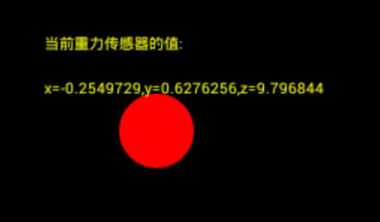 使用重力感測器製作 Android 滾動彈球
重力感測器能偵測裝置在 X、Y、Z 軸上的重力變化,常用於水平儀、搖動偵測與簡單遊戲互動。本文以滾動彈球為例,說明如何整合 SensorManager 與 Surface