

編輯:關於 Android 程式設計
當 Android 應用發生 crash 時,系統會跳出「程式異常退出」的提示,接著應用就被關閉,使用者體驗非常糟。為了在應用運行時攔截異常並做出合理處理、給出友善提示,我們可以在開發中繼承 UncaughtExceptionHandler 類來統一接管,顯著提升使用者體驗。
(1)定義 CrashHandler 處理類。當發生未捕獲異常時,由它接管程式,並將堆疊資訊記錄到本地檔案:
public class CrashHandler implements UncaughtExceptionHandler {
    public static final String TAG = "CrashHandler";
    private static CrashHandler INSTANCE = new CrashHandler();
    private Context mContext;
    private Thread.UncaughtExceptionHandler mDefaultHandler;
    private Map<String, String> infos = new HashMap<String, String>();
    private DateFormat formatter = new SimpleDateFormat("yyyy-MM-dd-HH-mm-ss");

    private CrashHandler() {}

    public static CrashHandler getInstance() {
        return INSTANCE;
    }

    public void init(Context context) {
        mContext = context;
        // 取得系統預設的 UncaughtException 處理器
        mDefaultHandler = Thread.getDefaultUncaughtExceptionHandler();
        // 將本 CrashHandler 設為程式預設處理器
        Thread.setDefaultUncaughtExceptionHandler(this);
    }

    /** 當 UncaughtException 發生時會轉入此函式處理 */
    @Override
    public void uncaughtException(Thread thread, Throwable ex) {
        if (!handleException(ex) && mDefaultHandler != null) {
            // 若使用者未處理,則交給系統預設處理器
            mDefaultHandler.uncaughtException(thread, ex);
        } else {
            try {
                thread.sleep(4000);
            } catch (InterruptedException e) {
                Log.e(TAG, "error:", e);
            }
            // 退出程式
            Global.logoutApplication(mContext);
        }
    }

    /** 自定義錯誤處理:收集錯誤資訊、發送報告等 */
    private boolean handleException(Throwable ex) {
        if (ex == null) {
            return false;
        }
        // 使用 Toast 顯示異常資訊
        new Thread() {
            @Override
            public void run() {
                Looper.prepare();
                Toast.makeText(mContext, "很抱歉,程式出現異常,即將退出", Toast.LENGTH_LONG).show();
                Looper.loop();
            }
        }.start();
        collectDeviceInfo(mContext);
        saveCrashInfo2File(ex);
        return true;
    }

    /** 收集裝置參數資訊 */
    public void collectDeviceInfo(Context ctx) {
        try {
            PackageManager pm = ctx.getPackageManager();
            PackageInfo pi = pm.getPackageInfo(ctx.getPackageName(), PackageManager.GET_ACTIVITIES);
            if (pi != null) {
                String versionName = pi.versionName == null ? "null" : pi.versionName;
                String versionCode = pi.versionCode + "";
                infos.put("versionName", versionName);
                infos.put("versionCode", versionCode);
            }
        } catch (NameNotFoundException e) {
            Log.e(TAG, "an error occured when collect package info", e);
        }
        Field[] fields = Build.class.getDeclaredFields();
        for (Field field : fields) {
            try {
                field.setAccessible(true);
                infos.put(field.getName(), field.get(null).toString());
                Log.d(TAG, field.getName() + ":" + field.get(null));
            } catch (Exception e) {
                Log.e(TAG, "an error occured when collect crash info", e);
            }
        }
    }

    /** 將錯誤資訊保存到檔案 */
    private void saveCrashInfo2File(Throwable ex) {
        StringBuffer sb = new StringBuffer();
        for (Map.Entry<String, String> entry : infos.entrySet()) {
            sb.append(entry.getKey() + "=" + entry.getValue() + "\n");
        }
        Writer writer = new StringWriter();
        PrintWriter printWriter = new PrintWriter(writer);
        ex.printStackTrace(printWriter);
        Throwable cause = ex.getCause();
        while (cause != null) {
            cause.printStackTrace(printWriter);
            cause = cause.getCause();
        }
        printWriter.close();
        sb.append(writer.toString());
        try {
            String time = formatter.format(new Date());
            String fileName = FileSystemManager.getCrashPath(mContext) + time + ".log";
            FileOutputStream fos = new FileOutputStream(fileName);
            fos.write(sb.toString().getBytes());
            fos.close();
        } catch (Exception e) {
            Log.e(TAG, "an error occured while writing file...", e);
        }
    }
}
可以看到,檔名以時間戳作為關鍵欄位保存在本地,等待後續上傳。收集錯誤資訊、發送報告等都在 handleException 中完成:一旦應用崩潰,便會自動呼叫 uncaughtException,接著透過 handleException 收集手機資訊、保存崩潰堆疊至本地、清理當前 Activity 堆疊,最後自動關閉應用並給出 Toast 提示。
(2)在 Application 中配置是否開啟全局捕獲。
public class CCApplication extends Application {
    public static CCApplication ccApplication = null;
    public static List<Activity> activitys = new ArrayList<Activity>();

    @Override
    public void onCreate() {
        super.onCreate();
        ccApplication = this;
        new SharePref(ccApplication).saveAppOpenOrClose(true);
        loadData(getApplicationContext());
        JPushInterface.setDebugMode(false);
        JPushInterface.init(this);
        // 打開全局異常捕獲
        CrashHandler crashHandler = CrashHandler.getInstance();
        crashHandler.init(getApplicationContext());
    }
    // ... 其餘初始化與 Activity 管理邏輯省略
}
(3)下次啟動後上傳本地保存的崩潰檔案,上傳成功後刪除,避免重複上傳。
/** 上傳崩潰日誌檔案到伺服器 */
private void uploadCrashFile() {
    File root = new File(FileSystemManager.getCrashPath(HomeFragmentActivity.this));
    File[] listFiles = root.listFiles();
    if (listFiles != null && listFiles.length > 0) {
        ArrayList<File> files = new ArrayList<File>();
        for (File file : listFiles) {
            files.add(file);
        }
        Map<String, File> fileParameters = new HashMap<String, File>();
        fileParameters.put("file", files);
        ConnectService.instance().connectServiceUploadCrashFile(
                HomeFragmentActivity.this, null, fileParameters,
                HomeFragmentActivity.this, UploadCrashFileResponse.class,
                URLUtil.UPLOAD_CRASH_FILE);
    }
}
上傳成功後,刪除本地檔案:
else if (ob instanceof UploadCrashFileResponse) {
    UploadCrashFileResponse response = (UploadCrashFileResponse) ob;
    if (GeneralUtils.isNotNullOrZeroLenght(response.getRetcode())
            && Constants.SUCESS_CODE.equals(response.getRetcode())) {
        // 發送成功後刪除本地檔案
        FileUtil.deleteDirectory(FileSystemManager.getCrashPath(HomeFragmentActivity.this));
    }
}
(4)檔案目錄管理類。透過 FileSystemManager 統一管理各類快取目錄,崩潰日誌目錄由 getCrashPath() 提供,上傳成功後即可清空:
public class FileSystemManager {
    private static String cacheFilePath;
    private static String crashPath;

    /** 根目錄快取目錄 */
    public static String getCacheFilePath(Context context) {
        cacheFilePath = FileUtil.getSDPath(context) + File.separator
                + "cloudcentral" + File.separator;
        return cacheFilePath;
    }

    /** 崩潰日誌快取目錄(上傳成功則刪除) */
    public static String getCrashPath(Context context) {
        crashPath = FileUtil.createNewFile(getCacheFilePath(context) + "crash" + File.separator);
        return crashPath;
    }
    // 圖片、頭像、資料庫、語音、發帖、臨時等目錄方法可依需求擴充
}
配套的 FileUtil 則負責取得 SD 卡路徑、建立目錄、複製檔案、遞迴刪除目錄、序列化物件存取與網路下載等底層檔案操作,為日誌落地與上傳提供基礎能力。這樣一整套機制運作下來,即便應用遭遇未預期異常,也能優雅收場並留下可供追蹤的線索。
 自訂 View 系列(四):用 Canvas 畫出一鍵清除動畫
1. 前言 過去也曾參考過不少自訂 View 的範例,累積了一些基本功底。這次同樣參考資料加上自己的理解,做出一個一鍵清除的動態效果。當年我第一次實作時用的是好幾張圖片搭
 我的第一個 Android 應用:手寫計算器
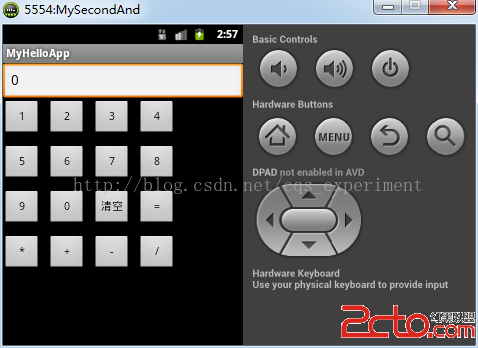
第一個 Android 應用 —— 計算器 先前完全沒碰過 Android 開發,實際接觸後發現比想像中容易上手,而且很有意思。今天動手做了一個小應用:一台能跑四則運算的
 用 ViewFlipper 實作帶淡入淡出效果的視差引導頁
前言 引導頁過去多半用 ViewPager 搭配 Fragment 來做。但其實 ViewFlipper 也能勝任,而且寫法更輕。本文就來示範如何用 ViewFlippe
 Android 自訂加載狀態檢視:Loading、Empty、Error 一站式處理
為什麼需要統一加載狀態 應用程式在等待資料時,常需要顯示加載中、無網路、無資料或加載失敗等狀態。若每個頁面都各自實作,容易風格不一且難以維護。把這些狀態封裝成一個自訂 V