

編輯:關於 Android 程式設計
UISearchBar 與 UITextField 功能相似,同樣是單行字元輸入框,但主要用於實作搜尋功能。以下整理使用時容易踩到的重點與常見設定。
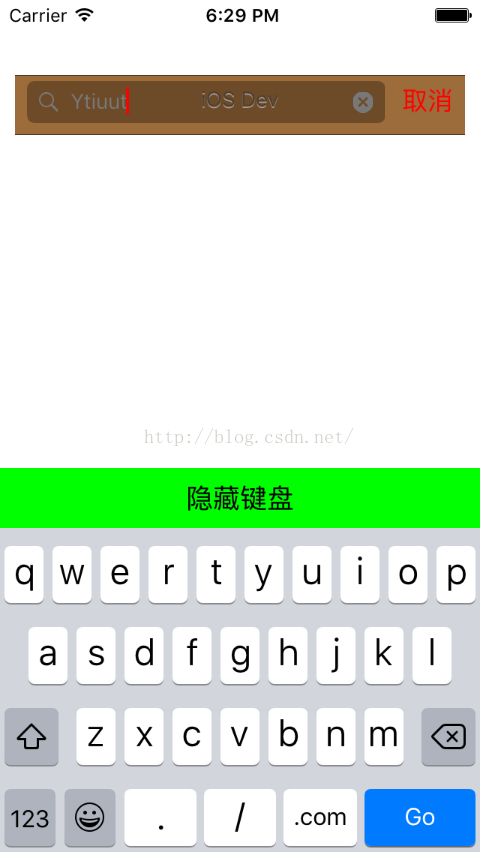
1、書籤按鈕屬性與搜尋回車按鈕屬性不可同時設定,只能二選一,否則會發生衝突。
2、鍵盤上的回車按鈕預設必須有輸入內容時才能點擊響應。
3、無法修改其輸入源視圖,預設固定為鍵盤。
4、需留意鍵盤的顯示與隱藏,並處理輸入元件被遮擋的情況。
5、退出按鈕通常應在代理方法中控制顯示或隱藏,而非在初始化階段就設定顯示。
6、退出按鈕標題預設為英文,可改為中文;但修改前必須先讓退出按鈕顯示出來,否則第一次仍會是英文。
UISearchBar*searchbar=[[UISearchBaralloc]init];
//添加到父視圖
[self.viewaddSubview:searchbar];
//設置原點坐標與大小
searchbar.frame=CGRectMake(10.0,50.0,(CGRectGetWidth(self.view.bounds)-10.0*2),40.0);
//其他屬性設置
//顯示類型
searchbar.barStyle=UIBarStyleBlack;
//占位符,即提示信息
searchbar.placeholder=@"請輸入搜索關鍵字";
//頂部提示文本,相當於控件的Title
searchbar.prompt=@"iOSDev";
//是否顯示書簽按鈕,默認隱藏(注意:書簽按鈕屬性與搜索回車按鈕屬性不能同時進行設置,只能二選一,否則會出現沖突)
searchbar.showsBookmarkButton=YES;
//是否顯示退出按鈕,默認隱藏(注意:通常退出按鈕的顯示是在代理方法中設置其顯示或隱藏,而不是在初始化時就設置基顯示)
//searchbar.showsCancelButton=YES;
//是否顯示搜索回車按鈕,默認隱藏(注意:書簽按鈕屬性與搜索回車按鈕屬性不能同時進行設置,只能二選一,否則會出現沖突)
//searchbar.showsSearchResultsButton=YES;
//輸入光標顏色
searchbar.tintColor=[UIColorredColor];
//輸入框邊框顏色
searchbar.barTintColor=[UIColorbrownColor];
//輸入框類型
searchbar.searchBarStyle=UISearchBarStyleProminent;
//設置鍵盤類型
searchbar.keyboardType=UIKeyboardTypeURL;
//設置回車鍵類型
searchbar.returnKeyType=UIReturnKeyGo;
//添加鍵盤上方的子視圖
UIButton*button=[[UIButtonalloc]initWithFrame:CGRectMake(0.0,0.0,CGRectGetWidth(self.view.bounds),40.0)];
button.backgroundColor=[UIColorgreenColor];
[buttonsetTitleColor:[UIColorblackColor]forState:UIControlStateNormal];
[buttonsetTitleColor:[UIColorredColor]forState:UIControlStateHighlighted];
[buttonsetTitle:@"隱藏鍵盤"forState:UIControlStateNormal];
[buttonaddTarget:selfaction:@selector(hiddenKeyboard)forControlEvents:UIControlEventTouchUpInside];
searchbar.inputAccessoryView=button;
/*
設置代理
1、設置實現UISearchBar代理方法的代理對象
2、添加協議
3、實現代理方法
*/
searchbar.delegate=self;
@interfaceViewController()
@end
[objc]view plaincopy
//UISearchBarDelegate
-(BOOL)searchBarShouldBeginEditing:(UISearchBar*)searchBar
{
//即將開始編輯
NSLog(@"即將開始編輯");
//顯示或隱藏退出按鈕
//方法1
//searchBar.showsCancelButton=YES;
//方法2
[searchBarsetShowsCancelButton:YESanimated:YES];
//修改退出按鈕標題為中文標題(注意:修改前先顯示退出按鈕,否則第一次仍會顯示為英文)
//方法1無效
/*
for(UIView*subViewinsearchBar.subviews)
{
if([subViewisKindOfClass:[UIButtonclass]])
{
UIButton*btn=(UIButton*)subView;
[btnsetTitle:@"取消"forState:UIControlStateNormal];
}
}
*/
//方法2
NSArray*subViews=searchBar.subviews;
UIView*subView=subViews.firstObject;
for(UIView*viewinsubView.subviews)
{
if([viewisKindOfClass:[UIButtonclass]])
{
UIButton*cancelButton=(UIButton*)view;
[cancelButtonsetTitle:@"取消"forState:UIControlStateNormal];
break;
}
}
returnYES;
}
-(void)searchBarTextDidBeginEditing:(UISearchBar*)searchBar
{
//已經開始編輯
NSLog(@"即將結束編輯");
}
-(BOOL)searchBarShouldEndEditing:(UISearchBar*)searchBar
{
//即將結束編輯
NSLog(@"即將結束編輯");
//顯示或隱藏退出按鈕
//方法1
//searchBar.showsCancelButton=NO;
//方法2
[searchBarsetShowsCancelButton:NOanimated:YES];
returnYES;
}
-(void)searchBarTextDidEndEditing:(UISearchBar*)searchBar;
{
//已經結束編輯
NSLog(@"已經結束編輯");
}
-(void)searchBar:(UISearchBar*)searchBartextDidChange:(NSString*)searchText
{
//正在編輯過程中的改變
NSLog(@"正在編輯過程中的改變");
}
-(BOOL)searchBar:(UISearchBar*)searchBarshouldChangeTextInRange:(NSRange)rangereplacementText:(NSString*)text
{
//正在編輯
NSLog(@"正在編輯");
/*
通常用途
1、判斷輸入的字符是否是限制輸入的內容
2、判斷輸入的字符長度是否是限制的輸入的長度
3、...
*/
returnYES;
}
-(void)searchBarSearchButtonClicked:(UISearchBar*)searchBar
{
//點擊了搜索按鈕
NSLog(@"點擊了搜索按鈕");
//獲取搜索輸入內容
NSString*text=searchBar.text;
NSLog(@"text=%@",text);
//隱藏鍵盤,即退出編輯
[selfhiddenKeyboard];
}
-(void)searchBarBookmarkButtonClicked:(UISearchBar*)searchBar
{
//點擊了書簽按鈕
NSLog(@"點擊了書簽按鈕");
}
-(void)searchBarCancelButtonClicked:(UISearchBar*)searchBar
{
//點擊了退出按鈕
NSLog(@"點擊了退出按鈕");
//隱藏鍵盤,即退出編輯
[selfhiddenKeyboard];
}
-(void)searchBarResultsListButtonClicked:(UISearchBar*)searchBar
{
//點擊了結果列表
NSLog(@"點擊了結果列表");
}
-(void)searchBar:(UISearchBar*)searchBarselectedScopeButtonIndexDidChange:(NSInteger)selectedScope
{
//點擊了結果列表
NSLog(@"selectedScopeButtonIndexDidChange");
}
//隱藏鍵盤
-(void)hiddenKeyboard
{
[self.viewendEditing:YES];
}
 Android 事件分發機制全解析:從觸控產生到被消費
網路上談 Android 事件分發的文章不少,但多數只講到 ViewGroup 與 View 這一層就停住了,來龍去脈並沒有交代清楚。本文嘗試把整條鏈路攤開:從手指按下螢
 暢玩安卓模擬器怎麼用?在電腦上安裝與遊玩手遊的圖解流程
裝好模擬器之後,最常見的困惑是:遊戲到底去哪裡下載?以騰訊的《天天飛車》為例,整個流程其實只要幾個步驟,之後所有安卓遊戲都能照同樣方式處理。1. 進入資源庫開啟模擬器後點
 Android Studio 必備常用插件整理:ButterKnife、Codota 與 Genymotion
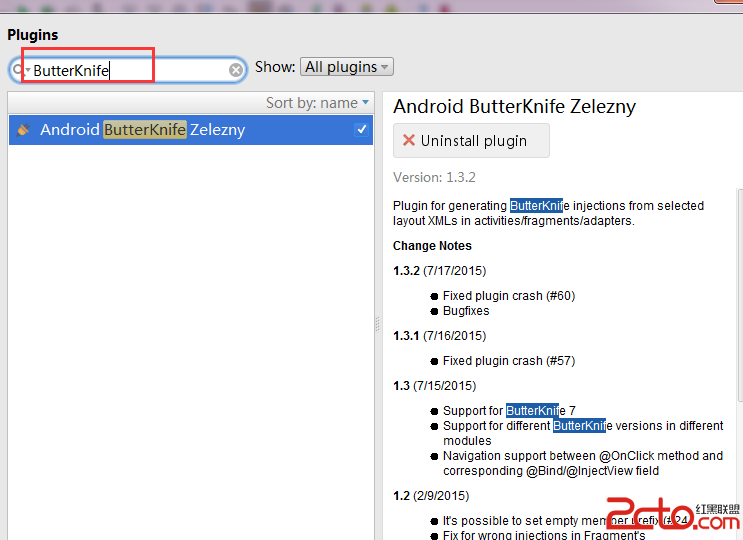
Android Studio 的插件生態相當豐富,以下整理常見且能提升開發效率的工具。 ButterKnife 由 Jake Wharton 開發,可用來快速綁定 Vi
 Android 下拉刷新庫 RefreshWidgetLib 設計解析
下拉刷新是許多 App 必備的互動模式。本文以自製的 RefreshWidgetLib 為例,說明如何透過自訂 ViewGroup、觸控事件攔截與 Header/Foot