

編輯:關於 Android 程式設計
目錄:
UIScrollView 的常見屬性 UIScrollView 的常用代理方法 UIScrollView 的縮放 UIScrollView 和 UIPageControl 的分頁 NSTimer 的使用UIScrollView 的用法很簡單,只需將要展示的內容添加到 UIScrollView 中即可。
一、UIScrollView 的常見屬性
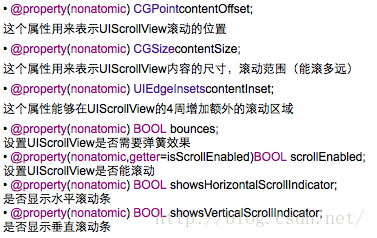
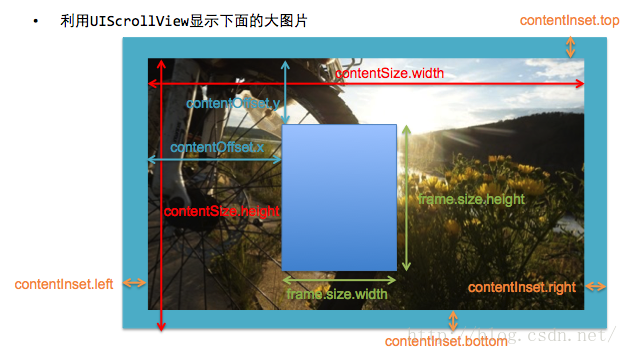
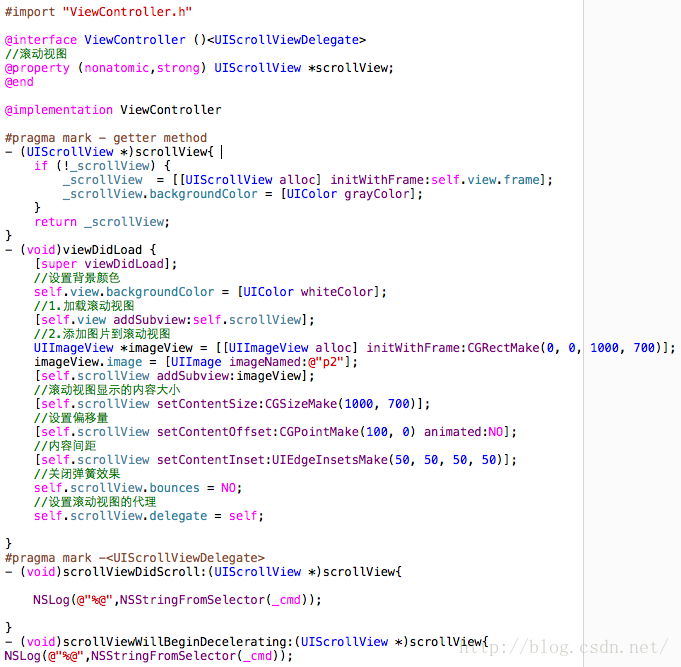
二、UIScrollView 的常用代理方法
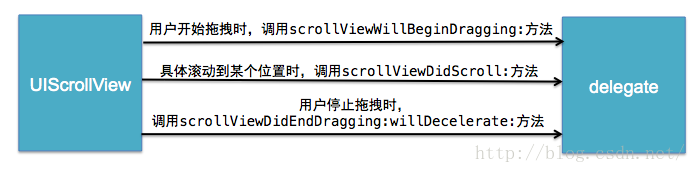
必須實現對應的方法才能監聽 UIScrollView 的滾動過程。
三、UIScrollView 的縮放
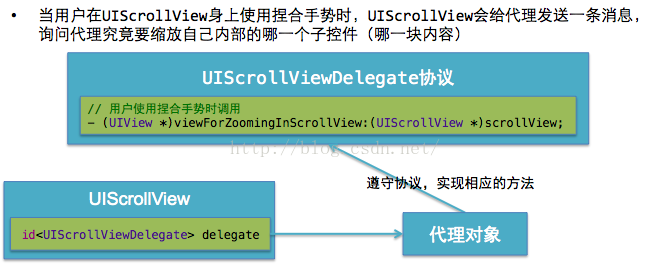
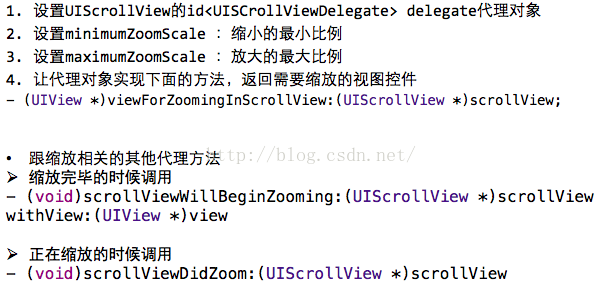
UIScrollView 不僅能滾動顯示大量內容,還能對其內容進行縮放處理。要想完成縮放功能,只需將需要縮放的內容添加到 UIScrollView 中即可。
縮放原理
縮放實現步驟
四、UIScrollView 和 UIPageControl 的分頁
UIPageControl 常用屬性:
一共有多少頁@property(nonatomic) NSInteger numberOfPages;
當前顯示的頁碼@property(nonatomic) NSInteger currentPage;
只有一頁時,是否需要隱藏頁碼指示器@property(nonatomic) BOOL hidesForSinglePage;
其他頁碼指示器的顏色@property(nonatomic,retain) UIColor *pageIndicatorTintColor;
當前頁碼指示器的顏色@property(nonatomic,retain) UIColor *currentPageIndicatorTintColor;
五、NSTimer
NSTimer 叫做定時器,它的作用是:在指定的時間執行指定任務;每隔一段時間執行指定任務。
調用下面的方法就會開啟一個定時任務:
+ (NSTimer*)scheduledTimerWithTimeInterval:(NSTimeInterval)ti target:(id)aTarget
selector:(SEL)aSelector
userInfo:(id)userInfo
repeats:(BOOL)yesOrNo;
每隔 ti 秒調用一次 aTarget 的 aSelector 方法,yesOrNo 決定是否重復執行這個任務。
-(void)invalidate; 可以停止定時器的工作,一旦定時器被停止了,就不能再次執行任務。
附上程式碼:
@interface ViewController ()@property (nonatomic,strong) UIScrollView *scrollView;//滾動視圖 @property (nonatomic,strong) NSMutableArray *titleArray;//圖片名 @property (nonatomic,strong) UIPageControl *page;//分頁 // 定時器(自動滾動) @property (nonatomic, strong) NSTimer *timer; - (void)initData;//加載數據 - (void)initUserInterface;//加載視圖 @end @implementation ViewController - (UIScrollView *)scrollView{ if (!_scrollView) { _scrollView = [[UIScrollView alloc] initWithFrame:CGRectMake(0, 0, CGRectGetWidth(self.view.bounds), 200)]; } return _scrollView; } - (NSMutableArray *)titleArray{ if (!_titleArray) { _titleArray = [NSMutableArray array]; } return _titleArray; } - (UIPageControl *)page{ if (!_page) { _page = [[UIPageControl alloc] initWithFrame:CGRectMake(0, 150, CGRectGetWidth(self.view.bounds), 30)]; _page.numberOfPages = 5;//設置頁數 _page.currentPage = 0;//當前頁 _page.currentPageIndicatorTintColor = [UIColor greenColor];//當前選中頁的顏色 _page.pageIndicatorTintColor = [UIColor whiteColor];//沒有選中的顏色 } return _page; } - (void)viewDidLoad { [super viewDidLoad]; [self initData]; [self initUserInterface]; } - (void)initData{ for (int i = 0; i < 5; i ++) { NSString *imageName = [NSString stringWithFormat:@"相冊%d",i + 1]; [self.titleArray addObject:imageName]; } } - (void)initUserInterface{ self.view.backgroundColor = [UIColor whiteColor]; self.navigationController.navigationBar.translucent = NO;//設置導航欄透明度 [self.view addSubview:self.scrollView];//1.添加滾動視圖 //2.加載圖片 for (int i = 0; i < 5; i ++ ) { UIImageView *imageView = [[UIImageView alloc] initWithFrame:CGRectMake( CGRectGetWidth(self.scrollView.frame) * i, 0, CGRectGetWidth(self.scrollView.frame), CGRectGetHeight(self.scrollView.frame))]; //設置圖片內容 //方法1:會緩存圖像 imageView.image = [UIImage imageNamed:self.titleArray[i]]; //方法2:加載大的圖片,從路徑中加載 // NSString *path = [[NSBundle mainBundle] pathForResource:self.titleImageArray[i] ofType:@"png"]; // imageView.image = [UIImage imageWithContentsOfFile:path]; [self.scrollView addSubview:imageView]; } //設置內容大小 [self.scrollView setContentSize:CGSizeMake(CGRectGetWidth(self.scrollView.frame) * 5, CGRectGetHeight(self.scrollView.frame))]; self.scrollView.pagingEnabled = YES;//設置分頁 self.scrollView.showsHorizontalScrollIndicator = NO;//關閉橫條 self.scrollView.showsVerticalScrollIndicator = NO;//關閉縱條 //設置偏移量 // [self.scrollView setContentOffset:CGPointMake(CGRectGetWidth(self.scrollView.bounds), 0)]; //添加分頁 [self.view addSubview:self.page]; self.scrollView.delegate = self; //初始化 timer _timer = [NSTimer scheduledTimerWithTimeInterval:2 target:self selector:@selector(changeTimer) userInfo:nil repeats:YES]; _timer.fireDate = [NSDate distantFuture];//先暫停 timer } #pragma mark - - (void)scrollViewDidScroll:(UIScrollView *)scrollView{ //1.獲得滾動視圖偏移量 CGFloat Offsetx = scrollView.contentOffset.x; //2.獲取當前第幾頁圖片 NSInteger pageName = Offsetx / self.scrollView.frame.size.width; self.page.currentPage = pageName;//3.設置分頁控制器的當前頁數 } - (void)viewWillAppear:(BOOL)animated{ [super viewWillAppear:animated]; _timer.fireDate = [NSDate dateWithTimeIntervalSinceNow:2];//2秒後打開 } #pragma mark - timer method - (void)changeTimer{ //1.獲取當前 scorllview 偏移量 CGFloat currentX =self.scrollView.contentOffset.x; //2.從當前的偏移量上往後面偏移 if (self.scrollView.contentOffset.x >= 4 * CGRectGetWidth(self.scrollView.frame)) { [self.scrollView setContentOffset:CGPointMake(0, 0) animated:YES]; }else{ //3.判斷當前滾動視圖的偏移量,如果已經顯示最後一張,就返回第一張 [self.scrollView setContentOffset:CGPointMake(currentX + CGRectGetWidth(self.scrollView.frame), 0) animated:YES]; } } // 手動即將拖拽的時候 - (void)scrollViewWillBeginDragging:(UIScrollView *)scrollView{ //停止定時器 _timer.fireDate = [NSDate distantFuture]; } // 手動拖拽結束的時候 - (void)scrollViewDidEndDragging:(UIScrollView *)scrollView willDecelerate:(BOOL)decelerate{ _timer.fireDate = [NSDate dateWithTimeIntervalSinceNow:2]; } - (void)viewWillDisappear:(BOOL)animated{ //timer 如果還有效 if (_timer.valid) { // 從運行循環中移除,讓其失效 [_timer invalidate]; // 將銷毀定時器 _timer = nil; } }
循環播放圖片(已優化 Timer)ViewController.m
#import "ViewController.h" #import "CycleScrollView.h" @interface ViewController () //分頁 @property (nonatomic, strong) UIPageControl *pageControl; //定時器 @property (nonatomic, strong) NSTimer *timer; //滾動視圖 @property (nonatomic, strong) CycleScrollView *cycleScrollerView; - (void)initUserInterface; @end @implementation ViewController - (void)viewDidLoad { [super viewDidLoad]; [self initUserInterface]; } - (UIPageControl *)pageControl{ if (!_pageControl) { _pageControl = [[UIPageControl alloc] initWithFrame:CGRectMake(0, 300, CGRectGetWidth(self.view.frame), 30)]; _pageControl.currentPageIndicatorTintColor = [UIColor redColor]; _pageControl.pageIndicatorTintColor = [UIColor yellowColor]; _pageControl.numberOfPages = 5; _pageControl.currentPage = 0; } return _pageControl; } - (void)initUserInterface{ self.view.backgroundColor = [UIColor whiteColor]; NSMutableArray *imageNameArray = [NSMutableArray array]; for (int i = 0; i < 5; i ++) { NSString *name = [NSString stringWithFormat:@"相冊%d",i + 1]; [imageNameArray addObject:name]; } CycleScrollView *cycleScrollerView = [[CycleScrollView alloc] initWithFrame:self.view.bounds imageNameArray:imageNameArray pageControl:self.pageControl]; self.cycleScrollerView = cycleScrollerView; [self.view addSubview:cycleScrollerView]; [self.view addSubview:self.pageControl]; //timer _timer = [NSTimer scheduledTimerWithTimeInterval:2 target:self selector:@selector(changeImage) userInfo:nil repeats:YES]; //暫停 _timer.fireDate = [NSDate distantFuture]; cycleScrollerView.timer = _timer; } - (void)changeImage{ //讓他往後面滾動一頁,觸發滾動視圖的代理 //自動播放下一頁 [self.cycleScrollerView setContentOffset:CGPointMake(self.cycleScrollerView.frame.size.width + self.cycleScrollerView.contentOffset.x, 0) animated:YES]; } - (void)viewWillAppear:(BOOL)animated{ [super viewWillAppear: animated]; _timer.fireDate = [NSDate dateWithTimeIntervalSinceNow:2]; } - (void)viewWillDisappear:(BOOL)animated{ [super viewWillDisappear: animated]; if (_timer.isValid) { [_timer invalidate]; _timer = nil; } } @end
CycleScrollView.h
#import@interface CycleScrollView : UIScrollView //定時器 @property (nonatomic, strong) NSTimer *timer; - (instancetype)initWithFrame:(CGRect)frame imageNameArray:(NSArray *)imageNameArray pageControl:(UIPageControl *)pageControl; @end
CycleScrollView.m
#import "CycleScrollView.h" #define IMAGE_WITH_NAME(name) [UIImage imageWithContentsOfFile:[[NSBundle mainBundle] pathForAuxiliaryExecutable:name]] @interface CycleScrollView ()//數據源 @property (nonatomic, strong) NSMutableArray *dataArray; //圖片數組 @property (nonatomic, strong) NSMutableArray *imageViewArray; //分頁 @property (nonatomic, strong) UIPageControl *pageControl; @end @implementation CycleScrollView - (instancetype)initWithFrame:(CGRect)frame imageNameArray:(NSArray *)imageNameArray pageControl:(UIPageControl *)pageControl{ self = [super initWithFrame:frame]; if (self) { //接受圖片名數組,防止釋放 _dataArray = [NSMutableArray arrayWithArray:imageNameArray]; //自身配置 self.backgroundColor = [UIColor blackColor]; self.delegate = self; self.contentSize = CGSizeMake(3 * CGRectGetWidth(frame), CGRectGetHeight(frame)); self.contentOffset = CGPointMake(CGRectGetWidth(frame), 0); self.pagingEnabled = YES; self.showsVerticalScrollIndicator = YES; self.contentMode = UIViewContentModeScaleAspectFill; //子 imageView 配置 _imageViewArray = [NSMutableArray array]; //1.創建3張沒有內容的圖片 for (int i = 0; i < 3; i ++) { UIImageView *imageView = [[UIImageView alloc] initWithFrame:CGRectMake(CGRectGetWidth(frame) * i, 0, CGRectGetWidth(frame), CGRectGetHeight(frame))]; [_imageViewArray addObject:imageView]; [self addSubview:imageView]; } //2.圖片上添加數據 [self loadImage]; _pageControl = pageControl; } return self; } #pragma mark - 加載圖片 - (void)loadImage{ int i = 0; for (UIImageView *imageView in _imageViewArray) { [imageView setImage:[UIImage imageNamed:_dataArray[i]]]; i ++; } } #pragma makr - UIScrollViewDelegate methods - (void)scrollViewDidScroll:(UIScrollView *)scrollView{ //判斷如果已經超過第二張,就將第一張的圖片名放到最後 if (scrollView.contentOffset.x >= 2 * CGRectGetWidth(self.frame)) { id firstName = [_dataArray[0] mutableCopy]; [_dataArray removeObject:firstName]; [_dataArray addObject:firstName]; _pageControl.currentPage = _pageControl.currentPage == 4 ? 0 : _pageControl.currentPage + 1; //如果是第一張之後往左滑動,就將最後一張圖片名放到第一張 }else if (scrollView.contentOffset.x <= 0){ id lastName = [_dataArray[4] mutableCopy]; [_dataArray removeObject:lastName]; [_dataArray insertObject:lastName atIndex:0]; _pageControl.currentPage = _pageControl.currentPage == 0 ? 4 : _pageControl.currentPage - 1; }else{ return; } //刷新圖片 [self loadImage]; //讓其保持第二張圖片居中,他是在到第三張後返回到第二張,但是注意一定要 animation 關掉,否則會有那種跳轉效果,這樣就可以給用戶一種錯覺 [self setContentOffset:CGPointMake(CGRectGetWidth(self.frame), 0) animated:NO]; } - (void)scrollViewWillBeginDragging:(UIScrollView *)scrollView{ self.timer.fireDate = [NSDate distantFuture]; } - (void)scrollViewDidEndDragging:(UIScrollView *)scrollView willDecelerate:(BOOL)decelerate{ self.timer.fireDate = [NSDate dateWithTimeIntervalSinceNow:2]; } @end
沒有添加定時器的循環播放:
#import "ViewController.h" @interface ViewController ()//滾動視圖 @property (nonatomic, strong) UIScrollView *scorllView; //圖片名數組 @property (nonatomic, strong) NSMutableArray *titlesArray; //圖片數組 @property (nonatomic, strong) NSMutableArray *imageArray; @property (nonatomic,strong) UIPageControl *page; //加載數據 - (void)initData; //加載界面 - (void)initUserInterface; @end @implementation ViewController #pragma mark - getter methods - (UIScrollView *)scorllView{ if (!_scorllView) { _scorllView = [[UIScrollView alloc] initWithFrame:CGRectMake(0, 0, CGRectGetWidth(self.view.bounds), 200)]; _scorllView.backgroundColor = [UIColor redColor]; } return _scorllView; } - (NSMutableArray *)titlesArray{ if (!_titlesArray) { _titlesArray = [NSMutableArray array]; } return _titlesArray; } - (UIPageControl *)page{ if (!_page) { _page = [[UIPageControl alloc] initWithFrame:CGRectMake(0, 150, CGRectGetWidth(self.view.bounds), 30)]; _page.numberOfPages = 5;//設置頁數 _page.currentPage = 0;//當前頁 _page.currentPageIndicatorTintColor = [UIColor greenColor];//當前選中頁的顏色 _page.pageIndicatorTintColor = [UIColor whiteColor];//沒有選中的顏色 } return _page; } - (void)viewDidLoad { [super viewDidLoad]; [self initData]; [self initUserInterface]; } #pragma mark - init methods - (void)initData{ for (int i = 0; i < 5; i ++) { NSString *imageName = [NSString stringWithFormat:@"相冊%d", i + 1]; [self.titlesArray addObject:imageName]; } } - (void)initUserInterface{ self.view.backgroundColor = [UIColor whiteColor]; [self.view addSubview:self.scorllView]; //滾動視圖配置 self.scorllView.contentSize = CGSizeMake(CGRectGetWidth(self.view.bounds) * 3, CGRectGetHeight(self.scorllView.frame)); self.scorllView.contentOffset = CGPointMake(CGRectGetWidth(self.view.bounds), 0); self.scorllView.pagingEnabled = YES; self.scorllView.delegate = self; //1.創建3張空白的圖片 _imageArray = [NSMutableArray array]; for (int i = 0; i < 3; i ++) { UIImageView *imageView = [[UIImageView alloc] initWithFrame:CGRectMake(CGRectGetWidth(self.view.bounds) * i, 0, CGRectGetWidth(self.view.bounds), CGRectGetHeight(self.scorllView.bounds))]; [_imageArray addObject:imageView]; [self.scorllView addSubview:imageView]; [self loadImage]; [self.view addSubview:self.page]; } } #pragma mark - image - (void) loadImage{ int i = 0; for (UIImageView *imageView in _imageArray) { [imageView setImage:[UIImage imageNamed:_titlesArray[i]]]; i ++; } } #pragma makr - UIScrollViewDelegate methods - (void)scrollViewDidScroll:(UIScrollView *)scrollView{ if (scrollView.contentOffset.x > 2 * CGRectGetWidth(self.scorllView.bounds)) { id firstNam = [_titlesArray[0] mutableCopy];//獲取第一張圖片名 [_titlesArray removeObject:firstNam];//移除第一張圖片名 [_titlesArray addObject:firstNam];//添加到最後 self.page.currentPage = self.page.currentPage == 4 ? 0 : self.page.currentPage + 1; }else if (scrollView.contentOffset.x <= 0){ //左滑動 id lastNam = [_titlesArray[4] mutableCopy]; [_titlesArray removeObject:lastNam]; [_titlesArray insertObject:lastNam atIndex:0]; }else{ return; } //刷新圖片 [self loadImage]; [self.scorllView setContentOffset:CGPointMake(CGRectGetWidth(self.scorllView.bounds), 0)]; } @end
 Android 開發調試工具整理:DDMS、ADB 與 Logcat
開發 Android 時,熟悉調試工具能大幅提升除錯效率。本文整理 DDMS、ADB 與 Logcat 的常見用法。 DDMS DDMS 是 Dalvik Debug
 Android 系統開發(3):Makefile 的編寫
Makefile 是什麼? Makefile 的作用主要有兩點: 1、組織工程文件,編譯成複雜的程序;2、安裝及卸載我們的程序。 Makefile 使用示例 在 /hom
 Android 使用 DrawerLayout 實現仿 QQ 雙向側滑菜單
之前寫過一篇《Android 高仿 QQ5.0 側滑菜單效果》的自定義控件文章,恰逢 QQ5.2 又新增了右側菜單,正好研究了 DrawerLayout。一方面官方的東西
 微信小惱惱一次解決:小影片與全螢幕播放設定
微信小問題可用設定解決。Android版可到設定、通用,把朋友圈小影片設為關閉或僅Wi-Fi,避免浪費行動網路。 Windows Phone看影片無法全屏,可到設定、輔助