

編輯:關於 Android 程式設計
Android App 的安裝離不開證書支持。我們在 Eclipse 或 Android Studio 中開發時,往往注意不到證書的存在也能正常安裝,那是因為使用了默認的 debug 證書。而在 App 升級時,證書的作用就凸顯出來了——只有證書相同,才能完成升級。證書同時也是防止 App 被偽造的重要一環,屬於 Android 安全策略的一部分。此外,Android 沙箱機制也與證書相關:兩個 App 若要共享文件、代碼或資源,需要使用 shareUid 屬性,而只有證書相同的 App 才能共享 shareUid;同樣地,若一個 App 聲明了 signature 級別的權限,也只有與其簽名相同的 App 才能申請到該權限。
此前對簽名校驗雖有耳聞,但多是照搬他人總結。本篇就從源碼出發,親手梳理 App 的簽名校驗過程,分析完畢後再給出總結。
在 PackageInstaller 源碼分析中,安裝過程調用了 installPackageLI(),其內部又調用 collectCertificates(),由此進入簽名檢驗環節。查看 collectCertificates() 的實現(路徑:/frameworks/base/core/java/android/content/pm/PackageParser.java):
public void collectCertificates(Package pkg, int flags) throws PackageParserException { pkg.mCertificates = null; pkg.mSignatures = null; pkg.mSigningKeys = null; collectCertificates(pkg, new File(pkg.baseCodePath), flags); if (!ArrayUtils.isEmpty(pkg.splitCodePaths)) { for (String splitCodePath : pkg.splitCodePaths) { collectCertificates(pkg, new File(splitCodePath), flags); } } }
private static void collectCertificates(Package pkg, File apkFile, int flags) throws PackageParserException { final String apkPath = apkFile.getAbsolutePath(); StrictJarFile jarFile = null; try { jarFile = new StrictJarFile(apkPath); // Always verify manifest, regardless of source final ZipEntry manifestEntry = jarFile.findEntry(ANDROID_MANIFEST_FILENAME); if (manifestEntry == null) { throw new PackageParserException(INSTALL_PARSE_FAILED_BAD_MANIFEST, "Package " + apkPath + " has no manifest"); } final List<ZipEntry> toVerify = new ArrayList<>(); toVerify.add(manifestEntry); // If we're parsing an untrusted package, verify all contents if ((flags & PARSE_IS_SYSTEM) == 0) { final Iterator<ZipEntry> i = jarFile.iterator(); while (i.hasNext()) { final ZipEntry entry = i.next(); if (entry.isDirectory()) continue; if (entry.getName().startsWith("META-INF/")) continue; if (entry.getName().equals(ANDROID_MANIFEST_FILENAME)) continue; toVerify.add(entry); } } // Verify that entries are signed consistently with the first entry // we encountered. for (ZipEntry entry : toVerify) { final Certificate[][] entryCerts = loadCertificates(jarFile, entry); if (ArrayUtils.isEmpty(entryCerts)) { throw new PackageParserException(INSTALL_PARSE_FAILED_NO_CERTIFICATES, "Package " + apkPath + " has no certificates at entry " + entry.getName()); } final Signature[] entrySignatures = convertToSignatures(entryCerts); if (pkg.mCertificates == null) { pkg.mCertificates = entryCerts; pkg.mSignatures = entrySignatures; pkg.mSigningKeys = new ArraySet<PublicKey>(); for (int i=0; i < entryCerts.length; i++) { pkg.mSigningKeys.add(entryCerts[i][0].getPublicKey()); } } else { if (!Signature.areExactMatch(pkg.mSignatures, entrySignatures)) { throw new PackageParserException( INSTALL_PARSE_FAILED_INCONSISTENT_CERTIFICATES, "Package " + apkPath + " has mismatched certificates at entry " + entry.getName()); } } } } catch (GeneralSecurityException e) { throw new PackageParserException(INSTALL_PARSE_FAILED_CERTIFICATE_ENCODING, "Failed to collect certificates from " + apkPath, e); } catch (IOException | RuntimeException e) { throw new PackageParserException(INSTALL_PARSE_FAILED_NO_CERTIFICATES, "Failed to collect certificates from " + apkPath, e); } finally { closeQuietly(jarFile); } }
在該函數中,首先提取 apk 的 manifest.xml:
final ZipEntry manifestEntry = jarFile.findEntry(ANDROID_MANIFEST_FILENAME); if (manifestEntry == null) { throw new PackageParserException(INSTALL_PARSE_FAILED_BAD_MANIFEST, "Package " + apkPath + " has no manifest"); } final List<ZipEntry> toVerify = new ArrayList<>(); toVerify.add(manifestEntry);
接著遍歷 apk 內所有節點,把除 META-INF/ 外的所有文件加入待檢驗列表:
if ((flags & PARSE_IS_SYSTEM) == 0) { final Iterator<ZipEntry> i = jarFile.iterator(); while (i.hasNext()) { final ZipEntry entry = i.next(); if (entry.isDirectory()) continue; if (entry.getName().startsWith("META-INF/")) continue; if (entry.getName().equals(ANDROID_MANIFEST_FILENAME)) continue; toVerify.add(entry); } }
然後把這些節點傳入 loadCertificates():
for (ZipEntry entry : toVerify) { final Certificate[][] entryCerts = loadCertificates(jarFile, entry); if (ArrayUtils.isEmpty(entryCerts)) { throw new PackageParserException(INSTALL_PARSE_FAILED_NO_CERTIFICATES, "Package " + apkPath + " has no certificates at entry " + entry.getName()); } final Signature[] entrySignatures = convertToSignatures(entryCerts); if (pkg.mCertificates == null) { pkg.mCertificates = entryCerts; pkg.mSignatures = entrySignatures; pkg.mSigningKeys = new ArraySet<PublicKey>(); for (int i=0; i < entryCerts.length; i++) { pkg.mSigningKeys.add(entryCerts[i][0].getPublicKey()); } } else { if (!Signature.areExactMatch(pkg.mSignatures, entrySignatures)) { throw new PackageParserException( INSTALL_PARSE_FAILED_INCONSISTENT_CERTIFICATES, "Package " + apkPath + " has mismatched certificates at entry " + entry.getName()); } } }
loadCertificates() 的原型實現如下:
private static Certificate[][] loadCertificates(StrictJarFile jarFile, ZipEntry entry)throws PackageParserException { InputStream is = null; try { // We must read the stream for the JarEntry to retrieve // its certificates. is = jarFile.getInputStream(entry); readFullyIgnoringContents(is); return jarFile.getCertificateChains(entry); } catch (IOException | RuntimeException e) { throw new PackageParserException(INSTALL_PARSE_FAILED_UNEXPECTED_EXCEPTION, "Failed reading " + entry.getName() + " in " + jarFile, e); } finally { IoUtils.closeQuietly(is); } }
在 StrictJarFile.java 中,getCertificateChains() 的實現(路徑:/libcore/luni/src/main/java/java/util/jar/StrictJarFile.java):
public Certificate[][] getCertificateChains(ZipEntry ze) { if (isSigned) { return verifier.getCertificateChains(ze.getName()); } return null; }
它繼續調用 JarVerifier 的 getCertificateChains()(路徑:/libcore/luni/src/main/java/java/util/jar/JarVerifier.java):
Certificate[][] getCertificateChains(String name) { return verifiedEntries.get(name); } private final Hashtable<String, Certificate[][]> verifiedEntries = new Hashtable<String, Certificate[][]>();
verifiedEntries 只是 JarVerifier 的一個成員變量,因此關鍵在於它是如何被賦值的。這個問題我們暫且放到後面。
回看 collectCertificates(),在調用 loadCertificates() 之前先對 jarFile 進行了實例化。查看 StrictJarFile 的構造函數:
public StrictJarFile(String fileName) throws IOException { this.nativeHandle = nativeOpenJarFile(fileName); this.raf = new RandomAccessFile(fileName, "r"); try { HashMap<String, byte[]> metaEntries = getMetaEntries(); this.manifest = new Manifest(metaEntries.get(JarFile.MANIFEST_NAME), true); this.verifier = new JarVerifier(fileName, manifest, metaEntries); isSigned = verifier.readCertificates() && verifier.isSignedJar(); } catch (IOException ioe) { nativeClose(this.nativeHandle); throw ioe; } guard.open("close"); } private HashMap<String, byte[]> getMetaEntries() throws IOException { HashMap<String, byte[]> metaEntries = new HashMap<String, byte[]>(); Iterator<ZipEntry> entryIterator = new EntryIterator(nativeHandle, "META-INF/"); while (entryIterator.hasNext()) { final ZipEntry entry = entryIterator.next(); metaEntries.put(entry.getName(), Streams.readFully(getInputStream(entry))); } return metaEntries; }
可見 getMetaEntries() 從 apk 的 META-INF/ 中讀取文件,以「文件名為鍵、字節內容為值」的形式存儲。構造函數中還有一行與 JarVerifier 相關:isSigned = verifier.readCertificates() && verifier.isSignedJar()。其中 isSignedJar() 依據 certificates 是否為空來判斷 Jar 是否被簽名。查看 readCertificates():
boolean isSignedJar() { return certificates.size() > 0; } synchronized boolean readCertificates() { if (metaEntries.isEmpty()) { return false; } Iterator<String> it = metaEntries.keySet().iterator(); while (it.hasNext()) { String key = it.next(); if (key.endsWith(".DSA") || key.endsWith(".RSA") || key.endsWith(".EC")) { verifyCertificate(key); it.remove(); } } return true; }
該函數從 META-INF/ 中提取以 .DSA、.RSA 或 .EC 結尾的文件,交給 verifyCertificate(key) 處理:
private void verifyCertificate(String certFile) { String signatureFile = certFile.substring(0, certFile.lastIndexOf('.')) + ".SF"; byte[] sfBytes = metaEntries.get(signatureFile); if (sfBytes == null) { return; } byte[] manifestBytes = metaEntries.get(JarFile.MANIFEST_NAME); if (manifestBytes == null) { return; } byte[] sBlockBytes = metaEntries.get(certFile); try { Certificate[] signerCertChain = JarUtils.verifySignature( new ByteArrayInputStream(sfBytes), new ByteArrayInputStream(sBlockBytes)); if (signerCertChain != null) { certificates.put(signatureFile, signerCertChain); } } catch (IOException e) { return; } catch (GeneralSecurityException e) { throw failedVerification(jarName, signatureFile); } // Verify manifest hash in .sf file ... } }
此方法先提取 [CERT].SF 與 MANIFEST.MF,再把 [CERT].SF 與 [CERT].RSA(或 .DSA、.EC)交給 JarUtils.verifySignature() 處理(路徑:/libcore/luni/src/main/java/org/apache/harmony/security/utils/JarUtils.java)。這個函數我先按下不表,後面再議。根據資料,verifySignature() 的作用是驗證 [CERT].RSA 中包含的、對 [CERT].SF 的簽名是否正確;若失敗則拋出 GeneralSecurityException,進而調用 failedVerification() 拋出 SecurityException;成功則返回簽名的證書鏈。
private static SecurityException failedVerification(String jarName, String signatureFile) { throw new SecurityException(jarName + " failed verification of " + signatureFile); }
接著是對 MANIFEST.MF 各條目簽名值與 [CERT].SF 中記錄值的比對:
if (mainAttributesEnd > 0 && !createdBySigntool) { String digestAttribute = "-Digest-Manifest-Main-Attributes"; if (!verify(attributes, digestAttribute, manifestBytes, 0, mainAttributesEnd, false, true)) { throw failedVerification(jarName, signatureFile); } }
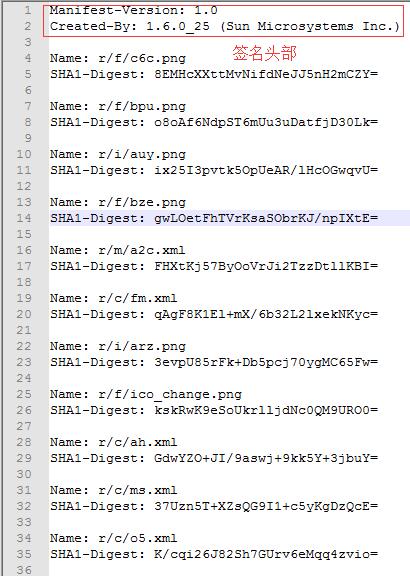
這裡先判斷是否由工具簽名(依據 [CERT].SF 的 Created-By 是否含 signtool 關鍵字)。若是工具簽名,會先檢驗 MANIFEST.MF 頭部的 hash 是否與 [CERT].SF 記錄的 SHA1-Digest-Manifest-Main-Attributes 匹配,再檢驗 MANIFEST.MF 中所有條目的 hash 是否與 [CERT].SF 對應。若不匹配,說明 MANIFEST.MF 遭到修改。
// Use .SF to verify the whole manifest. String digestAttribute = createdBySigntool ? "-Digest" : "-Digest-Manifest"; if (!verify(attributes, digestAttribute, manifestBytes, 0, manifestBytes.length, false, false)) { Iterator<Map.Entry<String, Attributes>> it = entries.entrySet().iterator(); while (it.hasNext()) { Map.Entry<String, Attributes> entry = it.next(); Manifest.Chunk chunk = manifest.getChunk(entry.getKey()); if (chunk == null) { return; } if (!verify(entry.getValue(), "-Digest", manifestBytes, chunk.start, chunk.end, createdBySigntool, false)) { throw invalidDigest(signatureFile, entry.getKey(), jarName); } } } metaEntries.put(signatureFile, null); signatures.put(signatureFile, entries);
注意 if 判斷裡,先檢驗 MANIFEST.MF 整體的簽名是否與 [CERT].SF 一致。若一致,說明未被修改,無須再檢驗各條目;若不一致,程序並未立即拋異常,而是繼續逐條檢驗 MANIFEST.MF 的 hash 是否與 [CERT].SF 記錄相符。這樣做的好處是:既然頭部已通過檢驗,說明必是某個條目被改動,遍歷時一定能定位到,並通過 invalidDigest() 拋出異常,從而能精準定位到哪個條目(乃至 apk 中哪個文件)被修改。
private static SecurityException invalidDigest(String signatureFile, String name, String jarName) { throw new SecurityException(signatureFile + " has invalid digest for " + name + " in " + jarName); }
那到底怎麼檢測 hash 是否匹配?查看 verify():
private boolean verify(Attributes attributes, String entry, byte[] data, int start, int end, boolean ignoreSecondEndline, boolean ignorable) { for (int i = 0; i < DIGEST_ALGORITHMS.length; i++) { String algorithm = DIGEST_ALGORITHMS[i]; String hash = attributes.getValue(algorithm + entry); if (hash == null) { continue; } MessageDigest md; try { md = MessageDigest.getInstance(algorithm); } catch (NoSuchAlgorithmException e) { continue; } if (ignoreSecondEndline && data[end - 1] == '\n' && data[end - 2] == '\n') { md.update(data, start, end - 1 - start); } else { md.update(data, start, end - start); } byte[] b = md.digest(); byte[] hashBytes = hash.getBytes(StandardCharsets.ISO_8859_1); return MessageDigest.isEqual(b, Base64.decode(hashBytes)); } return ignorable; } private static final String[] DIGEST_ALGORITHMS = new String[] { "SHA-512", "SHA-384", "SHA-256", "SHA1", };
由於不知道 apk 簽名時用了哪種 hash 算法,這裡遍歷四種算法,通過「算法名 + entry 名」來確定,例如嘗試「SHA1-Digest」從 [CERT].SF 取值,取到非空即說明用了 SHA1,否則繼續下一個。最後把屬性值 hash + Base64 後與 [CERT].SF 中的值比對,相同返回 true,否則 false。參數 ignorable 表示該驗證是否可忽略。
至此,StrictJarFile 實例的構造實際已完成兩部分校驗:一是把 [CERT].SF 的 hash 與 [CERT].RSA 中的簽名值比對,確保 [CERT].SF 未被修改;二是把 MANIFEST.MF 各條目 hash 與 [CERT].SF 比對,確保 MANIFEST.MF 未被修改。
回到之前的遺留問題:verifiedEntries 如何賦值?loadCertificates() 在調用 getCertificateChains() 前,還調用了 getInputStream() 與 readFullyIgnoringContents():
is = jarFile.getInputStream(entry); readFullyIgnoringContents(is); return jarFile.getCertificateChains(entry);
查看 StrictJarFile 的 getInputStream():
public InputStream getInputStream(ZipEntry ze) { final InputStream is = getZipInputStream(ze); if (isSigned) { JarVerifier.VerifierEntry entry = verifier.initEntry(ze.getName()); if (entry == null) { return is; } return new JarFile.JarFileInputStream(is, ze.getSize(), entry); } return is; }
它調用了 JarVerifier 的 initEntry() 與 JarFileInputStream 構造函數。查看 initEntry():
VerifierEntry initEntry(String name) { if (manifest == null || signatures.isEmpty()) { return null; } Attributes attributes = manifest.getAttributes(name); if (attributes == null) { return null; } ArrayList<Certificate[]> certChains = new ArrayList<Certificate[]>(); Iterator<Map.Entry<String, Attributes>> it = signatures.entrySet().iterator(); while (it.hasNext()) { Map.Entry<String, Attributes> entry = it.next(); HashMap<String, Attributes> hm = entry.getValue(); if (hm.get(name) != null) { String signatureFile = entry.getKey(); Certificate[] certChain = certificates.get(signatureFile); if (certChain != null) { certChains.add(certChain); } } } if (certChains.isEmpty()) { return null; } Certificate[][] certChainsArray = certChains.toArray(new Certificate[certChains.size()][]); for (int i = 0; i < DIGEST_ALGORITHMS.length; i++) { final String algorithm = DIGEST_ALGORITHMS[i]; final String hash = attributes.getValue(algorithm + "-Digest"); if (hash == null) { continue; } byte[] hashBytes = hash.getBytes(StandardCharsets.ISO_8859_1); try { return new VerifierEntry(name, MessageDigest.getInstance(algorithm), hashBytes, certChainsArray, verifiedEntries); } catch (NoSuchAlgorithmException ignored) { } } return null; }
該函數旨在返回一個 VerifierEntry 對象。其構造參數依次為:待驗證文件名、計算摘要所用的 MessageDigest 對象、從 MANIFEST.MF 取到的條目 hash、證書鏈(二維數組,因為 Android 允許用多個證書簽名,只是證書文件名須不同),以及 verifiedEntries。
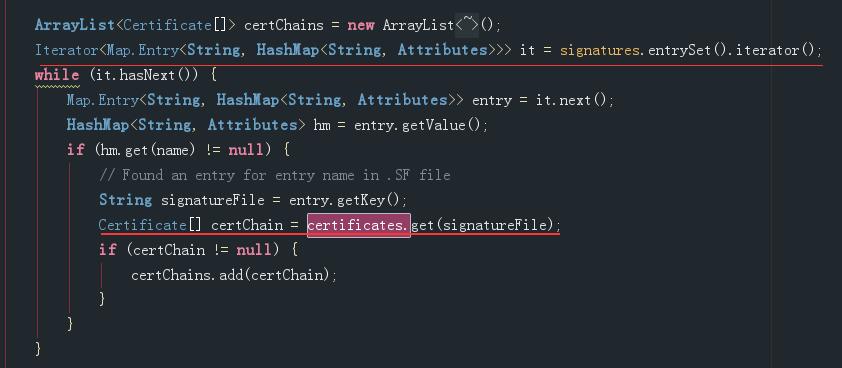
signatures 保存的是「<[CERT].SF 文件名,[CERT].SF 各條目組成的 HashMap>」,certificates 保存的是「<[CERT].SF 文件,證書數組>」。certificates 的初始化同樣用到了 JarUtils.verifySignature(),這部分留待後續討論。
JarFileInputStream 構造函數很簡單:
JarFileInputStream(InputStream is, long size, JarVerifier.VerifierEntry e) { super(is); entry = e; count = size; }
而 readFullyIgnoringContents() 負責讀取數據流並統計長度:
public static long readFullyIgnoringContents(InputStream in) throws IOException { byte[] buffer = sBuffer.getAndSet(null); if (buffer == null) { buffer = new byte[4096]; } int n = 0; int count = 0; while ((n = in.read(buffer, 0, buffer.length)) != -1) { count += n; } sBuffer.set(buffer); return count; }
這裡的 InputStream 實際是 JarFileInputStream,其重載的 read() 除讀數據外,還調用 write() 與 verify():
public int read(byte[] buffer, int byteOffset, int byteCount) throws IOException { if (done) { return -1; } if (count > 0) { int r = super.read(buffer, byteOffset, byteCount); if (r != -1) { int size = r; if (count < size) { size = (int) count; } entry.write(buffer, byteOffset, size); count -= size; } else { count = 0; } if (count == 0) { done = true; entry.verify(); } return r; } else { done = true; entry.verify(); return -1; } }
write() 把讀到的內容交給 digest(即 VerifierEntry 傳入的摘要算法):
public void write(byte[] buf, int off, int nbytes) { digest.update(buf, off, nbytes); }
verify() 則計算 apk 文件的摘要、Base64 編碼後與 MANIFEST.MF 記錄值比對,用以判斷文件是否被修改,若不一致拋出異常;一致則把文件加入 verifiedEntries:
void verify() { byte[] d = digest.digest(); if (!MessageDigest.isEqual(d, Base64.decode(hash))) { throw invalidDigest(JarFile.MANIFEST_NAME, name, name); } verifiedEntries.put(name, certChains); }
至此,verifiedEntries 的賦值謎團也解開了——正是在 verify() 的最後一行,校驗通過的文件會被加入其中。
apk 的 /META-INF 文件夾中保存著簽名信息,一般至少包含三個文件:
· MANIFEST.MF:包含 apk 中除 /META-INF 外所有文件的簽名值,做法是對文件先做 SHA1(或其他 hash)再做 Base64,存儲形式為「Name + [SHA1]-Digest」。
· [CERT].SF:對 MANIFEST.MF 整體及各條目的簽名,若使用工具簽名,還多一項對 MANIFEST.MF 頭部信息的簽名。
· [CERT].RSA:包含用私鑰對 [CERT].SF 的簽名,以及含公鑰信息的數字證書。
是否存在簽名偽造可能:
· 改動 apk 文件 → 計算出的文件摘要與 MANIFEST.MF 條目不匹配,失敗;
· 改動 apk 文件 + MANIFEST.MF → 改動條目的摘要與 [CERT].SF 對應條目不匹配,失敗;
· 改動 apk 文件 + MANIFEST.MF + [CERT].SF → 計算出的 [CERT].SF 簽名與 [CERT].RSA 記錄值不匹配,失敗;
· 改動 apk 文件 + MANIFEST.MF + [CERT].SF + [CERT].RSA → 由於證書不可偽造,[CERT].RSA 無法偽造。
· 初始化 StrictJarFile 時,構造器調用 readCertificates(),隨後的調用鏈完成兩件事:把 [CERT].SF 的 hash 與 [CERT].RSA 的簽名值比對,確保 [CERT].SF 未被改;把 MANIFEST.MF 各條目 hash 與 [CERT].SF 比對,確保 MANIFEST.MF 未被改。
· loadCertificates() 調用 readFullyIgnoringContents(),隨後的調用鏈完成對 apk 文件的簽名校驗:計算文件摘要並與 MANIFEST.MF 對應條目比對,確保文件未被修改。
源碼分析中,JarUtils.verifySignature() 究竟做了什麼、證書鏈 Certificate[] 的結構為何,尚未展開。這裡先拋一個問題:既然校驗只是把 [CERT].SF 計算出的簽名值與 [CERT].RSA 中記錄的值比對,而計算時並不知道私鑰,那為什麼不能讀取 [CERT].RSA 中的簽名值加以修改,使其與計算值匹配?換言之,校驗過程中是如何利用公私鑰的,數字證書又發揮了什麼具體作用?此外,源碼只校驗了幾個值是否匹配,並未體現證書的作用——換句話說,換一個簽名也能通過校驗;但 App 升級時需要驗證證書是否一致,而非值是否匹配,這一點源碼裡並未體現。帶著這些疑問,後續再深入探討 App 升級時證書的作用,這大概與 verifySignature() 的細節密切相關。
 自定義 View 實作:弧線進度條控件完整教學
這次要做的東西以弧線為主體,畫面構成很單純:一段背景圓弧、一段表示進度的圓弧、一個圓,以及中央的文字。 點擊「開始」按鈕後會播放一段動畫,進度逐漸增加。下面開始編碼。
 Android 開發技巧(2):登入與註冊模組的完整解決方案
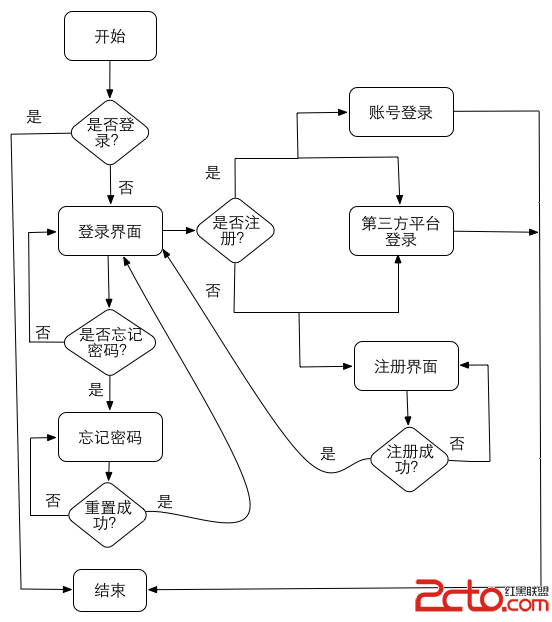
前言 幾乎每個 App 都有登入與註冊。以筆者開發的「南方周末新聞閱讀器」為例,個人中心裡就有登入、手機註冊、忘記密碼三個入口。這個模組外觀看起來平平無奇,真要做得好卻要
 Android 螢幕旋轉不閃退:Activity 與 AsyncTask 的狀態保存完整攻略
一、問題從哪裡來 所謂「執行期組態變更」(runtime configuration change),指的是 App 執行過程中裝置狀態發生改變,例如螢幕旋轉、實體鍵盤
 小米「請勿遮擋橙色區域」怎麼解?防誤觸與距離感測器校正
小米手機出現請勿遮擋橙色區域,通常是防誤觸或距離感測器作用。可先到設定、鎖屏和密碼,關閉防誤觸模式。 若仍異常,可在撥號盤輸入工程模式,進入距離感應器測試,將手指靠近感測