

編輯:關於 Android 程式設計
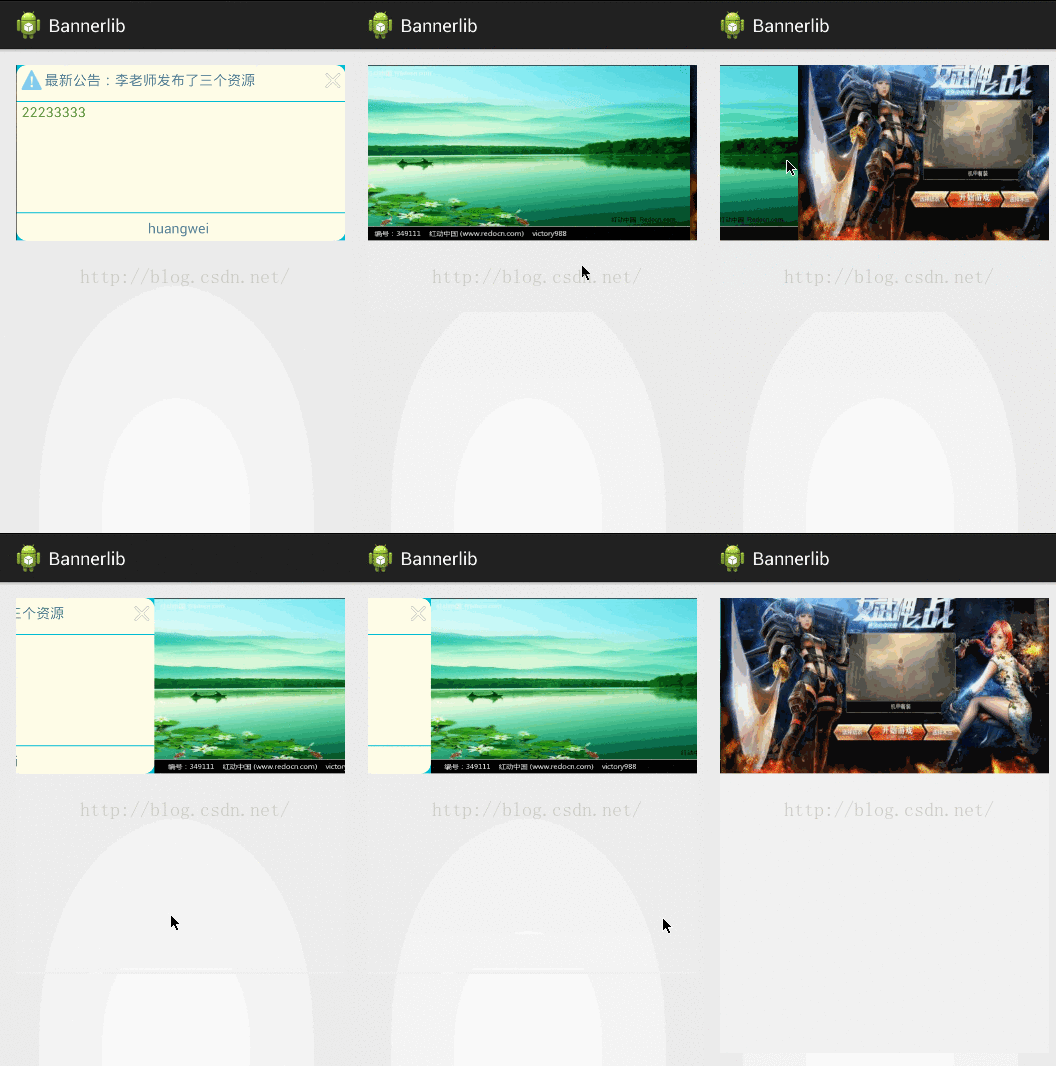
先前有個需求要做一個公告列,必須無限輪播。第一時間想到的是 ViewPager,網上一查也幾乎都是這個解法。但自己動手做過之後,發現效果其實不夠理想。
常見的兩種做法各有問題:
做法一:給 ViewPager 一個極大的頁數,例如 Integer.MAX_VALUE。不知為何總是不太順,偶爾出現空白頁;更麻煩的是往下一頁可以,往回翻卻可能跳回第一頁後再也翻不動,解法是一開始就跳到中間去。
做法二:只快取幾頁,翻到最後一頁時讓下一頁指向快取中的第一頁,切換後立刻跳回索引 0。因為速度很快所以看不出破綻,但代價是切換動畫被吃掉了。
兩種方式都有一堆零零碎碎的問題,勉強能跑,但都不是好解法。於是決定自己寫一個控制元件,順便練功。
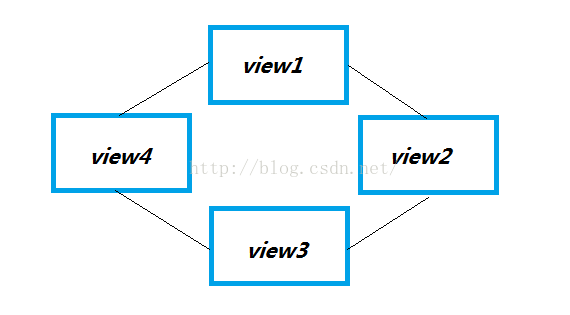
要同時支援上翻與下翻,最直覺的方式是把所有節點串成一個環——首尾相接,形成真正的循環。如下圖:
為了方便操作,把每個節點封裝成一個結構體:
public class BannerViewdata {
    private int index;
    private BannerViewdata previewdata;
    private BannerViewdata nextviewdata;
    private View view;
    private Boolean isfirst = false;
    private Boolean islast = false;
}
滑動過程中,畫面上永遠只會看到三個 view:前一頁、當前頁、後一頁。只要判斷方向,再從這個環上取出對應的三個節點即可。因為它是個封閉的環,所以只需快取極少數的 view 就能無限循環下去,這正是它比前兩種做法乾淨的地方。
leftdividerxposition 與 rightdividerxposition 兩個分界點切出三個可見區域;滑動時依分界點位置呼叫 onLayout 重新定位這三個 view。
/**
 * 輪播資料節點
 */
public class BannerViewdata {
    private int index;
    private BannerViewdata previewdata;
    private BannerViewdata nextviewdata;
    private View view;
    private Boolean isfirst = false;
    private Boolean islast = false;

    public BannerViewdata(Context context, int index, BannerViewdata previewdata,
            BannerViewdata nextviewdata, View view, Boolean isfirst, Boolean islast) {
        this.index = index;
        this.previewdata = previewdata;
        this.nextviewdata = nextviewdata;
        this.isfirst = isfirst;
        this.islast = islast;
        setView(view, context);
        if (view == null) {
            throw new NullPointerException();
        }
    }

    public int getIndex() { return index; }
    public void setIndex(int index) { this.index = index; }
    public BannerViewdata getPreviewdata() { return previewdata; }
    public void setPreviewdata(BannerViewdata d) { this.previewdata = d; }
    public BannerViewdata getNextviewdata() { return nextviewdata; }
    public void setNextviewdata(BannerViewdata d) { this.nextviewdata = d; }
    public View getView() { return view; }

    public void setView(View view, Context context) {
        RelativeLayout relativeLayout = new RelativeLayout(context);
        relativeLayout.setLayoutParams(new LayoutParams(
                LayoutParams.MATCH_PARENT, LayoutParams.MATCH_PARENT));
        relativeLayout.addView(view);
        this.view = relativeLayout;
    }

    public Boolean istheFirst() { return isfirst; }
    public Boolean istheLast() { return islast; }

    public int getLength() {
        BannerViewdata first = findtheFirstViewdata();
        if (first == null) return 0;
        BannerViewdata next = first.getNextviewdata();
        if (next == null) return 1;
        if (next.islast) return 2;
        int length = 1;
        while (next != null) {
            length++;
            next = next.getNextviewdata();
            if (next.islast) return ++length;
        }
        return length;
    }

    /** 回傳索引為 0 的節點,找不到則回傳 null */
    public BannerViewdata findtheFirstViewdata() {
        if (istheFirst()) return this;
        BannerViewdata bannerViewdata = previewdata;
        while (bannerViewdata != null && !bannerViewdata.istheFirst()) {
            bannerViewdata = bannerViewdata.getPreviewdata();
        }
        return bannerViewdata;
    }
}
public class BannerViewGroup extends ViewGroup {

    private static final int PAGE_UP = 0X04, PAGE_DOWN = 0X05;
    private int movestate = PAGE_DOWN;
    private int automsiwtchtime = 3000;          // 自動切換間隔
    private int leftdividerxposition, rightdividerxposition;
    private int x0, actiondownx0;
    private BannerViewdata mBannerViewdata;      // 當前頁
    private BannerViewdata prepagedata;
    private BannerViewdata nextpagedata;
    private Boolean onAimation = false;
    private Boolean startupautomswitch = true;
    private Handler handler;
    private BannerClickListenr bannerClickListenr;
    private long downtime;

    public BannerViewGroup(Context context) { super(context); }

    public BannerViewGroup(Context context, AttributeSet attrs) {
        super(context, attrs, 0);
        init();
    }

    public BannerViewGroup(Context context, AttributeSet attrs, int defStyleAttr) {
        super(context, attrs, defStyleAttr);
        init();
    }

    @SuppressLint("NewApi")
    public BannerViewGroup(Context context, AttributeSet attrs, int defStyleAttr, int defStyleRes) {
        super(context, attrs, defStyleAttr, defStyleRes);
        init();
    }

    private TimerTask timetask = new TimerTask() {
        @Override
        public void run() {
            if (movestate == PAGE_DOWN) {
                handler.sendEmptyMessage(PAGE_DOWN);
            } else {
                handler.sendEmptyMessage(PAGE_UP);
            }
        }
    };

    private void init() {
        handler = new Handler() {
            @Override
            public void handleMessage(Message msg) {
                switch (msg.what) {
                    case PAGE_DOWN:
                        if (!onAimation) doPagedownAnimation();
                        break;
                    case PAGE_UP:
                        if (!onAimation) doPageUpAnimation();
                        break;
                }
            }
        };
    }

    public void startupautomswitch() {
        startupautomswitch = true;
        Timer timer = new Timer();
        if (mBannerViewdata.getLength() > 1) {
            timer.schedule(timetask, 1000, automsiwtchtime);
        }
    }

    @Override
    protected void onLayout(boolean changed, int l, int t, int r, int b) {
        int cWidth = getMeasuredWidth();
        int cHeight = getMeasuredHeight();
        int childcount = getChildCount();

        // 先把所有子 view 移出畫面,避免重疊殘影
        for (int i = 0; i < childcount; i++) {
            View childview = getChildAt(i);
            childview.layout(-cWidth, 0, 0, 0);
        }

        // 前一頁:右邊界貼齊左分界點
        if (prepagedata != null) {
            View childView1 = prepagedata.getView();
            if (childView1 != null) {
                int cl1 = leftdividerxposition - cWidth, ct1 = 0;
                int cr1 = leftdividerxposition, cb1 = cHeight + ct1;
                childView1.layout(cl1, ct1, cr1, cb1);
            }
        }

        // 當前頁:剛好填滿兩個分界點之間
        if (mBannerViewdata != null) {
            View childView2 = mBannerViewdata.getView();
            if (childView2 != null) {
                int cl1 = leftdividerxposition, ct1 = 0;
                int cr1 = rightdividerxposition, cb1 = cHeight + ct1;
                childView2.layout(cl1, ct1, cr1, cb1);
            }
        }

        // 後一頁:左邊界貼齊右分界點
        if (nextpagedata != null) {
            View childView3 = nextpagedata.getView();
            if (childView3 != null) {
                int cl2 = rightdividerxposition, ct2 = 0;
                int cr2 = cl2 + cWidth, cb2 = cHeight + ct2;
                childView3.layout(cl2, ct2, cr2, cb2);
            }
        }
    }

    @Override
    protected void onMeasure(int widthMeasureSpec, int heightMeasureSpec) {
        super.onMeasure(widthMeasureSpec, heightMeasureSpec);
        int sizeWidth = MeasureSpec.getSize(widthMeasureSpec);
        int sizeHeight = MeasureSpec.getSize(heightMeasureSpec);
        measureChildren(
                MeasureSpec.makeMeasureSpec(sizeWidth, MeasureSpec.AT_MOST),
                MeasureSpec.makeMeasureSpec(sizeHeight, MeasureSpec.AT_MOST));
        leftdividerxposition = 0;
        rightdividerxposition = sizeWidth + leftdividerxposition;
        setMeasuredDimension(sizeWidth, sizeHeight);
    }

    /** 設定資料 */
    public void setBannerViewData(BannerViewdata bannerViewdata) {
        if (!checkBannersecurity(bannerViewdata)) return;
        mBannerViewdata = bannerViewdata.findtheFirstViewdata();
        if (!checkBannersecurity(mBannerViewdata)) return;
        prepagedata = mBannerViewdata.getPreviewdata();
        nextpagedata = mBannerViewdata.getNextviewdata();
        addview();
        if (startupautomswitch) {
            startupautomswitch();
        }
    }

    private void addview() {
        BannerViewdata viewdata = mBannerViewdata;
        while (checkBannersecurity(viewdata)) {
            addView(viewdata.getView());
            viewdata = viewdata.getNextviewdata();
            if (checkBannersecurity(viewdata) && viewdata.istheLast()) {
                addView(viewdata.getView());
                return;
            }
        }
    }

    @Override
    public boolean onInterceptTouchEvent(MotionEvent ev) {
        return true;   // 事件全部由自己攔截處理
    }

    @SuppressLint("ClickableViewAccessibility")
    @Override
    public boolean onTouchEvent(MotionEvent event) {
        int x = (int) event.getX();
        if (onAimation) return true;

        switch (event.getAction()) {
            case MotionEvent.ACTION_DOWN:
                downtime = System.currentTimeMillis();
                x0 = x;
                actiondownx0 = x0;
                break;
            case MotionEvent.ACTION_MOVE:
                int offsetx = x - x0;
                x0 = x;
                leftdividerxposition += offsetx;
                rightdividerxposition = leftdividerxposition + getWidth();
                movestate = (x < actiondownx0) ? PAGE_DOWN : PAGE_UP;
                onLayout(true, getLeft() + offsetx, getTop(),
                        getRight() + offsetx, getBottom());
                break;
            case MotionEvent.ACTION_UP:
                doclickListener(x);
                Boolean hasmoved = Math.abs(x - actiondownx0) > 5;
                if (hasmoved) {
                    // 位移明顯,依方向翻頁
                    if (x < actiondownx0) {
                        movestate = PAGE_DOWN;
                        doPagedownAnimation();
                    } else {
                        movestate = PAGE_UP;
                        doPageUpAnimation();
                    }
                } else {
                    // 位移不明顯,依放開位置決定翻向
                    if (x > getWidth() / 2) {
                        movestate = PAGE_DOWN;
                        doPagedownAnimation();
                    } else {
                        movestate = PAGE_UP;
                        doPageUpAnimation();
                    }
                }
                break;
        }
        return true;
    }

    /** 點擊事件派發 */
    private void doclickListener(int x) {
        if (!isckickeven()) return;
        if (bannerClickListenr == null) return;
        if (x < leftdividerxposition) {
            if (prepagedata != null) {
                bannerClickListenr.onckick(prepagedata.getIndex(), prepagedata);
            }
        } else {
            if (nextpagedata != null) {
                bannerClickListenr.onckick(nextpagedata.getIndex(), nextpagedata);
            }
        }
    }

    /** 以按下與放開的時間差判斷是否為點擊 */
    private Boolean isckickeven() {
        long timeoffset = System.currentTimeMillis() - downtime;
        downtime = 0;
        return timeoffset > 30 && timeoffset < 100;
    }

    /** 上翻動畫:當前頁往右滑出 */
    private void doPageUpAnimation() {
        final ValueAnimator valueAnimator = getValueAnimator();
        valueAnimator.setDuration(1000);
        final int startposition = leftdividerxposition;
        final int distance = getWidth() - startposition;
        valueAnimator.addUpdateListener(new AnimatorUpdateListener() {
            @Override
            public void onAnimationUpdate(ValueAnimator animation) {
                float value = (Float) animation.getAnimatedValue();
                leftdividerxposition = (int) (startposition + distance * value);
                rightdividerxposition = leftdividerxposition + getWidth();
                if (leftdividerxposition >= getWidth()) {
                    valueAnimator.cancel();
                    mBannerViewdata = mBannerViewdata.getPreviewdata();
                    committchange();
                    onAimation = false;
                    return;
                }
                onLayout(true, 0, 0, 0, 0);
            }
        });
        valueAnimator.start();
    }

    /** 動畫結束後把中間頁換成新的當前頁,並重置分界點 */
    private void committchange() {
        if (mBannerViewdata != null) {
            prepagedata = mBannerViewdata.getPreviewdata();
            nextpagedata = mBannerViewdata.getNextviewdata();
            leftdividerxposition = 0;
            rightdividerxposition = leftdividerxposition + getWidth();
        }
    }

    /** 下翻動畫:後一頁往左滑入 */
    private void doPagedownAnimation() {
        final ValueAnimator valueAnimator = getValueAnimator();
        valueAnimator.addUpdateListener(new AnimatorUpdateListener() {
            @Override
            public void onAnimationUpdate(ValueAnimator animation) {
                float value = (Float) animation.getAnimatedValue();
                rightdividerxposition = (int) (rightdividerxposition * (1 - value));
                leftdividerxposition = rightdividerxposition - getWidth();
                if (rightdividerxposition <= 0) {
                    valueAnimator.cancel();
                    mBannerViewdata = mBannerViewdata.getNextviewdata();
                    committchange();
                    onAimation = false;
                    return;
                }
                onLayout(true, 0, 0, 0, 0);
            }
        });
        valueAnimator.start();
    }

    private ValueAnimator getValueAnimator() {
        final ValueAnimator valueAnimator = ValueAnimator.ofFloat(0, 1);
        valueAnimator.setDuration(3000);
        onAimation = true;
        return valueAnimator;
    }

    private Boolean checkBannersecurity(BannerViewdata bannerViewdata) {
        return bannerViewdata != null;
    }

    @Override
    protected void onDetachedFromWindow() {
        super.onDetachedFromWindow();
        timetask.cancel();
        handler = null;
    }

    public void setOnBannerClickListenr(BannerClickListenr bannerClickListenr) {
        this.bannerClickListenr = bannerClickListenr;
    }

    public interface BannerClickListenr {
        void onckick(int index, BannerViewdata bannerViewdata);
    }
}
為什麼只需要三個 view?因為環狀結構讓「下一頁的最後一項」天然就是「第一頁」,不需要任何特殊判斷,也不需要在動畫結束後做索引校正——這正是它同時解決了做法一的空白頁與做法二的動畫消失問題。
動畫結束後的資料提交由 committchange() 負責:把當前頁指標往前或往後移動一格,重新取出前后頁,再把兩個分界點復位。整個切換因此變成「先滑動、再換資料、最後復位」三段,邏輯清楚。
點擊判定用按下與放開的時間差(30~100 毫秒)來判斷,避免與滑動手勢衝突;至於點到的是前一頁還是後一頁,則比較 X 座標與左分界點即可。
目前程式碼已能符合需求,唯一還沒處理的是節點數量少於三個的情況——不足三個時無法構成完整的環,輪播會異常。實際使用時請自行加上數量檢查與降級處理(例如少於三個就關閉自動輪播)。
 通過 Intent 啟動 Activity:讓界面跳轉靈活解耦
為什麼要用 Intent 關聯 Activity 寫界面跳轉時,最直白的做法是 startActivity(new Intent(this, TargetActivity
 仿 QQ5.0 側滑菜單:基於 ViewDragHelper 實現
QQ5.0 的側滑效果有多種實現方式,今天我們用 ViewDragHelper 來打造一個帶炫酷動畫的 SlidingMenu。 一、自定義 SlidingMenu 骨
 在 Android 專案中移植 FFmpeg(一):環境建置與交叉編譯
這幾天為了測試 FFmpeg 取影片幀的效率,認真玩了一次移植。以下記錄整個流程,所有測試都在 macOS 環境下進行。 一、取得 FFmpeg 源碼 官方下載頁(htt
 Android Window、PhoneWindow、WindowManager 與 Activity 學習心得(第一彈)
閱讀本文前,你需要先理解 Context 上下文環境與 Window 窗口的準確含義。那麼,我們就從 Activity 的啟動開始講起。 Activity 的啟動流程