

編輯:關於 Android 程式設計
在 Android 開發裡,Context 是個熟悉又陌生的角色。啟動 Activity 要它,彈 Dialog 要它,取資源、開 Service、讀 SharedPreferences 也都要它。但如果被問一句「Context 究竟是何物」,很多人會卡住。
官方 API 的描述是這樣的:
Interface to global information about an application environment. This is an abstract class whose implementation is provided by the Android system. It allows access to application-specific resources and classes, as well as up-calls for application-level operations such as launching activities, broadcasting and receiving intents, etc.
換成白話:Context 是應用運行環境資訊的對外接口,是一個由 Android 系統實作的抽象類;透過它能取得應用專屬的資源與類別,也能執行啟動 Activity、發送與接收廣播這類應用層級的操作。
抽象類一定會有實作。最常見的三個是 Activity、Service 與 Application,牠們的繼承鏈略有不同:
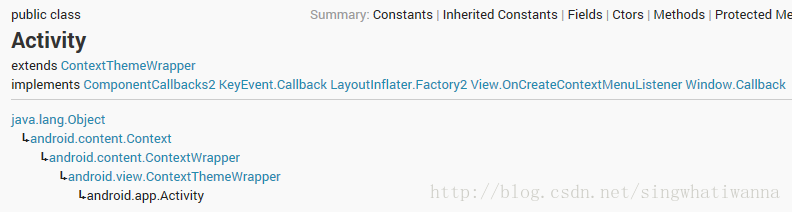
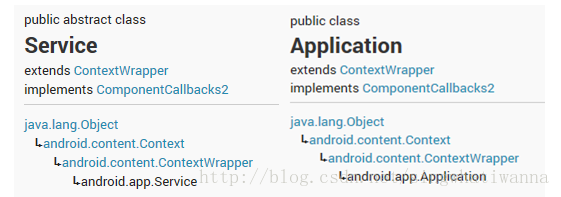
也就是說,我們每天在用的 Activity、Service、Application,本身就是 Context。實務上最容易混淆的一對,是 Activity 的 Context 與 Application 的 Context。
把 API 文件翻開,會發現很多我們以為是「Activity 的方法」,其實源頭都在 Context。
abstract void startActivity(Intent intent)
abstract void startActivity(Intent intent, Bundle options)
Activity 裡的 startActivity() 其實是對 Context 同名方法的重寫。
abstract Resources getResources()
abstract SharedPreferences getSharedPreferences(String name, int mode)
final String getString(int resId)
final String getString(int resId, Object... formatArgs)
abstract ComponentName startService(Intent service)
abstract boolean stopService(Intent service)
除此之外,Context 上還掛著大量與資源存取、元件通訊相關的方法。可以這樣理解:Context 是整個應用的「手與腳」,負責把資源取回來,也負責代為執行 Activity 與 Service 的操作,是讓程式保持通暢的樞紐。
想知道 Context 實際上被拿去做什麼,跟著 Toast.makeText() 走一遍最清楚。它接收到的 Context 被用在這一行:
View v = inflate.inflate(com.android.internal.R.layout.transient_notification, null);
這裡透過 Context 取得 LayoutInflater 服務,再載入系統預先寫好的 Toast 布局;接著又透過同一個 Context 去讀取字串與圖示等资源。結論很清楚:Toast 的外觀與顯示,都是靠 Context 向系統調用資源完成的。
差別只有一個字:壽命。
Activity 的 Context 依附在該 Activity 的生命週期上,頁面一關,它就失效;Application 的 Context 則與整個應用同生共死。實務上的結論是:如果一個長壽命的物件(例如單例、靜態變數、長時間存在的管理員類別)需要 Context,傳 Application 的 Context 進去,否則很容易因為間接持有已銷毀的 Activity 而造成記憶體洩漏。反之,若只是當前畫面內的 Dialog、Toast,用 Activity 的 Context 才能拿到正確的主題與視窗樣式。
把 Context 想成「應用環境的把手」,而不是某個頁面專屬的東西,很多設計上的猶豫就會自動消失。
 Android 實現 3D 旋轉 View 的步驟解析
本文說明如何以自定義 ViewGroup 實作具 3D 旋轉效果的 Android View,重點包含水平滑動、手感優化與立體渲染。先完成水平滑動可建立一個繼承 View
 Android drawable 微技巧:揭開圖片自動縮放的秘密
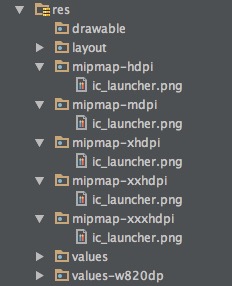
為了準備下一個系列的文章,我最近花了大量時間研讀源碼。由於系列內容還需一段時間才能完成,為了不讓大家久等,今天先分享一篇單篇小文,聊一聊 Android drawable
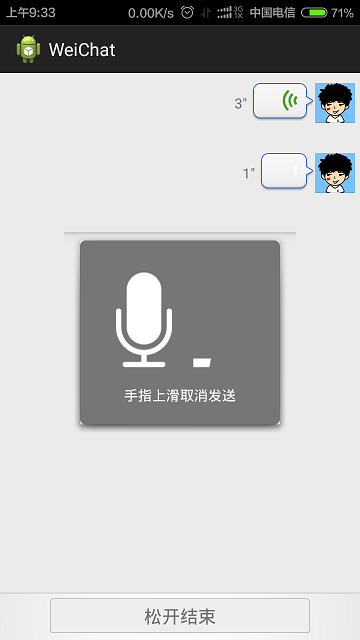 Android 仿微信語音聊天功能實作
語音聊天是即時通訊的重要功能。本文仿微信的錄音與播放流程,說明如何以 MediaRecorder 錄音、以自訂按鈕處理手勢、以 Dialog 顯示狀態,並用 ListVi
 Android Wi-Fi Display(Miracast)深入解析:從背景到 4.2 實現
Android 4.2 新增了 Wi-Fi Display 支援,讓裝置能透過 Wi-Fi 將畫面投遞到遠端顯示裝置。本文從 Miracast 的背景知識出發,再结合 A