

編輯:關於 Android 程式設計
DiskLruCache 是一套硬碟(磁碟)緩存方案,淘汰策略與
LruCache同源,都基於 LRU 演算法——最近最少使用的數據優先被清掉。
需要特別說明的是,這個類並不在 Android SDK 裡,它由開源社群維護,需要自行下載原始碼放進專案(常見做法是從 AOSP 的 libcore 中取得)。
唯一的入口是靜態方法 open():
public static DiskLruCache open(File directory, int appVersion, int valueCount, long maxSize)
directory:緩存存放目錄,通常選用應用內部或外部緩存資料夾,這樣卸載時數據會一起被清除。appVersion:當前應用版本號。版本一旦變化,該目錄下的所有緩存都會失效清空。valueCount:同一個 key 可以對應幾個檔案,一般傳 1,讓 key 與檔案一一對應。maxSize:允許佔用的最大位元組數,超標時演算法會自動淘汰舊數據。a. 挑一個合適的緩存目錄
public File getDiskCacheDir(Context context, String uniqueName) {
    String cachePath;
    if (Environment.MEDIA_MOUNTED.equals(Environment.getExternalStorageState())
            || !Environment.isExternalStorageRemovable()) {
        cachePath = context.getExternalCacheDir().getPath();
    } else {
        cachePath = context.getCacheDir().getPath();
    }
    File cacheDir = new File(cachePath + File.separator + uniqueName);
    if (!cacheDir.exists()) {
        cacheDir.mkdirs();
    }
    return cacheDir;
}
邏輯是:SD 卡存在或不可移除時用 getExternalCacheDir(),路徑形如 /sdcard/Android/data/<包名>/cache;否則退回 getCacheDir(),路徑形如 /data/data/<包名>/cache。前者空間更大,通常是我們的首選。
b. 取得版本號
public int getAppVersion(Context context) {
    try {
        PackageInfo info = context.getPackageManager()
                .getPackageInfo(context.getPackageName(), 0);
        return info.versionCode;
    } catch (NameNotFoundException e) {
        e.printStackTrace();
    }
    return 1;
}
c. 組合起來
private DiskLruCache mDiskCache;
private long DISK_CACHE_SIZE = 1024 * 1024 * 10; // 10MB

File cacheDir = getDiskCacheDir(mContext, "Bitmap");
mDiskCache = DiskLruCache.open(cacheDir, getAppVersion(context), 1, DISK_CACHE_SIZE);
寫入要靠 DiskLruCache.Editor,透過 edit(key) 取得:
public Editor edit(String key) throws IOException
這個 key 會成為檔名,並與資源 URL 一一對應。直接把 URL 當 key 並不合適——URL 裡常有 /、?、& 等在檔名中不合法的字符。最省事的做法是對 URL 做一次 MD5,結果既唯一,又只包含 0-F,完全符合命名規則。
public String hashKeyForDisk(String key) {
    String cacheKey;
    try {
        final MessageDigest mDigest = MessageDigest.getInstance("MD5");
        mDigest.update(key.getBytes());
        cacheKey = bytesToHexString(mDigest.digest());
    } catch (NoSuchAlgorithmException e) {
        cacheKey = String.valueOf(key.hashCode());
    }
    return cacheKey;
}

private String bytesToHexString(byte[] bytes) {
    StringBuilder sb = new StringBuilder();
    for (int i = 0; i < bytes.length; i++) {
        String hex = Integer.toHexString(0xFF & bytes[i]);
        if (hex.length() == 1) {
            sb.append('0');
        }
        sb.append(hex);
    }
    return sb.toString();
}
取得 Editor 並寫資料:
String imageUrl = "https://.....jpg";
String key = hashKeyForDisk(imageUrl);
DiskLruCache.Editor editor = mDiskLruCache.edit(key);
if (editor != null) {
    OutputStream outputStream = editor.newOutputStream(0);
    if (downloadUrlToStream(url, outputStream)) {
        editor.commit();   // 提交,寫入才會生效
    } else {
        editor.abort();    // 放棄本次寫入
    }
    mDiskCache.flush();    // 把操作記錄落盤
}
下載並寫流的實現:
private boolean downloadUrlToStream(String urlString, OutputStream outputStream) {
    HttpURLConnection urlConnection = null;
    BufferedOutputStream out = null;
    BufferedInputStream in = null;
    try {
        URL url = new URL(urlString);
        urlConnection = (HttpURLConnection) url.openConnection();
        in = new BufferedInputStream(urlConnection.getInputStream(), 8 * 1024);
        out = new BufferedOutputStream(outputStream, 8 * 1024);
        int b;
        while ((b = in.read()) != -1) {
            out.write(b);
        }
        return true;
    } catch (final IOException e) {
        e.printStackTrace();
    } finally {
        if (urlConnection != null) {
            urlConnection.disconnect();
        }
        try {
            if (out != null) out.close();
            if (in != null) in.close();
        } catch (final IOException e) {
            e.printStackTrace();
        }
    }
    return false;
}
newOutputStream() 的 index 參數取決於 valueCount,這裡是 1,所以傳 0。
a. 先用 get() 拿到 Snapshot 物件:
public synchronized Snapshot get(String key) throws IOException
String key = hashKeyForDisk(imageUrl);
DiskLruCache.Snapshot snapShot = mDiskLruCache.get(key);
b. 從 Snapshot 取得輸入流(index 同樣傳 0):
InputStream is = snapShot.getInputStream(0);
c. 解成 Bitmap:
Bitmap bitmap = BitmapFactory.decodeStream(is);
// 刪除單個 key,日常很少手動調用,因為淘汰由 maxSize 自動完成
public synchronized boolean remove(String key) throws IOException

// 目前緩存總大小(位元組),可用於設置頁顯示佔用空間
public synchronized long size()

// 清空全部緩存,實現「手動清理」功能
public void delete() throws IOException
public synchronized void flush() throws IOException {
    checkNotClosed();
    trimToSize();
    journalWriter.flush();
}
這個方法把記憶體中的操作記錄同步到 journal 日誌檔。它非常重要——DiskLruCache 能正常工作的前提就是依賴 journal 的內容。實踐中可以在 Activity 的 onPause() 裡調一次。
把上述能力封裝進一個單例的 DiskCacheImageLoader,對外只暴露「加載」與「取消」兩個動作,內部用 AsyncTask 承擔網路請求。
public class DiskCacheImageLoader {

    private Context mContext;
    private Set<DiskCacheAsyncTask> mTaskSet;
    private DiskLruCache mDiskCache;
    private static DiskCacheImageLoader mDiskCacheImageLoader;

    public static DiskCacheImageLoader getInstance(Context context) {
        if (mDiskCacheImageLoader == null) {
            synchronized (DiskCacheImageLoader.class) {
                if (mDiskCacheImageLoader == null) {
                    mDiskCacheImageLoader = new DiskCacheImageLoader(context);
                }
            }
        }
        return mDiskCacheImageLoader;
    }

    private DiskCacheImageLoader(Context context) {
        mTaskSet = new HashSet<>();
        mContext = context.getApplicationContext();
        File diskCacheDir = getDiskCacheDir(mContext, "Bitmap");
        if (!diskCacheDir.exists()) {
            diskCacheDir.mkdirs();
        }
        try {
            mDiskCache = DiskLruCache.open(diskCacheDir, 1, 1, 1024 * 1024 * 20);
        } catch (IOException e) {
            e.printStackTrace();
        }
    }

    /** 對外主入口:先查緩存,命中就直接顯示,否則異步下載 */
    public void loadImage(ImageView imageView, String url) {
        Bitmap bitmap = null;
        try {
            bitmap = getBitmapFromDiskCache(url);
        } catch (IOException e) {
            e.printStackTrace();
        }
        if (bitmap == null) {
            DiskCacheAsyncTask task = new DiskCacheAsyncTask(imageView);
            task.execute(url);
            mTaskSet.add(task);
        } else {
            imageView.setImageBitmap(bitmap);
        }
    }

    /** 只加載 ListView 當前可見區間內的圖片,避免無效請求 */
    public void loadTagedImagesInListView(int start, int end, String[] urls, ListView mListView) {
        for (int i = start; i < end; i++) {
            String url = urls[i];
            ImageView imageView = (ImageView) mListView.findViewWithTag(url);
            loadImage(imageView, url);
        }
        Log.i("num of task", " " + mTaskSet.size());
    }

    private Bitmap getBitmapFromDiskCache(String url) throws IOException {
        if (mDiskCache == null) return null;
        String key = hashKeyFormUrl(url);
        DiskLruCache.Snapshot snapShot = mDiskCache.get(key);
        if (snapShot != null) {
            InputStream ins = snapShot.getInputStream(0);
            return BitmapFactory.decodeStream(ins);
        }
        return null;
    }

    private Bitmap addBitmapToDiskCache(String url) throws IOException {
        if (mDiskCache == null) return null;
        String key = hashKeyFormUrl(url);
        DiskLruCache.Editor editor = mDiskCache.edit(key);
        if (editor != null) {
            OutputStream outputStream = editor.newOutputStream(0);
            if (downloadUrlToStream(url, outputStream)) {
                editor.commit();
            } else {
                editor.abort();
            }
            mDiskCache.flush();
        }
        return getBitmapFromDiskCache(url);
    }

    /** 列表滑動時取消所有在飛的請求 */
    public void cancelAllTask() {
        if (mTaskSet != null) {
            for (DiskCacheAsyncTask task : mTaskSet) {
                task.cancel(false);
            }
            mTaskSet.clear();
            Log.i("num of task", " " + mTaskSet.size());
        }
    }

    private class DiskCacheAsyncTask extends AsyncTask<String, Void, Bitmap> {
        private ImageView imageView;

        public DiskCacheAsyncTask(ImageView imageView) {
            this.imageView = imageView;
        }

        @Override
        protected Bitmap doInBackground(String... params) {
            Bitmap bitmap = getBitmapFromURL(params[0]);
            if (bitmap != null) {
                try {
                    addBitmapToDiskCache(params[0]);
                } catch (IOException e) {
                    e.printStackTrace();
                }
            }
            return bitmap;
        }

        @Override
        protected void onPostExecute(Bitmap bitmap) {
            super.onPostExecute(bitmap);
            if (imageView != null && bitmap != null) {
                imageView.setImageBitmap(bitmap);
            }
            mTaskSet.remove(this);
            Log.i("num of task", " " + mTaskSet.size());
        }
    }
}
效果目標:首次進入時從網路加載;斷網退出後再進來,直接從本地 DiskLruCache 讀取。
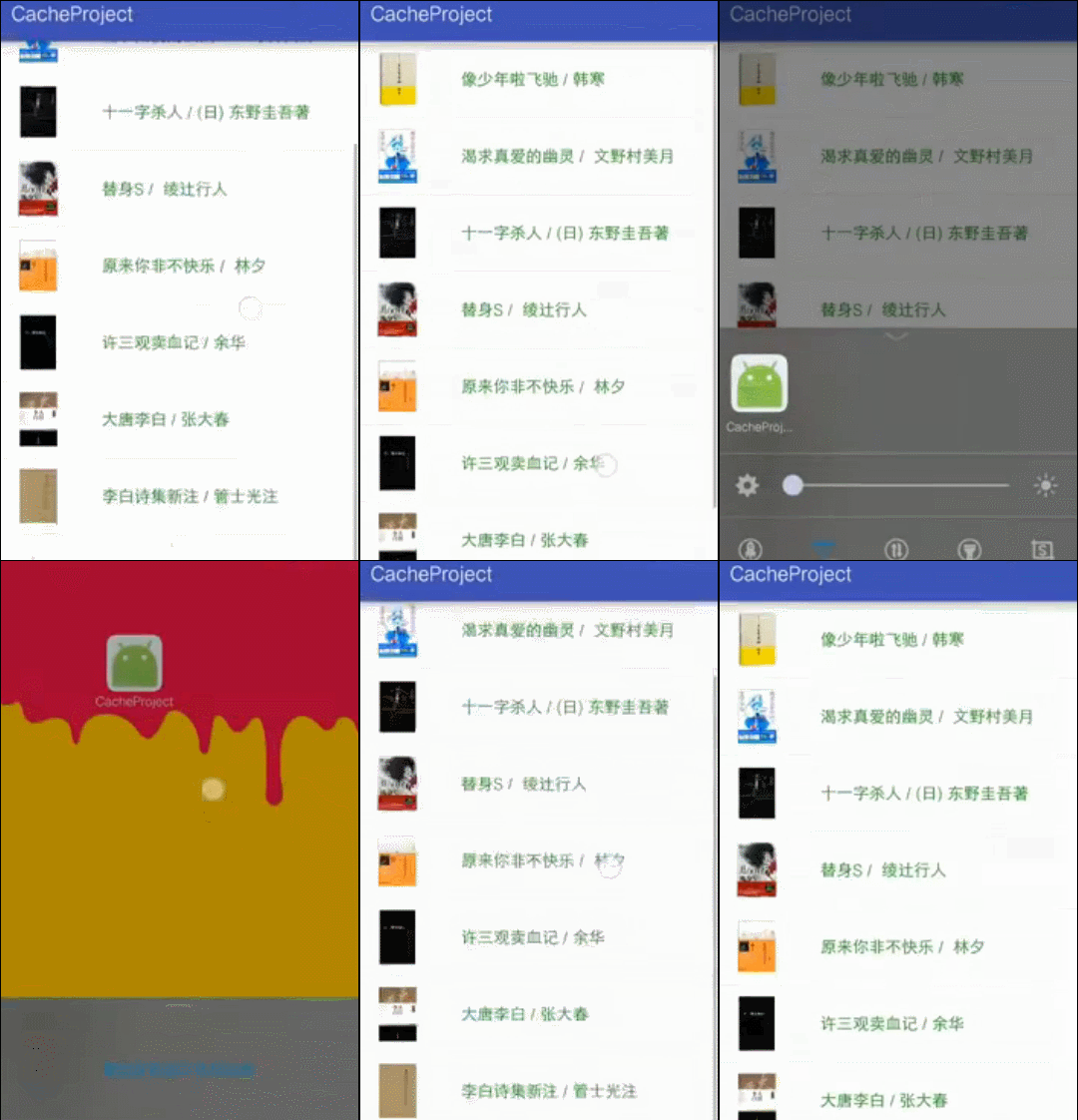
核心思路是「滑動中取消、停下來才加載」,這樣能大幅降低共識請求量:
listView.setOnScrollListener(new AbsListView.OnScrollListener() {
    @Override
    public void onScrollStateChanged(AbsListView absListView, int scrollState) {
        if (scrollState == SCROLL_STATE_IDLE) {
            mDiskImageLoader.loadTagedImagesInListView(mStart, mEnd, urls, listView);
        } else {
            mDiskImageLoader.cancelAllTask();
        }
    }

    @Override
    public void onScroll(AbsListView view, int firstVisibleItem,
                         int visibleItemCount, int totalItemCount) {
        mStart = firstVisibleItem;
        mEnd = firstVisibleItem + visibleItemCount;
        if (mFirstIn && visibleItemCount > 0) {
            mDiskImageLoader.loadTagedImagesInListView(mStart, mEnd, urls, listView);
            mFirstIn = false;
        }
    }
});
需要補充的是,只用磁碟緩存並不足以撐起流暢的列表——每次命中緩存仍然要解碼一次,開銷不小。成熟方案(如 Glide、Fresco)都是「記憶體緩存 + 磁碟緩存」雙層結構,並加上請求去重與圖片複用。本文的 DiskLruCache 正是那層磁碟緩存的地基。
 Android 開發筆記:RecyclerView 水平多行列表的加頭加尾封裝
RecyclerView 本身並不提供 addHeaderView / addFooterView 這樣的 API,如果我們需要一個既能水平多行排列、又支持頭尾布局的列表
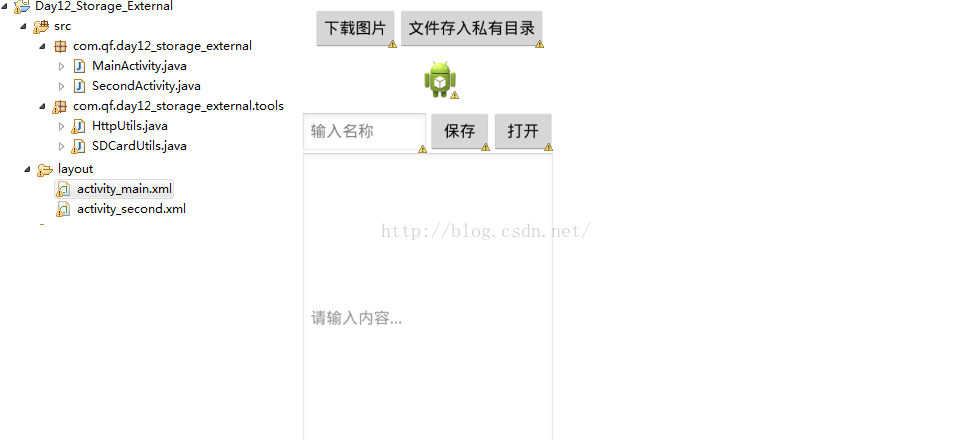 Android 數據存儲之外部存儲(SD 卡)External Storage 完全指南
一、特點1、需要插入 SD 卡;2、分為兩部分:SD 的公共目錄與 SD 的私有目錄;3、公共目錄下的文件可被各應用程序共享,私有目錄下的文件僅能被當前應用訪問;4、程序
 BlueStacks 安卓模擬器怎麼裝?在 Windows 上跑安卓應用的圖解流程
手機螢幕越做越大,對畫面的要求也跟著提高。但如果你手邊只有一台 Windows 電腦,其實不必為了跑某個安卓應用再買一台裝置——BlueStacks 就是讓安卓遊戲與軟體
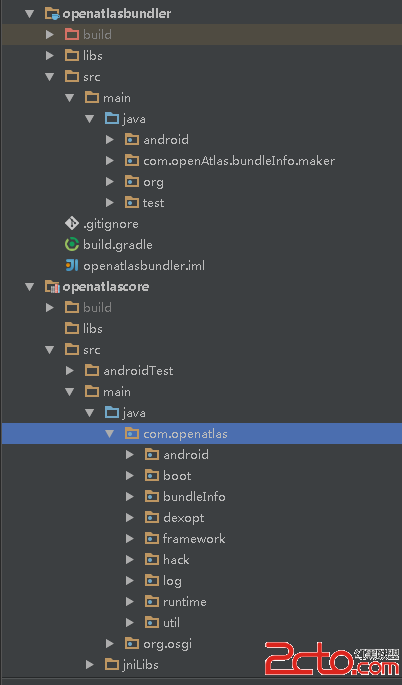 Android 插件化實作:OpenAtlas 框架初次上手指南
OpenAtlas 是一款相當完整的 Android 非代理式動態部署框架,目前狀態已趨於穩定。與傳統代理方案不同,OpenAtlas 需要將動態部署的元件事先註冊到 m