

編輯:關於 Android 程式設計
主線程之所以能接收 Handler 的消息,是因為它在啟動時就已經建立好了 Looper 對象。
/*** ActivityThread.java ***/ public static void main(String[] args) { Looper.prepareMainLooper(); ActivityThread thread = new ActivityThread(); thread.attach(false); if (sMainThreadHandler == null) { sMainThreadHandler = thread.getHandler(); } Looper.loop(); }
而如果我們自己建立一個線程,是無法接收 Handler 消息的,必須為該線程建立一個 Looper 對象才行。建立帶有 Looper 的線程的方法如下:
class LooperThread extends Thread { public Handler mHandler; public void run() { Looper.prepare(); mHandler = new Handler() { public void handleMessage(Message msg) { // process incoming messages here } }; Looper.loop(); } } 實際上,主線程建立 Looper 的過程和上面是一模一樣的。下面根據這個流程,簡單介紹一下 Android 的 Looper 機制。
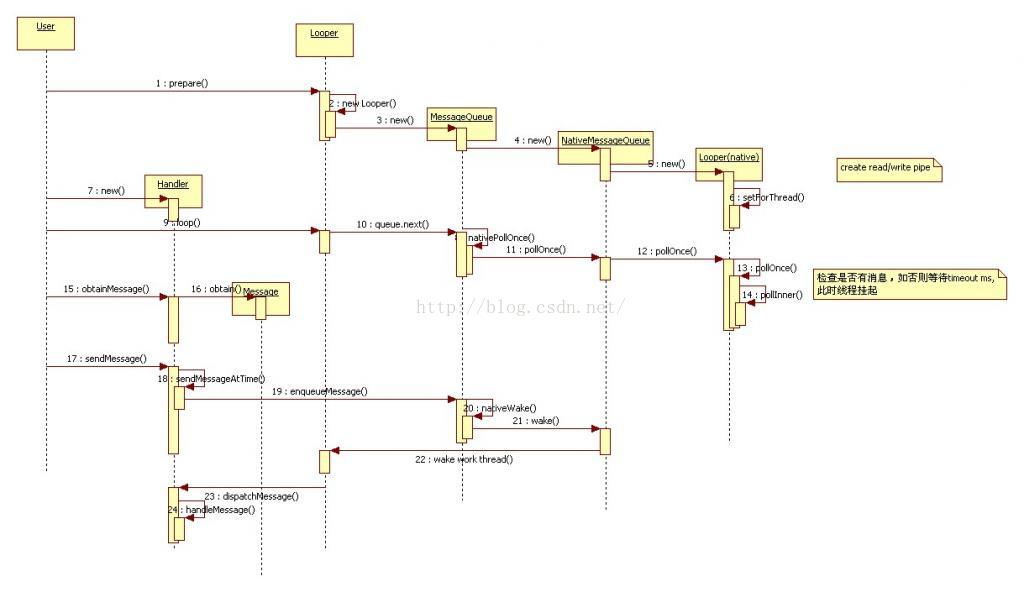
Android 應用程式本質上是靠消息來驅動的。每一個擁有 Looper 的線程(如主線程),都有一條消息隊列;其他線程把消息放進這條隊列,Looper 線程便不斷循環地從隊列裡取出消息並處理。當沒有消息可處理時,Looper 線程就進入阻塞狀態,直到有新消息需要處理時才被喚醒。
以下基於 Android 6.0 的源碼,列出涉及到的類所在位置
frameworks/base/core/java/android/os/Handler.java frameworks/base/core/java/android/os/Message.java frameworks/base/core/java/android/os/MessageQueue.java frameworks/base/core/java/android/os/Looper.java frameworks/base/core/jni/android_os_MessageQueue.cpp system/core/libutils/Looper.cpp
package android.os; public final class Looper { //為每一個線程維護一個Looper static final ThreadLocal sThreadLocal = new ThreadLocal(); //主線程Looper,每個進程只有一個 private static Looper sMainLooper; //Looper的消息隊列 final MessageQueue mQueue; //Looper所在的線程 final Thread mThread; public static void prepare() { prepare(true); } private static void prepare(boolean quitAllowed) { //同一個線程不能重復創建Looper if (sThreadLocal.get() != null) { throw new RuntimeException("Only one Looper may be created per thread"); } sThreadLocal.set(new Looper(quitAllowed)); } //創建主線程Looper,由系統調用 public static void prepareMainLooper() { prepare(false); synchronized (Looper.class) { if (sMainLooper != null) { throw new IllegalStateException("The main Looper has already been prepared."); } sMainLooper = myLooper(); } } /** * Returns the application's main looper, which lives in the main thread of the application. */ public static Looper getMainLooper() { synchronized (Looper.class) { return sMainLooper; } } /** * Run the message queue in this thread. Be sure to call * {@link #quit()} to end the loop. */ public static void loop() { final Looper me = myLooper(); if (me == null) { throw new RuntimeException("No Looper; Looper.prepare() wasn't called on this thread."); } final MessageQueue queue = me.mQueue; for (;;) { Message msg = queue.next(); // might block if (msg == null) { // No message indicates that the message queue is quitting. return; } msg.target.dispatchMessage(msg); msg.recycleUnchecked(); } } /** * Return the Looper object associated with the current thread. Returns * null if the calling thread is not associated with a Looper. */ public static @Nullable Looper myLooper() { return sThreadLocal.get(); } /** * Return the {@link MessageQueue} object associated with the current * thread. This must be called from a thread running a Looper, or a * NullPointerException will be thrown. */ public static @NonNull MessageQueue myQueue() { return myLooper().mQueue; } private Looper(boolean quitAllowed) { mQueue = new MessageQueue(quitAllowed); mThread = Thread.currentThread(); } //直接退出,回收消息隊列裡所有的消息 public void quit() { mQueue.quit(false); } //處理完當前的消息,回收消息隊列裡要在將來某個時刻處理的消息 public void quitSafely() { mQueue.quit(true); } /** * Gets the Thread associated with this Looper. * * @return The looper's thread. */ public @NonNull Thread getThread() { return mThread; } /** * Gets this looper's message queue. * * @return The looper's message queue. */ public @NonNull MessageQueue getQueue() { return mQueue; } }
呼叫 Looper.prepare() 會 new 一個 Looper 對象,而在 Looper 的建構子裡,又會 new 一個消息隊列 MessageQueue。
/*** MessageQueue.java ***/ MessageQueue(boolean quitAllowed) { mQuitAllowed = quitAllowed; mPtr = nativeInit(); } 透過 JNI 機制,MessageQueue 呼叫 nativeInit() 函數,在 JNI 層建立一個 NativeMessageQueue 對象,並把該對象的句柄保存在 mPtr 變量中,程式碼如下 /*** android_os_MessageQueue.cpp ***/ static jlong android_os_MessageQueue_nativeInit(JNIEnv* env, jclass clazz) { NativeMessageQueue* nativeMessageQueue = new NativeMessageQueue(); if (!nativeMessageQueue) { jniThrowRuntimeException(env, "Unable to allocate native queue"); return 0; } nativeMessageQueue->incStrong(env); return reinterpret_cast(nativeMessageQueue); } NativeMessageQueue 初始化時又會建立一個 native 層的 Looper 對象。 /*** android_os_MessageQueue.cpp ***/ NativeMessageQueue::NativeMessageQueue() : mPollEnv(NULL), mPollObj(NULL), mExceptionObj(NULL) { mLooper = Looper::getForThread(); if (mLooper == NULL) { mLooper = new Looper(false); Looper::setForThread(mLooper); } } native 層的 Looper 和 java 層的 Looper 是一一對應的,主要負責喚醒 java 層的 Looper,後面會講到喚醒原理。
Handler 有多個建構方法,主要分兩類:一類帶有 Looper 參數,構造時可以直接把 Looper 對象傳進去;另一類不帶 Looper 參數,這一類構造會呼叫到下面這個隱藏的建構方法。
/*** Handler.java ***/ public Handler(Callback callback, boolean async) { mLooper = Looper.myLooper(); if (mLooper == null) { throw new RuntimeException( "Can't create handler inside thread that has not called Looper.prepare()"); } mQueue = mLooper.mQueue; mCallback = callback; mAsynchronous = async; } 由上面的程式碼可知:
呼叫 Looper.loop() 開啟消息循環。loop() 的主要邏輯如下
/*** Looper.java ***/ public static void loop() { //獲取當前線程的Looper對象 final Looper me = myLooper(); //獲取Looper對象的消息隊列 final MessageQueue queue = me.mQueue; for (;;) { //循環從消息隊列中獲取消息 //消息隊列中沒有消息,或者都是若干時間後才要處理的消息,就會阻塞在這裡 //等有新的需要馬上處理的消息或者到時間後,就會取出消息繼續執行。 Message msg = queue.next(); //從消息隊列取出消息後分發處理 msg.target.dispatchMessage(msg); //處理完消息後回收消息對象 msg.recycleUnchecked(); } } 可以看出,Looper.loop() 是一個無窮循環,其後面的程式碼一般不會執行,除非呼叫了 Looper 的 quit 方法退出消息循環。
/*** MessageQueue.java ***/ Message next() { //mPtr指向NativeMessageQueue對象 final long ptr = mPtr; if (ptr == 0) { return null; } int nextPollTimeoutMillis = 0; for (;;) { if (nextPollTimeoutMillis != 0) { //不知道是干啥的 Binder.flushPendingCommands(); } nativePollOnce(ptr, nextPollTimeoutMillis); synchronized (this) { final long now = SystemClock.uptimeMillis(); Message prevMsg = null; Message msg = mMessages; if (msg != null) { if (now < msg.when) { //下個消息還沒有准備好,需要延時處理 nextPollTimeoutMillis = (int) Math.min(msg.when - now, Integer.MAX_VALUE); } else { // Got a message. if (prevMsg != null) { prevMsg.next = msg.next; } else { mMessages = msg.next; } msg.next = null; if (DEBUG) Log.v(TAG, "Returning message: " + msg); msg.markInUse(); //取出消息,並從消息隊列移除 return msg; } } else { // No more messages. nextPollTimeoutMillis = -1; } // Process the quit message now that all pending messages have been handled. if (mQuitting) { dispose(); return null; } } // Run the idle handlers. // 省略了 idle handlers 的相關處理 // While calling an idle handler, a new message could have been delivered // so go back and look again for a pending message without waiting. nextPollTimeoutMillis = 0; } } nativePollOnce(ptr, nextPollTimeoutMillis) 這個函數最終會呼叫到 native Looper 的 pollOnce() 函數
/*** Looper.cpp ***/ Looper::pollOnce(int timeoutMillis, int* outFd, int* outEvents, void** outData) { int result = 0; for (;;) { //... if (result != 0) { //... return result; } result = pollInner(timeoutMillis); } } pollInner 這個函數比較長,而且涉及到了 Linux 的 epoll 系統呼叫介面和管道等概念,這裡不做介紹,只截取了部分程式碼,如下 /*** Looper.cpp ***/ int Looper::pollInner(int timeoutMillis) { //這裡就是等待消息,真正阻塞的地方!!! int eventCount = epoll_wait(mEpollFd, eventItems, EPOLL_MAX_EVENTS, timeoutMillis); //some error if (eventCount < 0) { result = POLL_ERROR; goto Done; } //沒有新消息,超時喚醒。 //說明消息隊列裡有delay的消息到時間該處理了。 if (eventCount == 0) { result = POLL_TIMEOUT; goto Done; } for (int i = 0; i < eventCount; i++) { int fd = eventItems[i].data.fd; uint32_t epollEvents = eventItems[i].events; if (fd == mWakeEventFd) { if (epollEvents & EPOLLIN) { awoken(); } else { ALOGW("Ignoring unexpected epoll events 0x%x on wake event fd.", epollEvents); } } else { //...... } } } 總之,無論是新消息到來還是超時喚醒,都會從這個函數返回到 MessageQueue.next() 中的 nativePollOnce(ptr, nextPollTimeoutMillis) 處,繼續往下執行。
上面說了,有新消息到來或超時時間到時,epoll_wait(mEpollFd, eventItems, EPOLL_MAX_EVENTS, timeoutMillis) 都可以被喚醒。既然有超時時間,就代表已經有延時消息被發過來了,只是還沒到點、暫時沒馬上處理。那麼什麼時候會有消息發過來呢?
先來看一下 java 層消息的發送流程。
發送消息有以下幾種方法:
1. 使用 Message 的 sendToTarget():會呼叫 Handler 的 sendMessage(Message msg) 方法
2. 使用 Handler 的 sendXXX 系列和 postXXX 系列:
sendMessage(Message msg) sendMessageDelayed(Message msg, long delayMillis) sendMessageAtTime(Message msg, long uptimeMillis) sendEmptyMessage(int what) sendEmptyMessageDelayed(int what, long delayMillis) sendEmptyMessageAtTime(int what, long uptimeMillis) post(Runnable r) postDelayed(Runnable r, long delayMillis) postAtTime(Runnable r, long uptimeMillis) //下面兩個方法會將Message插入到消息隊列的最前端 sendMessageAtFrontOfQueue(Message msg) postAtFrontOfQueue(Runnable r)以上函數最終都會呼叫到下面的函數,把 Message 放進消息隊列裡去。
/*** Handler.java ***/ private boolean enqueueMessage(MessageQueue queue, Message msg, long uptimeMillis) { msg.target = this; if (mAsynchronous) { msg.setAsynchronous(true); } return queue.enqueueMessage(msg, uptimeMillis); } /*** MessageQueue.java ***/ boolean enqueueMessage(Message msg, long when) { synchronized (this) { msg.markInUse(); msg.when = when; Message p = mMessages; boolean needWake; //如果隊列為空||插入到隊首||消息處理時間早於隊首消息處理時間 if (p == null || when == 0 || when < p.when) { // New head, wake up the event queue if blocked. msg.next = p; mMessages = msg; needWake = mBlocked; } else { needWake = mBlocked && p.target == null && msg.isAsynchronous(); Message prev; //循環遍歷隊列裡的消息,按處理時間先後順序,將新消息插入到合適位置 for (;;) { prev = p; p = p.next; if (p == null || when < p.when) { break; } if (needWake && p.isAsynchronous()) { needWake = false; } } msg.next = p; prev.next = msg; } //注意了注意了 wake wake if (needWake) { nativeWake(mPtr); } } return true; } 需要說明的是,msg.when 變量表示該消息在什麼時間點(以系統啟動時間 SystemClock.uptimeMillis() 為基準)處理。
首先了解一下什麼是 synchronization barrier(見 MessageQueue 的 postSyncBarrier() 和 removeSyncBarrier(int token) 方法)。
在 Message 中有同步消息和異步消息之分(見 Message 的 setAsynchronous(boolean async) 和 isAsynchronous() 方法)。
同步分割欄本身也是一個 Message 類型的對象,只不過它的 target 為空,如上面程式碼中 p.target == null 就代表 p 是一個同步分割欄。
簡單地說,如果消息隊列裡沒有同步分割欄,同步和異步消息沒有區別;一旦隊列裡有同步分割欄,那麼它後面的同步消息即使時間到了也不會被執行,除非同步分割欄被移除,而異步消息則不受此限制。
把消息插入隊列時,只有以下兩種情況才需要喚醒:
一種是新消息插入到隊首;
另一種是隊首是一個同步分割欄,而新插入的消息之前沒有異步消息。
其他情況說明消息正在被處理,或新消息前面還有等待處理的消息、其處理時間尚未到,則不需要喚醒。
/*** MessageQueue.java ***/ nativeWake(mPtr);
/*** android_os_MessageQueue.cpp ***/ static void android_os_MessageQueue_nativeWake(JNIEnv* env, jclass clazz, jlong ptr) { NativeMessageQueue* nativeMessageQueue = reinterpret_cast(ptr); nativeMessageQueue->wake(); } /*** android_os_MessageQueue.cpp ***/ void NativeMessageQueue::wake() { mLooper->wake(); } /*** Looper.cpp ***/ void Looper::wake() { uint64_t inc = 1; ssize_t nWrite = TEMP_FAILURE_RETRY(write(mWakeEventFd, &inc, sizeof(uint64_t))); if (nWrite != sizeof(uint64_t)) { if (errno != EAGAIN) { ALOGW("Could not write wake signal, errno=%d", errno); } } } 這裡同樣涉及 Linux 的 epoll 系統呼叫介面和管道等概念,不做深入介紹,有興趣可自行查閱資料。
Looper 線程被喚醒後,從消息隊列取出消息,然後進行分發處理。
msg.target.dispatchMessage(msg);Message 的成員變量 target 就是要處理該 Message 的目標 Handler,消息分發函數如下
/*** Handler.java ***/ public void dispatchMessage(Message msg) { if (msg.callback != null) { handleCallback(msg); } else { if (mCallback != null) { if (mCallback.handleMessage(msg)) { return; } } handleMessage(msg); } } 前面說了,發送消息使用 Handler 的 sendXXX 和 postXXX 方法。
簡單總結一下:java 層和 native 層各有一個 Looper。
java 層 Looper:維護一條消息隊列,不斷循環從隊列取消息並處理;隊列中沒有消息時等待,其他線程把消息插入隊列後,Looper 並不是馬上取出處理,而是等待喚醒。
native 層 Looper:與 java 層對應,使用 Linux 的 epoll 系統呼叫監聽事件發生(檔案有內容寫入),進而喚醒 java 層 Looper。
消息隊列:中的消息按處理時間排序。
其他線程把消息插入隊列後,再根據需要呼叫 native 接口喚醒 java 層 Looper 處理消息。
對於延時消息,則由 MessageQueue 計算延時時間,利用 epoll_wait 的超時機制超時喚醒。
 Android 6.0 動態權限:仿微信逐項申請的實現思路
對開發者來說,Android 6.0 帶來的動態權限機制大概是當年最「不友好」的變化之一。市面上多數權限框架(例如 EasyPermissions)走的都是一次性申請一批
 Android ViewPager + Fragment 實作選項卡
用 ViewPager 搭配 Fragment 做選項卡,是早期 Android 開發中相當經典的一種寫法。以下逐步拆解。 效果圖: 1. 建立 TestFragme
 Android 刮刮樂效果實作:用 Canvas 與 PorterDuff 模式做塗開式遮罩
刮刮樂的核心原理其實非常單純:在獎項上方蓋一層不透明的「銀漆」,使用者手指劃過的地方就把這層漆擦掉。換成 Android 的語言,就是「一張可繪圖的 Bitmap 當作遮
 Android Studio 技巧:給 LogCat 換上高辨識度的配色
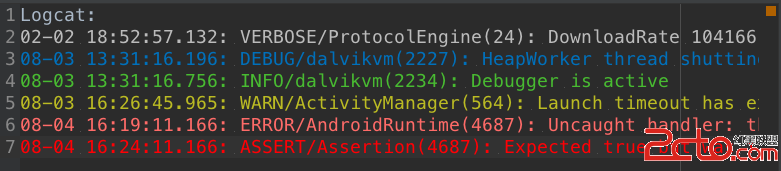
LogCat 默認配色偏素,各級別日誌混在一起時很不醒目。花一分鐘改一下顏色,排查問題的效率會明顯提升。 一、先看效果 二、設置步驟 打開 File → Setti