

編輯:關於 Android 程式設計
項目裡需要一個橫向的照片瀏覽器,於是動手做了一個,基於 HorizontalScrollView 實現。

動手之前本著「有輪子就用輪子」的精神,先去搜了一圈:「Android 橫向照片牆」、「Android 橫向照片流」、「Android 橫向照片選擇器」……結果全是豎向的瀑布流,橫向的一個都沒有。
直到拜讀了郭神的《Android 瀑布流照片牆實現,體驗不規則排列的美感》(原文連結),靈光一閃:既然豎向能實現,橫向豈不是轉個方向就好?
最終寫下來確實花了些時間,但基本原理還真是「轉了個方向」。不過改完的代碼與郭神的源碼差別不小——圖片加載那部分基本沒動,其他地方則改得比較多。需要注意三點:
1、容器從普通 ScrollView 換成 HorizontalScrollView。
2、onLayout 初始化時不再分三列(瀑布流那套),改為橫向單列,並讓每張照片寬高相等,保持正方形。
3、可見性判斷從比高度改成比寬度。
/**
 * 遍歷 imageViewList,檢查每張圖片是否在可見範圍內。
 * 離開屏幕的圖片回收其 Bitmap,回到屏幕內的重新從內存緩存取。
 */
public void checkVisibility() {
    for (int i = 0; i < imageViewList.size(); i++) {
        ImageView imageView = imageViewList.get(i);
        int borderLeft = (Integer) imageView.getTag(R.string.border_top);
        int borderRight = (Integer) imageView.getTag(R.string.border_bottom);

        if (borderLeft > getScrollX() && borderRight < getScrollX() + ColumnWith) {
            String imageUrl = (String) imageView.getTag(R.string.image_url);
            Bitmap bitmap = NGImageLoader.getBitmapFromMemoryCache(imageUrl);
            if (bitmap != null) {
                imageView.setImageBitmap(bitmap);
            } else {
                // TODO 顯示佔位圖
            }
        } else {
            // TODO 回收 Bitmap
        }
    }
}
package com.whale.nangua.toquan.view;

public class NGOthersInfoAtyHorizotalScrollView extends HorizontalScrollView
        implements View.OnTouchListener {

    /** onLayout 中的初始化只需執行一次 */
    private boolean loadOnce;

    /** 橫向單列容器 */
    private LinearLayout linearlayout_userinfo_personal_column;

    /** 累計總寬度 */
    private static int ColumnWith;

    /** 每張照片的寬度 */
    private int perphotoWidth;

    /** 記錄上次的橫向滾動距離 */
    private static int lastScrollX = -1;

    /** ScrollView 下的直接子布局 */
    private static View scrollLayout;

    /** 布局高度 */
    private static int scrollViewHeight;

    /** 當前已加載到第幾頁 */
    private int page = 0;

    /** 每頁加載數量 */
    public static final int PAGE_SIZE = 5;

    /** 所有正在下載或等待下載的任務 */
    private static Set<LoadImageTask> taskCollection;

    private com.whale.nangua.toquan.utils.NGImageLoader NGImageLoader;

    /** 界面上的所有 ImageView,便於統一回收 */
    private List<ImageView> imageViewList = new ArrayList<>();

    private String[] imageUrls;

    public NGOthersInfoAtyHorizotalScrollView(Context context, AttributeSet attrs) {
        super(context, attrs);
        NGImageLoader = NGImageLoader.getInstance();
        taskCollection = new HashSet<>();
        setOnTouchListener(this);
    }

    public void setImageUrls(String[] imageUrls) {
        this.imageUrls = imageUrls;
    }

    @Override
    protected void onLayout(boolean changed, int l, int t, int r, int b) {
        super.onLayout(changed, l, t, r, b);
        if (changed && !loadOnce) {
            scrollViewHeight = getHeight();

            linearlayout_userinfo_personal_column = new LinearLayout(getContext());
            linearlayout_userinfo_personal_column.setLayoutParams(
                    new LinearLayout.LayoutParams(
                            ViewGroup.LayoutParams.WRAP_CONTENT,
                            ViewGroup.LayoutParams.MATCH_PARENT));
            linearlayout_userinfo_personal_column.setOrientation(LinearLayout.HORIZONTAL);
            this.addView(linearlayout_userinfo_personal_column);

            perphotoWidth = scrollViewHeight;   // 正方形:寬度等於高度
            loadOnce = true;

            loadMoreImages();
            scrollLayout = getChildAt(0);
        }
    }

    /**
     * 手指離開屏幕後開始檢測滾動狀態。
     * 位置沒變說明已停止,此時才做可見性檢查與翻頁判斷。
     */
    private static Handler handler = new Handler() {
        public void handleMessage(android.os.Message msg) {
            NGOthersInfoAtyHorizotalScrollView myScrollView =
                    (NGOthersInfoAtyHorizotalScrollView) msg.obj;
            int scrollX = myScrollView.getScrollX();

            if (scrollX == lastScrollX) {
                // 滾到最右側且沒有後台任務時,加載下一頁
                if (ColumnWith + scrollX >= scrollLayout.getWidth()
                        && taskCollection.isEmpty()) {
                    myScrollView.loadMoreImages();
                }
                myScrollView.checkVisibility();
            } else {
                lastScrollX = scrollX;
                Message message = new Message();
                message.obj = myScrollView;
                handler.sendMessageDelayed(message, 5);
            }
        }
    };

    @Override
    public boolean onTouch(View v, MotionEvent event) {
        if (event.getAction() == MotionEvent.ACTION_UP) {
            Message message = new Message();
            message.obj = this;
            handler.sendMessageDelayed(message, 5);
        }
        return false;
    }

    /** 分頁加載,每張圖一個異步任務 */
    public void loadMoreImages() {
        if (!hasSDCard() || imageUrls == null) {
            return;
        }
        int startIndex = page * PAGE_SIZE;
        int endIndex = page * PAGE_SIZE + PAGE_SIZE;

        if (startIndex < imageUrls.length) {
            if (endIndex > imageUrls.length) {
                endIndex = imageUrls.length;
            }
            for (int i = startIndex; i < endIndex; i++) {
                LoadImageTask task = new LoadImageTask();
                taskCollection.add(task);
                task.execute(imageUrls[i]);
            }
            page++;
        } else {
            Toast.makeText(getContext(), "已沒有更多圖片", Toast.LENGTH_SHORT).show();
        }
    }

    private boolean hasSDCard() {
        return Environment.MEDIA_MOUNTED.equals(Environment.getExternalStorageState());
    }

    /** 異步下載任務 */
    class LoadImageTask extends AsyncTask<String, Void, Bitmap> {

        private String mImageUrl;
        private ImageView mImageView;

        public LoadImageTask() { }

        public LoadImageTask(ImageView imageView) {
            mImageView = imageView;
        }

        @Override
        protected Bitmap doInBackground(String... params) {
            mImageUrl = params[0];
            Bitmap bitmap = NGImageLoader.getBitmapFromMemoryCache(mImageUrl);
            if (bitmap == null) {
                bitmap = loadImage(mImageUrl);
            }
            return bitmap;
        }

        @Override
        protected void onPostExecute(Bitmap bitmap) {
            if (bitmap != null) {
                addImage(bitmap, perphotoWidth, perphotoWidth);
            }
            taskCollection.remove(this);
        }

        /** 本地有緩存就直接讀,沒有才走網絡 */
        private Bitmap loadImage(String imageUrl) {
            File imageFile = new File(getImagePath(imageUrl));
            if (!imageFile.exists()) {
                downloadImage(imageUrl);
            }
            Bitmap bitmap = NGImageLoader.decodeSampledBitmapFromResource(
                    imageFile.getPath(), perphotoWidth);
            if (bitmap != null) {
                NGImageLoader.addBitmapToMemoryCache(imageUrl, bitmap);
            }
            return bitmap;
        }

        private void addImage(Bitmap bitmap, int imageWidth, int imageHeight) {
            LinearLayout.LayoutParams params =
                    new LinearLayout.LayoutParams(imageWidth, imageHeight);

            if (mImageView != null) {
                mImageView.setImageBitmap(bitmap);
            } else {
                ImageView imageView = new ImageView(getContext());
                imageView.setLayoutParams(params);
                imageView.setImageBitmap(bitmap);
                imageView.setScaleType(ImageView.ScaleType.FIT_XY);
                imageView.setTag(R.string.image_url, mImageUrl);

                // 用累計寬度記錄每張圖的左右邊界
                imageView.setTag(R.string.border_top, ColumnWith);
                ColumnWith += perphotoWidth;
                imageView.setTag(R.string.border_bottom, ColumnWith);

                linearlayout_userinfo_personal_column.addView(imageView);
                imageViewList.add(imageView);
            }
        }

        private void downloadImage(String imageUrl) {
            HttpURLConnection con = null;
            BufferedOutputStream bos = null;
            BufferedInputStream bis = null;
            File imageFile = null;
            try {
                URL url = new URL(imageUrl);
                con = (HttpURLConnection) url.openConnection();
                con.setConnectTimeout(5 * 1000);
                con.setReadTimeout(15 * 1000);
                con.setDoInput(true);

                bis = new BufferedInputStream(con.getInputStream());
                imageFile = new File(getImagePath(imageUrl));
                bos = new BufferedOutputStream(new FileOutputStream(imageFile));

                byte[] b = new byte[1024];
                int length;
                while ((length = bis.read(b)) != -1) {
                    bos.write(b, 0, length);
                    bos.flush();
                }
            } catch (Exception e) {
                e.printStackTrace();
            } finally {
                try {
                    if (bis != null) bis.close();
                    if (bos != null) bos.close();
                    if (con != null) con.disconnect();
                } catch (IOException e) {
                    e.printStackTrace();
                }
            }
        }

        private String getImagePath(String imageUrl) {
            String imageName = imageUrl.substring(imageUrl.lastIndexOf("/") + 1);
            String imageDir = Environment.getExternalStorageDirectory().getPath()
                    + "/PhotoWallFalls/";
            File dir = new File(imageDir);
            if (!dir.exists()) {
                dir.mkdirs();
            }
            return imageDir + imageName;
        }
    }
}
核心機制其實就三件事:HorizontalScrollView 承擔滾動,LinearLayout(HORIZONTAL) 承擔排列,Handler 輪詢判斷「是否停止滾動」,停止後才做可見性檢查與分頁加載——避免滑動過程中頻繁解碼。
 Android 實現列表捲動時標題欄自動顯示與隱藏
越來越多應用喜歡讓頂部標題欄隨列表捲動自動收放,把更多空間還給內容。本文嘗試實現這樣一個效果:為 ListView 設定 mListView.setOnTouchList
 Android 網路應用開發完全解析:Socket 與 HTTP 通訊
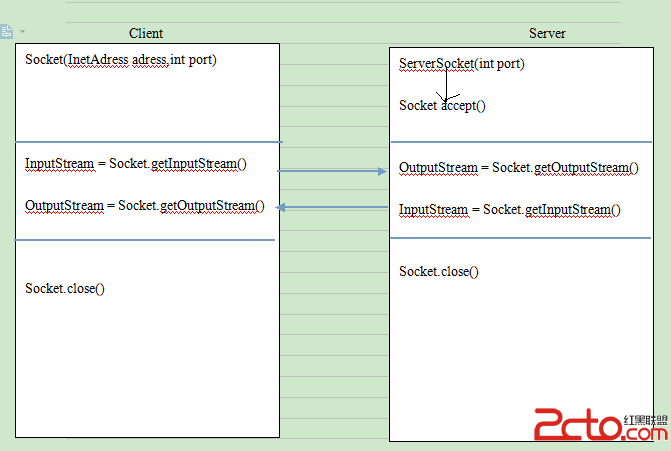
在 Android 上做網路應用開發,主要可以分成兩大路線:一是 Socket(對 TCP/UDP 協定的封裝),二是 HTTP 協定。其中 HTTP 在 Android
 微信公眾平台開發入門:從建立百度雲站到啟用開發模式(圖文詳解)
這篇入門教程假設你已經具備 PHP 程式基礎、MySQL 資料庫概念、電腦網路通訊常識與 XML 語言知識。如果還沒有,建議先補上這些前置知識,閱讀起來會順暢很多。 全文
 Android 四大組件之 Activity(六):狀態保存與恢復的真相
這一節要談的是 Activity 的狀態保存與恢復。這個主題單看條文很枯燥,動手做兩組對照實驗就一清二楚了。 準備一個實驗用的 Activity 布局放兩個按鈕和一個輸入