

編輯:關於 Android 程式設計
有一段時間沒寫博客了,主要是想寫點有質量的內容。今天碰到的需求挺有意思,正如標題所述,這裡記錄一下。廢話不多說,先看效果圖:
單行顯示:
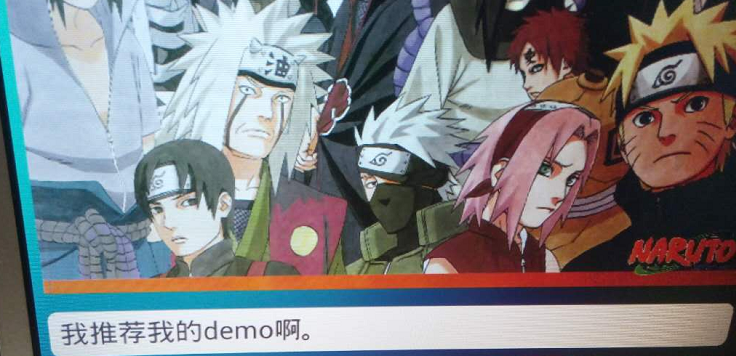
大於一行顯示:
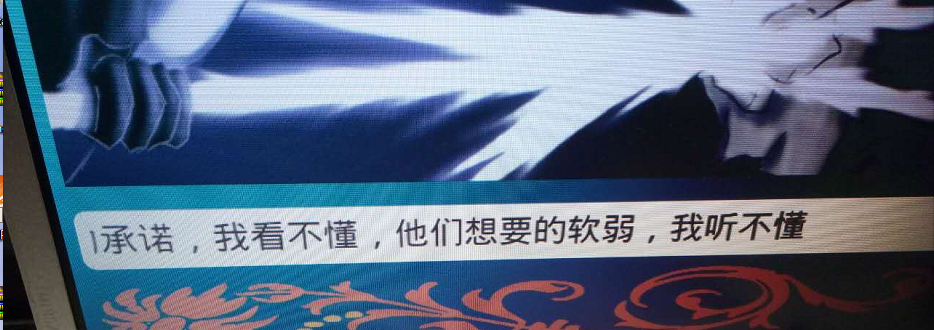
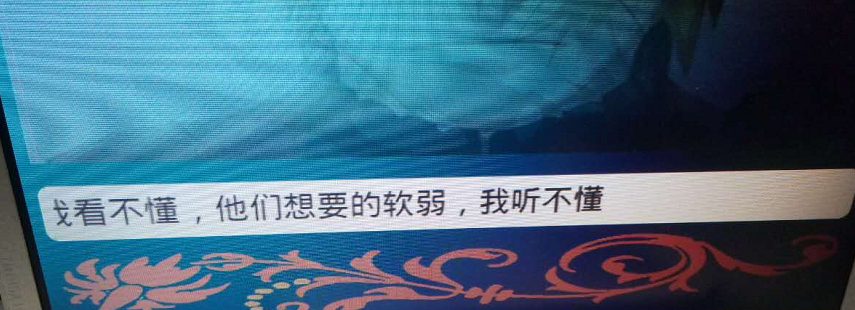
也就是說:單行時上下滾動,超過一行時則變為跑馬燈。這裡有兩個難點:
下面從最基礎的上下滾動效果做起。
我們需要上下滾動效果,因此要重寫 TextSwitcher 的相關設置,這與 ImageSwitcher 類似,差別在於 ImageSwitcher 的 makeView 返回 ImageView,而 TextSwitcher 的 makeView 返回 TextView。先來實現上下滾動:
public class TextSwitcherView extends TextSwitcher implements ViewFactory {
    private ArrayList<String> reArrayList = new ArrayList<>();
    private int resIndex = 0;
    private final int UPDATE_TEXTSWITCHER = 1;
    private Context mContext;

    public TextSwitcherView(Context context) {
        super(context);
        mContext = context;
        init();
    }
    public TextSwitcherView(Context context, AttributeSet attrs) {
        super(context, attrs);
        mContext = context;
        init();
    }
    private void init() {
        this.setFactory(this);
        this.setInAnimation(getContext(), R.anim.vertical_in);
        this.setOutAnimation(getContext(), R.anim.vertical_out);
        Timer timer = new Timer();
        timer.schedule(timerTask, 1, 3000);
    }
    TimerTask timerTask = new TimerTask() {
        @Override
        public void run() {
            // 不能在子線程更新 UI
            Message msg = new Message();
            msg.what = UPDATE_TEXTSWITCHER;
            handler.sendMessage(msg);
        }
    };
    Handler handler = new Handler() {
        public void handleMessage(Message msg) {
            switch (msg.what) {
                case UPDATE_TEXTSWITCHER:
                    updateTextSwitcher();
                    break;
            }
        }
    };
    public void getResource(ArrayList<String> reArrayList) {
        this.reArrayList = reArrayList;
    }
    public void updateTextSwitcher() {
        if (this.reArrayList != null && this.reArrayList.size() > 0) {
            this.setText(this.reArrayList.get(resIndex++));
            if (resIndex > this.reArrayList.size() - 1) resIndex = 0;
        }
    }
    @Override
    public View makeView() {
        TextView tView = new TextView(getContext());
        tView.setTextSize(20);
        tView.setTextColor(0xff24aaff);
        return tView;
    }
}
數據透過一個 ArrayList 傳入,再用定時器 Timer 實現上下滾動,每 3 秒執行一次。此時 makeView 返回的是普通 TextView,所以只有上下滾動效果。配套的上下切換動畫 vertical_in.xml 與 vertical_out.xml 分別定義進場與退場的 translate 位移即可。
跑馬燈效果要求控件獲得焦點(focusable = true)。因此我們可以繼承 TextView 並重寫 isFocused 方法,讓它始終返回 true:
public class WaterTextView extends TextView {
    public WaterTextView(Context context, AttributeSet attrs, int defStyle) {
        super(context, attrs, defStyle);
    }
    public WaterTextView(Context context, AttributeSet attrs) {
        super(context, attrs);
    }
    public WaterTextView(Context context) {
        super(context);
    }
    @Override
    @ExportedProperty(category = "focus")
    public boolean isFocused() {
        return true;
    }
}
既然要跑馬燈,就在 makeView 中返回這個重寫後的 TextView,並設置相關屬性:
public View makeView() {
    WaterTextView tView = new WaterTextView(getContext());
    tView.setSingleLine(true);
    tView.setEllipsize(TruncateAt.MARQUEE);
    tView.setPadding(
        getResources().getDimensionPixelOffset(R.dimen.x10),
        getResources().getDimensionPixelOffset(R.dimen.x5),
        getResources().getDimensionPixelOffset(R.dimen.x10),
        getResources().getDimensionPixelOffset(R.dimen.x5));
    tView.setTextSize(TypedValue.COMPLEX_UNIT_PX, getResources().getDimensionPixelOffset(R.dimen.x28));
    tView.setMarqueeRepeatLimit(1);
    return tView;
}
注意字體這裡傳入了兩個參數:第一個是像素的標志位。因為 setTextSize 的默認單位是 sp,若後面傳入的是像素就需要換算,所以這裡統一用像素。關於自適應知識,可參考我此前的博客:https://blog.csdn.net/u011418943/article/details/51247828
現在你可以傳入一些較長的文本,看看是不是當字數超過一行時就出现了流水燈般的效果。
在這裡糾結了很久。一開始考慮像素問題,但取到的數據都不對。後來的思路是:既然規定了字體大小,那麼字節大小就是確定的,再根據一個字節占屏幕多少,就能算出一行占多少字節。這種方法雖存在一些問題,但目前在公司 various 板子上都未出過差錯。取字節時,中文一般占兩個字節,英文占一個字節:
public void subStr(String str, int subSLength) throws UnsupportedEncodingException {
    char[] array = str.toCharArray();
    if (str.toString().getBytes("GBK").length > subSLength) {
        int shi = str.toString().getBytes("GBK").length / subSLength;
        int ge = str.toString().getBytes("GBK").length % subSLength;
        if (shi > 0 && ge != 0) {
            for (int i = 0; i < array.length; i++) {
                if ((char)(byte)array[i] != array[i]) {
                    byteCount += 2;   // 中文占 2 字節
                    stringCount += 1;
                } else {
                    byteCount += 1;   // 英文占 1 字節
                    stringCount += 1;
                }
                if (byteCount >= subSLength) {
                    getRealCount = stringCount;
                    byteCount = 0;
                    stringCount = 0;
                }
            }
        } else {
            subArrayList.add(str);   // 小於一行則正常顯示
        }
    }
}
這裡以一行 48 字節為例(subSLength = 48)。成功截取一行後,有兩種處理思路:
思路是把多行數據截取成一段段存進數組,注意這裡的字節數與數組元素個數並不一致(中英文都算一個元素),所以才需要 stringCount:
for (int i = 0; i <= shi; i++) {
    if (i == shi) {
        subArrayList.add(str.substring(getRealCount * i, str.length()));
    } else {
        subArrayList.add(str.substring(getRealCount * i, getRealCount * (i + 1)));
    }
}
對應的更新邏輯:先判斷截取後的 subArrayList 是否只有一行,若只有一行就直接顯示;若多於一行,則逐段顯示直到最后一段,再重置狀態。
如何取消上下滾動、改用左右跑馬燈?由於上面用的是定時器,只需改變邏輯即可。這裡用一個 waterTextStatus 變量來標識是否大於一行:
private void updateText() {
    if (this.dataflag == 1) {
        if (this.reArrayList != null && this.reArrayList.size() > 0) {
            subStr(reArrayList.get(resIndex), 48);
            if (subArrayList != null && subArrayList.size() > 0) {
                if (subArrayList.size() == 1) {
                    waterTextStatus = false;   // 單行
                    this.setText(this.reArrayList.get(resIndex));
                } else {
                    waterTextStatus = true;    // 多行,走跑馬燈
                    this.setText(this.reArrayList.get(resIndex));
                }
                subArrayList.clear();
            }
            resIndex++;
            if (resIndex >= reArrayList.size() - 1) resIndex = 0;
        }
    } else {
        this.setText(this.string);
    }
}
定時任務裡也相應調整:若為多行,就不去刷新上下滾動,而是計時等待跑馬燈跑完再切換:
class MyTimerTask extends TimerTask {
    @Override
    public void run() {
        if (!waterTextStatus) {
            Message msg = new Message();
            msg.what = UPDATE_TEXTSWITCHER;
            handler.sendMessage(msg);
        } else {
            startAgainCount++;
            if (startAgainCount > waterloopTime) {
                startAgainCount = 0;
                waterTextStatus = false;
            }
        }
    }
}
至於怎麼判斷跑馬燈是否跑完,我目前還沒找到理想方法,只能用「延時」這個笨法子,根據截取的行數與超出的個數估算 waterloopTime:
if (ge > 0 && ge <= 7) {
    waterloopTime = 3 * shi;
} else if (ge > 7 && ge <= 16) {
    waterloopTime = 3 * shi + 1;
} else if (ge > 16 && ge <= 25) {
    waterloopTime = 4 * shi + 1;
} else if (ge > 25 && ge <= 35) {
    waterloopTime = 5 * shi + 1;
} else {
    waterloopTime = 6 * shi + 2;
}
可以看到,waterloopTime 是根據截取的行數與超出個數計算得出。我心裡其實有點忐忑,延時能不用就盡量不用,如果你有更好的建議,也請告訴我,謝謝。
布局很簡單:
<com.vst.launchertext.textswitcherview
    android:id="@+id/watertext"
    android:layout_height="match_parent"
    android:layout_width="match_parent">
</com.vst.launchertext.textswitcherview>
 Android 自定義 View:手寫簽名板實作
概述 本文透過自定義 View 實現一個 Android 手寫簽名板,支持透明背景、貝塞爾平滑曲線,並能對最終結果進行邊緣空白裁剪。 自定義 LinePathView 核
 魅藍Note3看優酷沒有超清選項 這樣解決
不少魅藍Note3用戶發現,機上的優酷居然找不到超清畫質選項,對愛看高清片源的人來說著實難熬。這個問題也困擾了小編很久,好在現在已經有解法,下面我們就來看具體操作。 解
 Android 自定義 View 高級特效:神奇的貝塞爾曲線
效果預覽 效果圖中我們實現了一個隨手指滑動變化的二階貝塞爾曲線,還有一個能穿越所有已知點的複雜貝塞爾曲線。學會使用貝塞爾曲線後,可以做出 QQ 紅點滑動刪除、360 動
 Android 難題淺析:Dialog 關閉後軟鍵盤不消失的原因與解法
當設置了 setCanceledOnTouchOutside(true),用戶點擊 dialog 外部陰影區域使其 dismiss 時,會遇到一個惱人的問題——軟鍵盤並不