編輯:關於 Android 程式設計
上一篇我們介紹了 Hybrid 開發的概念、作用與實作方式;本文則整理 WebView 在實際使用過程中經常踩到的坑,涵蓋效能優化、Cookie 注入、退出 Activity 異常、Native 與 JS 互動、檔案下載以及騰訊 X5 瀏覽服務等主題,希望能幫助大家更順利地使用 WebView。
要談效能,得先理解 WebView 的快取機制。WebView 存在兩種快取:網頁資料快取與 H5 程式碼快取,它們存放在不同目錄下。
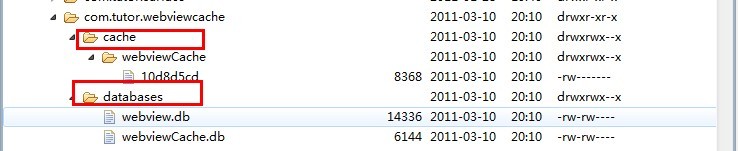
載入 HTML 時,會在 data/應用 package 下產生 database 與 cache 兩個資料夾:請求的 URL 記錄存於 webviewCache.db,URL 的內容則存於 webviewCache 資料夾。
快取是否啟用透過 WebSettings 設定,先確保快取可用,才能進一步選擇快取策略:
 WebSettings webSettings = mWebView.getSettings();
webSettings.setJavaScriptEnabled(true);
webSettings.setLoadWithOverviewMode(true);
webSettings.setAllowFileAccess(false);
webSettings.setUseWideViewPort(false);
webSettings.setCacheMode(WebSettings.LOAD_NO_CACHE);
webSettings.setDatabaseEnabled(false);
webSettings.setAppCacheEnabled(false);
webSettings.setBlockNetworkImage(true);
mWebView.setWebViewClient(new MWebViewClient(this));
mWebView.setWebChromeClient(new WebChromeClient());
WebView 的五種快取模式:
LOAD_CACHE_ONLY:不使用網路,只讀本地快取。
LOAD_DEFAULT:依 cache-control 決定是否從網路取資料。
LOAD_CACHE_NORMAL:API 17 起已廢棄,作用同 LOAD_DEFAULT。
LOAD_NO_CACHE:不使用快取,只從網路取資料。
LOAD_CACHE_ELSE_NETWORK:只要本地有,無論是否過期都使用快取。
(1)使用 LOAD_CACHE_ELSE_NETWORK,需在 App 退出時清除快取;缺點是若 App 已開啟,網頁更新不會立即反映。
(2)使用 LOAD_DEFAULT,是否從快取或網路取資料由 H5 參數決定,可動態處理更新。
設定快取:
 mWebView.getSettings().setJavaScriptEnabled(true);
mWebView.getSettings().setRenderPriority(RenderPriority.HIGH);
mWebView.getSettings().setCacheMode(WebSettings.LOAD_DEFAULT);
mWebView.getSettings().setDomStorageEnabled(true);
mWebView.getSettings().setDatabaseEnabled(true);
String cacheDirPath = getFilesDir().getAbsolutePath() + APP_CACAHE_DIRNAME;
mWebView.getSettings().setDatabasePath(cacheDirPath);
mWebView.getSettings().setAppCachePath(cacheDirPath);
mWebView.getSettings().setAppCacheEnabled(true);
退出 App 時清除快取:
 try {
    deleteDatabase("webview.db");
    deleteDatabase("webviewCache.db");
} catch (Exception e) { e.printStackTrace(); }
File appCacheDir = new File(getFilesDir().getAbsolutePath() + APP_CACAHE_DIRNAME);
File webviewCacheDir = new File(getCacheDir().getAbsolutePath() + "/webviewCache");
if (webviewCacheDir.exists()) { deleteFile(webviewCacheDir); }
if (appCacheDir.exists()) { deleteFile(appCacheDir); }先不載入圖片,等 HTML 標籤載入完成後再載入圖片,能給人「很快」的錯覺。初始化時設定:
webSettings.setBlockNetworkImage(true);HTML 載入完成後再開啟圖片:
 @Override
public void onPageFinished(WebView view, String url) {
    super.onPageFinished(view, url);
    mWebView.getSettings().setBlockNetworkImage(false);
}
此外,可將網頁所需的 JS、CSS 檔保存在 App 本地,載入 HTML 後把引用路徑替換為本地資源,加快存取速度,這也是目前主流新聞客戶端的做法。
App 中的 WebView 除了可透過 Native 與 JS 互動外,也能用 Cookie 傳遞資訊。以下是最終採用的一種做法:
 public static void synCookies(Context context, String url, String cookie) {
    CookieSyncManager.createInstance(context);
    CookieManager cookieManager = CookieManager.getInstance();
    cookieManager.setAcceptCookie(true);
    Uri uri = null;
    String domain = "";
    try {
        uri = Uri.parse(URLDecoder.decode(url, "utf-8"));
        domain = uri.getHost();
    } catch (UnsupportedEncodingException e) { e.printStackTrace(); }
    String cookieStr = cookieManager.getCookie(url);
    if (!TextUtils.isEmpty(cookieStr) && cookieStr.contains(cookie) && !cookie.equals(H5Constant.TOKEN + "=")) {
        return;
    }
    if (!TextUtils.isEmpty(URLConfig.getUrlInfo().getB4Domain())) {
        domain = URLConfig.getUrlInfo().getB4Domain();
    }
    List uaList = SysConfig.getSystemUa(context);
    String md = ";domain=" + domain;
    cookieManager.setCookie(url, "lat=" + Config.lat + md);
    cookieManager.setCookie(url, "lng=" + Config.lng + md);
    cookieManager.setCookie(url, cookie + ";" + md);
    if (uaList != null && uaList.size() > 0) {
        for (String coo : uaList) { cookieManager.setCookie(url, coo + md); }
    }
    CookieSyncManager.getInstance().sync();
}
CookieManager 負責注入與清除網頁 Cookie,注入格式為 key=value;domain=url。
移除 Cookie:
 public static void removeCookies(Context context) {
    CookieSyncManager.createInstance(context);
    CookieManager cookieManager = CookieManager.getInstance();
    cookieManager.removeSessionCookie();
    CookieSyncManager.getInstance().sync();
}
一般會在開啟 H5 頁面時注入 Cookie,離開時清除。
曾在三星 Grand2 上遇到以下錯誤,其他機型則正常:
 java.lang.Throwable: Error: WebView.destroy() called while still attached!
    at android.webkit.WebViewClassic.destroy(WebViewClassic.java:4173)
    at android.webkit.WebView.destroy(WebView.java:707)
    ...
原本的清除寫法:
 @Override
public void onDestroyView() {
    super.onDestroyView();
    mWebView.removeAllViews();
    mWebView.destroy();
}
錯誤含義是:呼叫 destroy() 時 WebView 仍依附在父容器上,應先解除依附關係。修正方式為先從父容器移除:
 @Override
public void onDestroyView() {
    super.onDestroyView();
    swipeRefreshLayout.removeView(mWebView);
    mWebView.removeAllViews();
    mWebView.destroy();
}H5 頁面定義 JS 函式:
 <script type="text/javascript">
function uu_click(clicked_id) { alert(clicked_id); }
</script>
Native 直接呼叫:
h5Fragment.mWebView.loadUrl("javascript:uu_click(" + "'" + clickId + "'" + ")");這種方式無法取得有回傳值的 JS 函式,但一般情境也少有需要。
先撰寫可被 JS 呼叫的方法:
 class JsInteration {
    @JavascriptInterface
    public void toastMessage(String message) {
        Toast.makeText(getActivity(), message, Toast.LENGTH_LONG).show();
    }
}
注入本地方法:
mWebView.addJavascriptInterface(new JsInteration(), "control");JS 端呼叫:
 function reply_click(clicked_id) {
    window.control.toastMessage(clicked_id);
}
WebView 預設未開啟檔案下載功能,需自訂 DownloadListener:
 mWebView.setDownloadListener(new DownloadListener() {
    @Override
    public void onDownloadStart(String url, String userAgent, String contentDisposition, String mimetype, long contentLength) {
        Uri uri = Uri.parse(url);
        Intent intent = new Intent(Intent.ACTION_VIEW, uri);
        startActivity(intent);
    }
});
如此一來,WebView 中的下載連結便能透過開啟瀏覽器完成下載。之所以預設不實作,可能是基於權限與安全考量。
由於各廠商定制差異,WebView 在不同手機上表現不一,適配顯得重要。X5 相當於 WebView 的第三方框架,由 QQ 瀏覽器團隊出品,透過 X5 內核 SDK 與雲端服務解決相容性、載入速度與功能缺陷等問題。
X5 的優勢:
1) 速度更快,網頁載入較系統 WebView 提升近 30%。
2) 省流量,雲端優化技術可省約 20% 流量。
3) 更安全,具備 24 小時安全問題處理機制。
4) 更穩定,經億級用戶考驗,CRASH 率約 0.15%。
5) 內建強大的播放器,支援多種影片格式。
6) 提供適屏排版、字體設定等瀏覽增強功能。
7) 對 HTML5 支援更完整。
8) 無系統內核碎片化問題,相容性更佳。
對於使用 WebView 開發 App 的團隊而言,X5 在機型適配與特色功能上的表現值得評估採用。
專案原始碼歡迎至 GitHub 查看並給予支持:https://github.com/yipianfengye/androidProject
 Android 開發入門:Android Studio 下載與安裝全流程
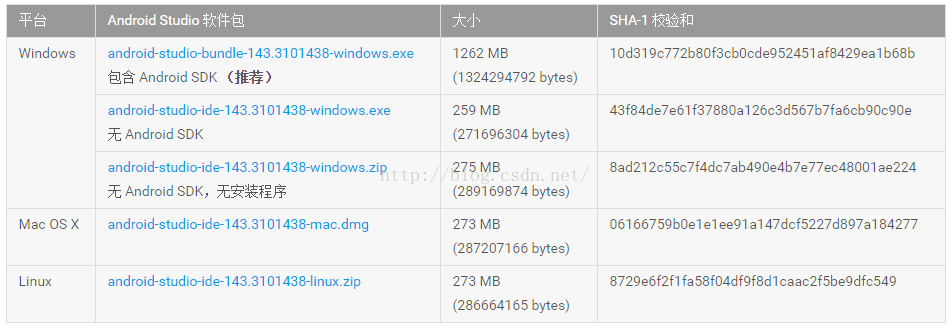
Android Studio 是目前 Android 開發最主流的 IDE。本文以 Windows 環境為例,整理系統需求、下載、安裝與首次設定的完整流程,方便剛入門的開
 Launcher3 桌面圖標拖動機制筆記:事件攔截、落點計算與重排
拖動時的視覺回饋 在 Launcher3 中,桌面圖標的拖動體驗包含許多細節。當使用者按下圖標時,會出現輕微的按壓回饋;開始拖動後,周圍受影響的圖標會產生搖動動畫,以提示
 Android API Guides 導讀:屬性動畫(Property Animation)
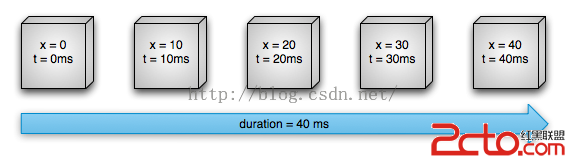
屬性動畫系統是 Android 3.0 起提供的一套管線,威力在於它能對任何物件的屬性做動畫,不管該屬性會不會被畫到螢幕上。傳統的 View 動畫只能改動繪製結果,屬性動
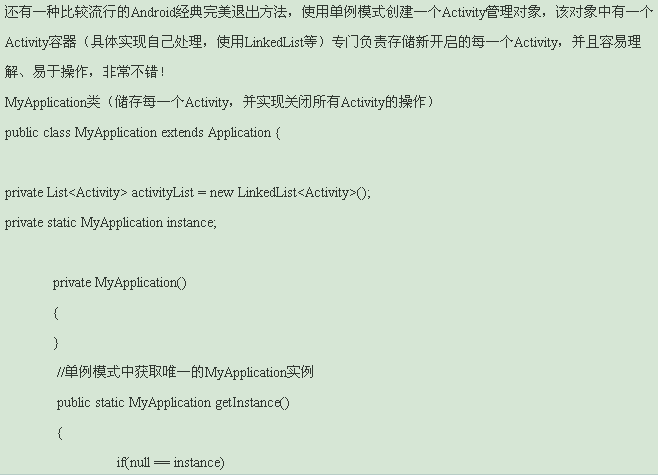 Android 完全退出應用程式的實作方式
在 Android 中,若要完全退出應用程式,不能只依賴單一 Activity 的 finish。若 App 內有多個 Activity,直接呼叫 killProcess