

編輯:關於 Android 程式設計
自定義 View 的三步曲是 measure、layout、draw,而 measure 站在整條鏈路的最前端。偏偏這一步最容易被讀懂個皮毛就跳過:為什麼父 View 會決定子 View 的 MeasureSpec?為什麼自己寫的 View 在 XML 裡寫 wrap_content,跑出來卻像 match_parent?本文就從源碼把這件事講到底。
系統要畫出一個 View,得先知道它多寬多高,這個「詢問與回答」的過程就是測量,而 MeasureSpec 貫穿其中。
官方文件的說法很精簡:
A MeasureSpec encapsulates the layout requirements passed from parent to child. Each MeasureSpec represents a requirement for either the width or the height. A MeasureSpec is comprised of a size and a mode.
從這段話可以抽出三個要點:MeasureSpec 封裝了父容器傳給子 View 的版面要求;它分別描述寬與高;它由 size 與 mode 兩部分組成。
它本質上是一個 32 位元的 int:高 2 位是 SpecMode,低 30 位是 SpecSize。
int specSize = MeasureSpec.getSize(measureSpec);
int specMode = MeasureSpec.getMode(measureSpec);
int measureSpec = MeasureSpec.makeMeasureSpec(size, mode);
ViewGroup 測量子 View 時會走 measureChildWithMargins():
protected void measureChildWithMargins(View child,
        int parentWidthMeasureSpec, int widthUsed,
        int parentHeightMeasureSpec, int heightUsed) {
    final MarginLayoutParams lp = (MarginLayoutParams) child.getLayoutParams();
    final int childWidthMeasureSpec = getChildMeasureSpec(parentWidthMeasureSpec,
            mPaddingLeft + mPaddingRight + lp.leftMargin + lp.rightMargin + widthUsed,
            lp.width);
    final int childHeightMeasureSpec = getChildMeasureSpec(parentHeightMeasureSpec,
            mPaddingTop + mPaddingBottom + lp.topMargin + lp.bottomMargin + heightUsed,
            lp.height);
    child.measure(childWidthMeasureSpec, childHeightMeasureSpec);
}
注意它的參數:父容器的 MeasureSpec、父容器在水平與垂直方向已被佔用的空間。父 View 的資訊竟然出現在「量子 View」的方法簽名裡,這已經暗示了答案——子 View 的 MeasureSpec 由父容器的 MeasureSpec 與子 View 自己的 LayoutParams 共同決定。
其中 padding 參數的組成值得細看:mPaddingLeft + mPaddingRight 是父容器左右內距,lp.leftMargin + lp.rightMargin 是子 View 左右外距,這四段空間都無法再拿來排版子 View,加總即為「父容器在水平方向已被佔用的空間」;垂直方向同理。
public static int getChildMeasureSpec(int spec, int padding, int childDimension) {
    int specMode = MeasureSpec.getMode(spec);
    int specSize = MeasureSpec.getSize(spec);
    int size = Math.max(0, specSize - padding);
    int resultSize = 0;
    int resultMode = 0;
    switch (specMode) {
        case MeasureSpec.EXACTLY:
            if (childDimension >= 0) {
                resultSize = childDimension;
                resultMode = MeasureSpec.EXACTLY;
            } else if (childDimension == LayoutParams.MATCH_PARENT) {
                resultSize = size;
                resultMode = MeasureSpec.EXACTLY;
            } else if (childDimension == LayoutParams.WRAP_CONTENT) {
                resultSize = size;
                resultMode = MeasureSpec.AT_MOST;
            }
            break;
        case MeasureSpec.AT_MOST:
            if (childDimension >= 0) {
                resultSize = childDimension;
                resultMode = MeasureSpec.EXACTLY;
            } else if (childDimension == LayoutParams.MATCH_PARENT) {
                resultSize = size;
                resultMode = MeasureSpec.AT_MOST;
            } else if (childDimension == LayoutParams.WRAP_CONTENT) {
                resultSize = size;
                resultMode = MeasureSpec.AT_MOST;
            }
            break;
        case MeasureSpec.UNSPECIFIED:
            if (childDimension >= 0) {
                resultSize = childDimension;
                resultMode = MeasureSpec.EXACTLY;
            } else if (childDimension == LayoutParams.MATCH_PARENT) {
                resultSize = View.sUseZeroUnspecifiedMeasureSpec ? 0 : size;
                resultMode = MeasureSpec.UNSPECIFIED;
            } else if (childDimension == LayoutParams.WRAP_CONTENT) {
                resultSize = View.sUseZeroUnspecifiedMeasureSpec ? 0 : size;
                resultMode = MeasureSpec.UNSPECIFIED;
            }
            break;
    }
    return MeasureSpec.makeMeasureSpec(resultSize, resultMode);
}
關鍵是 childDimension >= 0 這個判斷。之所以可能為負,是因為 MATCH_PARENT = -1、WRAP_CONTENT = -2;也就是說,大於等於 0 代表使用者寫了一個具體數值,例如 100px。
| 父容器 specMode | 子 View 的 LayoutParams | 子 View 的 specMode | 子 View 的 specSize |
|---|---|---|---|
| EXACTLY | 具體數值 | EXACTLY | childDimension |
| EXACTLY | match_parent | EXACTLY | size(父容器剩餘空間) |
| EXACTLY | wrap_content | AT_MOST | size(父容器剩餘空間) |
| AT_MOST | 具體數值 | EXACTLY | childDimension |
| AT_MOST | match_parent | AT_MOST | size(父容器剩餘空間) |
| AT_MOST | wrap_content | AT_MOST | size(父容器剩餘空間) |
| UNSPECIFIED | 具體數值 | EXACTLY | childDimension |
| UNSPECIFIED | match_parent / wrap_content | UNSPECIFIED | 0(或 size) |
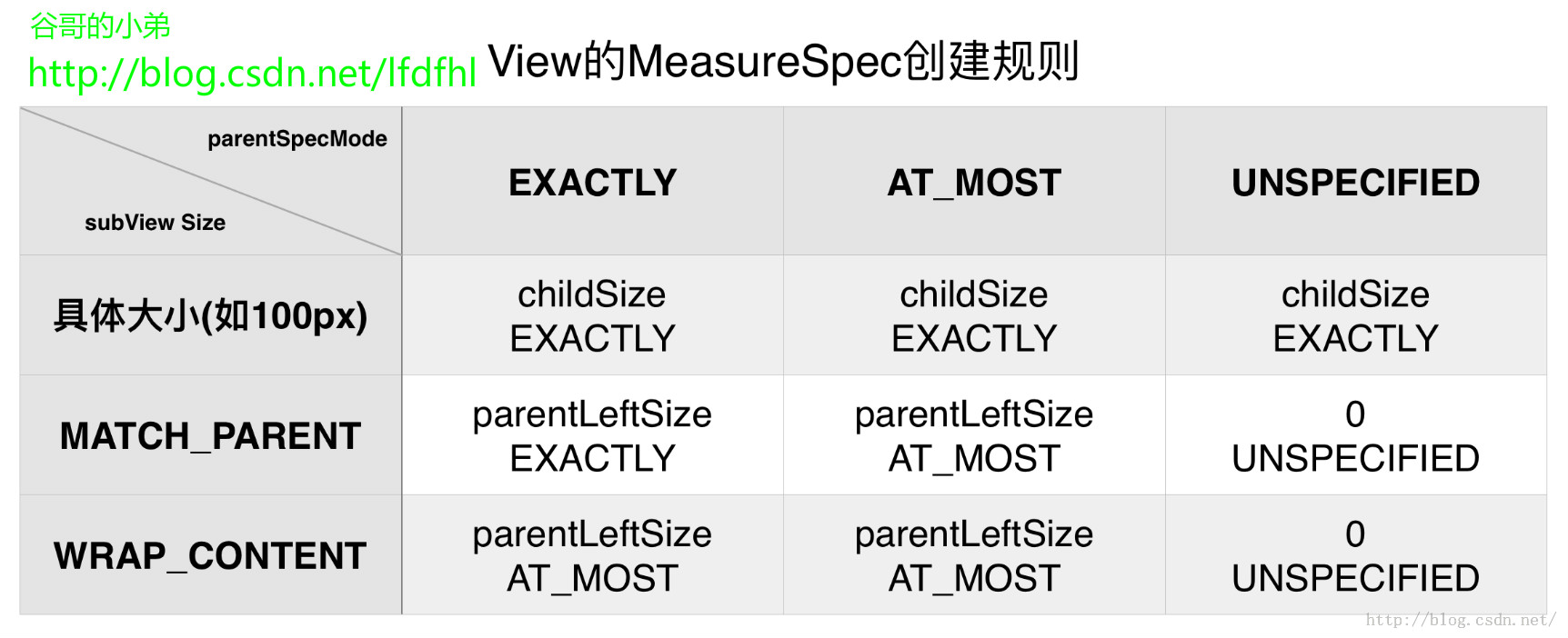
用白話再說一次:只要子 View 寫了具體 px 值,不論父容器是什麼模式,結果一律是 EXACTLY 加上那個數字;寫 match_parent 時,子 View 會「複製」父容器的模式;寫 wrap_content 時,結果幾乎一定是 AT_MOST 加上父容器剩餘空間。
另外要記住:這裡算出來的只是系統給的「參考值」。你也可以完全跳過這套流程,直接在 onMeasure 裡呼叫 setMeasuredDimension() 指定測量結果。
protected void onMeasure(int widthMeasureSpec, int heightMeasureSpec) {
    setMeasuredDimension(
        getDefaultSize(getSuggestedMinimumWidth(), widthMeasureSpec),
        getDefaultSize(getSuggestedMinimumHeight(), heightMeasureSpec));
}
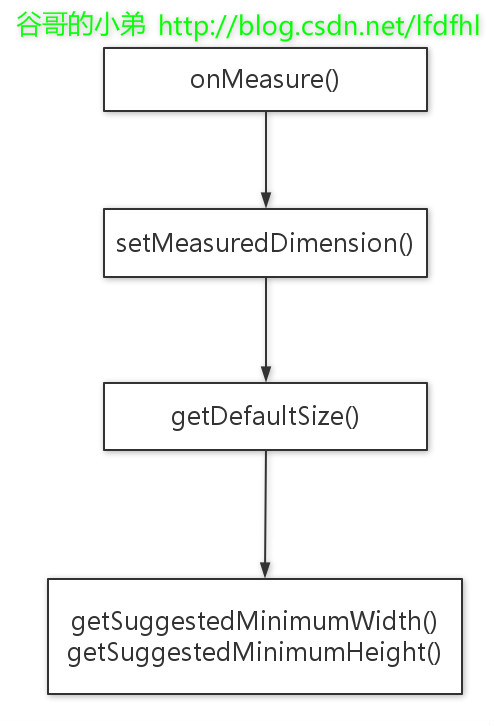
呼叫順序是:onMeasure → setMeasuredDimension,中間透過 getDefaultSize 取得寬高,而 getDefaultSize 的第一個參數來自 getSuggestedMinimumWidth / getSuggestedMinimumHeight。
protected int getSuggestedMinimumWidth() {
    return (mBackground == null) ? mMinWidth
            : Math.max(mMinWidth, mBackground.getMinimumWidth());
}
沒有背景時,最小值就是 mMinWidth,可透過 XML 的 minWidth 或 setMinimumWidth() 設定;有背景時,取 mMinWidth 與背景最小寬度的較大者。getSuggestedMinimumHeight 邏輯相同。
public static int getDefaultSize(int size, int measureSpec) {
    int result = size;
    int specMode = MeasureSpec.getMode(measureSpec);
    int specSize = MeasureSpec.getSize(measureSpec);
    switch (specMode) {
        case MeasureSpec.UNSPECIFIED:
            result = size;
            break;
        case MeasureSpec.AT_MOST:
        case MeasureSpec.EXACTLY:
            result = specSize;
            break;
    }
    return result;
}
除了罕見的 UNSPECIFIED,其餘情況回傳的都是 specSize。換句話說:在 measure 階段,View 的寬高由 MeasureSpec 中的 specSize 決定。
protected final void setMeasuredDimension(int measuredWidth, int measuredHeight) {
    mMeasuredWidth = measuredWidth;
    mMeasuredHeight = measuredHeight;
    mPrivateFlags |= MEASURED_DIMENSION_SET;
}
把上面的結論擺在一起看,問題就浮現了:當子 View 寫 wrap_content,不論父容器是 AT_MOST 還是 EXACTLY,系統給它的 specMode 都是 AT_MOST、specSize 都是父容器剩餘空間。再對照 getDefaultSize,AT_MOST 直接回傳 specSize——於是 wrap_content 的行為等同於 match_parent。
所以自定義 View 若希望 wrap_content 真的「包裹內容」,必須在 onMeasure 中自行攔截處理。
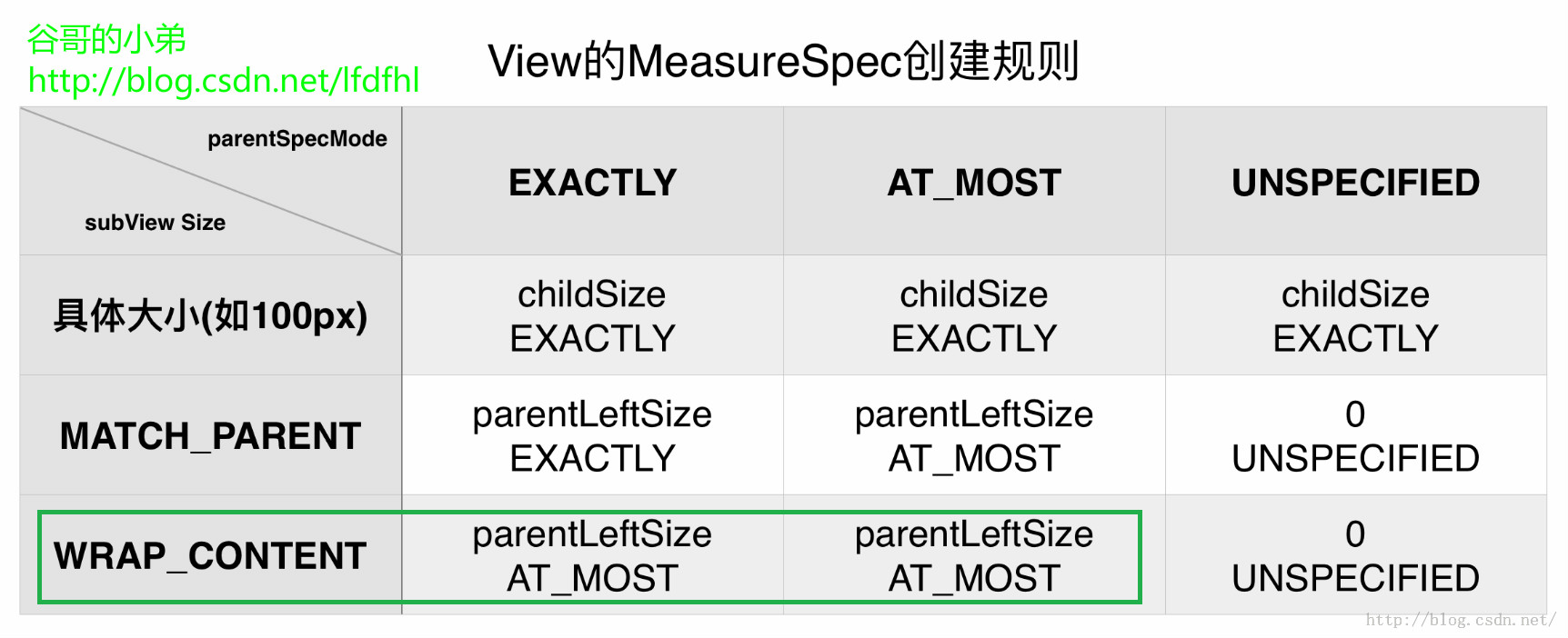
分兩種情況:寬高都是 wrap_content 時,兩者都用自己的預設值 mWidth、mHeight;只有一邊是 wrap_content 時,那邊用預設值,另一邊沿用系統測得的 specSize。
@Override
protected void onMeasure(int widthMeasureSpec, int heightMeasureSpec) {
    super.onMeasure(widthMeasureSpec, heightMeasureSpec);
    int widthSpecMode = MeasureSpec.getMode(widthMeasureSpec);
    int widthSpecSize = MeasureSpec.getSize(widthMeasureSpec);
    int heightSpecMode = MeasureSpec.getMode(heightMeasureSpec);
    int heightSpecSize = MeasureSpec.getSize(heightMeasureSpec);
    if (widthSpecMode == MeasureSpec.AT_MOST && heightSpecMode == MeasureSpec.AT_MOST) {
        setMeasuredDimension(mWidth, mHeight);
    } else if (widthSpecMode == MeasureSpec.AT_MOST) {
        setMeasuredDimension(mWidth, heightSpecSize);
    } else if (heightSpecMode == MeasureSpec.AT_MOST) {
        setMeasuredDimension(widthSpecSize, mHeight);
    }
}
先呼叫 super.onMeasure() 保留系統測量結果,再針對 AT_MOST 分支覆寫。mWidth 與 mHeight 是預設值,可依實際內容決定,例如 TextView 就是用文字測出的內容尺寸來處理這件事。
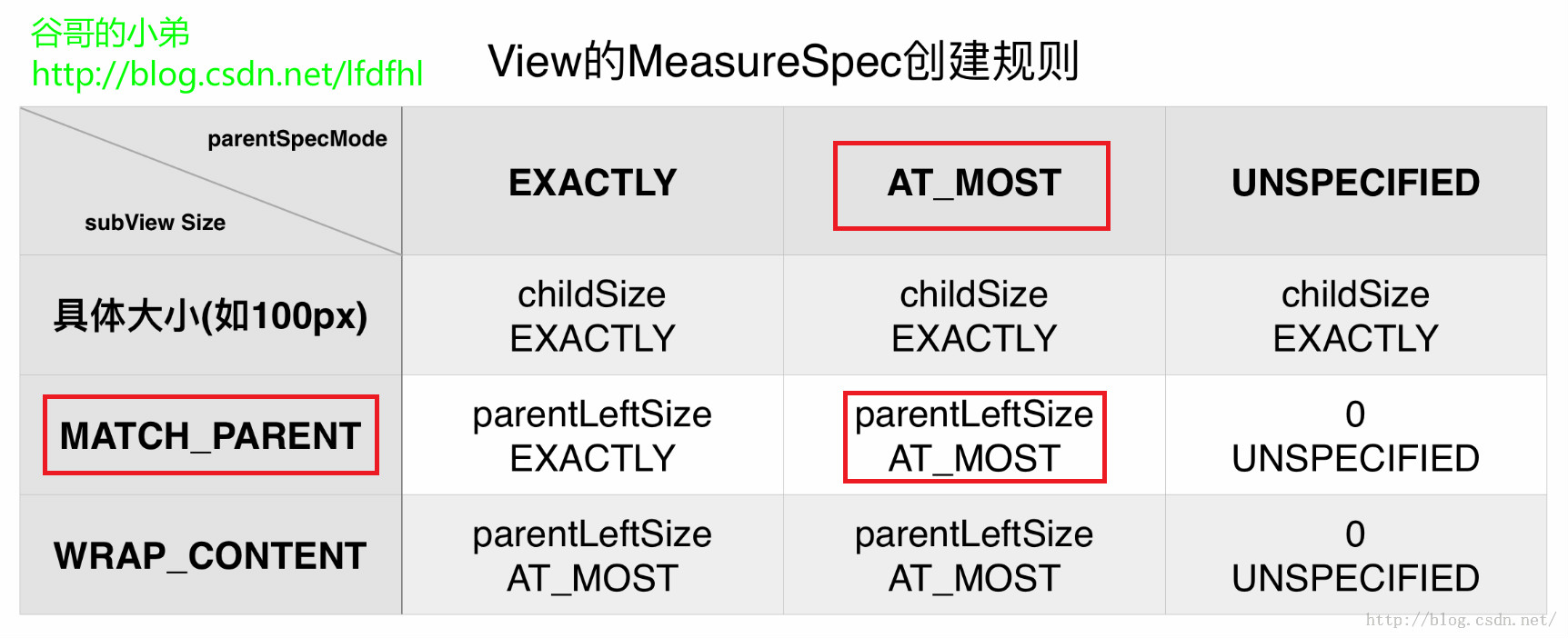
仔心包對照會發現一個疑慮:如果子 View 寫 match_parent 而父容器是 AT_MOST,子 View 也會拿到 AT_MOST,照上面的判斷邏輯豈不是會被改成預設值?原本要撐滿父容器,結果變成固定尺寸。
要出現「父容器為 AT_MOST」,只有兩條路:父容器自己是 wrap_content,或父容器是 match_parent 而其上層為 AT_MOST。
第一條路本身就矛盾:父容器要包裹內容,子 View 卻要跟父容器一樣大,誰也決定不了誰,這是邏輯上不合理、實務上不該出現的寫法。
第二條路往上追一層:爺容器不可能是 wrap_content(同前);也不可能是具體數值,因為那樣 specMode 會是 EXACTLY,與前提衝突;只能是 match_parent。而若爺容器是 match_parent 且 EXACTLY,父容器就該是 EXACTLY,同樣衝突;只剩爺容器為 match_parent + AT_MOST 這一條,於是又回到同樣的循環,一路推到根 View——但根 View 若是 match_parent,其 specMode 必為 EXACTLY,循環在此斷掉,依然矛盾。
結論:圖中紅色標記的那格,本身就是不可能穩定成立的組合,等價於第一條路的錯誤寫法。真正需要特別處理的,只有 wrap_content 那一格;而「從根到父容器一路 wrap_content、子 View 也是 wrap_content」正是我們上面補強的情況。
把 MeasureSpec 與 measure 的原理吃透,後續讀 layout 與 draw 才不會卡住。下一篇:layout。
 Android 自訂進度條完整指南:換色、縱向與弧形
Android 原生的 ProgressBar 只有橫向一種樣式,而且預設外觀實在算不上美觀,如下圖: 當設計稿要求換掉前後背景、改成縱向,甚至做成弧形時,該怎麼辦?本
 ViewPager 深入實戰:從基礎用法到仿微博滑動標題與自動輪播圖
ViewPager 幾乎是每個 Android 應用的必備元件,但真正用它做出「有質感」的效果,往往需要一點自訂的功夫。本文從最基礎的用法出發,逐步做到仿微博的滑動標題欄
 ImageView 的 ScaleType 全解析:八種縮放模式的真實差異
ScaleType 決定了一張圖片在 ImageView 內部「如何縮放、如何對齊」。同樣一張圖、同樣一個 150dp × 100dp 的容器,換一個 ScaleType
 Android 動畫入門:補間動畫(Tween Animation)完整指南
本節引言 本文要談的是 Android 三種動畫中的第二種——補間動畫(Tween)。與逐幀動畫靠連續播放圖片來模擬效果不同,補間動畫只需要開發者指定起始關鍵幀與結束關