

編輯:關於 Android 程式設計
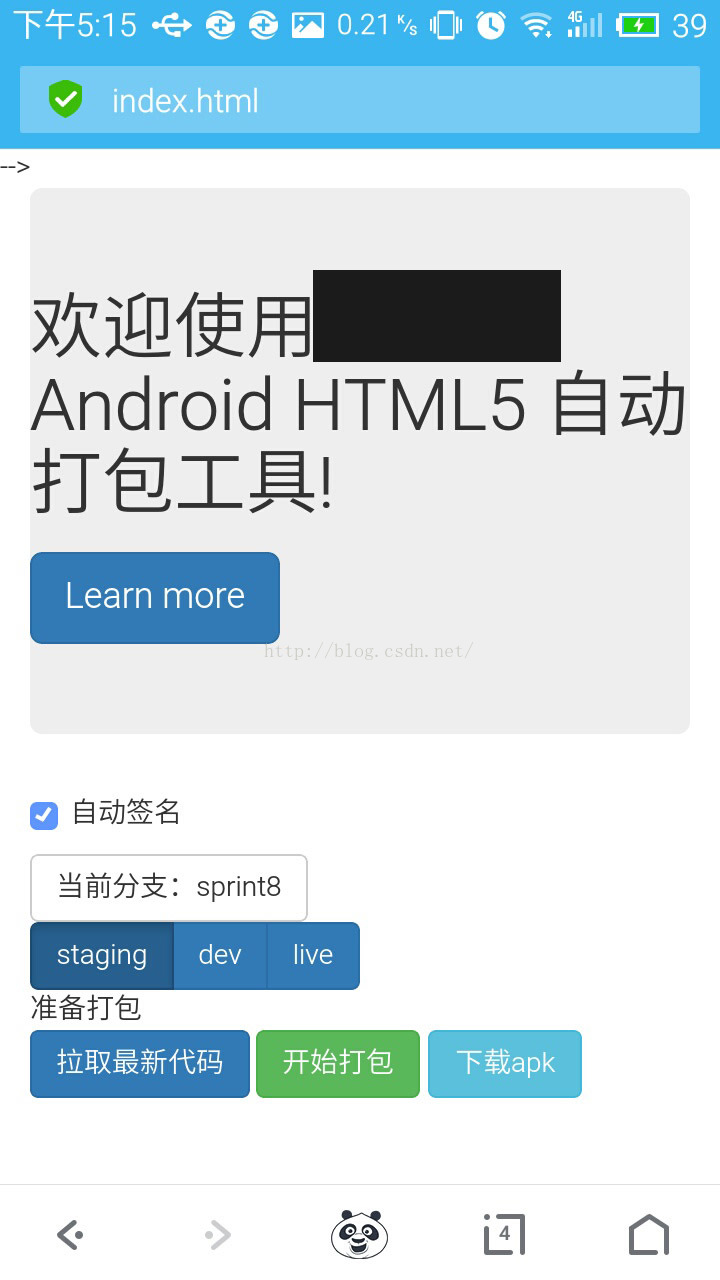
看到公司 iOS 同事做了一個打包工具給 QA 用,效果很好:QA 自己就能取到測試包,開發也不必反覆被打斷去手動出包。於是也替 Android 端做了一個——用 Tomcat 8 當伺服器、網頁當前端,任何人用手機或電腦開瀏覽器就能觸發打包並下載 apk。
不同分支的代碼與依賴差異很大。直接 clone 下來用 gradle 命令列編譯往往失敗,原因有三:
.iml 等 IDE 配置檔在本機無法直接使用;com.google.xxx 形式寫在 gradle 裡,需要聯網下載;所以最終方案是 一個分支對應一個獨立倉庫,「切換分支」實際上就是切換不同的倉庫路徑。這樣一來,依賴下載與 iml 重整就交給 Android Studio 處理一次:clone 完先用 AS 執行一次 clean、再手動打一個包,這個倉庫就與本機環境契合,之後可以純命令列出包。
本專案把伺服器 IP 寫死在 ApplicationConfigurationEntity.java 裡,因此環境切換就等於「打包前用對應環境的檔案覆蓋它」。這些寫好不同 IP 的檔案放在 git 倉庫之外集中管理,打包時再複製進專案目錄。
這三步都是標準命令,直接由 Java 呼叫 Runtime.exec() 執行即可。
Gradle 編譯對 CPU 與記憶體消耗很大,同一時間只允許一個編譯進程,因此用一個靜態變數記錄當前進度,前端每隔兩秒輪詢一次即可。這裡刻意沒用 WebSocket——輪詢足夠,實作成本卻低得多。
編譯(先 cd 到有 gradlew 的專案根目錄):
gradle build
gradlew build
gradlew clean build
比 Eclipse 那套流程簡單太多。
產生簽名檔:
keytool -genkeypair -alias mykeyName -keyalg RSA -validity 100 -keystore mydemo.keystore
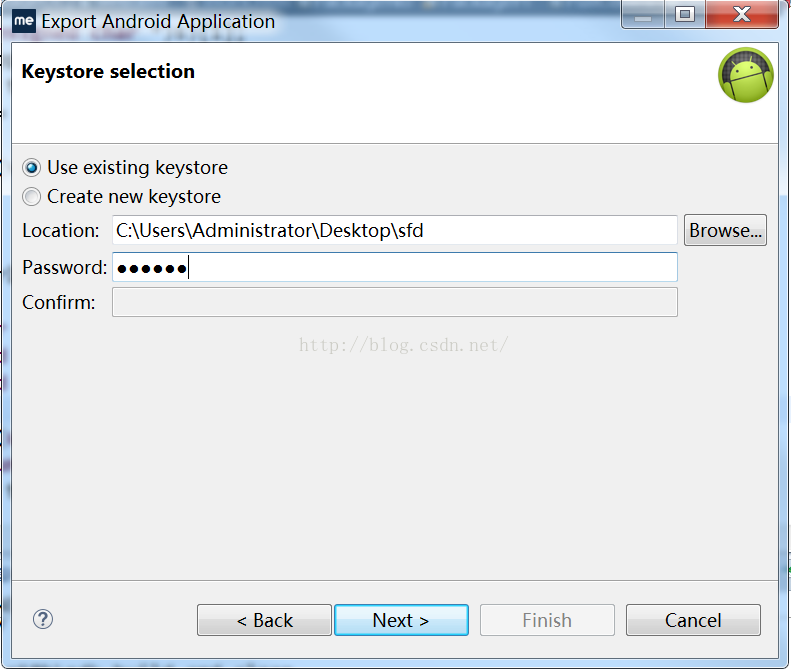
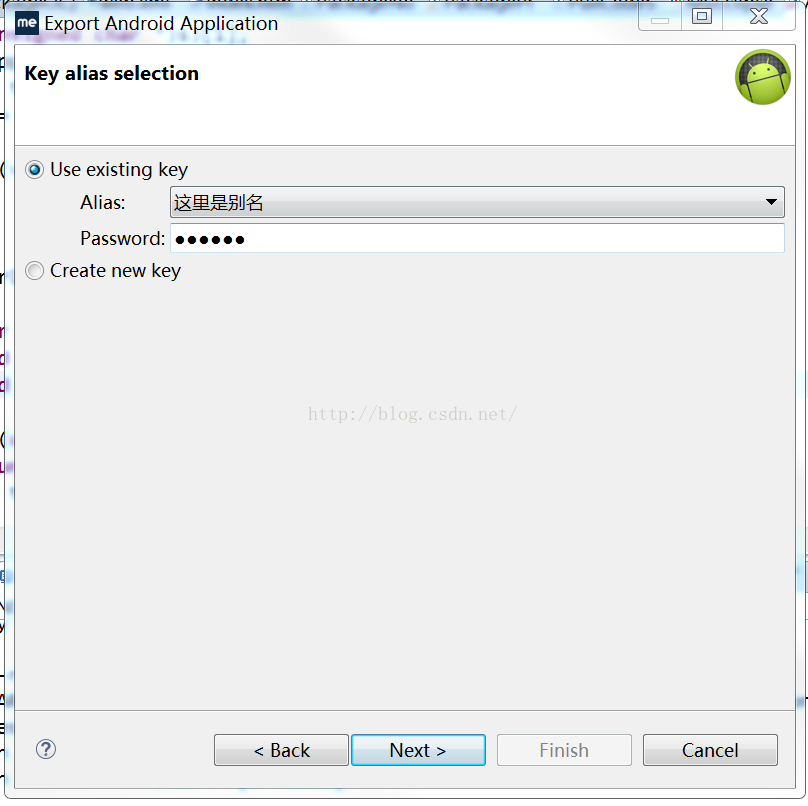
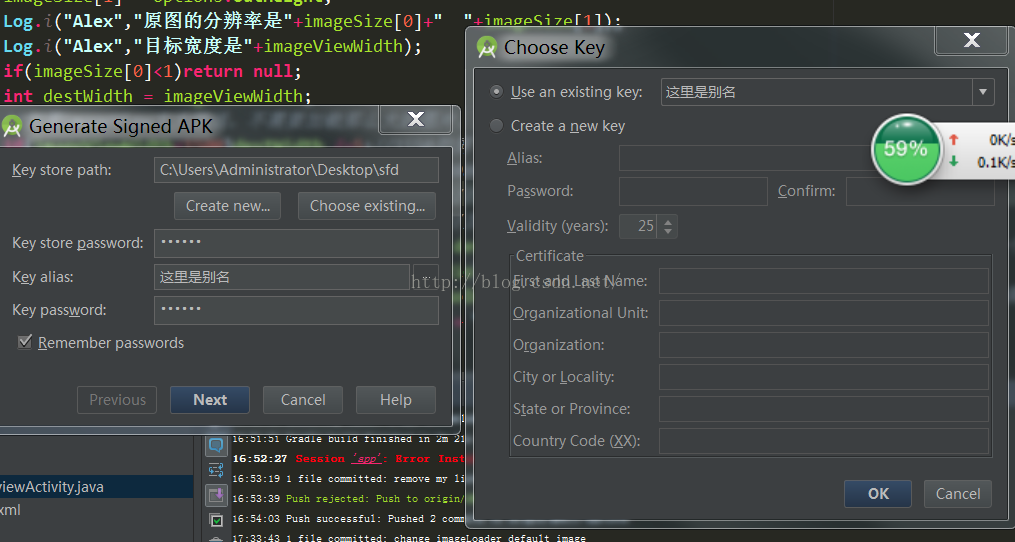
mykeyName 是別名(alias),100 是憑證有效天數,mydemo.keystore 是簽名檔檔名。執行後會提示輸入一組密碼——別把 alias 和 password 搞混,這兩個是不同的東西,當初我在這上面浪費了不少時間。下面三張圖是 Eclipse 與 Android Studio 簽名精靈的截圖,可以對照分辨:
對 apk 簽名:
jarsigner -verbose -keystore E:\QA\file\key -signedjar app-signed.apk app-release-unsigned.apk mykeyName
先 cd 到未簽名 apk 所在目錄,接著依序是簽名檔路徑、輸出檔名、輸入檔名、別名。執行後控制台會要求輸入簽名檔密碼,驗證通過便會逐個檔案簽名。
4K 對齊:
zipalign -f -v 4 app-signed.apk app-publish.apk
對齊據說能讓系統 mmap 時更快存取 apk 內的資源。實測對齊後檔案體積反而略增,但既然是上架規範要求,就照做。
public class PackageNow {
    /** 各分支的 [倉庫路徑, 分支名] */
    public static final String[] BRANCH_0 = {"E:\\QA\\master\\app3", "master"};
    public static final String[] BRANCH_1 = {"E:\\QA\\branch1\\app3", "QRAII-6916"};
    public static final String[] BRANCH_2 = {"E:\\QA\\branch2\\app3", "QRAII-sprint8"};
    public static final String[][] BRANCHES = {BRANCH_0, BRANCH_1, BRANCH_2};

    public static final String GIT_ROOT = "https://git.xxxx.com:7171/android/app3.git";
    public static final String APK_PATH = "\\app\\build\\outputs\\apk";

    public static final String APP_DEBUG   = "app-debug.apk";    // 預設簽名
    public static final String APP_SIGNED  = "app-signed.apk";   // 正式簽名、未對齊
    public static final String APP_PUBLISH = "app-publish.apk";  // 正式簽名、已對齊

    public static final String KEY_PATH = "E:\\QA\\file\\key";

    /** 各環境對應的配置檔(存放於倉庫外) */
    public static final String LIVE_FILE    = "E:\\QA\\file\\live\\ApplicationConfigurationEntity.java";
    public static final String STAGING_FILE = "E:\\QA\\file\\staging\\ApplicationConfigurationEntity.java";
    public static final String DEV_FILE     = "E:\\QA\\file\\dev\\ApplicationConfigurationEntity.java";
    public static final String[] environmentNames = {"Staging", "Dev", "Live"};
    public static final String[] ENVIRONMENTS = {STAGING_FILE, DEV_FILE, LIVE_FILE};

    /** 專案中會被動態覆蓋的目標檔案 */
    public static final String ENV_FILE =
            "\\app\\src\\main\\java\\com\\xxxx\\xxxxx\\model\\ApplicationConfigurationEntity.java";

    /** gradle 輸出總行數,用來估算進度百分比 */
    public static final int totalCount = 997;
    public static String progress;
    /** 同一時間僅允許一個打包進程 */
    public static boolean isPackaging = false;

    /** 編譯指令 */
    public static String[] packageNow(int branch) {
        return new String[]{
                "cd " + BRANCHES[branch][0],
                BRANCHES[branch][0].charAt(0) + ":",
                "gradlew build"
        };
    }

    /** 簽名指令 */
    public static String[] signKey(int branch) {
        return new String[]{
                "cd " + BRANCHES[branch][0] + APK_PATH,
                BRANCHES[branch][0].charAt(0) + ":",
                "jarsigner -verbose -keystore " + KEY_PATH
                        + " -signedjar " + APP_SIGNED + " app-release-unsigned.apk mykeyName",
                "keyPassword"     // 簽名檔密碼
        };
    }

    /** 4K 對齊指令 */
    public static String[] zipAlign(int branch) {
        return new String[]{
                "cd " + BRANCHES[branch][0] + APK_PATH,
                BRANCHES[branch][0].charAt(0) + ":",
                "zipalign -f -v 4 " + APP_SIGNED + " " + APP_PUBLISH
        };
    }

    /** 拉取最新代碼 */
    public static String[] gitPull(int branch) {
        return new String[]{
                "cd " + BRANCHES[branch][0],
                BRANCHES[branch][0].charAt(0) + ":",
                "git pull " + GIT_ROOT + " " + BRANCHES[branch][1]
        };
    }

    /** 控制台每輸出一行就會回呼一次 */
    public interface ReadLineCallBack {
        void readLine(String line);
    }

    /** 執行一串命令,並逐行回報輸出 */
    public static void runOneRow(String[] orders, ReadLineCallBack callBack) throws IOException {
        Process process = Runtime.getRuntime().exec("cmd");
        SequenceInputStream sis = new SequenceInputStream(
                process.getInputStream(), process.getErrorStream());
        OutputStreamWriter osw = new OutputStreamWriter(process.getOutputStream());
        InputStreamReader isr = new InputStreamReader(sis, "GBK");   // Windows 控制台編碼
        BufferedReader br = new BufferedReader(isr);
        BufferedWriter bw = new BufferedWriter(osw);

        for (String s : orders) {
            bw.write(s);
            bw.newLine();
        }
        bw.flush();
        bw.close();
        osw.close();

        String line = null;
        while (null != (line = br.readLine())) {
            callBack.readLine(line);
        }
        br.close();
        isr.close();
        process.destroy();
    }

    /** 打包主流程 */
    public static void buildPackage(String appLocation, int branch,
                                    int environment, final boolean sign) throws IOException {
        progress = "正在進行編譯";
        final int[] rowCount = {0, 0};

        // 1. 覆蓋環境配置檔
        File targetEnvFile = new File(BRANCHES[branch][0] + ENV_FILE);
        File sourceEnvFile = new File(ENVIRONMENTS[environment]);
        copyFile(sourceEnvFile, targetEnvFile);

        // 2. 編譯
        runOneRow(packageNow(branch), new ReadLineCallBack() {
            public void readLine(String line) {
                rowCount[0]++;
                if (!progress.equals("編譯完成") && !progress.equals("error:編譯失敗")) {
                    progress = "Progress:" + Math.round((float) rowCount[0] / totalCount * 100) + "%";
                }
                if (line.startsWith("BUILD SUCCESSFUL")) {
                    if (!sign) isPackaging = false;
                    progress = "編譯完成";
                } else if (line.startsWith("BUILD FAILED")) {
                    progress = "error:編譯失敗";
                    isPackaging = false;
                }
            }
        });
        if (!progress.equals("編譯完成")) {
            progress = "error:沒有編譯成功";
            return;
        }

        // 3. 簽名
        if (sign) {
            runOneRow(signKey(branch), new ReadLineCallBack() {
                public void readLine(String line) {
                    if (!line.startsWith("jar 已簽名")) return;
                    progress = "簽名成功!!";
                }
            });
            if (!progress.equals("簽名成功!!")) {
                progress = "error:簽名失敗!!!";
                return;
            }

            // 4. 對齊
            progress = "正在進行apk對齊";
            runOneRow(zipAlign(branch), new ReadLineCallBack() {
                public void readLine(String line) {
                    if (line.startsWith("Unable to open")) {
                        progress = "4k對齊失敗!!!";
                        return;
                    }
                    if (!line.equals("Verification succesful")) return;
                    progress = "4k對齊成功";
                }
            });
            if (!progress.equals("4k對齊成功")) {
                progress = "error:4k對齊失敗";
                return;
            }
        }

        // 5. 複製到對外下載目錄
        progress = "正在准備傳送文件";
        File sourceFile = new File(BRANCHES[branch][0] + APK_PATH + "\\"
                + (sign ? APP_PUBLISH : APP_DEBUG));
        if (sourceFile.exists() && sourceFile.isFile() && sourceFile.length() > 100000) {
            if (copyFile(sourceFile, new File(appLocation))) {
                progress = "succeed";
            }
        } else {
            progress = "error:失敗";
        }
        isPackaging = false;
    }

    /** 簡易檔案複製 */
    public static boolean copyFile(File sourceFile, File targetFile) {
        if (sourceFile == null || targetFile == null) return false;
        try {
            if (!targetFile.exists()) {
                targetFile.createNewFile();
            } else {
                targetFile.delete();
                targetFile.createNewFile();
            }
        } catch (IOException e) {
            e.printStackTrace();
            return false;
        }
        try (FileInputStream fis = new FileInputStream(sourceFile);
             FileOutputStream fos = new FileOutputStream(targetFile)) {
            byte[] b = new byte[1024];
            int len;
            while ((len = fis.read(b)) != -1) {
                fos.write(b, 0, len);
            }
            fos.flush();
        } catch (IOException e) {
            e.printStackTrace();
            return false;
        }
        return true;
    }
}
打包請求到達後先檢查是否有人正在打包,若可打包則依當前時間產生檔名並回傳給前端,供打包完成後下載。
public class PackageOL extends HttpServlet {
    protected void doGet(HttpServletRequest request, HttpServletResponse response)
            throws ServletException, IOException {
        int branch = 0;
        int environment = 0;
        boolean needSign = false;
        try {
            branch = Integer.parseInt(request.getParameter("branch"));
            environment = Integer.parseInt(request.getParameter("environment"));
            if (request.getParameter("needSign") != null
                    && request.getParameter("needSign").length() > 0) {
                needSign = true;
            }
        } catch (Exception e) {
            return;   // 參數缺失
        }

        SimpleDateFormat dateFormat = new SimpleDateFormat("yyyyMMdd");
        String fileName = "AppII" + PackageNow.environmentNames[environment]
                + "_" + dateFormat.format(new Date()) + ".apk";
        String appLocation = getServletConfig().getServletContext()
                .getRealPath("/").concat("release\\").concat(fileName);

        PrintWriter out = response.getWriter();
        if (PackageNow.isPackaging) {
            out.write("packaging");     // 已有人在打包
        } else {
            out.write(fileName);        // 回傳檔名供前端輪詢與下載
        }
        out.flush();
        out.close();

        PackageNow.isPackaging = true;
        PackageNow.buildPackage(appLocation, branch, environment, needSign);
    }
}
這裡有個必須修正的設計問題:Servlet 的 doGet 直接同步呼叫 buildPackage(),會佔住請求線程數十秒到數分鐘。實務上應該丟進單執行緒的 ExecutorService 背景執行,doGet 立刻回應;否則 Tomcat 線程池很快就被打滿,進度輪詢也一起掛掉。另外,這個端點完全沒有身分驗證——任何能連到伺服器的人都能觸發編譯、簽名並下載正式簽名的 apk。上線前至少要加上登入機制與存取控制,並把簽名檔密碼從代碼移到外部設定或環境變數,不要寫死在原始碼裡。
<!DOCTYPE html>
<html>
<head>
    <title>Android 自動打包</title>
    <link rel="stylesheet" type="text/css" href="./css/bootstrap.min.css">
</head>
<body>
<div class="container-fluid">
    <div class="jumbotron">
        <h1>Android HTML5 自動打包工具</h1>
    </div>

    <div class="checkbox">
        <label><input id="autoSign" type="checkbox"> 自動簽名</label>
    </div>

    <div class="dropdown">
        <button id="currentBranch" class="btn btn-default dropdown-toggle"
                data-toggle="dropdown">當前分支:sprint8</button>
        <ul class="dropdown-menu">
            <li><a href="#" code="0">master</a></li>
            <li><a href="#" code="1">sprint7</a></li>
            <li><a href="#" code="2">sprint8</a></li>
        </ul>
    </div>

    <div class="btn-group" data-toggle="buttons">
        <label class="btn btn-primary active">
            <input type="radio" name="env" code="0" checked> staging
        </label>
        <label class="btn btn-primary">
            <input type="radio" name="env" code="1"> dev
        </label>
        <label class="btn btn-primary">
            <input type="radio" name="env" code="2"> live
        </label>
    </div>

    <div><span id="process">准備打包</span></div>
    <div>
        <button class="btn btn-primary" id="pull">拉取最新代碼</button>
        <button class="btn btn-success" id="startPackage">開始打包</button>
        <button class="btn btn-info" id="download">下載apk</button>
    </div>
</div>

<script src="https://libs.baidu.com/jquery/2.0.0/jquery.min.js"></script>
<script>
var choosedBranch = "2", environment = "0", autoSign = false;
var showDialog = false, isPulling = false, timer = null;

$("#startPackage").click(function () {
    $.get("./PackageOL",
        "branch=" + choosedBranch + "&environment=" + environment
        + (autoSign ? "&needSign=true" : ""),
        function (data) {
            if (data === "packaging") {
                $("#process").text("正在打包中,請稍等");
                alert("當前有其他用戶正在打包,請稍候");
                return;
            }
            $("#process").text("開始打包");
            showDialog = false;
            // 打包完成後,回傳的就是檔名
            $("#download").unbind("click").click(function () {
                window.open("./release/" + data);
            });
            // 輪詢進度
            timer = setInterval(function () {
                $.get("./PackageProcess", "", function (d) {
                    if (d === "succeed") {
                        $("#process").text("打包成功,請點擊下載");
                        if (!showDialog) {
                            alert("打包成功,請點擊下載");
                            showDialog = true;
                        }
                        clearInterval(timer);
                    } else if (d.substr(0, 5) === "error") {
                        clearInterval(timer);
                        alert("打包失敗,原因:" + d);
                    } else {
                        $("#process").text(d);
                    }
                });
            }, 2500);
        });
});

$(".dropdown-menu a").click(function () {
    choosedBranch = $(this).attr("code");
    $("#currentBranch").text("當前分支:" + $(this).text());
});

$("#pull").click(function () {
    if (isPulling) { alert("上次代碼還沒有拉取完"); return; }
    isPulling = true;
    $("#process").text("正在拉取代碼,請稍等");
    $.get("./PullCodeServlet", "branch=" + choosedBranch, function (data) {
        alert(data === "succeed" ? "拉取代碼成功" : "拉取代碼失敗");
        $("#process").text("代碼拉取完畢");
        isPulling = false;
    });
});

$("input[name=env]").click(function () {
    environment = $(this).attr("code");
});

$("#autoSign").click(function () { autoSign = !autoSign; });
</script>
</body>
</html>
前端送給伺服器的是陣列下標(分支序號與環境序號),對應 PackageNow.java 裡那幾個靜態陣列的索引。拉取代碼與查詢進度的兩個 Servlet 實作與上面類似,此處從略。
這套工具的核心價值不在代碼多漂亮,而在「把重複性勞動自動化」這個方向。若繼續打磨,優先順序會是:
buildConfigField 或 resValue,一個倉庫就能同時管理多環境,不必維護多份倉庫與多份配置檔副本。 Android 自訂控件分享:讓數字動起來的 DancingNumberView
簡介 DancingNumberView 是一個專門用來「跳動顯示數字」的控件,直接繼承自 TextView。這類效果常用在金額這類使用者比較敏感的數字上,讓 UI 互動
 Android MP3 播放器實作拆解(一):掃描媒體庫與 Service 播放
做一個音樂播放器,第一步永遠是「把歌找出來」,第二步則是「點下去要能響」。本文示範如何用 MediaStore 掃描本機音樂、以 SimpleAdapter 填充列表,再
 FlycoTabLayout 開源庫深度剖析:三款 TabLayout 與源碼細節
效果預覽 FlycoTabLayout 是 Android 上一套相當完整的 Tab 切換方案,動畫順滑、樣式豐富,原始碼也值得一读。 接入方式 在 Android
 仿 RadioGroup 打造可複用的單選卡片容器(以底部導航/Tab 為例)
需求很直觀:一排四張樣式相同、內容不同的卡片,同一時間只能有一張處於選中狀態,選中後回傳對應的金額。圖上只是示意效果,實際資料要從伺服器拉回來再灌進控制項。 先盤點幾種