

編輯:關於 Android 程式設計
效果預覽
Send(發送):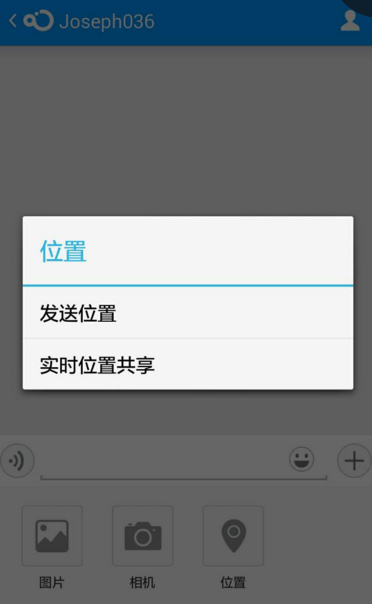
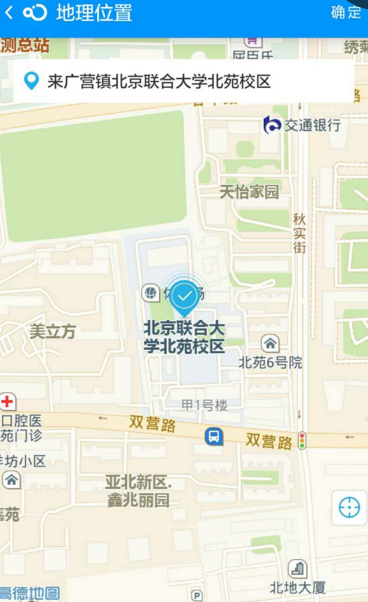
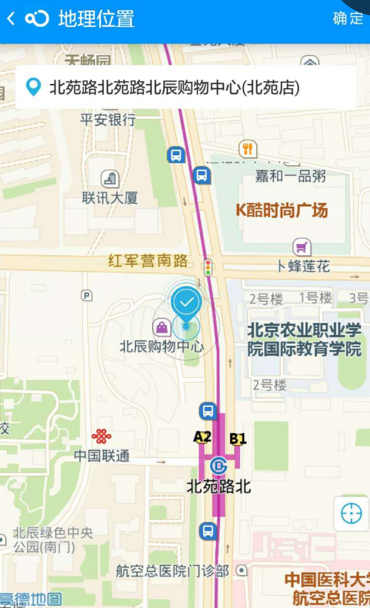
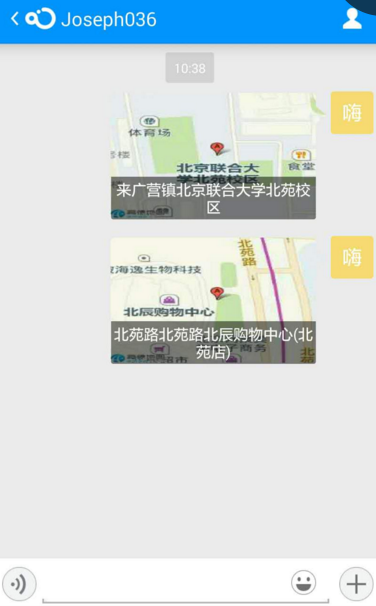
Click LocationMessage(點擊位置訊息):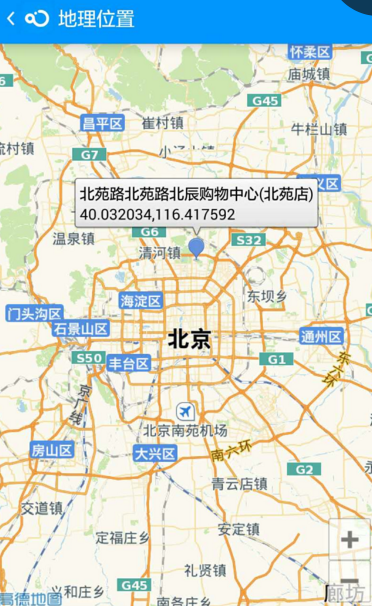
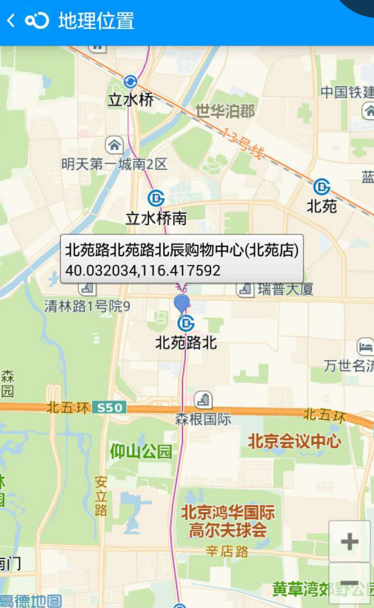
實作步驟
1:先註冊高德地圖開發者帳號,建立應用並取得 appkey。
2:jar 建議直接從融雲 demo 中複製。因為某些地圖廠商的版本相容性做得不夠好,你下載的新版 jar 可能在舊版實作程式碼裡找不到對應介面,或者介面已經變動。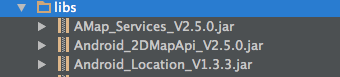
3:參考 demo 程式碼,在 RongCloudEvent.java 中實作地理位置提供者介面。在 onStartLocation 方法裡,點擊後開啟地圖的 Activity。
@Override public void onStartLocation(Context context, LocationCallback locationCallback) { /** * demo 代碼 開發者需替換成自己的代碼。 */ DemoContext.getInstance().setLastLocationCallback(locationCallback); Intent intent = new Intent(context, AMAPLocationActivity.class); intent.setFlags(Intent.FLAG_ACTIVITY_NEW_TASK); context.startActivity(intent);高德地圖的展示、經緯度取得與定位邏輯,全部集中在這個類別裡。
程式碼如下:
public class AMAPLocationActivity extends ActionBarActivity implements View.OnClickListener, LocationSource, GeocodeSearch.OnGeocodeSearchListener, AMapLocationListener, AMap.OnCameraChangeListener { private MapView mapView; private AMap aMap; private LocationManagerProxy mLocationManagerProxy; private Handler handler = new Handler(); private LocationSource.OnLocationChangedListener listener; private LatLng myLocation = null; private Marker centerMarker; private boolean isMovingMarker = false; private BitmapDescriptor successDescripter; private GeocodeSearch geocodeSearch; private LocationMessage mMsg; private TextView tvCurLocation; private boolean model = false; private boolean isPerview; @Override protected void onCreate(Bundle savedInstanceState) { super.onCreate(savedInstanceState); setContentView(R.layout.activity_amap); getSupportActionBar().setTitle("地理位置"); getSupportActionBar().setDisplayHomeAsUpEnabled(true); getSupportActionBar().setHomeAsUpIndicator(R.drawable.de_actionbar_back); mapView = (MapView) findViewById(R.id.map); mapView.onCreate(savedInstanceState); initUI(); initAmap(); setUpLocationStyle(); } private void initAmap() { if (aMap == null) { aMap = mapView.getMap(); } if (getIntent().hasExtra("location")) { isPerview = true; mMsg = getIntent().getParcelableExtra("location"); tvCurLocation.setVisibility(View.GONE); returns.setVisibility(View.GONE); if (model) { CameraPosition location = new CameraPosition.Builder() .target(new LatLng(mMsg.getLat(), mMsg.getLng())).zoom(18).bearing(0).tilt(30).build(); show(location); } else { aMap.addMarker(new MarkerOptions().anchor(0.5f, 0.5f) .position(new LatLng(mMsg.getLat(), mMsg.getLng())).title(mMsg.getPoi()) .snippet(mMsg.getLat() + "," + mMsg.getLng()).draggable(false)); } return; } aMap.setLocationSource(this);// 設置定位監聽 aMap.setMyLocationEnabled(true); aMap.getUiSettings().setZoomControlsEnabled(false); aMap.getUiSettings().setMyLocationButtonEnabled(false); CameraUpdate cameraUpdate = CameraUpdateFactory.zoomTo(15);//設置縮放監聽 aMap.moveCamera(cameraUpdate); successDescripter = BitmapDescriptorFactory.fromResource(R.drawable.icon_usecarnow_position_succeed); geocodeSearch = new GeocodeSearch(this); geocodeSearch.setOnGeocodeSearchListener(this); } private static final String MAP_FRAGMENT_TAG = "map"; private SupportMapFragment aMapFragment; private void show(CameraPosition location) { AMapOptions aOptions = new AMapOptions(); aOptions.zoomGesturesEnabled(true); aOptions.scrollGesturesEnabled(false); aOptions.camera(location); if (aMapFragment == null) { aMapFragment = SupportMapFragment.newInstance(aOptions); FragmentTransaction fragmentTransaction = getSupportFragmentManager() .beginTransaction(); fragmentTransaction.add(android.R.id.content, aMapFragment, MAP_FRAGMENT_TAG); fragmentTransaction.commit(); } } private ImageView returns; private void initUI() { returns = (ImageView) findViewById(R.id.myLocation); returns.setOnClickListener(this); tvCurLocation = (TextView) findViewById(R.id.location); } @Override public void onClick(View v) { switch (v.getId()) { case R.id.myLocation: CameraUpdate update = CameraUpdateFactory.changeLatLng(myLocation); aMap.animateCamera(update); break; default: break; } } @Override public void activate(OnLocationChangedListener onLocationChangedListener) { listener = onLocationChangedListener; mLocationManagerProxy = LocationManagerProxy.getInstance(this); mLocationManagerProxy.requestLocationData( LocationProviderProxy.AMapNetwork, -1, 100, this); } @Override public void deactivate() { if (mLocationManagerProxy != null) { mLocationManagerProxy.removeUpdates(this); mLocationManagerProxy.destroy(); } mLocationManagerProxy = null; } @Override public void onRegeocodeSearched(RegeocodeResult regeocodeResult, int i) { if (i == 0) { if (regeocodeResult != null && regeocodeResult.getRegeocodeAddress() != null) { endAnim(); centerMarker.setIcon(successDescripter); RegeocodeAddress regeocodeAddress = regeocodeResult.getRegeocodeAddress(); String formatAddress = regeocodeResult.getRegeocodeAddress().getFormatAddress(); String shortAdd = formatAddress.replace(regeocodeAddress.getProvince(), "").replace(regeocodeAddress.getCity(), "").replace(regeocodeAddress.getDistrict(), ""); tvCurLocation.setText(shortAdd); double latitude = regeocodeResult.getRegeocodeQuery().getPoint().getLatitude(); double longitude = regeocodeResult.getRegeocodeQuery().getPoint().getLongitude(); mMsg = LocationMessage.obtain(latitude, longitude, shortAdd, getMapUrl(latitude, longitude)); NLog.e("LocationChange", shortAdd + latitude + "----" + longitude); } else { NToast.shortToast(AMAPLocationActivity.this, "沒有搜索到結果"); } } else { NToast.shortToast(AMAPLocationActivity.this, "搜索失敗,請檢查網絡"); } } @Override public void onGeocodeSearched(GeocodeResult geocodeResult, int i) { } @Override public void onLocationChanged(AMapLocation aMapLocation) { if (aMapLocation != null && aMapLocation.getAMapException().getErrorCode() == 0) { if (listener != null) { listener.onLocationChanged(aMapLocation);// 顯示系統小藍點 } myLocation = new LatLng(aMapLocation.getLatitude(), aMapLocation.getLongitude());//獲取當前位置經緯度 tvCurLocation.setText(aMapLocation.getRoad() + aMapLocation.getStreet() + aMapLocation.getPoiName());//當前位置信息 double latitude = aMapLocation.getLatitude(); double longitude = aMapLocation.getLongitude(); mMsg = LocationMessage.obtain(latitude, longitude, aMapLocation.getRoad() + aMapLocation.getStreet() + aMapLocation.getPoiName(), getMapUrl(latitude, longitude)); NLog.e("LocationInit", aMapLocation.getRoad() + aMapLocation.getStreet() + aMapLocation.getPoiName() + latitude + "----" + longitude); addChooseMarker(); } } private void addChooseMarker() { //加入自定義標簽 MarkerOptions centerMarkerOption = new MarkerOptions().position(myLocation).icon(successDescripter); centerMarker = aMap.addMarker(centerMarkerOption); centerMarker.setPositionByPixels(mapView.getWidth() / 2, mapView.getHeight() / 2); handler.postDelayed(new Runnable() { @Override public void run() { CameraUpdate update = CameraUpdateFactory.zoomTo(17f); aMap.animateCamera(update, 1000, new AMap.CancelableCallback() { @Override public void onFinish() { aMap.setOnCameraChangeListener(AMAPLocationActivity.this); } @Override public void onCancel() { } }); } }, 1000); } private void setMovingMarker() { if (isMovingMarker) return; isMovingMarker = true; centerMarker.setIcon(successDescripter); hideLocationView(); } @Override public void onCameraChange(CameraPosition cameraPosition) { if (centerMarker != null) { setMovingMarker(); } } @Override public void onCameraChangeFinish(CameraPosition cameraPosition) { LatLonPoint point = new LatLonPoint(cameraPosition.target.latitude, cameraPosition.target.longitude); RegeocodeQuery query = new RegeocodeQuery(point, 50, GeocodeSearch.AMAP); geocodeSearch.getFromLocationAsyn(query); if (centerMarker != null) { animMarker(); } showLocationView(); } @Override public void onLocationChanged(Location location) { } @Override public void onStatusChanged(String provider, int status, Bundle extras) { } @Override public void onProviderEnabled(String provider) { } @Override public void onProviderDisabled(String provider) { } @Override protected void onResume() { super.onResume(); mapView.onResume(); } @Override protected void onPause() { super.onPause(); mapView.onPause(); deactivate(); } @Override protected void onSaveInstanceState(Bundle outState) { super.onSaveInstanceState(outState); mapView.onSaveInstanceState(outState); } @Override protected void onDestroy() { mapView.onDestroy(); super.onDestroy(); } private ValueAnimator animator = null; private void animMarker() { isMovingMarker = false; if (animator != null) { animator.start(); return; } animator = ValueAnimator.ofFloat(mapView.getHeight() / 2, mapView.getHeight() / 2 - 30); animator.setInterpolator(new DecelerateInterpolator()); animator.setDuration(150); animator.setRepeatCount(1); animator.setRepeatMode(ValueAnimator.REVERSE); animator.addUpdateListener(new ValueAnimator.AnimatorUpdateListener() { @Override public void onAnimationUpdate(ValueAnimator animation) { Float value = (Float) animation.getAnimatedValue(); centerMarker.setPositionByPixels(mapView.getWidth() / 2, Math.round(value)); } }); animator.addListener(new AnimatorListenerAdapter() { @Override public void onAnimationEnd(Animator animation) { centerMarker.setIcon(successDescripter); } }); animator.start(); } private void endAnim() { if (animator != null && animator.isRunning()) animator.end(); } private void hideLocationView() { ObjectAnimator animLocation = ObjectAnimator.ofFloat(tvCurLocation, "TranslationY", -tvCurLocation.getHeight() * 2); animLocation.setDuration(200); animLocation.start(); } private void showLocationView() { ObjectAnimator animLocation = ObjectAnimator.ofFloat(tvCurLocation, "TranslationY", 0); animLocation.setDuration(200); animLocation.start(); } private void setUpLocationStyle() { // 自定義系統定位藍點 MyLocationStyle myLocationStyle = new MyLocationStyle(); myLocationStyle.myLocationIcon(BitmapDescriptorFactory. fromResource(R.drawable.img_location_now)); myLocationStyle.strokeWidth(0); myLocationStyle.strokeColor(R.color.main_theme_color); myLocationStyle.radiusFillColor(Color.TRANSPARENT); aMap.setMyLocationStyle(myLocationStyle); } private Uri getMapUrl(double x, double y) { String url = "https://restapi.amap.com/v3/staticmap?location=" + y + "," + x + "&zoom=17&scale=2&size=150*150&markers=mid,,A:" + y + "," + x + "&key=" + "ee95e52bf08006f63fd29bcfbcf21df0"; NLog.e("getMapUrl", url); return Uri.parse(url); } @Override public boolean onCreateOptionsMenu(Menu menu) { MenuInflater inflater = getMenuInflater(); inflater.inflate(R.menu.de_location_menu, menu); if (isPerview) { menu.getItem(0).setVisible(false); } return super.onCreateOptionsMenu(menu); } @Override public boolean onOptionsItemSelected(MenuItem item) { switch (item.getItemId()) { case R.id.send_location: if (mMsg != null) { DemoContext.getInstance().getLastLocationCallback().onSuccess(mMsg); DemoContext.getInstance().setLastLocationCallback(null); finish(); } else { DemoContext.getInstance().getLastLocationCallback() .onFailure("定位失敗"); } break; case android.R.id.home: finish(); break; } return super.onOptionsItemSelected(item); } }xml:
<framelayout android:layout_height="match_parent" android:layout_width="match_parent"> </framelayout> 把程式碼與相關資源檔複製進來即可運行。下面說明整體邏輯。
程式碼大體分為兩部分:一部分是發送位置的邏輯,另一部分是從會話介面點擊地理位置訊息進入的邏輯,核心在於發送位置。
@Override public void onLocationChanged(AMapLocation aMapLocation) { if (aMapLocation != null && aMapLocation.getAMapException().getErrorCode() == 0) {如果卡在這個 if 判斷進不去,那說明你配置的高德相關 jar、key、storeFile(此處在 gradle 配置)出了問題,具體請諮詢高德地圖官方。
另外還有一點值得注意,就是取得靜態縮圖的問題。
private Uri getMapUrl(double x, double y) { String url = "https://restapi.amap.com/v3/staticmap?location=" + y + "," + x + "&zoom=17&scale=2&size=150*150&markers=mid,,A:" + y + "," + x + "&key=" + "ee95e52bf08006f63fd29bcfbcf21df0"; NLog.e("getMapUrl", url); return Uri.parse(url); }最後拼接的 key,高德官網的說法是必須配置成你自己的 key。這是個坑:我拿自己的 key 到瀏覽器裡解析,結果返回錯誤碼 10009。


當時把我愁壞了。後來朋友提醒,可以隨便找一個綁定了 web api 的 key 來試試,結果還真行。所以參考這篇博文的朋友,直接用上面 demo 提供的 key 即可。
點擊地理位置訊息預覽的邏輯,是在 RongCloudEvent.java 中重寫訊息點擊事件:
if (message.getContent() instanceof LocationMessage) { Intent intent = new Intent(context, AMAPLocationActivity.class); intent.putExtra("location", message.getContent()); intent.setFlags(Intent.FLAG_ACTIVITY_NEW_TASK); context.startActivity(intent); }接著在 AMAPLocationActivity 中攔截並判斷這個 intent:
if (getIntent().hasExtra("location")) { isPerview = true; mMsg = getIntent().getParcelableExtra("location"); tvCurLocation.setVisibility(View.GONE); returns.setVisibility(View.GONE); if (model) { CameraPosition location = new CameraPosition.Builder() .target(new LatLng(mMsg.getLat(), mMsg.getLng())).zoom(18).bearing(0).tilt(30).build(); show(location); } else { aMap.addMarker(new MarkerOptions().anchor(0.5f, 0.5f) .position(new LatLng(mMsg.getLat(), mMsg.getLng())).title(mMsg.getPoi()) .snippet(mMsg.getLat() + "," + mMsg.getLng()).draggable(false)); } return; }最後的 return 讓程式不再往下執行,完成當前位置的預覽後即結束。
發送地理位置與高德地圖的整合到此結束,有任何疑問歡迎留言。高德地圖相關問題可登入官網諮詢。
 Android 動畫總結系列(6):矢量圖形與矢量動畫完全解析
按照最初的規劃,上一篇本應是「Android 動畫總結系列(5)——屬性動畫源碼分析」,但屬性動畫源碼寫起來相對複雜,出於某些原因,我把精力先投入到了矢量動畫這塊,第 5
 Android 開發實戰:為 APP 創建桌面快捷方式
很多應用首次啟動時會自動在手機桌面生成一個快捷圖標,方便用戶快速進入。本文就來看看如何在 Android 程序中實現這一功能。 效果預覽 所需權限 <uses-
 Android Wear 設計原則:讓使用者不必為你的 App 停下腳步
專注於「不打断使用者」,其餘的自然會跟上 手錶是一種非常理想的隨身設備:做飯、吃東西、散步、跑步,甚至交談的過程中,都能順手使用。如果你的應用會迫使使用者中止手邊正在做的
 Android 全景影片播放器——用 OpenGL ES 2.0 畫一個三角形
Github 專案地址,歡迎 star~! 初始化 OpenGL ES 環境 OpenGL ES 的使用一般包括如下幾個步驟: 1. EGL Context 初始化 2.