

編輯:關於 Android 程式設計
先預覽一批與文字相關的 Paint 方法:
//普通設置
paint.setAntiAlias(true); //是否使用抗鋸齒,開啟後繪圖速度會變慢,默認 false
setStyle(Paint.Style.FILL); //繪圖樣式,對文字和幾何圖形都有效
setTextAlign(Align.LEFT); //文字對齊方式:CENTER、LEFT、RIGHT,默認 LEFT
paint.setTextSize(12); //設置文字大小
//樣式設置
paint.setFakeBoldText(true); //是否為粗體文字
paint.setUnderlineText(true); //設置下劃線
paint.setTextSkewX((float) -0.25); //字體水平傾斜度,普通斜體字為 -0.25
paint.setStrikeThruText(true); //設置刪除線效果
//其它設置
paint.setTextScaleX(2); //僅水平方向拉伸,高度不變
mPaint.setStrokeWidth(5);
mPaint.setTextSize(80);
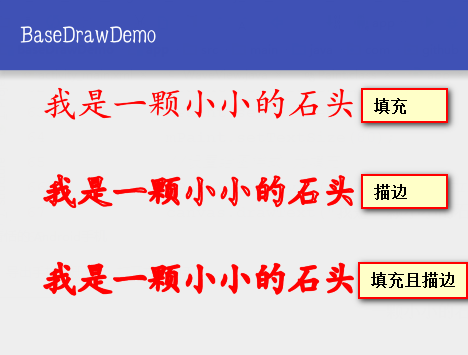
//填充
mPaint.setStyle(Paint.Style.FILL);
canvas.drawText("我是一顆小小的石頭", 100, 100, mPaint);
//描邊
mPaint.setStyle(Paint.Style.STROKE);
canvas.drawText("我是一顆小小的石頭", 100, 300, mPaint);
//填充且描邊
mPaint.setStyle(Paint.Style.FILL_AND_STROKE);
canvas.drawText("我是一顆小小的石頭", 100, 500, mPaint);
mPaint.setStyle(Paint.Style.FILL);
mPaint.setTextSize(80);
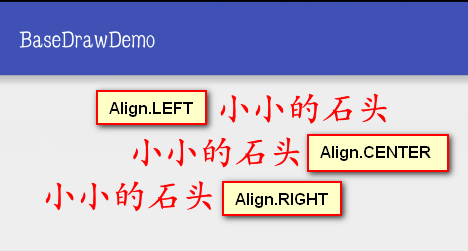
//左對齊
mPaint.setTextAlign(Paint.Align.LEFT);
canvas.drawText("小小的石頭", 500, 100, mPaint);
//居中對齊
mPaint.setTextAlign(Paint.Align.CENTER);
canvas.drawText("小小的石頭", 500, 200, mPaint);
//右對齊
mPaint.setTextAlign(Paint.Align.RIGHT);
canvas.drawText("小小的石頭", 500, 300, mPaint);
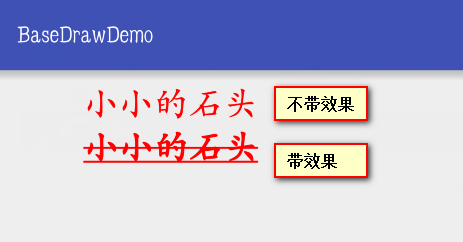
canvas.drawText("小小的石頭", 200, 100, mPaint); //不帶任何效果
mPaint.setFakeBoldText(true); //粗體
mPaint.setUnderlineText(true); //下劃線
mPaint.setStrikeThruText(true); //刪除線
canvas.drawText("小小的石頭", 200, 200, mPaint);
mPaint.setTextSkewX(-0.25f);
canvas.drawText("小小的石頭", 100, 100, mPaint);
mPaint.setTextSkewX(0.25f);
canvas.drawText("小小的石頭", 100, 200, mPaint);
mPaint.setTextSkewX(-0.5f);
canvas.drawText("小小的石頭", 100, 300, mPaint);
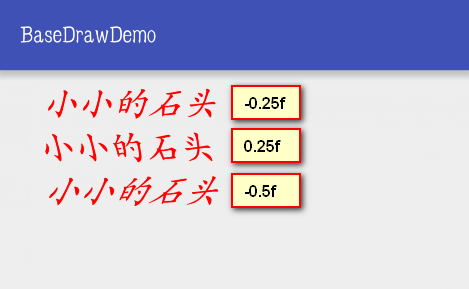
可見普通斜體字對應 -0.25f,數值大於 -0.25f 向左傾斜,小於 -0.25f 則向右傾斜。
mPaint.setTextScaleX(1); //不拉伸
canvas.drawText("小小的石頭", 100, 100, mPaint);
mPaint.setTextScaleX(2); //水平拉伸 2 倍
canvas.drawText("小小的石頭", 100, 200, mPaint);
mPaint.setTextScaleX(3); //水平拉伸 3 倍
canvas.drawText("小小的石頭", 100, 300, mPaint);
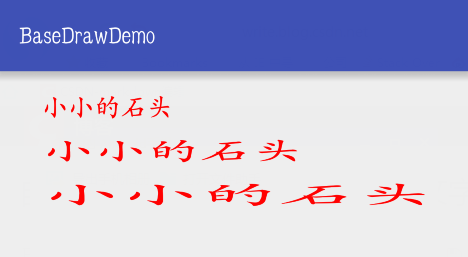
可以發現,只有水平方向被拉伸,高度並未改變。
drawText(String text, float x, float y, Paint paint)
drawText(char[] text, int index, int count, float x, float y, Paint paint)
drawText(CharSequence text, int start, int end, float x, float y, Paint paint)
drawTextRun(char[] text, int index, int count, int contextIndex, int contextCount, float x, float y, boolean isRtl, Paint paint)
drawTextRun(CharSequence text, int start, int end, int contextStart, int contextEnd, float x, float y, boolean isRtl, Paint paint)
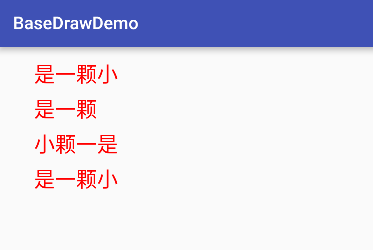
參數說明:第一個構造函數最為普通;第二個中 index 表示起始索引、count 表示繪製個數;第三個中 start 與 end 為截取區間 [start, end),含 start 不含 end;第四、第五個多了 contextIndex、contextCount 與 isRtl(true 正序、false 倒序)。注意 drawTextRun 是 API 23 才引入的。
canvas.drawText("我是一顆小小的石頭".toCharArray(), 1, 4, 100, 100, mPaint);
canvas.drawText("我是一顆小小的石頭", 1, 4, 100, 200, mPaint);
//最低 sdk 23
canvas.drawTextRun("我是一顆小小的石頭".toCharArray(), 1, 4, 1, 4, 100, 300, true, mPaint);
canvas.drawTextRun("我是一顆小小的石頭".toCharArray(), 1, 4, 1, 4, 100, 400, false, mPaint);
drawPosText(String text, float[] pos, Paint paint)
drawPosText(char[] text, int index, int count, float[] pos, Paint paint)
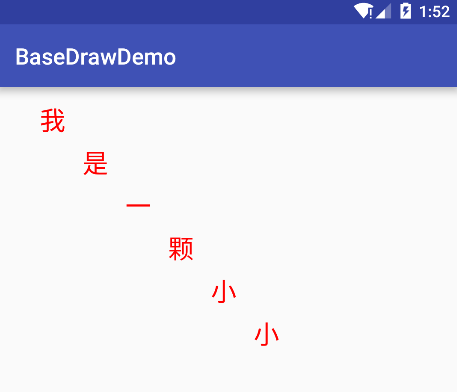
float[] pos = {100, 100, 200, 200, 300, 300, 400, 400, 500, 500, 600, 600};
canvas.drawPosText("我是一顆小小", pos, mPaint);
drawTextOnPath(String text, Path path, float hOffset, float vOffset, Paint paint)
drawTextOnPath(char[] text, int index, int count, Path path, float hOffset, float vOffset, Paint paint)
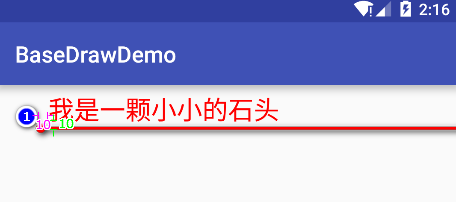
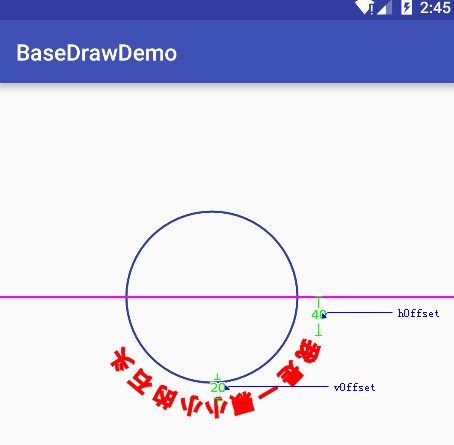
參數含義:hOffset 為相對於路徑起點的水平偏移量,正數向 X 軸正方向(下移)、負數向上移;若是圓弧,正數為順時針偏移,反之逆時針。vOffset 為相對於路徑中心的垂直偏移量,正數向 Y 軸正方向(右移)、負數向左移。
mPath.moveTo(100, 100);
mPath.lineTo(800, 100);
canvas.drawTextOnPath("我是一顆小小的石頭", mPath, 10, -10, mPaint);
路徑為圓弧的例子:
mPath.addCircle(500, 500, 200, Path.Direction.CW);
canvas.drawTextOnPath("我是一顆小小的石頭", mPath, 40, -20, mPaint);
setTypeface(Typeface typeface)
Typeface 用於設置字體樣式,通過 paint.setTypeface() 指定,既可用系統字體,也可加載自定義樣式文件。枚舉值如下:
Typeface.NORMAL //正常體
Typeface.BOLD //粗體
Typeface.ITALIC //斜體
Typeface.BOLD_ITALIC //粗斜體
create(String familyName, int style) //按字體名創建
create(Typeface family, int style) //按類型創建
defaultFromStyle(int style) //默認類型
typeface = Typeface.create("宋體", Typeface.NORMAL);
mPaint.setTypeface(typeface);
canvas.drawText("我是一顆小小的石頭", 100, 100, mPaint);
typeface = Typeface.create("楷體", Typeface.NORMAL);
mPaint.setTypeface(typeface);
canvas.drawText("我是一顆小小的石頭", 100, 200, mPaint);
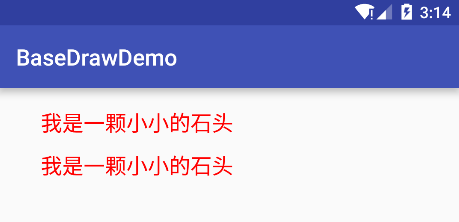
從圖中可以看到,設置楷體並未生效,因為系統字體中並不存在楷體。
createFromAsset(AssetManager mgr, String path) //從 Asset 中獲取
createFromFile(File path) //從文件對象獲取
createFromFile(String path) //從外部路徑獲取
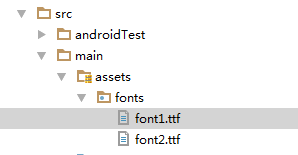
先在 main 下創建 assets 文件夾,再在其中建 fonts 文件夾,最後放入 font1.ttf:
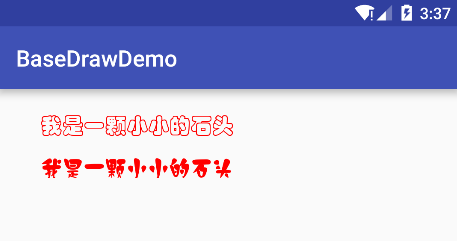
typeface = Typeface.createFromAsset(mContext.getAssets(), "fonts/font1.ttf");
mPaint.setTypeface(typeface);
canvas.drawText("我是一顆小小的石頭", 100, 100, mPaint);
typeface = Typeface.createFromAsset(mContext.getAssets(), "fonts/font2.ttf");
mPaint.setTypeface(typeface);
canvas.drawText("我是一顆小小的石頭", 100, 200, mPaint);
 Android 檔案上傳實作:圖片與檔案進度更新
實作概念 在 Android 中實作檔案上傳,通常需要先取得要上傳的檔案來源,例如系統檔案選擇器、相機、錄影機或錄音機,再將檔案內容以 multipart/form-d
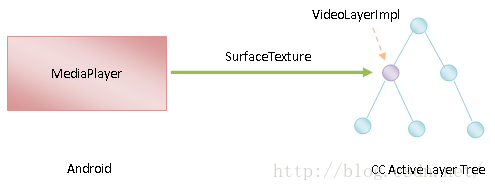 Chromium 如何為 video 標籤渲染影片畫面
前言在 Chromium 中,video 標籤的畫面並不是簡單地把播放器視窗塞進網頁,而是透過一套跨進程、跨線程的渲染鏈路完成。核心思路是讓播放器把解碼結果寫入 GPU
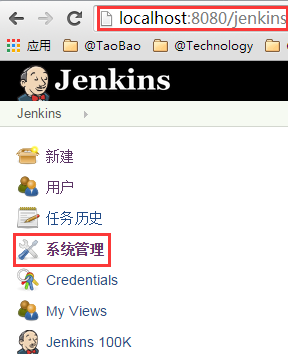 Jenkins + Gradle 實踐:Android 持續集成與多渠道打包自動化
為什麼要談持續集成 先看一個常見場景:Android 工程師小李打出十幾個渠道包,丟給運維小胡,小胡再一個一個上傳到各應用市場送審。 仔細想,小李這份工有任何價值嗎?它打
 LRecyclerView 進階用法:側滑菜單、長按拖拽、滑動刪除一次搞定
LRecyclerView 現在能做什麼 反覆思考並兼顧使用便利性之後,LRecyclerView 整合了 SwipeMenu 系列能力:Item 左右側滑菜單、長按拖拽