

編輯:關於 Android 程式設計
這三個動作在 Android 上都是幾行的事,但每次要用的時候總會忘記細節,所以整理成一份備忘。
File sd = Environment.getExternalStorageDirectory();
String path = sd.getPath() + "/notes";
File file = new File(path);
if (!file.exists()) file.mkdir();
要一次建多層目錄的話,把 mkdir() 換成 mkdirs()。另外建議把路徑改成 Environment.getExternalFilesDir() 或 getExternalStoragePublicDirectory(Environment.DIRECTORY_DOCUMENTS),前者是應用專屬目錄、不需要任何權限,後者才是真正對外的公共位置。
示範從網路抓一張圖存成本機檔案:
HttpClient httpClient = new DefaultHttpClient();
HttpGet httpGet = new HttpGet("https://img3.3lian.com/2006/016/09/031.jpg");
HttpResponse httpResponse = httpClient.execute(httpGet);

if (httpResponse.getStatusLine().getStatusCode() == 200) {
    total_length = httpResponse.getEntity().getContentLength();
    is = httpResponse.getEntity().getContent();

    File file = new File(Environment.getExternalStorageDirectory(), "aupdata.jpg");
    fos = new FileOutputStream(file);
    bis = new BufferedInputStream(is);

    byte[] buffer = new byte[1024];
    byte[] result_two = new byte[(int) total_length];
    int len = 0;
    int total = 0;

    while ((len = bis.read(buffer)) > -1) {
        System.arraycopy(buffer, 0, result_two, total, len);
        fos.write(buffer, 0, len);
        total = total + len;
    }
}
重點就一句:FileOutputStream 建立檔案,write() 寫入內容,檔案就產生了。
不過要說清楚,這段寫法有幾個該避免的地方:DefaultHttpClient 早已廢棄,result_two 這個陣列其實完全沒被用到,而網路請求寫在主線程會直接觸發 NetworkOnMainThreadException。現代寫法應該用 HttpURLConnection 或 OkHttp,搭配協程/背景執行緒,串流直接從輸入流拷貝到輸出流即可,不必先把整個檔案讀進記憶體。
Intent intent = new Intent();
intent.setAction(Intent.ACTION_VIEW);
File install_file = new File(Environment.getExternalStorageDirectory(), "MyWeb.apk");
intent.setDataAndType(Uri.fromFile(install_file), "application/vnd.android.package-archive");
startActivity(intent);
這段在 Android 4.x 時代可以正常運作,但在新版本上會遇到兩道關卡:
file:// URI 跨應用傳遞,會拋 FileUriExposedException。必須改用 FileProvider 取得 content:// URI,並在 Manifest 宣告對應的 provider 與 paths。REQUEST_INSTALL_PACKAGES 權限,並引導使用者到系統設定手動允許「安裝未知應用」。改用 FileProvider 之後,記得補上 intent.addFlags(Intent.FLAG_GRANT_READ_URI_PERMISSION),否則目標應用讀不到檔案。
 常用 Android 開發代碼片段大合集(持續更新)
這份清單匯聚了日常開發中反覆用到、卻常常想不起來的 API 與小技巧,來源包括個人積累和社區文章。內容難免有重複或過時之處,看到問題歡迎指正。 一、View 與佈局 s
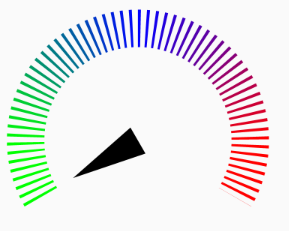 自定義 View 實作漸變圓弧虛線:SweepGradient 與 DashPathEffect 組合技
儀表盤風格的圓弧刻度是設計稿裡的高頻元素。要做出「彩色漸變 + 虛線分段」的效果,關鍵是兩個 API:SweepGradient 負責掃描式漸變上色,DashPathEf
 麥芒5與榮耀8怎麼選?規格、售價與定位的完整對照
華為新機的節奏很快,榮耀8由吳亦凡代言登場之後,麥芒5也接著亮相。兩台都是全網通、都是 4GB+64GB 的高階配置,售價只差 100 元——於是「該買哪一台」變成一個需
 RecyclerView + CardView 實作卡片式列表,資料來自 LeanCloud
最近做了一個用 CardView 與 RecyclerView 實作列表功能的 Demo,資料存放並抓取自 LeanCloud。以下依序拆解。 用到的工具:LeanCl