

編輯:關於 Android 程式設計
圖片模糊是常見需求,做過 iOS 或前端的同學大概都接觸過毛玻璃效果。網上 Android 的實現不少,但很多方案要麼效果不理想,要麼性能開銷大。這裡分享一個項目中實際用過的模糊方案,效果穩定且帶異步線程池支持。
原圖:

模糊後:

· 圖片處理基本都繞不開 Bitmap,本例也不例外;
· 示例中使用 ImageLoader 加載網絡圖片,方便大家參考「模糊網絡圖片」的完整鏈路。網絡加載必然是異步的,所以首次進入界面時會有等待時間,追求極致體驗的話需要在此基礎上做預加載或本地緩存;
· 模糊是純 CPU 計算,必須放在子線程執行,切忌在主線程直接調用。
核心思路是基於盒式模糊(Box Blur)多次迭代逼近高斯效果,並通過固定線程池做異步分發:
package com.byl.blur;

import java.util.concurrent.ExecutorService;
import java.util.concurrent.Executors;

import android.graphics.Bitmap;
import android.graphics.drawable.BitmapDrawable;
import android.graphics.drawable.Drawable;
import android.os.Handler;
import android.os.Message;

public class BitmapBlurUtil {

    private static ExecutorService executor;
    private static int POOL_SIZE = 2; // 單個 CPU 線程池大小

    private static ExecutorService getExecutor() {
        if (executor == null) {
            int cpuNums = Runtime.getRuntime().availableProcessors();
            executor = Executors.newFixedThreadPool(cpuNums * POOL_SIZE);
        }
        return executor;
    }

    public static void addTask(Bitmap bitmap, Handler handler) {
        getExecutor().submit(new BitmapVagueTask(bitmap, handler));
    }

    /** 水平方向模糊度 */
    private static float hRadius = 3;
    /** 豎直方向模糊度 */
    private static float vRadius = 3;
    /** 模糊迭代度 */
    private static int iterations = 5;

    /** 異步任務 */
    private static class BitmapVagueTask implements Runnable {
        private Bitmap bitmap;
        private Handler handler;

        public BitmapVagueTask(Bitmap bitmap, Handler handler) {
            super();
            this.bitmap = bitmap;
            this.handler = handler;
        }

        @Override
        public void run() {
            boxBlurFilter(bitmap, handler);
        }
    }

    /**
     * 高斯模糊主流程
     */
    private static void boxBlurFilter(Bitmap bmp, Handler handler) {
        int width = bmp.getWidth();
        int height = bmp.getHeight();
        int[] inPixels = new int[width * height];
        int[] outPixels = new int[width * height];
        Bitmap bitmap = Bitmap.createBitmap(width, height, Bitmap.Config.ARGB_8888);
        bmp.getPixels(inPixels, 0, width, 0, 0, width, height);

        for (int i = 0; i < iterations; i++) {
            blur(inPixels, outPixels, width, height, hRadius);
            blur(outPixels, inPixels, height, width, vRadius);
        }
        blurFractional(inPixels, outPixels, width, height, hRadius);
        blurFractional(outPixels, inPixels, height, width, vRadius);

        bitmap.setPixels(inPixels, 0, width, 0, 0, width, height);

        if (handler != null) {
            @SuppressWarnings("deprecation")
            Drawable drawable = new BitmapDrawable(bitmap);
            Message message = new Message();
            message.obj = drawable;
            handler.sendMessage(message);
        }
    }

    private static void blur(int[] in, int[] out, int width, int height, float radius) {
        int widthMinus1 = width - 1;
        int r = (int) radius;
        int tableSize = 2 * r + 1;
        int divide[] = new int[256 * tableSize];

        for (int i = 0; i < 256 * tableSize; i++)
            divide[i] = i / tableSize;

        int inIndex = 0;
        for (int y = 0; y < height; y++) {
            int outIndex = y;
            int ta = 0, tr = 0, tg = 0, tb = 0;

            for (int i = -r; i <= r; i++) {
                int rgb = in[inIndex + clamp(i, 0, width - 1)];
                ta += (rgb >> 24) & 0xff;
                tr += (rgb >> 16) & 0xff;
                tg += (rgb >> 8) & 0xff;
                tb += rgb & 0xff;
            }

            for (int x = 0; x < width; x++) {
                out[outIndex] = (divide[ta] << 24) | (divide[tr] << 16)
                        | (divide[tg] << 8) | divide[tb];

                int i1 = x + r + 1;
                if (i1 > widthMinus1) i1 = widthMinus1;
                int i2 = x - r;
                if (i2 < 0) i2 = 0;

                int rgb1 = in[inIndex + i1];
                int rgb2 = in[inIndex + i2];
                ta += ((rgb1 >> 24) & 0xff) - ((rgb2 >> 24) & 0xff);
                tr += ((rgb1 & 0xff0000) - (rgb2 & 0xff0000)) >> 16;
                tg += ((rgb1 & 0xff00) - (rgb2 & 0xff00)) >> 8;
                tb += (rgb1 & 0xff) - (rgb2 & 0xff);

                outIndex += height;
            }
            inIndex += width;
        }
    }

    private static void blurFractional(int[] in, int[] out, int width,
                                       int height, float radius) {
        radius -= (int) radius;
        float f = 1.0f / (1 + 2 * radius);
        int inIndex = 0;

        for (int y = 0; y < height; y++) {
            int outIndex = y;
            out[outIndex] = in[0];
            outIndex += height;

            for (int x = 1; x < width - 1; x++) {
                int i = inIndex + x;
                int rgb1 = in[i - 1];
                int rgb2 = in[i];
                int rgb3 = in[i + 1];

                int a1 = (rgb1 >> 24) & 0xff;
                int r1 = (rgb1 >> 16) & 0xff;
                int g1 = (rgb1 >> 8) & 0xff;
                int b1 = rgb1 & 0xff;
                int a2 = (rgb2 >> 24) & 0xff;
                int r2 = (rgb2 >> 16) & 0xff;
                int g2 = (rgb2 >> 8) & 0xff;
                int b2 = rgb2 & 0xff;
                int a3 = (rgb3 >> 24) & 0xff;
                int r3 = (rgb3 >> 16) & 0xff;
                int g3 = (rgb3 >> 8) & 0xff;
                int b3 = rgb3 & 0xff;

                a1 = a2 + (int) ((a1 + a3) * radius);
                r1 = r2 + (int) ((r1 + r3) * radius);
                g1 = g2 + (int) ((g1 + g3) * radius);
                b1 = b2 + (int) ((b1 + b3) * radius);

                a1 *= f; r1 *= f; g1 *= f; b1 *= f;

                out[outIndex] = (a1 << 24) | (r1 << 16) | (g1 << 8) | b1;
                outIndex += height;
            }
            out[outIndex] = in[width - 1];
            inIndex += width;
        }
    }

    public static int clamp(int x, int a, int b) {
        return (x < a) ? a : (x > b) ? b : x;
    }
}
模糊程度可以通過調節類中的 hRadius、vRadius、iterations 三個變量控制。一般來說,h/v 半徑決定模糊範圍,迭代次數決定高斯逼近程度,兩者組合出想要的視覺強度。
// 加載網絡圖片並得到 bitmap
ImageLoader.getInstance().loadImage("/meinv/uploads/160328/1-16032Q42211962.jpg", new ImageLoadingListener() {

    @Override
    public void onLoadingStarted(String imageUri, View view) { }

    @Override
    public void onLoadingFailed(String imageUri, View view, FailReason failReason) { }

    @Override
    public void onLoadingComplete(String imageUri, View view, final Bitmap loadedImage) {
        if (loadedImage != null) {
            // 模糊處理
            BitmapBlurUtil.addTask(loadedImage, new Handler() {
                @Override
                public void handleMessage(Message msg) {
                    super.handleMessage(msg);
                    Drawable drawable = (Drawable) msg.obj;
                    iv_blur.setImageDrawable(drawable);
                    loadedImage.recycle();
                }
            });
        }
    }

    @Override
    public void onLoadingCancelled(String imageUri, View view) { }
});
· 降採樣:模糊前先把原圖縮小(比如 1/4),處理完再拉伸顯示,性能提升非常明顯,視覺差異幾乎看不出來;
· 內存管理:注意 bitmap 的回收時機,避免 handler 持有已回收的 bitmap;
· API 21+:如果 minSdk 允許,可以直接用 RenderScript 的 ScriptIntrinsicBlur,走 GPU 一條路會快很多;
· 緩存結果:模糊結果可按原圖 URL 做內存或磁盤緩存,避免同一張圖反覆計算。
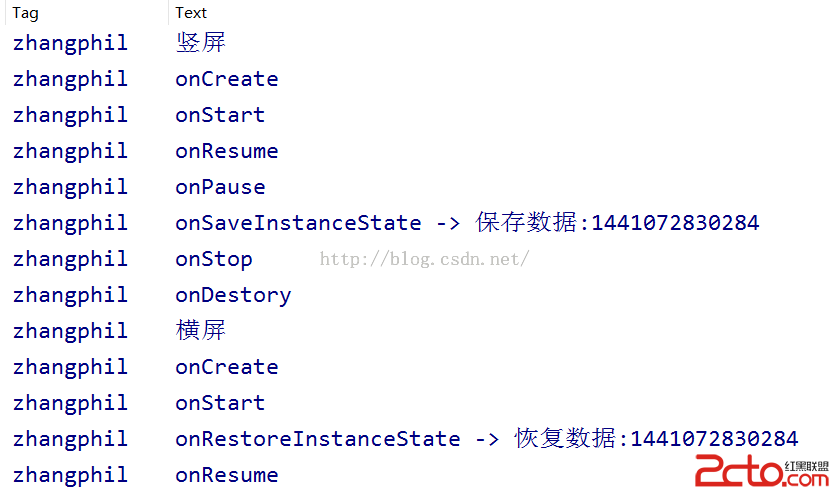 Activity 生命週期與 onSaveInstanceState、onRestoreInstanceState 重點整理
把 Activity 生命週期與狀態保存/還原的時機一次說清楚 一般來說,當 Activity 的生命週期走到 onPause() 之後,系統緊接著就會回呼: pro
 Android 自訂衛星菜單:ViewGroup、屬性與動畫的完整實作
衛星菜單常見於相機、工具或快速操作入口。它通常由一個主按鈕與多個子按鈕組成,展開時子按鈕以圓弧排列,並搭配旋轉與平移動畫。 自訂 ViewGroup 的步驟 實作時先自訂
 Android PopupWindow 詳解:彈出菜單、焦點控制與動畫效果
基本用法PopupWindow 是 Android 中常用的浮動視窗元件,適合用來顯示短暫的操作選單或提示內容。使用時只要指定要顯示的 View、寬高與是否可取得焦點,就
 Android ListView 多 Tab 上滑懸浮效果實作思路
在一些內容頁中,常會看到兩個 Tab 共用同一塊描述區域,當頁面向下滑動時,Tab 會停留在頂部,方便使用者切換。本文整理這種 ListView 多 Tab 上滑懸浮效果