

編輯:關於 Android 程式設計
HTTP Cache 指的是瀏覽器復用本地已快取文件「副本」的能力。由於透過網路取得內容成本較高,快取並重用先前取得的資源成為優化效能的關鍵,而 HTTP 協議本身就提供了快取支持。
1. 減少冗餘資料傳輸
2. 緩解網路帶寬瓶頸
3. 降低距離時延
4. 減少伺服器負擔
Expires & Cache-Control
Expires 回應首部給出回應失效的絕對時間,客戶端可在這段時間內直接使用快取副本,不必詢問伺服器。它於 HTTP 1.0 引入,例如 Expires: Thu, 03 Oct 1997 17:15:00 GMT。
Cache-Control 首部用於傳輸物件的快取資訊,於 HTTP 1.1 引入,其值是快取指令,可出現在請求或回應頭中,例如 Cache-Control: no-cache。
兩者作用一致,都指當前資源的有效期,控制瀏覽器是直接從快取取資料還是重新向伺服器請求。Cache-Control 可設置的值分為請求與回應兩類:
(1)Request:no-cache(不讀快取、重新請求)、no-store(禁止快取)、max-age(有效期秒數)、max-stale、min-fresh、only-if-cached、no-transform 等。
(2)Response:public、private、no-cache(可快取但須驗證後才返回)、no-store、max-age、must-revalidate、s-maxage(僅作用於共享快取,優先級高於 max-age)、no-transform 等。
注意:Expires 是絕對時間,易受本地時鐘偏差影響;Cache-Control 是相對時間,因此優先級高於 Expires。
最優的 Cache-Control 策略:
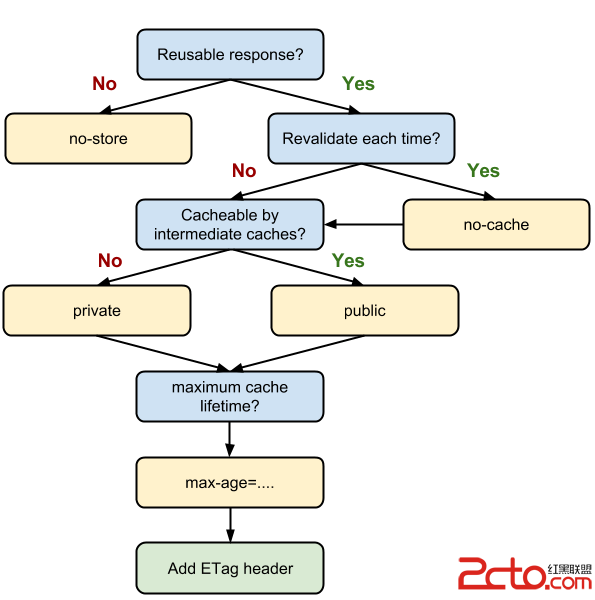
ETag & If-None-Match
ETag 告知瀏覽器當前資源在伺服器的唯一標識符,由回應頭攜帶;If-None-Match 檢查資源實體是否改變,由請求頭攜帶。
兩者通常結合使用。瀏覽器首次請求資源,伺服器計算指紋(如 md5)作為 ETag 令牌放進回應頭,瀏覽器快取資源。第二次訪問時,瀏覽器把資源的 ETag 作為 If-None-Match 請求頭發往伺服器,伺服器比對指紋,若無變化則返回 304 讓瀏覽器復用快取,否則返回 200 或 4xx。
Last-Modified & If-Modified-Since
Last-Modified 提供資源最後一次被修改的日期,由回應頭攜帶;If-Modified-Since 檢查資源是否在此時間後被修改過,由請求頭攜帶。
兩者結合使用。伺服器在回應頭加上 Last-Modified 標識資源最近改動時間,瀏覽器快取後,第二次訪問時把該日期作為 If-Modified-Since 發往伺服器,伺服器比對,若相同返回 304 復用資源,否則重新請求。注意並非所有瀏覽器都支持 If-Modified-Since。
舉個例子,訪問某張圖片,第一次請求因為本地沒有副本,不攜帶 if-Modified-Since 請求頭,伺服器透過 Last-Modified 返回資源最後修改時間;第二次因為快取了副本,會攜帶 if-Modified-Since,響應碼也從 200 變為 304。
區分快取命中與否有點「困難」,因為 HTTP 沒提供手段區分響應來自快取還是原始伺服器,兩種情況下響應碼都是 200 OK。客戶端可透過比較回應中 Date 首部與當前時間來判斷,也可用 Age 首部檢測。
Android 4.0 之後提供 HttpResponseCache 類;也有相容版;此外可直接使用 Square 推出的 OkHttp,Google 在 4.0 之後把 OkHttp 集成進 Android,作為 HttpURLConnection 的實現引擎,而方案中的 HttpResponseCache 其實也依賴於 OkHttp。
以 Android 提供的 HttpResponseCache 為例。下面的 NetworkUtils 提供了 getBitmap 方法,透過客戶端 Policy 判斷是否需要快取,不需要就設置 no-cache 頭:
public static HttpResponse getBitmap(Context context, Uri uri, Policy policy) {
    if (uri == null) { throw new IllegalArgumentException("uri is null"); }
    installCacheIfNeeded(context);
    try {
        HttpURLConnection connection = (HttpURLConnection) new URL(MainActivity.URL).openConnection();
        connection.setConnectTimeout(DEFAULT_CONNECT_TIMEOUT);
        connection.setReadTimeout(DEFAULT_READ_TIMEOUT);
        if (policy == Policy.Cache) {
            connection.setUseCaches(true);
        } else {
            connection.setUseCaches(false);
            connection.addRequestProperty("Cache-Control", "no-cache");
            connection.addRequestProperty("Cache-Control", "max-age=0");
        }
        int contentLen = connection.getContentLength();
        int responseCode = connection.getResponseCode();
        HttpResponse response = new HttpResponse(responseCode, null, contentLen,
                BitmapFactory.decodeStream(connection.getInputStream()));
        connection.getInputStream().close();
        return response;
    } catch (IOException e) {
        e.printStackTrace();
    }
    return null;
}
installCacheIfNeeded 內部實際呼叫了 HttpCache#install(),用於初始化快取:
static HttpResponseCache install(Context context) {
    if (context == null) { throw new IllegalArgumentException("context must not be null"); }
    File cacheDir = new File(context.getApplicationContext().getCacheDir(), CACHE_DIR);
    if (!cacheDir.exists()) { cacheDir.mkdirs(); }
    HttpResponseCache cache = null;
    if (Build.VERSION.SDK_INT > Build.VERSION_CODES.ICE_CREAM_SANDWICH) {
        try {
            if ((cache = HttpResponseCache.getInstalled()) != null) { return cache; }
            cache = HttpResponseCache.install(cacheDir, CACHE_SIZE);
        } catch (IOException e) {
            e.printStackTrace();
            Log.e(TAG, "http response installation failed, code = 0");
        }
    } else {
        try {
            if ((cache = (HttpResponseCache) Class.forName("android.net.http.HttpResponseCache")
                    .getMethod("getInstalled").invoke(null)) != null) { return cache; }
            Method method = Class.forName("android.net.http.HttpResponseCache")
                    .getMethod("install", File.class, long.class);
            cache = (HttpResponseCache) method.invoke(null, cacheDir, CACHE_SIZE);
        } catch (Exception e) {
            e.printStackTrace();
            Log.e(TAG, "http response installation failed, code = 1");
        }
    }
    return cache;
}
我在 MainActivity 寫了測試用例,分別測試允許與不允許快取的情況,載入的阿裡 CDN 圖片過期時間為一年,可確保能快取:
Cache-Control: max-age=31536000
Content-Type: image/jpeg
Date: Thu, 22 Oct 2015 05:41:18 GMT
Expires: Fri, 21 Oct 2016 05:41:18 GMT
測試結果很理想:允許快取時只需第一次請求伺服器,拿到資料後快取到本地預設目錄,之後的請求都直接走快取。
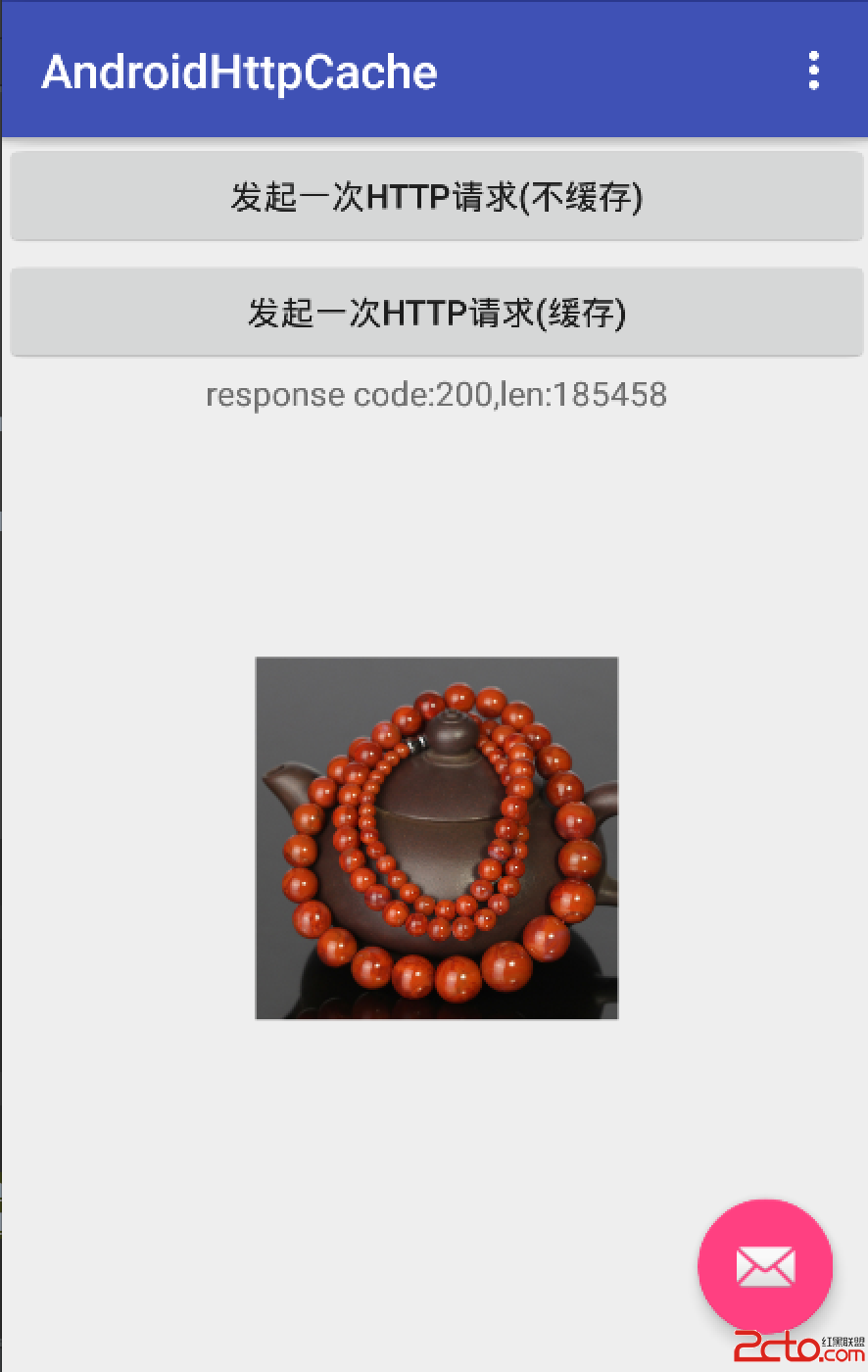
觀察快取資料格式:預設快取位於包名 /cache/http/ 下,用 ddms 拉出來發現三個檔案,其中 journal 檔說明使用了 DiskLruCache,另外兩個中一個大小 185458 位元組即圖片本身,另一個用編輯器打開後內容如下:
https://img.alicdn.com/bao/uploaded/i4/..._!!2433767071-0-paimai.jpg
GET
0
HTTP/1.1 200 OK
Server: Tengine
Content-Type: image/jpeg
Content-Length: 185458
Last-Modified: Sat, 12 Sep 2015 11:24:37 GMT
Expires: Fri, 21 Oct 2016 05:41:18 GMT
Cache-Control: max-age=31536000
X-Android-Response-Source: NETWORK 200
這其實是一個回應頭,X-Android-Response-Source 首部由 OkHttp 追加,可判斷回應資料來自 disk cache 還是網路:
// 返回 true 說明從快取拿
static boolean parseResponseSourceHeader(String header) {
    if (header == null) { return false; }
    String[] parts = header.split(",", 2);
    if ("CACHE".equals(parts[0])) { return true; }
    if (parts.length == 1) { return false; }
    try {
        return "CONDITIONAL_CACHE".equals(parts[0]) && Integer.parseInt(parts[1]) == 304;
    } catch (NumberFormatException e) {
        return false;
    }
}
透過 parseResponseSourceHeader(connection.getHeaderField("X-Android-Response-Source")) 即可判定。
若使用 OkHttp,快取控制更方便,只需在建立 OkHttpClient 例項時設置快取:
try {
    mHttpClient.setCache(new Cache(new File(context.getApplicationContext().getCacheDir(), CACHE_DIR), CACHE_SIZE));
} catch (Exception e) { }
快取策略可透過 CacheControl 控制:
CacheControl cacheControl;
if (policy == Policy.Cache) {
    cacheControl = CacheControl.FORCE_CACHE;
} else {
    CacheControl.Builder builder = new CacheControl.Builder();
    cacheControl = builder.noCache().build();
}像 Volley、Picasso 等開源庫都利用 HTTP 快取作為 DiskCache 方案,具體可參考 Volley 的 HttpHeaderParser 類與 Picasso 的 URLConnectionDownloader 類。
 微信朋友圈值乎怎麼玩?付費看答案機制解析
值乎是知乎推出的一種付費閱讀玩法,使用者可在微信朋友圈看到「某人有一條價值 x 元的消息」。 點進去後,內容關鍵部分會被打碼,必須支付小額費用才能查看完整答案。支付後可
 Android IPC 機制:利用 Messenger 實現跨進程通信
寫作原因:跨進程通信的實現與理解是 Android 進階路上重要的一環。本文將分享 IPC 的相關知識、操作,以及我在學習過程中對 IPC 的一些理解。這一章使用 Mes
 Android 基礎入門教程——Bitmap(位圖)全解析 Part 1
本節引言 上一節我們講解了 Android 中 13 種 Drawable 類型,不知道你有沒有應用到自己的項目裡?本節要探討 Bitmap(位圖)的使用。開始之前,先
 Android 消息機制詳解:為什麼子執行緒不能直接更新 UI?
先看一段看起來很正常的程式碼: public class MainActivity extends Activity implements View.OnClickLi