

編輯:關於 Android 程式設計
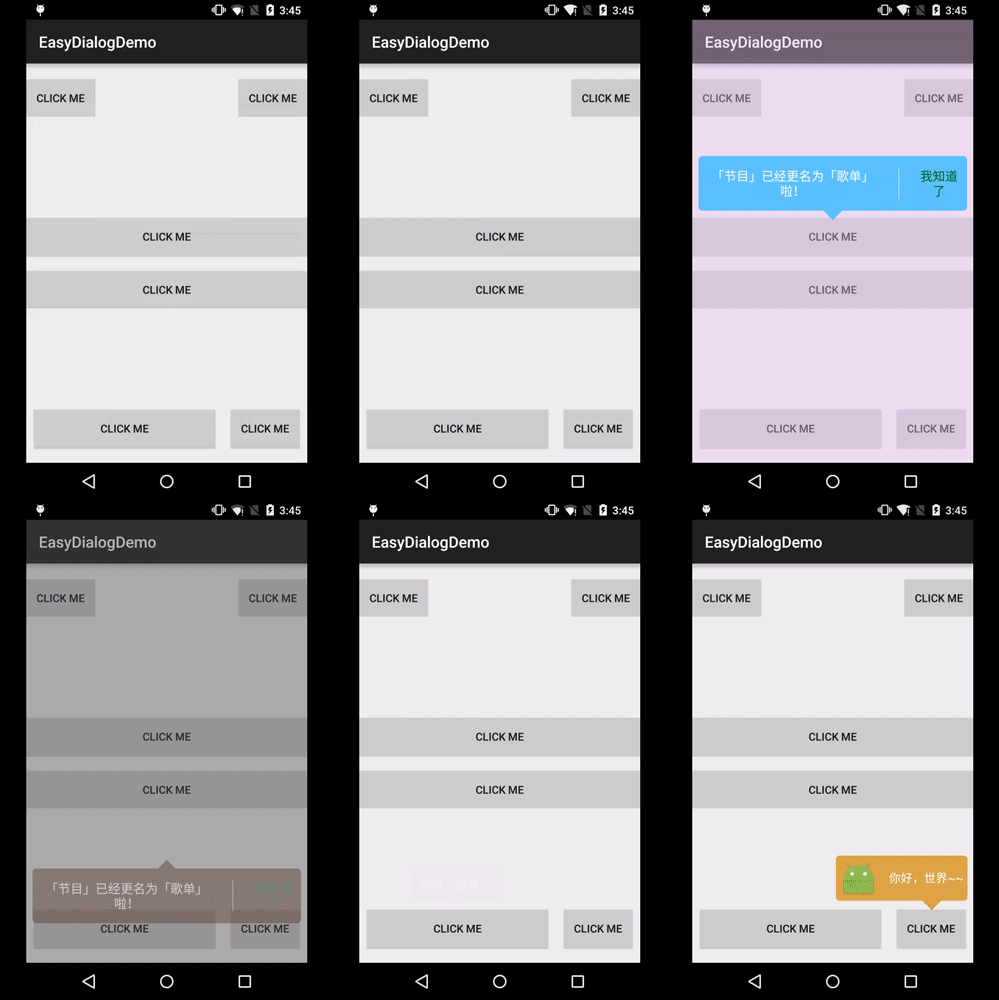
GitHub 上這個相當清爽的 Dialog 值得一用,動畫效果帶點 Q 彈的手感,適合拿來做提示氣泡。
效果預覽:
compile 'com.github.michaelye.easydialog:easydialog:1.0'
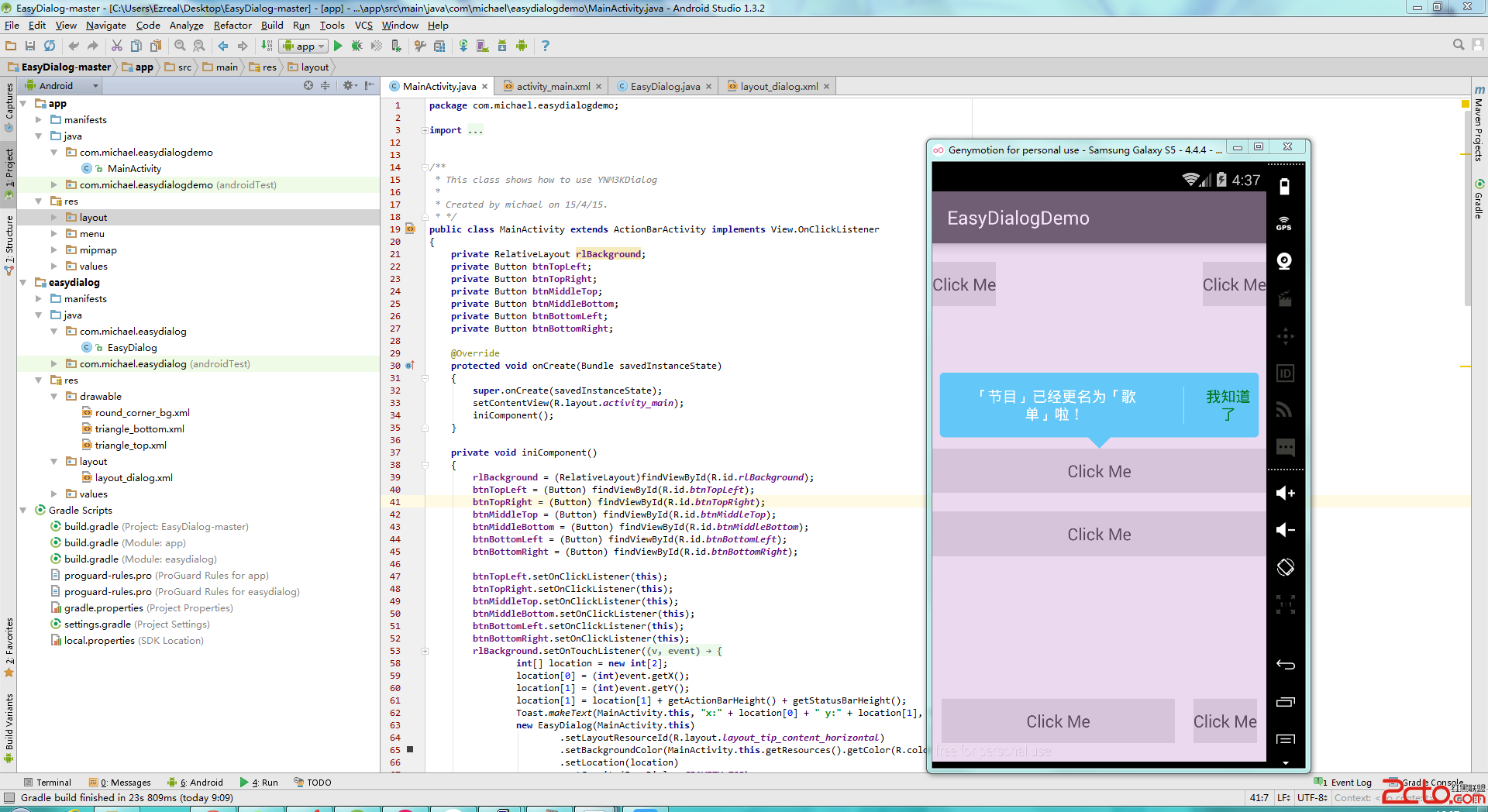
實際上它就是一個類別加上幾個 layout 檔,直接複製原始碼進專案反而更好掌控。
專案結構:
設計上採串接(chain)風格,幾乎每個 setter 都回傳 this,讓呼叫端可以一路寫到底:
public class EasyDialog {
    private Context context;

    /** 內容顯示在三角形上方 */
    public static final int GRAVITY_TOP = 0;
    /** 內容顯示在三角形下方 */
    public static final int GRAVITY_BOTTOM = 1;
    /** 橫向動畫 */
    public static final int DIRECTION_X = 0;
    /** 縱向動畫 */
    public static final int DIRECTION_Y = 1;

    private Dialog dialog;
    private int[] location;
    private int gravity;
    private View contentView;
    private ImageView ivTriangle;
    private LinearLayout llContent;
    private boolean touchOutsideDismiss;
    private RelativeLayout rlOutsideBackground;
    private View attachedView = null;
    private int backgroundColor;

    private AnimatorSet animatorSetForDialogShow;
    private AnimatorSet animatorSetForDialogDismiss;
    private List<ObjectAnimator> objectAnimatorsForDialogShow;
    private List<ObjectAnimator> objectAnimatorsForDialogDismiss;

    public EasyDialog(Context context) {
        initDialog(context);
    }

    private void initDialog(final Context context) {
        this.context = context;
        LayoutInflater layoutInflater = ((Activity) context).getLayoutInflater();
        View dialogView = layoutInflater.inflate(R.layout.layout_dialog, null);

        // 等 View 能取到寬高時再定位
        dialogView.getViewTreeObserver().addOnGlobalLayoutListener(
            new ViewTreeObserver.OnGlobalLayoutListener() {
                @Override
                public void onGlobalLayout() {
                    relocation(location);
                }
            });

        rlOutsideBackground = (RelativeLayout) dialogView.findViewById(R.id.rlOutsideBackground);
        rlOutsideBackground.setOnTouchListener(new View.OnTouchListener() {
            @Override
            public boolean onTouch(View v, MotionEvent event) {
                if (touchOutsideDismiss && dialog != null) {
                    onDialogDismiss();
                }
                return false;
            }
        });

        ivTriangle = (ImageView) dialogView.findViewById(R.id.ivTriangle);
        llContent = (LinearLayout) dialogView.findViewById(R.id.llContent);

        dialog = new Dialog(context, isFullScreen()
                ? android.R.style.Theme_Translucent_NoTitleBar_Fullscreen
                : android.R.style.Theme_Translucent_NoTitleBar);
        dialog.setContentView(dialogView);

        animatorSetForDialogShow = new AnimatorSet();
        animatorSetForDialogDismiss = new AnimatorSet();
        objectAnimatorsForDialogShow = new ArrayList<>();
        objectAnimatorsForDialogDismiss = new ArrayList<>();

        ini();
    }

    /** 初始化預設值 */
    private void ini() {
        this.setLocation(new int[]{0, 0})
            .setGravity(GRAVITY_BOTTOM)
            .setTouchOutsideDismiss(true)
            .setOutsideColor(Color.TRANSPARENT)
            .setBackgroundColor(Color.BLUE)
            .setMatchParent(true)
            .setMarginLeftAndRight(24, 24);
    }

    /** 指定要顯示的內容 View */
    public EasyDialog setLayout(View layout) {
        if (layout != null) {
            this.contentView = layout;
        }
        return this;
    }

    /** 以 layout id 指定內容 */
    public EasyDialog setLayoutResourceId(int layoutResourceId) {
        View view = ((Activity) context).getLayoutInflater().inflate(layoutResourceId, null);
        return setLayout(view);
    }

    public EasyDialog setLocation(int[] location) {
        this.location = location;
        return this;
    }

    /**
     * 以某個 View 為錨點定位
     * location.x 為該 View 在螢幕上的中心
     * location.y 依 gravity 而定:GRAVITY_TOP 取上方 y,GRAVITY_BOTTOM 取下方 y
     */
    public EasyDialog setLocationByAttachedView(View attachedView) {
        if (attachedView != null) {
            this.attachedView = attachedView;
            int[] attachedViewLocation = new int[2];
            attachedView.getLocationOnScreen(attachedViewLocation);
            attachedViewLocation[0] = attachedViewLocation[0] + attachedView.getWidth() / 2;
            switch (gravity) {
                case GRAVITY_BOTTOM:
                    attachedViewLocation[1] = attachedViewLocation[1] + attachedView.getHeight();
                    break;
                case GRAVITY_TOP:
                    break;
            }
            setLocation(attachedViewLocation);
        }
        return this;
    }

    /** 內容在上方或下方,傳入錯誤值會回退為下方 */
    public EasyDialog setGravity(int gravity) {
        if (gravity != GRAVITY_BOTTOM && gravity != GRAVITY_TOP) {
            gravity = GRAVITY_BOTTOM;
        }
        this.gravity = gravity;
        switch (this.gravity) {
            case GRAVITY_BOTTOM:
                ivTriangle.setBackgroundResource(R.drawable.triangle_bottom);
                break;
            case GRAVITY_TOP:
                ivTriangle.setBackgroundResource(R.drawable.triangle_top);
                break;
        }
        llContent.setBackgroundResource(R.drawable.round_corner_bg);
        if (attachedView != null) {
            // 若在 setGravity 之前就呼叫過 setLocationByAttachedView,需重算一次
            this.setLocationByAttachedView(attachedView);
        }
        return this.setBackgroundColor(backgroundColor);
    }

    /** 是否填滿寬度;false 則依內容自適應,並盡量對齊三角形 */
    public EasyDialog setMatchParent(boolean matchParent) {
        ViewGroup.LayoutParams layoutParams = llContent.getLayoutParams();
        layoutParams.width = matchParent
                ? ViewGroup.LayoutParams.MATCH_PARENT
                : ViewGroup.LayoutParams.WRAP_CONTENT;
        llContent.setLayoutParams(layoutParams);
        return this;
    }

    /** 距離螢幕左右兩側的邊距 */
    public EasyDialog setMarginLeftAndRight(int left, int right) {
        RelativeLayout.LayoutParams layoutParams =
                (RelativeLayout.LayoutParams) llContent.getLayoutParams();
        layoutParams.setMargins(left, 0, right, 0);
        llContent.setLayoutParams(layoutParams);
        return this;
    }

    public EasyDialog setTouchOutsideDismiss(boolean touchOutsideDismiss) {
        this.touchOutsideDismiss = touchOutsideDismiss;
        return this;
    }

    public EasyDialog setOutsideColor(int color) {
        rlOutsideBackground.setBackgroundColor(color);
        return this;
    }

    /**
     * 設定氣泡與三角形的顏色
     * 三角形是 layer-list 內嵌 RotateDrawable,取色需多繞一層
     */
    public EasyDialog setBackgroundColor(int color) {
        backgroundColor = color;
        LayerDrawable drawableTriangle = (LayerDrawable) ivTriangle.getBackground();
        GradientDrawable shapeTriangle = (GradientDrawable) ((RotateDrawable)
                drawableTriangle.findDrawableByLayerId(R.id.shape_id)).getDrawable();
        if (shapeTriangle != null) {
            shapeTriangle.setColor(color);
        } else {
            Toast.makeText(context, "shape is null", Toast.LENGTH_SHORT).show();
        }
        GradientDrawable drawableRound = (GradientDrawable) llContent.getBackground();
        if (drawableRound != null) {
            drawableRound.setColor(color);
        }
        return this;
    }

    /** 水平/垂直位移動畫(顯示) */
    public EasyDialog setAnimationTranslationShow(int direction, int duration, float... values) {
        return setAnimationTranslation(true, direction, duration, values);
    }

    /** 水平/垂直位移動畫(關閉) */
    public EasyDialog setAnimationTranslationDismiss(int direction, int duration, float... values) {
        return setAnimationTranslation(false, direction, duration, values);
    }

    private EasyDialog setAnimationTranslation(boolean isShow, int direction,
                                              int duration, float... values) {
        if (direction != DIRECTION_X && direction != DIRECTION_Y) {
            direction = DIRECTION_X;
        }
        String propertyName;
        switch (direction) {
            case DIRECTION_X:
                propertyName = "translationX";
                break;
            default:
                propertyName = "translationY";
                break;
        }
        ObjectAnimator animator = ObjectAnimator.ofFloat(
                rlOutsideBackground.findViewById(R.id.rlParentForAnimate),
                propertyName, values).setDuration(duration);
        if (isShow) {
            objectAnimatorsForDialogShow.add(animator);
        } else {
            objectAnimatorsForDialogDismiss.add(animator);
        }
        return this;
    }

    /** 淡入動畫 */
    public EasyDialog setAnimationAlphaShow(int duration, float... values) {
        return setAnimationAlpha(true, duration, values);
    }

    /** 淡出動畫 */
    public EasyDialog setAnimationAlphaDismiss(int duration, float... values) {
        return setAnimationAlpha(false, duration, values);
    }

    private EasyDialog setAnimationAlpha(boolean isShow, int duration, float... values) {
        ObjectAnimator animator = ObjectAnimator.ofFloat(
                rlOutsideBackground.findViewById(R.id.rlParentForAnimate),
                "alpha", values).setDuration(duration);
        if (isShow) {
            objectAnimatorsForDialogShow.add(animator);
        } else {
            objectAnimatorsForDialogDismiss.add(animator);
        }
        return this;
    }

    public EasyDialog show() {
        if (dialog != null) {
            if (contentView == null) {
                throw new RuntimeException(
                    "您是否未調用 setLayout() 或 setLayoutResourceId() 設定要顯示的內容?");
            }
            llContent.addView(contentView);
            dialog.show();
            onDialogShowing();
        }
        return this;
    }

    /** 動畫的父容器,想自訂動畫可從這裡下手 */
    public View getTipViewInstance() {
        return rlOutsideBackground.findViewById(R.id.rlParentForAnimate);
    }

    private void onDialogShowing() {
        if (animatorSetForDialogShow != null
                && objectAnimatorsForDialogShow != null
                && objectAnimatorsForDialogShow.size() > 0) {
            animatorSetForDialogShow.playTogether(objectAnimatorsForDialogShow);
            animatorSetForDialogShow.start();
        }
    }

    private void onDialogDismiss() {
        if (animatorSetForDialogDismiss.isRunning()) {
            return;
        }
        if (animatorSetForDialogDismiss != null
                && objectAnimatorsForDialogDismiss != null
                && objectAnimatorsForDialogDismiss.size() > 0) {
            animatorSetForDialogDismiss.playTogether(objectAnimatorsForDialogDismiss);
            animatorSetForDialogDismiss.start();
            animatorSetForDialogDismiss.addListener(new Animator.AnimatorListener() {
                @Override public void onAnimationStart(Animator animation) {}
                @Override public void onAnimationEnd(Animator animation) { dialog.dismiss(); }
                @Override public void onAnimationCancel(Animator animation) {}
                @Override public void onAnimationRepeat(Animator animation) {}
            });
        } else {
            dialog.dismiss();
        }
    }

    public void dismiss() {
        if (dialog != null && dialog.isShowing()) {
            onDialogDismiss();
        }
    }

    /**
     * 依 x、y 重新定位
     * setX / setY 為 0 時是從狀態欄以下起算,所以非全螢幕時要扣掉狀態欄高度
     */
    private void relocation(int[] location) {
        float statusOffset = isFullScreen() ? 0.0f : getStatusBarHeight();

        ivTriangle.setX(location[0] - ivTriangle.getWidth() / 2);
        ivTriangle.setY(location[1] - ivTriangle.getHeight() / 2 - statusOffset);

        switch (gravity) {
            case GRAVITY_BOTTOM:
                llContent.setY(location[1] - ivTriangle.getHeight() / 2
                        - statusOffset + ivTriangle.getHeight());
                break;
            case GRAVITY_TOP:
                llContent.setY(location[1] - llContent.getHeight()
                        - statusOffset - ivTriangle.getHeight() / 2);
                break;
        }

        // 讓內容區盡量往三角形靠攏
        int triangleCenterX = (int) (ivTriangle.getX() + ivTriangle.getWidth() / 2);
        int contentWidth = llContent.getWidth();
        int rightMargin = getScreenWidth() - triangleCenterX;
        int leftMargin = getScreenWidth() - rightMargin;

        RelativeLayout.LayoutParams layoutParams =
                (RelativeLayout.LayoutParams) llContent.getLayoutParams();
        int availableLeftMargin = leftMargin - layoutParams.leftMargin;
        int availableRightMargin = rightMargin - layoutParams.rightMargin;
        int x;

        if (contentWidth / 2 <= availableLeftMargin
                && contentWidth / 2 <= availableRightMargin) {
            // 左右都夠寬,直接置中於三角形
            x = triangleCenterX - contentWidth / 2;
        } else if (availableLeftMargin <= availableRightMargin) {
            // 三角形偏左
            x = layoutParams.leftMargin;
        } else {
            // 三角形偏右
            x = getScreenWidth() - (contentWidth + layoutParams.rightMargin);
        }
        llContent.setX(x);
    }

    private int getScreenWidth() {
        DisplayMetrics metrics = context.getResources().getDisplayMetrics();
        return metrics.widthPixels;
    }

    private int getStatusBarHeight() {
        int result = 0;
        int resourceId = context.getResources()
                .getIdentifier("status_bar_height", "dimen", "android");
        if (resourceId > 0) {
            result = context.getResources().getDimensionPixelSize(resourceId);
        }
        return result;
    }

    /** 判斷所依附的 Activity 是否為全螢幕 */
    public boolean isFullScreen() {
        int flg = ((Activity) context).getWindow().getAttributes().flags;
        return (flg & 1024) == 1024;
    }

    public EasyDialog setCancelable(boolean cancelable) {
        dialog.setCancelable(cancelable);
        return this;
    }
}
public class MainActivity extends ActionBarActivity implements View.OnClickListener {

    private RelativeLayout rlBackground;
    private Button btnTopLeft, btnTopRight, btnMiddleTop;
    private Button btnMiddleBottom, btnBottomLeft, btnBottomRight;

    @Override
    protected void onCreate(Bundle savedInstanceState) {
        super.onCreate(savedInstanceState);
        setContentView(R.layout.activity_main);
        iniComponent();
    }

    private void iniComponent() {
        rlBackground = (RelativeLayout) findViewById(R.id.rlBackground);
        btnTopLeft = (Button) findViewById(R.id.btnTopLeft);
        btnTopRight = (Button) findViewById(R.id.btnTopRight);
        btnMiddleTop = (Button) findViewById(R.id.btnMiddleTop);
        btnMiddleBottom = (Button) findViewById(R.id.btnMiddleBottom);
        btnBottomLeft = (Button) findViewById(R.id.btnBottomLeft);
        btnBottomRight = (Button) findViewById(R.id.btnBottomRight);

        btnTopLeft.setOnClickListener(this);
        btnTopRight.setOnClickListener(this);
        btnMiddleTop.setOnClickListener(this);
        btnMiddleBottom.setOnClickListener(this);
        btnBottomLeft.setOnClickListener(this);
        btnBottomRight.setOnClickListener(this);

        // 點擊背景任意處,於該座標彈出氣泡
        rlBackground.setOnTouchListener(new View.OnTouchListener() {
            @Override
            public boolean onTouch(View v, MotionEvent event) {
                int[] location = new int[2];
                location[0] = (int) event.getX();
                location[1] = (int) event.getY()
                        + getActionBarHeight() + getStatusBarHeight();
                Toast.makeText(MainActivity.this,
                        "x: " + location[0] + " y: " + location[1],
                        Toast.LENGTH_SHORT).show();
                new EasyDialog(MainActivity.this)
                        .setLayoutResourceId(R.layout.layout_tip_content_horizontal)
                        .setBackgroundColor(getResources().getColor(R.color.background_color_black))
                        .setLocation(location)
                        .setGravity(EasyDialog.GRAVITY_TOP)
                        .setTouchOutsideDismiss(true)
                        .setMatchParent(false)
                        .setMarginLeftAndRight(24, 24)
                        .setOutsideColor(getResources().getColor(R.color.outside_color_gray))
                        .show();
                return false;
            }
        });
    }

    @Override
    public void onClick(View v) {
        switch (v.getId()) {
            case R.id.btnTopLeft:
                View view = getLayoutInflater().inflate(R.layout.layout_tip_content_horizontal, null);
                new EasyDialog(MainActivity.this)
                        .setLayout(view)
                        .setBackgroundColor(getResources().getColor(R.color.background_color_black))
                        .setLocationByAttachedView(btnTopLeft)
                        .setGravity(EasyDialog.GRAVITY_BOTTOM)
                        .setAnimationTranslationShow(EasyDialog.DIRECTION_X, 1000, -600, 100, -50, 50, 0)
                        .setAnimationAlphaShow(1000, 0.3f, 1.0f)
                        .setAnimationTranslationDismiss(EasyDialog.DIRECTION_X, 500, -50, 800)
                        .setAnimationAlphaDismiss(500, 1.0f, 0.0f)
                        .setTouchOutsideDismiss(true)
                        .setMatchParent(true)
                        .setMarginLeftAndRight(24, 24)
                        .setOutsideColor(getResources().getColor(R.color.outside_color_trans))
                        .show();
                break;

            case R.id.btnTopRight:
                new EasyDialog(MainActivity.this)
                        .setLayoutResourceId(R.layout.layout_tip_image_text)
                        .setGravity(EasyDialog.GRAVITY_BOTTOM)
                        .setBackgroundColor(getResources().getColor(R.color.background_color_black))
                        .setLocationByAttachedView(btnTopRight)
                        .setAnimationTranslationShow(EasyDialog.DIRECTION_X, 350, 400, 0)
                        .setAnimationTranslationDismiss(EasyDialog.DIRECTION_X, 350, 0, 400)
                        .setTouchOutsideDismiss(true)
                        .setMatchParent(false)
                        .setMarginLeftAndRight(24, 24)
                        .setOutsideColor(getResources().getColor(R.color.outside_color_trans))
                        .show();
                break;

            case R.id.btnMiddleTop:
                new EasyDialog(MainActivity.this)
                        .setLayoutResourceId(R.layout.layout_tip_content_horizontal)
                        .setBackgroundColor(getResources().getColor(R.color.background_color_blue))
                        .setLocationByAttachedView(btnMiddleTop)
                        .setAnimationTranslationShow(EasyDialog.DIRECTION_Y, 1000, -800, 100, -50, 50, 0)
                        .setAnimationTranslationDismiss(EasyDialog.DIRECTION_Y, 500, 0, -800)
                        .setGravity(EasyDialog.GRAVITY_TOP)
                        .setTouchOutsideDismiss(true)
                        .setMatchParent(false)
                        .setMarginLeftAndRight(24, 24)
                        .setOutsideColor(getResources().getColor(R.color.outside_color_pink))
                        .show();
                break;

            case R.id.btnMiddleBottom:
                new EasyDialog(MainActivity.this)
                        .setLayoutResourceId(R.layout.layout_tip_content_horizontal)
                        .setGravity(EasyDialog.GRAVITY_BOTTOM)
                        .setBackgroundColor(getResources().getColor(R.color.background_color_brown))
                        .setLocationByAttachedView(btnMiddleBottom)
                        .setAnimationTranslationShow(EasyDialog.DIRECTION_Y, 1000, 800, -100, -50, 50, 0)
                        .setAnimationTranslationDismiss(EasyDialog.DIRECTION_Y, 500, 0, 800)
                        .setAnimationAlphaShow(1000, 0.3f, 1.0f)
                        .setTouchOutsideDismiss(true)
                        .setMatchParent(true)
                        .setMarginLeftAndRight(24, 24)
                        .setOutsideColor(getResources().getColor(R.color.outside_color_gray))
                        .show();
                break;

            case R.id.btnBottomLeft:
                new EasyDialog(MainActivity.this)
                        .setLayoutResourceId(R.layout.layout_tip_text)
                        .setBackgroundColor(getResources().getColor(R.color.background_color_pink))
                        .setLocationByAttachedView(btnBottomLeft)
                        .setGravity(EasyDialog.GRAVITY_TOP)
                        .setAnimationAlphaShow(600, 0.0f, 1.0f)
                        .setAnimationAlphaDismiss(600, 1.0f, 0.0f)
                        .setTouchOutsideDismiss(true)
                        .setMatchParent(false)
                        .setMarginLeftAndRight(24, 24)
                        .setOutsideColor(getResources().getColor(R.color.outside_color_trans))
                        .show();
                break;

            case R.id.btnBottomRight:
                new EasyDialog(MainActivity.this)
                        .setLayoutResourceId(R.layout.layout_tip_image_text)
                        .setBackgroundColor(getResources().getColor(R.color.background_color_yellow))
                        .setLocationByAttachedView(btnBottomRight)
                        .setGravity(EasyDialog.GRAVITY_TOP)
                        .setAnimationTranslationShow(EasyDialog.DIRECTION_X, 300, 400, 0)
                        .setAnimationTranslationShow(EasyDialog.DIRECTION_Y, 300, 400, 0)
                        .setAnimationTranslationDismiss(EasyDialog.DIRECTION_X, 300, 0, 400)
                        .setAnimationTranslationDismiss(EasyDialog.DIRECTION_Y, 300, 0, 400)
                        .setTouchOutsideDismiss(true)
                        .setMatchParent(false)
                        .setMarginLeftAndRight(24, 24)
                        .setOutsideColor(getResources().getColor(R.color.outside_color_trans))
                        .show();
                break;
        }
    }

    private int getStatusBarHeight() {
        int result = 0;
        int resourceId = getResources().getIdentifier("status_bar_height", "dimen", "android");
        if (resourceId > 0) {
            result = getResources().getDimensionPixelSize(resourceId);
        }
        return result;
    }

    private int getActionBarHeight() {
        return getSupportActionBar().getHeight();
    }
}
從 relocation() 的邏輯可以看出這個庫最用心的地方:它會先算出三角形中心的 X 座標,再判斷左右兩側各自還剩多少可用空間,最後決定內容框要置中對齊三角形、還是靠左/靠右貼邊。這正是氣泡提示最容易被忽略卻最影響觀感的環節。
另一個關鍵是狀態欄高度的補償。因為 setX()/setY() 的原點落在狀態欄之下,非全螢幕的 Activity 必須減掉狀態欄高度,否則氣泡會整體下移。程式碼透過 isFullScreen() 判斷後動態補償,同時也處理了 ActionBar 高度。
三角形本身是用 layer-list 包一層 RotateDrawable 畫出來的,所以 setBackgroundColor() 需要多繞一層才能取到底下的 GradientDrawable 改色——這也是原始碼註解中特別標註的坑。
其餘資源檔直接參考專案即可,範例可直接執行。
 Android Studio 下的 NDK(JNI)開發全流程
名詞先對齊 NDK 是什麼 NDK 全名 Native Development Kit,提供了一整套工具,讓開發者能快速產出 C/C++ 的動態庫,並自動把 .so 和
 Fragment 管理與重疊怪象:add/hide 與 replace 該怎麼選
一、Fragment 是什麼 自從 3.0 引入 Fragment 之後,專案裡用到它的比例越來越高,最典型的場景就是底部 tab 切換內容。首頁的每一個 navigat
 Android 語音辨識實作:用 RecognizerIntent 串接 Google 服務
Google 一向把語音相關的核心技術推進 Android 系統,加上雲端運算支援,語音辨識在 Android 上的實作門檻其實低得驚人——大部分工作系統都幫你做完了,你
 Android AnimationListener 監聽動畫狀態的用法
AnimationListener 的作用 AnimationListener 用來監聽動畫的生命週期,包括開始、結束與重複。透過它,可以在動畫完成後執行額外處理,例如移