

編輯:關於 Android 程式設計
不少 Android 手機都內建了常用號碼功能,例如訂餐電話、公共服務電話、航空機票等分類,點一下對應號碼就會跳出撥號介面。本文就來實作一個類似的小範例。
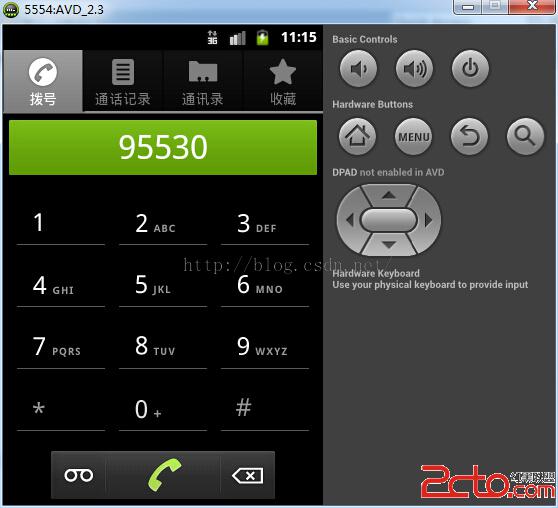
這些常用號碼存放在一個 SQLite 資料庫中。我們把號碼讀取出來,依分類結構呈現在系統提供的 ExpandableListView(可展開列表檢視)裡——關於它的詳細用法可參考 Android 官方文件。接著為每個子項目設定點擊事件,點擊時啟動撥號介面並把號碼傳過去。
原理就這麼簡單,開始動手。
先把資料庫放在專案的 assets 目錄下:
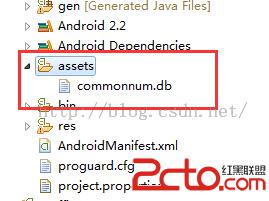
這裡有個關鍵概念要說明:assets 目錄中的檔案是唯讀的,程式無法直接以 SQLiteDatabase 開啟。因此必須先把資料庫複製到 /data/data/應用包名/files/ 目錄,才能用 SQLite API 存取。這也是下面 CommonNumberService 這個類別存在的主要理由。
這個類別有四個方法:建構子負責接收 Context,另外三個分別處理資料庫複製、取得分類資料、取得子項目資料。
private Context context;

public CommonNumberService(Context context) {
    super();
    this.context = context;
}
/**
 * 取得分類清單
 */
public List<Map<String, String>> getGroupData() {
    List<Map<String, String>> groupData = new ArrayList<Map<String, String>>();
    File file = new File(context.getFilesDir(), "commonnum.db");
    SQLiteDatabase db = SQLiteDatabase.openDatabase(
            file.getAbsolutePath(), null, SQLiteDatabase.OPEN_READONLY);
    if (db.isOpen()) {
        Cursor c = db.query("classlist", new String[]{"name", "idx"},
                null, null, null, null, null);
        while (c.moveToNext()) {
            Map<String, String> map = new HashMap<String, String>();
            String name = c.getString(c.getColumnIndex("name"));
            String idx = c.getString(c.getColumnIndex("idx"));
            map.put("name", name);
            map.put("idx", idx);
            groupData.add(map);
        }
        c.close();
        db.close();
    }
    return groupData;
}
這裡的 idx 欄位是分類索引,用來對應到各自的子表。這是一種常見的關聯手法:用一個主表存分類清單,再用索引去指向不同的子表。
/**
 * 取得各分類下的子項目
 */
public List<List<Map<String, String>>> getChildData() {
    List<List<Map<String, String>>> childData = new ArrayList<List<Map<String, String>>>();
    List<Map<String, String>> groupData = this.getGroupData();

    File file = new File(context.getFilesDir(), "commonnum.db");
    SQLiteDatabase db = SQLiteDatabase.openDatabase(
            file.getAbsolutePath(), null, SQLiteDatabase.OPEN_READONLY);

    if (db.isOpen()) {
        for (int i = 0; i < groupData.size(); i++) {
            String idx = groupData.get(i).get("idx");
            List<Map<String, String>> list = new ArrayList<Map<String, String>>();

            Cursor c = db.query("table" + idx, new String[]{"_id", "number", "name"},
                    null, null, null, null, null);
            while (c.moveToNext()) {
                Map<String, String> map = new HashMap<String, String>();
                map.put("name", c.getString(c.getColumnIndex("name")));
                map.put("number", c.getString(c.getColumnIndex("number")));
                list.add(map);
            }
            c.close();
            childData.add(list);
        }
        db.close();
    }
    return childData;
}
package cn.lyz.mobilesafe.engine;

import java.io.File;
import java.io.FileOutputStream;
import java.io.InputStream;
import java.io.OutputStream;
import java.util.ArrayList;
import java.util.HashMap;
import java.util.List;
import java.util.Map;

import android.content.Context;
import android.database.Cursor;
import android.database.sqlite.SQLiteDatabase;

/**
 * 常用號碼資料存取
 */
public class CommonNumberService {

    private Context context;

    public CommonNumberService(Context context) {
        super();
        this.context = context;
    }

    /** 把資料庫從 assets 複製到 files 目錄 */
    public void copyDbToFilesDir() {
        File file = new File(context.getFilesDir(), "commonnum.db");
        if (!file.exists()) {
            try {
                InputStream in = context.getAssets().open("commonnum.db");
                OutputStream out = new FileOutputStream(file);
                byte[] buffer = new byte[1024];
                int len = 0;
                while ((len = in.read(buffer)) != -1) {
                    out.write(buffer, 0, len);
                }
                out.close();
                in.close();
            } catch (Exception e) {
                e.printStackTrace();
            }
        }
    }

    /** 取得分類清單 */
    public List<Map<String, String>> getGroupData() {
        List<Map<String, String>> groupData = new ArrayList<Map<String, String>>();
        File file = new File(context.getFilesDir(), "commonnum.db");
        SQLiteDatabase db = SQLiteDatabase.openDatabase(
                file.getAbsolutePath(), null, SQLiteDatabase.OPEN_READONLY);
        if (db.isOpen()) {
            Cursor c = db.query("classlist", new String[]{"name", "idx"},
                    null, null, null, null, null);
            while (c.moveToNext()) {
                Map<String, String> map = new HashMap<String, String>();
                map.put("name", c.getString(c.getColumnIndex("name")));
                map.put("idx", c.getString(c.getColumnIndex("idx")));
                groupData.add(map);
            }
            c.close();
            db.close();
        }
        return groupData;
    }

    /** 取得各分類下的子項目 */
    public List<List<Map<String, String>>> getChildData() {
        List<List<Map<String, String>>> childData = new ArrayList<List<Map<String, String>>>();
        List<Map<String, String>> groupData = this.getGroupData();

        File file = new File(context.getFilesDir(), "commonnum.db");
        SQLiteDatabase db = SQLiteDatabase.openDatabase(
                file.getAbsolutePath(), null, SQLiteDatabase.OPEN_READONLY);

        if (db.isOpen()) {
            for (int i = 0; i < groupData.size(); i++) {
                String idx = groupData.get(i).get("idx");
                List<Map<String, String>> list = new ArrayList<Map<String, String>>();

                Cursor c = db.query("table" + idx,
                        new String[]{"_id", "number", "name"},
                        null, null, null, null, null);
                while (c.moveToNext()) {
                    Map<String, String> map = new HashMap<String, String>();
                    map.put("name", c.getString(c.getColumnIndex("name")));
                    map.put("number", c.getString(c.getColumnIndex("number")));
                    list.add(map);
                }
                c.close();
                childData.add(list);
            }
            db.close();
        }
        return childData;
    }
}
這個類別負責取得控制項、呼叫 CommonNumberService 封裝資料、設定 ExpandableListView 的子項目點擊事件,並啟動撥號介面。
package cn.lyz.mobilesafe.activity;

import java.util.List;
import java.util.Map;

import android.app.Activity;
import android.content.Intent;
import android.net.Uri;
import android.os.Bundle;
import android.view.View;
import android.widget.ExpandableListView;
import android.widget.ExpandableListView.OnChildClickListener;
import android.widget.SimpleExpandableListAdapter;

import cn.lyz.mobilesafe.R;
import cn.lyz.mobilesafe.engine.CommonNumberService;

public class CommonNumberActivity extends Activity {

    private ExpandableListView elv_common_number;
    private CommonNumberService service;
    private SimpleExpandableListAdapter adapter;

    @Override
    protected void onCreate(Bundle savedInstanceState) {
        super.onCreate(savedInstanceState);
        setContentView(R.layout.common_number);

        elv_common_number = (ExpandableListView) findViewById(R.id.elv_common_number);
        service = new CommonNumberService(this);

        // 先把資料庫複製到 files 目錄
        service.copyDbToFilesDir();

        List<Map<String, String>> groupData = service.getGroupData();
        List<List<Map<String, String>>> childData = service.getChildData();

        adapter = new SimpleExpandableListAdapter(
                this,
                groupData,
                android.R.layout.simple_expandable_list_item_1,
                new String[]{"name"},
                new int[]{android.R.id.text1},
                childData,
                android.R.layout.simple_expandable_list_item_2,
                new String[]{"name", "number"},
                new int[]{android.R.id.text1, android.R.id.text2});

        elv_common_number.setAdapter(adapter);
        elv_common_number.setOnChildClickListener(new MyOnChildClickListener());
    }

    private class MyOnChildClickListener implements OnChildClickListener {
        @Override
        public boolean onChildClick(ExpandableListView parent, View v,
                                    int groupPosition, int childPosition, long id) {
            Map<String, String> map = (Map<String, String>) adapter.getChild(groupPosition, childPosition);
            String number = map.get("number");

            Intent intent = new Intent();
            intent.setAction(Intent.ACTION_DIAL);
            intent.setData(Uri.parse("tel:" + number));
            startActivity(intent);
            return false;
        }
    }
}
這裡有兩個細節值得注意。一是使用了 SimpleExpandableListAdapter,它能直接把 List 結構映射到系統內建的兩行式布局,省下自訂 Adapter 的功夫。二是 Intent 用的是 ACTION_DIAL 而非 ACTION_CALL——前者只跳到撥號盤並帶入號碼,仍需使用者按下撥號鍵才會真的撥出;後者則直接撥打,需要 CALL_PHONE 權限。基於使用者體驗與權限考量,ACTION_DIAL 是更合適的選擇。
<LinearLayout xmlns:android="https://schemas.android.com/apk/res/android"
    android:layout_width="match_parent"
    android:layout_height="match_parent"
    android:orientation="vertical">

    <ExpandableListView
        android:id="@+id/elv_common_number"
        android:layout_width="match_parent"
        android:layout_height="match_parent" />
</LinearLayout>
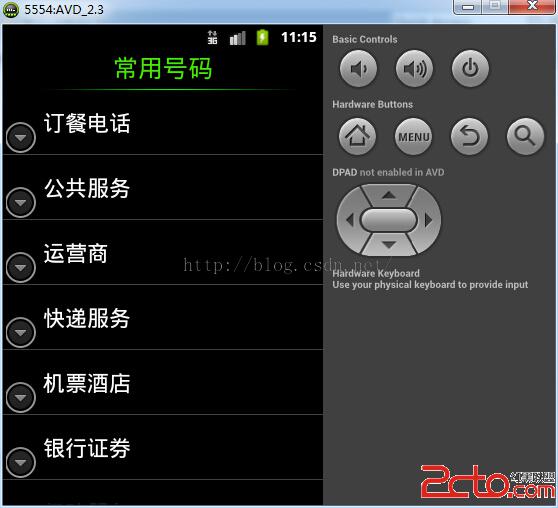
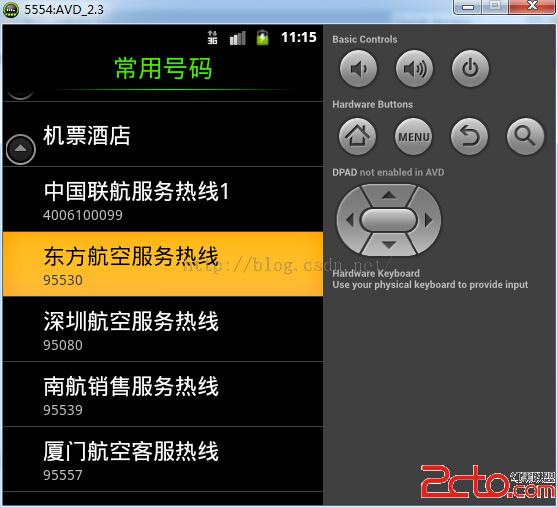
資料庫版本升級。assets 中的資料庫若日後需要更新,僅替換檔案是不夠的——舊資料庫已存在於 files 目錄,程式不會重新複製。實務上應改用 SQLiteOpenHelper 並實作 onUpgrade(),或比對版本號決定是否覆蓋。
Cursor 要確實關閉。範例中的 close 都寫在 while 迴圈之後,若中間拋出例外就會洩漏。建議改用 try-with-resources 或 try/finally 確保釋放。
查詢應放到背景執行緒。資料庫讀取屬於 I/O 操作,放在 onCreate 中會造成畫面卡頓,Android 3.0 之後更可能直接觸發 NetworkOnMainThreadException 類似的檢查( StrictMode 檢測)。應改用 AsyncTask、Loader 或 Kotlin 協程處理。
用 ContentProvider 取代直接複製。更正規的做法是把常用號碼做成獨立的 ContentProvider,讓各 App 透過 URI 查詢,不必各自複製一份資料庫。
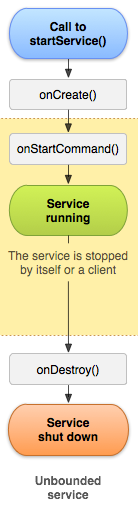 Android 四大組件之 Service 學習筆記(一):兩種啟動方式與生命週期
Service 是 Android 四大組件之一,用在後台處理事情,本身沒有界面。要特別澄清一個常見誤解:它不是我們通常所說的「服務器」,也不是一個獨立線程——Servi
 從零打造功能完整的 Android 刮獎控制項 ScratchView
前言 身邊有些開發夥伴有個共同的習慣:看到某個 App 上有個漂亮的自定義控制項或動畫,就忍不住想自己動手做一遍。我自己也是這類型的人——需求驅動學習,越是絞盡腦汁想把它
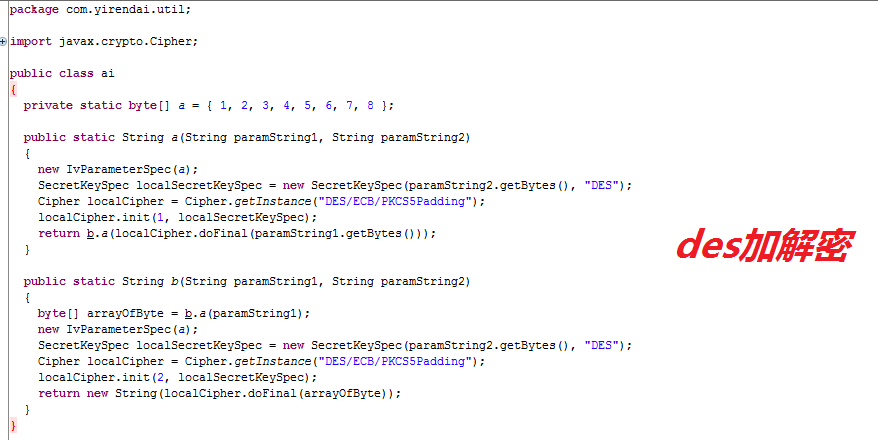 Android 安全開發指南:密鑰硬編碼風險與防護
為什麼密鑰硬編碼是高風險行為 在 Android 應用開發與安全審計中,將密鑰直接寫死在 Java 程式碼、資源檔或設定檔裡,是非常常見卻也相當危險的做法。密碼學演算法多
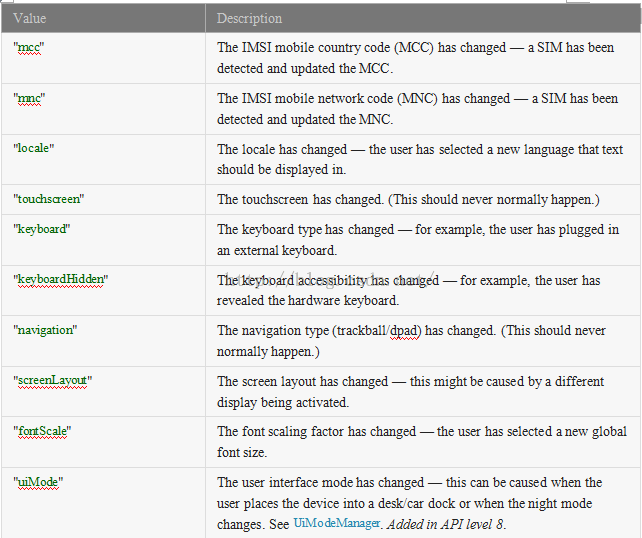 AndroidManifest 中的 activity 標籤:屬性含義與取值全解
清單文件裡的 activity 標籤,是 Android 四大組件配置中最常被修改、也最容易改錯的一處。一個 launchMode 寫錯,可能導致頁面重複創建;一個 ex