

編輯:關於 Android 程式設計
Animation 的用法門檻不高,這裡用一個 loading 效果把四種動畫都串一遍。
先看效果:
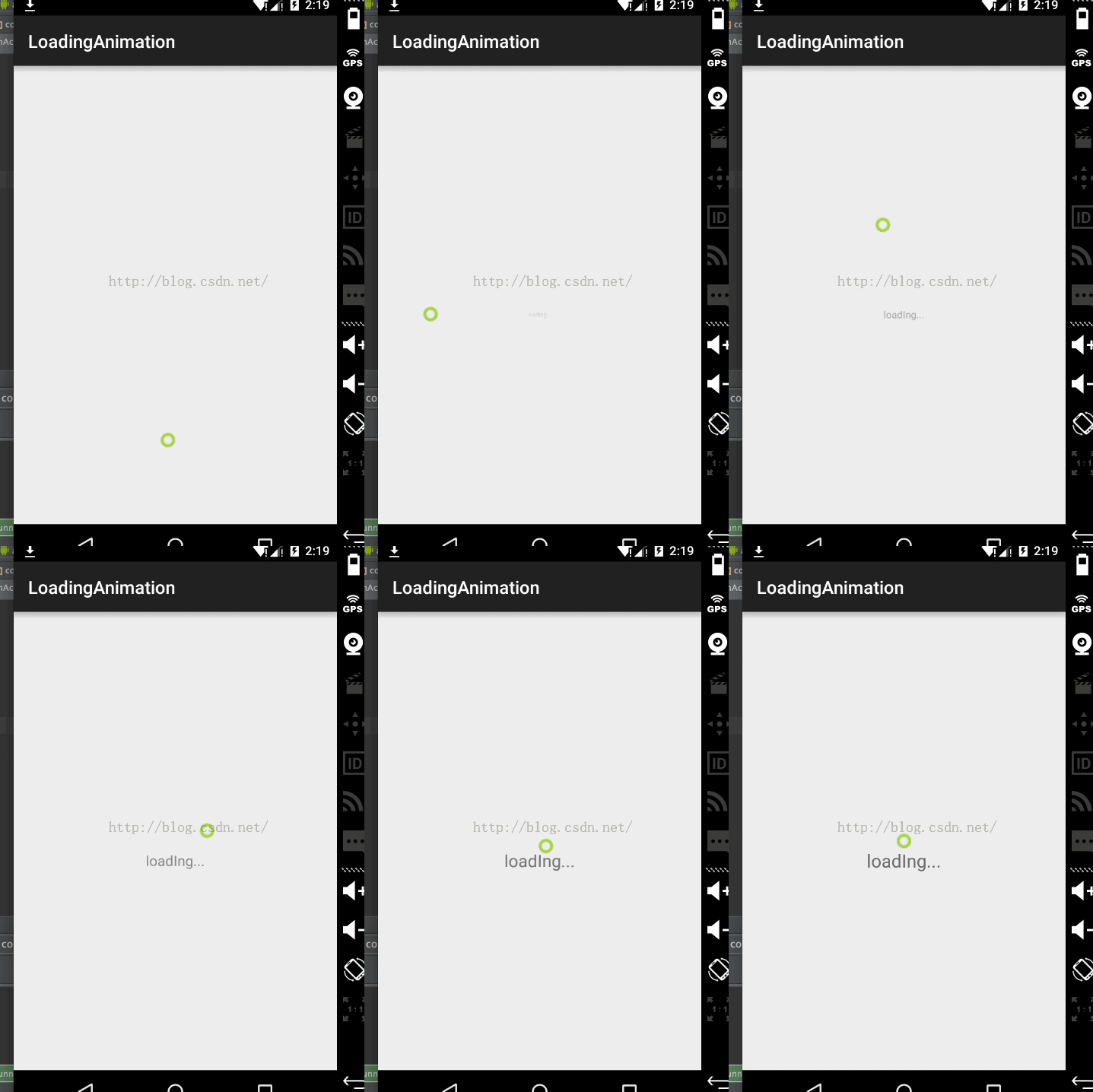
Android 的 Animation 體系提供四種基本動畫:
AlphaAnimation:透明度漸變
ScaleAnimation:尺寸縮放
TranslateAnimation:位移
RotateAnimation:旋轉
這個 loading 效果剛好四種都用上了——小球一邊繞圈一邊平移,文字一邊放大一邊淡入。
在 Activity 佈局中放一個居中的 ImageView 和一個位於其下方的 TextView:
<RelativeLayout xmlns:android="https://schemas.android.com/apk/res/android"
    android:layout_width="match_parent"
    android:layout_height="match_parent">

    <ImageView
        android:id="@+id/point"
        android:layout_width="wrap_content"
        android:layout_height="wrap_content"
        android:layout_centerInParent="true"
        android:src="@drawable/point" />

    <TextView
        android:id="@+id/loading"
        android:layout_width="wrap_content"
        android:layout_height="wrap_content"
        android:layout_below="@id/point"
        android:layout_centerHorizontal="true"
        android:text="loadIng..."
        android:textSize="20sp" />
</RelativeLayout>先聲明需要的成員。由於 ImageView 和 TextView 各自要疊加多種動畫,需要兩個 AnimationSet 作為容器:
private ImageView mImageView;
private TextView mTextView;
private AnimationSet mImageAni;
private AnimationSet mTextAni;
先看小球這組:
TranslateAnimation ta = new TranslateAnimation(200, 0, 300, 0);
ta.setDuration(5000);

RotateAnimation ra = new RotateAnimation(0, 360,
        Animation.RELATIVE_TO_SELF, 0.5f,
        Animation.RELATIVE_TO_SELF, 0.5f);
ra.setDuration(5000);

mImageAni.addAnimation(ta);
mImageAni.addAnimation(ra);
TranslateAnimation 的四個參數是「從哪到哪」的位移量,這裡是 X 從 200 到 0、Y 從 300 到 0。RotateAnimation 的參數是起始角度與結束角度(0 到 360),後四個參數指定旋轉中心——RELATIVE_TO_SELF 配合 0.5f,就是以自身中心為軸。兩者疊加,小球就有了「繞著轉」的視覺。
再看文字這組:
ScaleAnimation sa = new ScaleAnimation(0, 2.5f, 0, 2.5f,
        Animation.RELATIVE_TO_SELF, 0.5f,
        Animation.RELATIVE_TO_SELF, 0.5f);
sa.setDuration(5000);

AlphaAnimation aa = new AlphaAnimation(0, 1);
aa.setDuration(5000);

mTextAni.addAnimation(sa);
mTextAni.addAnimation(aa);
ScaleAnimation 的參數結構與位移類似:X 從 0 倍放大到 2.5 倍,Y 同樣,後四個參數一樣是以自身中心為基準點。AlphaAnimation 更簡單,只有透明度起止值,這裡是從全透明漸顯。
最後掛上點擊監聽,點一下開始播放:
mImageView.setOnClickListener(view -> {
    mImageView.startAnimation(mImageAni);
    mTextView.startAnimation(mTextAni);
});
搞定。有興趣的話還可以再翻翻每個動畫類的其他參數(比如插值器、重複次數、填充模式),以及怎麼改用 XML 描述動畫——把動畫從代碼裡抽離出來,後續維護會清爽不少。
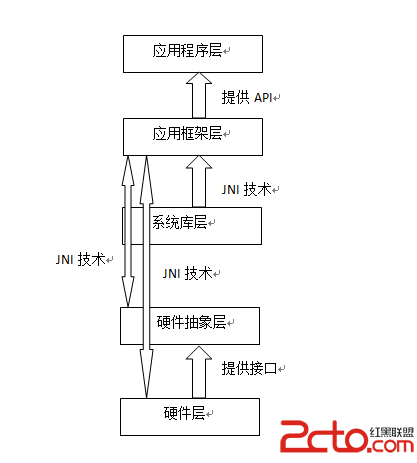 Android 應用框架層、HAL 硬件抽象層與 Linux Kernel 底層的關係
Android 應用框架層與硬件抽象層、底層之間的關係1. JNI 技術(1)JNI 技術簡單來說,就是在本地 Java 語言中聲明本地方法,並加載動態鏈接庫(.so 檔
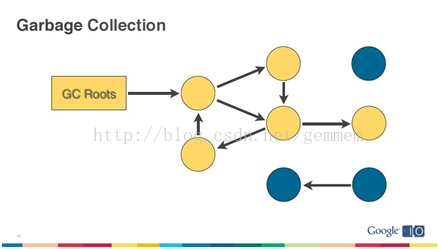 Android 內存優化實踐,兼談 Handler 引起的內存洩漏
Android 應用崩潰的原因裡,OOM 佔比一直居高不下。本文先理清內存管理的幾個基礎概念,再談 Bitmap 等常見大戶的優化手段,最後用 Handler 這個經典案
 榮耀8與榮耀V8哪個好?從外型工藝、螢幕到價格全面比較
華為在上海的發表會上正式推出榮耀8。此前傳聞它比 V8 做工更精、顏值更高,看到實機之後大致可以確認這個說法。於是問題來了:想買榮耀的人,該選 8 還是 V8?華為榮耀8
 跟我學 Android 之九:日期與時間控制元件完全指南
本章內容 第 1 節 AnalogClock 與 DigitalClock第 2 節 CalendarView第 3 節 DatePicker 與 TimePicker