

編輯:關於 Android 程式設計
Toast 只能顯示、無法互動;AlertDialog 能互動,卻又太重,還得使用者親手點掉。真實產品裡經常需要中間地帶:一條從底部滑出的提示,幾秒後自動消失,但如果你想,使用者可以在它消失前按下「復原」。
SnackBar 填的就是這個空缺。Material Design 把它定義為輕量級的回饋元件,適合呈現操作結果並提供一個可選的後續動作。
本文分析的是一份社群實作,程式碼並非本人所寫,只是把研讀過程記錄下來。XML 部分從略,Java 部分則依 MVC 拆成三個類:Model(Snack)、View(SnackContainer)、Controller(SnackBar)。
/** Model 角色:一條 SnackBar 的屬性集合 */
class Snack implements Parcelable {
    final String mMessage;
    final String mActionMessage;
    final int mActionIcon;
    final Parcelable mToken;
    final short mDuration;
    final ColorStateList mBtnTextColor;

    Snack(String message, String actionMessage, int actionIcon,
          Parcelable token, short duration, ColorStateList textColor) {
        mMessage = message;
        mActionMessage = actionMessage;
        mActionIcon = actionIcon;
        mToken = token;
        mDuration = duration;
        mBtnTextColor = textColor;
    }

    // 從 Parcel 讀回
    Snack(Parcel p) {
        mMessage = p.readString();
        mActionMessage = p.readString();
        mActionIcon = p.readInt();
        mToken = p.readParcelable(p.getClass().getClassLoader());
        mDuration = (short) p.readInt();
        mBtnTextColor = p.readParcelable(p.getClass().getClassLoader());
    }

    @Override
    public void writeToParcel(Parcel out, int flags) {
        out.writeString(mMessage);
        out.writeString(mActionMessage);
        out.writeInt(mActionIcon);
        out.writeParcelable(mToken, 0);
        out.writeInt((int) mDuration);
        out.writeParcelable(mBtnTextColor, 0);
    }

    @Override
    public int describeContents() {
        return 0;
    }

    public static final Parcelable.Creator<Snack> CREATOR = new Parcelable.Creator<Snack>() {
        public Snack createFromParcel(Parcel in) {
            return new Snack(in);
        }

        public Snack[] newArray(int size) {
            return new Snack[size];
        }
    };
}這個類本身沒什麼玄機,但有一個設計決定值得注意:它實作了 Parcelable。因為 SnackContainer 需要在 Bundle 之間傳遞 Snack 物件,而 Bundle 只能裝 Parcelable 或 Serializable。這也是為了支援「旋轉螢幕後提示不丟失」而付出的代價。
它是真正負責顯示與排隊的地方。設計上把待顯示的 Snack 放進一個 Queue,要顯示就從隊頭取出;顯示完再 poll 掉一個,直到佇列清空為止——概念上和 Toast 的內部佇列機制一致。
class SnackContainer extends FrameLayout {

    private static final int ANIMATION_DURATION = 300;
    private static final String SAVED_MSGS = "SAVED_MSGS";

    private Queue<SnackHolder> mSnacks = new LinkedList<SnackHolder>();
    private AnimationSet mOutAnimationSet;
    private AnimationSet mInAnimationSet;
    private float mPreviousY;

    SnackContainer(ViewGroup container) {
        super(container.getContext());
        container.addView(this, new ViewGroup.LayoutParams(
                ViewGroup.LayoutParams.MATCH_PARENT,
                ViewGroup.LayoutParams.MATCH_PARENT));
        setVisibility(View.GONE);
        setId(R.id.snackContainer);
        init();
    }

    private void init() {
        // 進場:由下滑入 + 淡入
        mInAnimationSet = new AnimationSet(false);
        mInAnimationSet.addAnimation(new TranslateAnimation(
                TranslateAnimation.RELATIVE_TO_PARENT, 0.0f,
                TranslateAnimation.RELATIVE_TO_PARENT, 0.0f,
                TranslateAnimation.RELATIVE_TO_SELF, 1.0f,
                TranslateAnimation.RELATIVE_TO_SELF, 0.0f));
        mInAnimationSet.addAnimation(new AlphaAnimation(0.0f, 1.0f));

        // 退場:往下滑出 + 淡出
        mOutAnimationSet = new AnimationSet(false);
        mOutAnimationSet.addAnimation(new TranslateAnimation(
                TranslateAnimation.RELATIVE_TO_PARENT, 0.0f,
                TranslateAnimation.RELATIVE_TO_PARENT, 0.0f,
                TranslateAnimation.RELATIVE_TO_SELF, 0.0f,
                TranslateAnimation.RELATIVE_TO_SELF, 1.0f));
        mOutAnimationSet.addAnimation(new AlphaAnimation(1.0f, 0.0f));
        mOutAnimationSet.setDuration(ANIMATION_DURATION);

        // 退場動畫結束後,主動消化下一條
        mOutAnimationSet.setAnimationListener(new Animation.AnimationListener() {
            @Override public void onAnimationStart(Animation animation) { }

            @Override
            public void onAnimationEnd(Animation animation) {
                removeAllViews();
                if (!mSnacks.isEmpty()) {
                    sendOnHide(mSnacks.poll());
                }
                if (!isEmpty()) {
                    showSnack(mSnacks.peek());
                } else {
                    setVisibility(View.GONE);
                }
            }

            @Override public void onAnimationRepeat(Animation animation) { }
        });
    }

    @Override
    protected void onDetachedFromWindow() {
        super.onDetachedFromWindow();
        mInAnimationSet.cancel();
        mOutAnimationSet.cancel();
        removeCallbacks(mHideRunnable);
        mSnacks.clear();
    }

    /** 佇列管理 */
    public boolean isEmpty() {
        return mSnacks.isEmpty();
    }

    public Snack peek() {
        return mSnacks.peek().snack;
    }

    public void clearSnacks(boolean animate) {
        mSnacks.clear();
        if (animate) {
            mHideRunnable.run();
        }
    }

    public boolean isShowing() {
        return !mSnacks.isEmpty();
    }

    public void hide() {
        removeCallbacks(mHideRunnable);
        mHideRunnable.run();
    }

    public void showSnack(Snack snack, View snackView,
                          OnVisibilityChangeListener listener) {
        showSnack(snack, snackView, listener, false);
    }

    public void showSnack(Snack snack, View snackView,
                          OnVisibilityChangeListener listener, boolean immediately) {
        if (snackView.getParent() != null && snackView.getParent() != this) {
            ((ViewGroup) snackView.getParent()).removeView(snackView);
        }
        SnackHolder holder = new SnackHolder(snack, snackView, listener);
        mSnacks.offer(holder);
        if (mSnacks.size() == 1) {
            showSnack(holder, immediately);
        }
    }

    private void showSnack(final SnackHolder holder, boolean showImmediately) {
        setVisibility(View.VISIBLE);
        sendOnShow(holder);
        addView(holder.snackView);
        holder.messageView.setText(holder.snack.mMessage);

        if (holder.snack.mActionMessage != null) {
            holder.button.setVisibility(View.VISIBLE);
            holder.button.setText(holder.snack.mActionMessage);
            holder.button.setCompoundDrawablesWithIntrinsicBounds(
                    holder.snack.mActionIcon, 0, 0, 0);
        } else {
            holder.button.setVisibility(View.GONE);
        }
        holder.button.setTextColor(holder.snack.mBtnTextColor);

        mInAnimationSet.setDuration(showImmediately ? 0 : ANIMATION_DURATION);
        startAnimation(mInAnimationSet);

        if (holder.snack.mDuration > 0) {
            postDelayed(mHideRunnable, holder.snack.mDuration);
        }

        // 向下滑動即可提早關閉這條提示
        holder.snackView.setOnTouchListener(new View.OnTouchListener() {
            @Override
            public boolean onTouch(View v, MotionEvent event) {
                float y = event.getY();
                switch (event.getAction()) {
                    case MotionEvent.ACTION_MOVE:
                        int[] location = new int[2];
                        holder.snackView.getLocationInWindow(location);
                        if (y > mPreviousY) {
                            float dy = y - mPreviousY;
                            holder.snackView.offsetTopAndBottom(Math.round(4 * dy));
                            if ((getResources().getDisplayMetrics().heightPixels
                                    - location[1]) - 100 <= 0) {
                                removeCallbacks(mHideRunnable);
                                sendOnHide(holder);
                                startAnimation(mOutAnimationSet);
                                // 是否清空後續佇列,需依需求斟酌
                                if (!mSnacks.isEmpty()) {
                                    mSnacks.clear();
                                }
                            }
                        }
                        mPreviousY = y;
                        return true;
                }
                return false;
            }
        });
    }

    private final Runnable mHideRunnable = new Runnable() {
        @Override
        public void run() {
            if (View.VISIBLE == getVisibility()) {
                startAnimation(mOutAnimationSet);
            }
        }
    };

    /** 狀態保存與還原 */
    public void restoreState(Bundle state, View v) {
        Parcelable[] messages = state.getParcelableArray(SAVED_MSGS);
        boolean showImmediately = true;
        for (Parcelable message : messages) {
            showSnack((Snack) message, v, null, showImmediately);
            showImmediately = false;
        }
    }

    public Bundle saveState() {
        Bundle outState = new Bundle();
        final int count = mSnacks.size();
        final Snack[] snacks = new Snack[count];
        int i = 0;
        for (SnackHolder holder : mSnacks) {
            snacks[i++] = holder.snack;
        }
        outState.putParcelableArray(SAVED_MSGS, snacks);
        return outState;
    }

    /** 類似 Adapter 中的 ViewHolder */
    private static class SnackHolder {
        final View snackView;
        final TextView messageView;
        final TextView button;
        final Snack snack;
        final OnVisibilityChangeListener visListener;

        private SnackHolder(Snack snack, View snackView,
                            OnVisibilityChangeListener listener) {
            this.snackView = snackView;
            button = (TextView) snackView.findViewById(R.id.snackButton);
            messageView = (TextView) snackView.findViewById(R.id.snackMessage);
            this.snack = snack;
            visListener = listener;
        }
    }
}
幾處設計細節值得留意:SnackHolder 的作用等同 Adapter 裡的 ViewHolder,避免重複 findViewById;onDetachedFromWindow 中把所有回呼與佇列清乾淨,防止 Window 被銷毀後殘留參照;而 onTouch 裡那段「是否清空後續佇列」的判斷,正是需要依產品需求權衡的地方——清掉,則後續提示不會再顯示。
這個類的角色對寫過自定義 Dialog 的人應該很熟悉:探用 Builder 模式,讓呼叫端能流暢地組裝參數。
public class SnackBar {

    public static final short LONG_SNACK = 5000;
    public static final short MED_SNACK = 3500;
    public static final short SHORT_SNACK = 2000;
    public static final short PERMANENT_SNACK = 0;

    private SnackContainer mSnackContainer;
    private View mParentView;
    private OnMessageClickListener mClickListener;
    private OnVisibilityChangeListener mVisibilityChangeListener;

    public interface OnMessageClickListener {
        void onMessageClick(Parcelable token);
    }

    public interface OnVisibilityChangeListener {
        void onShow(int stackSize);
        void onHide(int stackSize);
    }

    public SnackBar(Activity activity) {
        ViewGroup container = (ViewGroup) activity.findViewById(android.R.id.content);
        View v = activity.getLayoutInflater().inflate(R.layout.sb_snack, container, false);
        init(container, v);
    }

    private void init(ViewGroup container, View v) {
        mSnackContainer = (SnackContainer) container.findViewById(R.id.snackContainer);
        if (mSnackContainer == null) {
            mSnackContainer = new SnackContainer(container);
        }
        mParentView = v;
        TextView snackBtn = (TextView) v.findViewById(R.id.snackButton);
        snackBtn.setOnClickListener(mButtonListener);
    }

    private final View.OnClickListener mButtonListener = new View.OnClickListener() {
        @Override
        public void onClick(View v) {
            if (mClickListener != null && mSnackContainer.isShowing()) {
                mClickListener.onMessageClick(mSnackContainer.peek().mToken);
            }
            mSnackContainer.hide();
        }
    };

    public static class Builder {
        private final SnackBar mSnackBar;
        private final Context mContext;
        private String mMessage;
        private String mActionMessage;
        private int mActionIcon = 0;
        private Parcelable mToken;
        private short mDuration = MED_SNACK;
        private ColorStateList mTextColor;

        public Builder(Activity activity) {
            mContext = activity.getApplicationContext();
            mSnackBar = new SnackBar(activity);
        }

        public Builder withMessage(String message) {
            mMessage = message;
            return this;
        }

        public Builder withMessageId(int messageId) {
            mMessage = mContext.getString(messageId);
            return this;
        }

        public Builder withActionMessage(String actionMessage) {
            mActionMessage = actionMessage;
            return this;
        }

        public Builder withActionIconId(int id) {
            mActionIcon = id;
            return this;
        }

        public Builder withStyle(Style style) {
            mTextColor = getActionTextColor(style);
            return this;
        }

        public Builder withToken(Parcelable token) {
            mToken = token;
            return this;
        }

        public Builder withDuration(short duration) {
            mDuration = duration;
            return this;
        }

        public Builder withOnClickListener(OnMessageClickListener onClickListener) {
            mSnackBar.setOnClickListener(onClickListener);
            return this;
        }

        public Builder withVisibilityChangeListener(
                OnVisibilityChangeListener visibilityChangeListener) {
            mSnackBar.setOnVisibilityChangeListener(visibilityChangeListener);
            return this;
        }

        public SnackBar show() {
            Snack message = new Snack(mMessage,
                    (mActionMessage != null ? mActionMessage.toUpperCase() : null),
                    mActionIcon, mToken, mDuration,
                    mTextColor != null ? mTextColor : getActionTextColor(Style.DEFAULT));
            mSnackBar.showMessage(message);
            return mSnackBar;
        }

        private ColorStateList getActionTextColor(Style style) {
            switch (style) {
                case ALERT:   return mContext.getResources()
                        .getColorStateList(R.color.sb_button_text_color_red);
                case INFO:    return mContext.getResources()
                        .getColorStateList(R.color.sb_button_text_color_yellow);
                case CONFIRM: return mContext.getResources()
                        .getColorStateList(R.color.sb_button_text_color_green);
                default:      return mContext.getResources()
                        .getColorStateList(R.color.sb_default_button_text_color);
            }
        }
    }

    private void showMessage(Snack message) {
        mSnackContainer.showSnack(message, mParentView, mVisibilityChangeListener);
    }

    public void clear() {
        clear(true);
    }

    public void clear(boolean animate) {
        mSnackContainer.clearSnacks(animate);
    }

    public void onRestoreInstanceState(Bundle state) {
        mSnackContainer.restoreState(state, mParentView);
    }

    public Bundle onSaveInstanceState() {
        return mSnackContainer.saveState();
    }

    public enum Style { DEFAULT, ALERT, CONFIRM, INFO }
}
呼叫端因此變得非常乾淨:
mBuilder = new SnackBar.Builder(MainActivity.this)
        .withMessage("Hello SnackBar!")
        .withDuration(SnackBar.LONG_SNACK)
        .withActionMessage("Undo")
        .withStyle(SnackBar.Style.INFO)
        .withOnClickListener(new OnMessageClickListener() {
            @Override
            public void onMessageClick(Parcelable token) {
                Toast.makeText(getApplicationContext(), "Click Undo", 0).show();
            }
        });
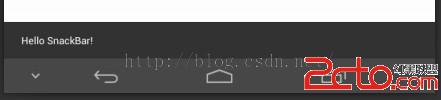
mSnackBar = mBuilder.show();不帶動作按鈕的樣式:
帶動作按鈕的樣式:
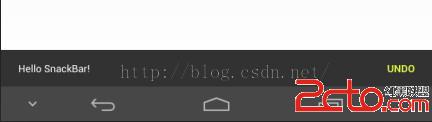
三個值得帶走的設計經驗:把「一條提示的資料」「排隊與顯示的容器」「對外的組裝介面」拆成三層,職責清楚且各自可測;用 Parcelable 換取狀態可保存性;用 Builder 換取呼叫端的可讀性。
不過也要說實話:這份實作的年代已久。若要在今天落地,直接依賴官方 Material Components 的 Snackbar 會省事得多——它已經處理好无障碍朗讀、深色模式、WindowInsets 與螢幕方向變更。讀懂原理很有價值,自己再造一次輪子則未必划算。
 Android 獲取手機資訊實例詳解
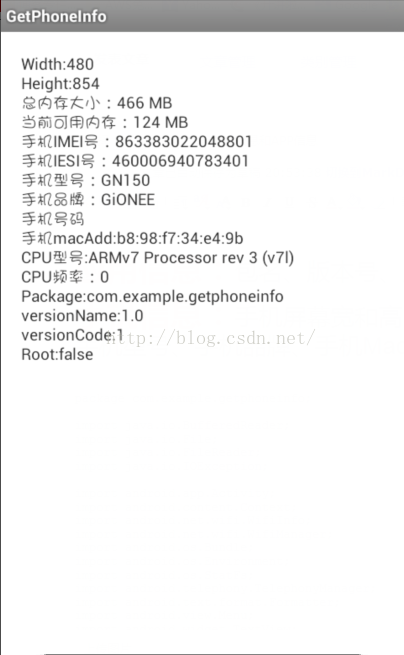
下圖為手機資訊畫面的示意。 可取得的資訊 常見的手機資訊包含螢幕寬高、可用記憶體、總記憶體、IMEI、IMSI、手機型號、品牌、MAC 位址、CPU 型號與頻率。應用層
 Android EventBus 源碼解析
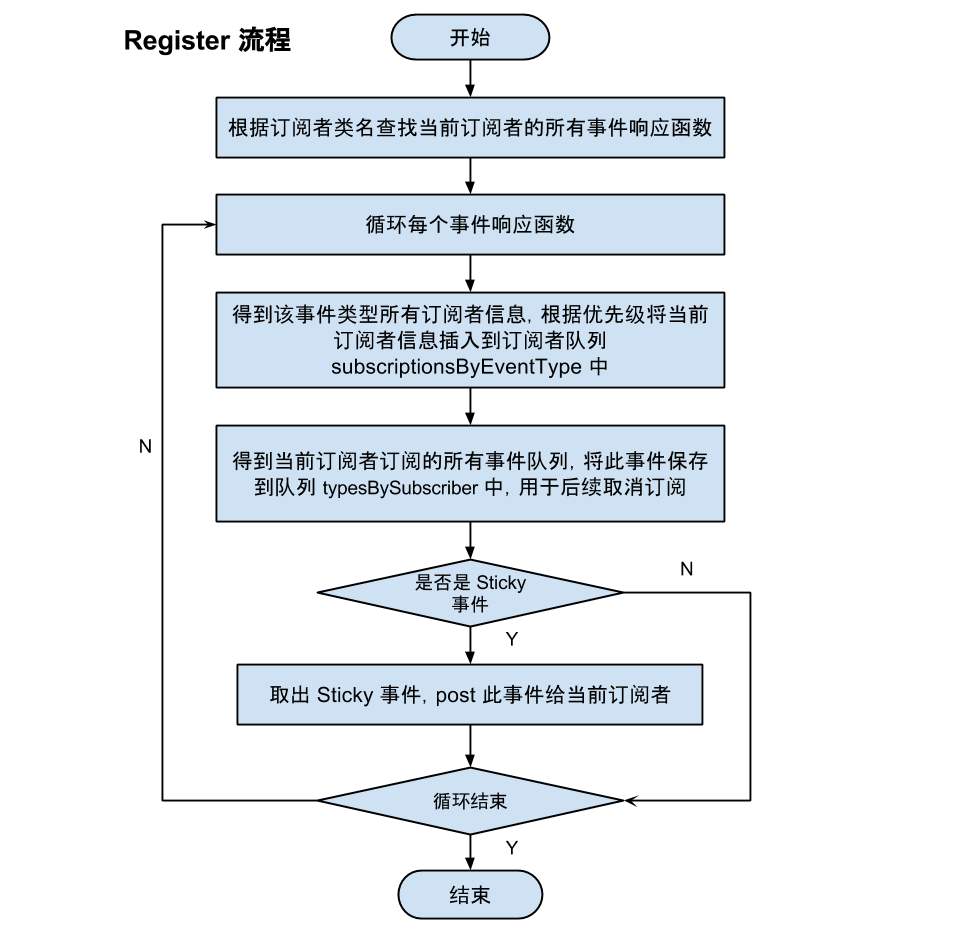
1. 功能介紹 1.1 EventBus EventBus 是一個 Android 事件發布/訂閱框架,透過解耦發布者與訂閱者來簡化事件傳遞。這裡的「事件」可理解為消息,
 Android 自定義控件屬性詳解:TypedArray 與 attrs 的用法全流程
近來在研究 Android 自定義控件的屬性,把 TypedArray 和 attrs 這套機制徹底摸了一遍,收穫頗多。本文就把整個流程梳理清楚,後續還會有實戰應用的續篇
 HSDPA 學習小結:關鍵技術、信道結構與定時關係
一、HSDPA 簡介 HSDPA 引入的 HS-DSCH 捨棄了 R99 中的功率控制、軟切換與可變展頻增益技術,同時帶來一系列關鍵技術: 1) 更短的無線幀結構(2ms