

編輯:關於 Android 程式設計
幾乎每個 App 的設定頁裡都藏著一個「檢查更新」。它的邏輯並不複雜,但要完整跑通——服務端版本描述、客戶端比對、下載進度、下載完成後拉起安裝——需要串起的環節不少。本文把整套流程拆開講清楚。
當開發方或運營方在伺服器上發布新版本,用戶點擊「檢查更新」時,App 向伺服器查詢最新版本資訊;若發現本地版本偏舊,就提示用戶是否升級。用戶確認後,App 下載新版 APK 並完成安裝;用戶選擇「稍後」,則保持現狀不動。
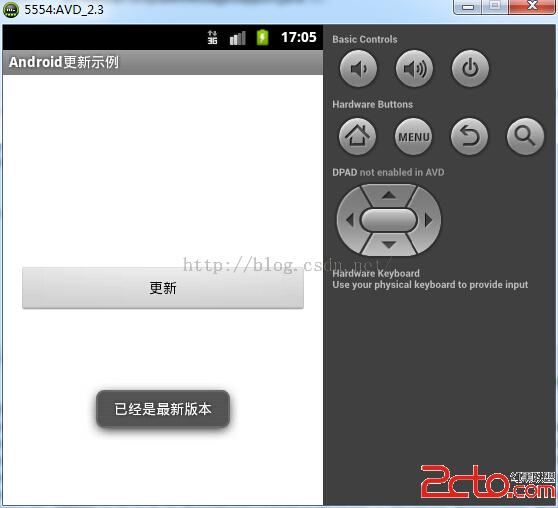
伺服器上放一份描述版本資訊的文件(本文用 XML),裡面寫明版本號、名稱、檔案大小、下載位址與更新說明。用戶觸發檢查更新時,客戶端把本地 versionCode 與文件中的版本號比大小:伺服器版本更高就提示更新,否則提示「已是最新版本」。
整個流程可以概括為四步:拉取描述文件 → 解析並比對版本 → 下載 APK 並展示進度 → 檢索完成後觸發系統安裝器。
它是客戶端與服務端溝通的媒介,內容必須與伺服器上實際存放的 APK 完全一致,否則會出現「提示更新卻下載失敗」的窘境。
<?xml version="1.0" encoding="utf-8"?>
<update>
    <version>2</version>
    <versiondesc>0.2</versiondesc>
    <name>update.apk</name>
    <size>6313406</size>
    <url>https://192.168.254.103:9999/Wechat/app/get-app/update.apk</url>
    <description>我們的產品上線啦</description>
</update>
服務端提供兩類接口:一類回傳 XML 描述文件,一類以檔案串流的形式回傳 APK。核心是把檔案包裝成串流寫入 response,並正確設定 Content-Length,這樣客戶端才能拿到總長度並計算進度。
@Controller
public class MobileVersionAPI {

    private static final String TYPE_APK = "apk";
    private static final String TYPE_XML = "xml";

    /** 取得 Android 版本比對檔 */
    @RequestMapping(value = "/app/get-android-version/android.xml")
    public void getAndroidVersionXml(HttpServletRequest request,
                                     HttpServletResponse response) {
        try {
            this.downloadFile(request, response, TYPE_XML, "version/android/version.xml");
        } catch (IOException e) {
            e.printStackTrace();
        }
    }

    /** 下載 APK */
    @RequestMapping(value = "/app/get-app/update.apk")
    public void getApp(HttpServletRequest request, HttpServletResponse response) {
        try {
            this.downloadFile(request, response, TYPE_APK, "app/update.apk");
        } catch (IOException e) {
            e.printStackTrace();
        }
    }

    /** 以串流方式回傳檔案,並帶上長度資訊 */
    private void downloadFile(HttpServletRequest request, HttpServletResponse response,
                              String type, String fileName) throws IOException {
        String path = request.getServletContext().getRealPath("/");
        if (StringUtils.isEmpty(path)) return;
        if (path.contains("\\")) path = path.replace("\\", "/");
        path = path.concat(fileName);

        File file = new File(path);
        if (file == null || !file.exists() || !file.isFile()) return;

        response.setHeader("Content-Length", String.valueOf(file.length()));
        InputStream in = new BufferedInputStream(new FileInputStream(file));
        OutputStream out = new BufferedOutputStream(response.getOutputStream());
        FileCopyUtils.copy(in, out);
    }
}
除了給 App 內使用的接口,通常還會額外提供一組 application/octet-stream 類型的位址,方便用戶直接用瀏覽器或電腦下載安裝檔。
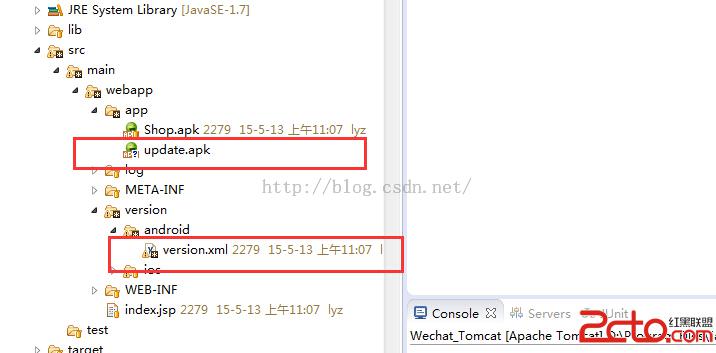
把 APK 放在 WebRoot 下的 app 目錄,把版本描述檔放在 version/android 目錄,與代碼中的相對路徑對應即可。
下載屬於耗時操作,必須放在子線程;子線程又不能直接更新 UI,因此需要透過 Handler 與主線程互動。這是整個客戶端的骨架。
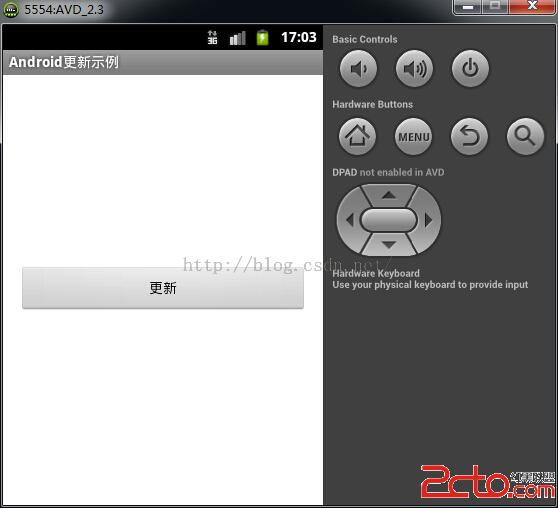
主界面只需要一顆按鈕觸發檢查更新:
<RelativeLayout xmlns:android="https://schemas.android.com/apk/res/android"
    android:layout_width="match_parent"
    android:layout_height="match_parent"
    android:padding="16dp">

    <Button
        android:layout_width="match_parent"
        android:layout_height="wrap_content"
        android:layout_centerInParent="true"
        android:onClick="update"
        android:text="檢查更新" />
</RelativeLayout>
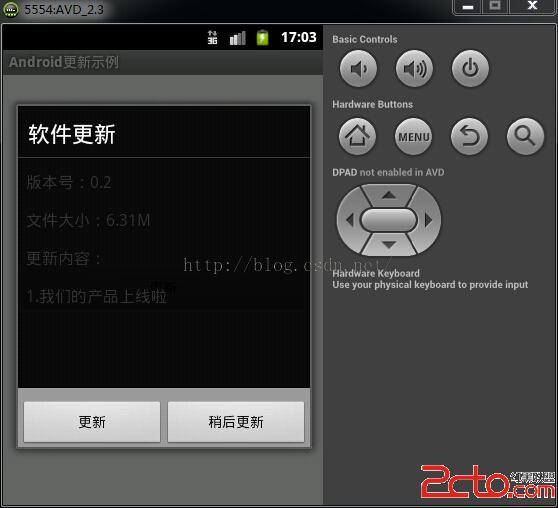
更新提示界面用來展示版本號、檔案大小與更新內容清單,外層包一個 ScrollView 以防更新說明過長:
<ScrollView
    android:layout_width="match_parent"
    android:layout_height="220dp">

    <LinearLayout
        android:layout_width="fill_parent"
        android:layout_height="wrap_content"
        android:orientation="vertical">

        <LinearLayout
            android:layout_width="match_parent"
            android:layout_height="wrap_content"
            android:layout_margin="8dp"
            android:orientation="horizontal">
            <TextView
                android:layout_width="wrap_content"
                android:layout_height="wrap_content"
                android:text="版本號:"
                android:textSize="16sp" />
            <TextView
                android:id="@+id/vesion_num_textview"
                android:layout_width="wrap_content"
                android:layout_height="wrap_content"
                android:textSize="16sp" />
        </LinearLayout>

        <!-- 檔案大小、更新內容依此類推 -->
        <LinearLayout
            android:id="@+id/update_content_layout"
            android:layout_width="match_parent"
            android:layout_height="wrap_content"
            android:layout_margin="8dp"
            android:orientation="vertical" />
    </LinearLayout>
</ScrollView>
封裝幾個高頻操作:讀取版本號、讀取版本名稱、判斷某個包是否已安裝、以及按需跳轉下載。
public final class AppUtils {

    /** 讀取自身 versionCode */
    public static int getVersionCode(Context context) {
        try {
            return context.getPackageManager()
                    .getPackageInfo(context.getPackageName(), 0).versionCode;
        } catch (NameNotFoundException e) {
            e.printStackTrace();
            return 0;
        }
    }

    /** 讀取指定包的版本名稱 */
    public static String getVersionName(String pName, Context mContext) {
        try {
            PackageInfo pinfo = mContext.getPackageManager()
                    .getPackageInfo(pName, PackageManager.GET_CONFIGURATIONS);
            return pinfo.versionName;
        } catch (Exception e) {
            e.printStackTrace();
            return null;
        }
    }

    /** 判斷指定包是否已安裝 */
    public static boolean checkAPK(String packageName, Context context) {
        for (PackageInfo pi : context.getPackageManager()
                .getInstalledPackages(PackageManager.GET_UNINSTALLED_PACKAGES)) {
            if (packageName.endsWith(pi.packageName)) return true;
        }
        return false;
    }

    /** 用系統瀏覽器/下載器打開連結 */
    public static void downloadNewApp(String url, Context context) {
        context.startActivity(new Intent(Intent.ACTION_VIEW, Uri.parse(url)));
    }
}
監聽 PACKAGE_ADDED,在新版本安裝完成後把 App 重新拉回前台,使用者不必手動點圖示。
public class PkInstallReceiver extends BroadcastReceiver {
    @Override
    public void onReceive(Context context, Intent intent) {
        if (Intent.ACTION_PACKAGE_ADDED.equals(intent.getAction())) {
            String packageName = intent.getDataString().substring(8);
            Log.i("安裝應用", "安裝: " + packageName);
            Intent newIntent = new Intent();
            newIntent.setClassName("com.lyz.update.activity",
                    "com.lyz.update.activity.MainActivity");
            newIntent.setAction(Intent.ACTION_MAIN);
            newIntent.addCategory(Intent.CATEGORY_LAUNCHER);
            newIntent.setFlags(Intent.FLAG_ACTIVITY_NEW_TASK);
            context.startActivity(newIntent);
        }
    }
}
把下載串流與檔案總長度封裝成實體,讓下載環節不必到處傳兩個參數。
public class UpdateDatas implements Serializable {
    private static final long serialVersionUID = 9210856546501387030L;
    private Integer length;      // 檔案總長度
    private InputStream in;      // 檔案串流
    // getter / setter 省略
}
用 DOM 方式解析描述檔(檔案很小,DOM 足夠),把每個節點整理成 Map 回傳,鍵名以常數集中管理,避免散落各處的字串 typo。
public class ParseXmlUtils {
    public static final String Version     = "version";
    public static final String Name        = "name";
    public static final String Url         = "url";
    public static final String Description = "description";
    public static final String Size        = "size";
    public static final String VERSION_DESC = "versiondesc";

    public static Map<String, String> parseXml(InputStream inStream) throws Exception {
        NodeList childNodes = XmlUtils.parseXml(inStream);
        if (childNodes == null) return null;

        Map<String, String> hashMap = new HashMap<String, String>();
        for (int j = 0; j < childNodes.getLength(); j++) {
            Node childNode = childNodes.item(j);
            if (childNode.getNodeType() != Node.ELEMENT_NODE) continue;
            Element el = (Element) childNode;
            String nodeName = el.getNodeName();
            if (Version.equals(nodeName) || Name.equals(nodeName)
                    || Url.equals(nodeName) || Description.equals(nodeName)
                    || Size.equals(nodeName) || VERSION_DESC.equals(nodeName)) {
                hashMap.put(nodeName, el.getFirstChild().getNodeValue());
            }
        }
        return hashMap;
    }
}
這是整個更新的中樞,負責三件事:在子線程下載描述檔並解析、比對版本後決定是否提示、下載 APK 並回報進度。子線程透過 Handler 通知主線程更新介面,構造方法中註冊安裝廣播,任務結束後取消註冊,避免洩漏。
public class UpdateManager {

    private static final String URL = "https://192.168.254.103:9999/Wechat";
    private static final String VERSION = "version";
    private static final String LENGTH  = "length";

    private static final int DOWNLOAD = 1;        // 下載中
    private static final int DOWNLOAD_FINISH = 2; // 下載完成
    private static final int PARSE_XML = 3;       // 描述檔解析完成

    private ProgressDialog mProgressDialog;
    private Map<String, String> mHashMap;
    private String mSavePath;
    private int progress;
    private int count;
    private boolean cancelUpdate = false;
    private Context mContext;
    private PkInstallReceiver pkInstallReceiver;

    private Handler mHandler = new Handler() {
        @Override
        public void handleMessage(Message msg) {
            switch (msg.what) {
                case DOWNLOAD:
                    mProgressDialog.incrementProgressBy(progress);
                    mProgressDialog.setProgress(count);
                    break;
                case DOWNLOAD_FINISH:
                    installApk();
                    if (pkInstallReceiver != null) {
                        mContext.unregisterReceiver(pkInstallReceiver);
                    }
                    break;
                case PARSE_XML:
                    Map<String, Integer> map = (Map<String, Integer>) msg.obj;
                    int serviceCode = map.get(VERSION);
                    int length = map.get(LENGTH);
                    if (serviceCode > AppUtils.getVersionCode(mContext)) {
                        showNoticeDialog(length);   // 有新版本
                    } else {
                        Toast.makeText(mContext, R.string.soft_update_no,
                                Toast.LENGTH_LONG).show();
                        if (pkInstallReceiver != null) {
                            mContext.unregisterReceiver(pkInstallReceiver);
                        }
                    }
                    break;
            }
        }
    };

    public UpdateManager(Context context) {
        this.mContext = context;
        pkInstallReceiver = new PkInstallReceiver();
        IntentFilter filter = new IntentFilter();
        filter.addAction(Intent.ACTION_PACKAGE_ADDED);
        filter.addAction(Intent.ACTION_PACKAGE_REMOVED);
        filter.addDataScheme("package");
        this.mContext.registerReceiver(pkInstallReceiver, filter);
    }

    /** 檢查是否有新版本,網路操作放在子線程 */
    public void checkUpdate() {
        new Thread(new Runnable() {
            @Override
            public void run() {
                try {
                    InputStream inStream = FileUtils.getInputStreamFromUrl(
                            URL + "/app/get-android-version/android.xml");
                    mHashMap = ParseXmlUtils.parseXml(inStream);
                    if (mHashMap != null) {
                        String size = mHashMap.get(ParseXmlUtils.Size);
                        int length = StringUtils.isEmpty(size) ? 0 : Integer.parseInt(size);
                        Map<String, Integer> map = new HashMap<String, Integer>();
                        map.put(VERSION, Integer.valueOf(mHashMap.get(ParseXmlUtils.Version)));
                        map.put(LENGTH, length);
                        Message msg = new Message();
                        msg.what = PARSE_XML;
                        msg.obj = map;
                        mHandler.sendMessage(msg);
                    }
                } catch (Exception e) {
                    e.printStackTrace();
                }
            }
        }).start();
    }

    /** 下載完成後呼叫系統安裝器 */
    private void installApk() {
        File apkfile = new File(mSavePath, mHashMap.get(ParseXmlUtils.Name));
        if (!apkfile.exists()) return;
        Intent i = new Intent(Intent.ACTION_VIEW);
        i.setDataAndType(Uri.parse("file://" + apkfile.toString()),
                "application/vnd.android.package-archive");
        mContext.startActivity(i);
    }
}
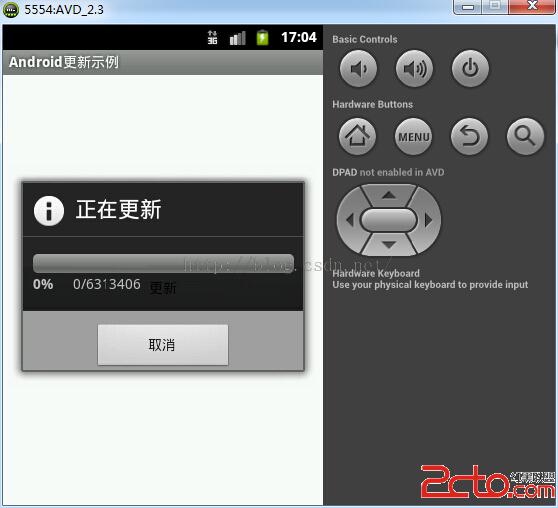
下載線程的關鍵細節:先確認外部儲存可用,再以 1KB 緩衝區循環讀寫,每輪根據 count / length 換算百分比並發訊息給 Handler;讀到 0 就發送完成訊息跳出迴圈;使用者按「取消」時把 cancelUpdate 設為 true,迴圈條件自然終止。
public class MainActivity extends Activity {
    @Override
    protected void onCreate(Bundle savedInstanceState) {
        super.onCreate(savedInstanceState);
        setContentView(R.layout.activity_main);
    }

    public void update(View v) {
        new UpdateManager(this).checkUpdate();
    }
}
聯網是前提,清單文件中必須声明:
<uses-permission android:name="android.permission.INTERNET" />
同時把 android:versionCode 與 android:versionName 維護好——版本比對完全依賴 versionCode,每次發版務必遞增。
新版 Android 對 file:// 形式的 URI 有嚴格限制,直接這樣拉起安裝器會拋 FileUriExposedException,需要改用 FileProvider 並授予臨時讀取權限。此外,下載目錄建議放在應用專屬的外部儲存目錄,避免與其他 App 的檔案衝突;下載前也應先檢查剩餘空間,並對完成後的 APK 做一次完整性校驗。這些都是示例代碼裡沒有涵蓋、但正式專案必須補上的部分。
 Android 與 BLE 終端通信實戰:Service、Characteristic 與讀寫
穿戴裝置這幾年相當熱門,也把相關技術帶動起來,其中一項就是 BLE(Bluetooth Low Energy)。BLE 是藍牙 4.0 的核心 Profile,主打快速搜
 Android 常用 ADB 命令整理
ADB 是 Android 開發與測試中非常重要的工具。熟練使用 adb 命令,可以大幅提升安裝、除錯、日誌分析與自動化測試效率。 ADB 架構 adb 是 Androi
 簡單談談 Android 中 sp 與 dp 的區別
從一開始寫 Android 程式,我們就被反覆提醒這兩個單位的使用場合。一、dp(device independent pixels)一種基於螢幕密度的抽象單位。在每英寸
 GreenDao 在 Android Studio 中的配置與使用全流程
GreenDao 的 GitHub 位址: https://github.com/greenrobot/greenDAO 先建立一個 gradle 空白專案,專案結構如下