

編輯:關於 Android 程式設計
AIDL 這東西,看帖子的人多,真正下載跑一遍的人少。自己動手做一個最簡單的例子,反而最容易理解。
需求:服務端提供一個輸入界面,把文字寫到 SD 卡;客戶端綁定服務端的 Service,調用 getText() 把文字讀回來並顯示。
新建 implaidl.aidl(後綴不能錯,且接口裡不要加任何修飾符):
package com.yung.aidlclient;

interface implaidl {
    String getText();
}
編譯後,gen 目錄下會自動生成對應包名的 implaidl.java。裡面有一個抽象的靜態內部類 Stub,它繼承了 Binder 並實現了我們的接口——這正是 Android 跨進程通信的核心:onBind 返回一個 IBinder,而 Stub 就是這個 IBinder 的本地代理。
工程結構如下:
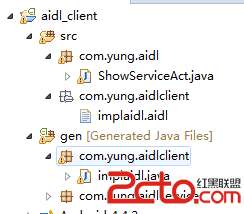
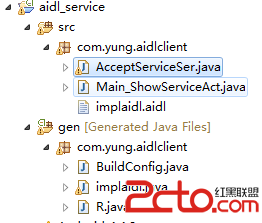
把 aidl 文件複製到客戶端工程的同一個包路徑下(包名必須一致),客戶端就拿到了同一份接口定義。
客戶端只需要一個界面,在 onResume 中綁定服務並讀取數據:
public class ShowServiceAct extends Activity {
    private TextView tv;

    @Override
    protected void onCreate(Bundle savedInstanceState) {
        super.onCreate(savedInstanceState);
        setContentView(R.layout.mainact);
        tv = findViewById(R.id.textview1);
    }

    @Override
    protected void onResume() {
        super.onResume();
        // 這個 action 與服務端 manifest 中聲明的一致
        Intent intent = new Intent("com.yung.aidlservice.START");
        bindService(intent, new ServiceConnection() {
            @Override
            public void onServiceDisconnected(ComponentName name) {
            }

            @Override
            public void onServiceConnected(ComponentName name, IBinder service) {
                implaidl i = implaidl.Stub.asInterface(service);
                try {
                    tv.setText(i.getText());
                } catch (RemoteException e) {
                    e.printStackTrace();
                }
            }
        }, Context.BIND_AUTO_CREATE);
    }
}
onServiceConnected 回傳的 IBinder 就是遠端 Stub 對象,asInterface 把它轉成接口代理。之後所有接口調用都會經由 Binder 驅動跨進程執行,因此方法必須拋或捕獲 RemoteException。
public class Main_ShowServiceAct extends Activity implements OnClickListener {
    public EditText ed;
    public static String filePath = "aidl.txt";

    @Override
    protected void onCreate(Bundle savedInstanceState) {
        super.onCreate(savedInstanceState);
        setContentView(R.layout.mainact);
        ed = findViewById(R.id.editText1);
    }

    @Override
    public void onClick(View v) {
        saveTextContent(ed.getText().toString() + " 保存時間: " + System.currentTimeMillis());
    }

    private void saveTextContent(String str) {
        File file = new File(getsdpath() + "/" + filePath);
        try {
            if (!file.exists()) {
                file.createNewFile();
            }
            FileOutputStream out = new FileOutputStream(file);
            out.write(str.getBytes());
            out.flush();
            out.close();
            Toast.makeText(this, "文字保存完畢", Toast.LENGTH_SHORT).show();
        } catch (IOException e) {
            e.printStackTrace();
        }
    }

    public static String getsdpath() {
        return Environment.getExternalStorageDirectory().getAbsolutePath();
    }
}public class AcceptServiceSer extends Service {
@Override
public IBinder onBind(Intent intent) {
return new implaidl.Stub() {
@Override
public String getText() throws RemoteException {
return getTextContent();
}
};
}
private String getTextContent() {
File file = new File(Main_ShowServiceAct.getsdpath()
+ "/" + Main_ShowServiceAct.filePath);
try {
FileInputStream read = new FileInputStream(file);
byte[] bys = new byte[read.available()];
read.read(bys);
read.close();
return new String(bys);
} catch (IOException e) {
e.printStackTrace();
}
return null;
}
}最後在服務端的 AndroidManifest 中聲明 Service,並加上 intent-filter 供客戶端按 action 匹配:
<service android:name=".AcceptServiceSer">
    <intent-filter>
        <action android:name="com.yung.aidlservice.START" />
    </intent-filter>
</service>
另外別忘了動態存 SD 卡需要 WRITE_EXTERNAL_STORAGE 權限(Android 6.0 以上還要運行時申請)。跑起來之後,服務端輸入文字保存,客戶端打開頁面即可看到同樣的內容——這就是一次完整的跨進程調用。
 Android Activity 完整解析:啟動、生命週期與狀態保存
Activity 是使用者與 App 互動的主要畫面。每個 Activity 都有自己的視窗、介面與生命週期。理解 Activity 的啟動方式、結果回傳與狀態保存,是建
 Android Fragment 完全解析:生命週期、靜態與動態加載、元件間通訊
本文以「先看結論、再看程式碼」的方式,把 Fragment 這個元件從概念一路講到實戰,涵蓋以下重點: Fragment 是什麼、為何而出現 Fragment 的生命週
 用 Android Studio 揪出內存洩漏:一次 ImageLoader OOM 排查全記錄
大家好!我是即將畢業的學生一枚,閒暇時常看大神們的博客,收穫頗多。最近做畢業設計時遇到一些問題,就把問題和解決方法記錄下來,若有不當之處還望大家多多包涵、批評指正。 本文
 Android Binder 與遠程服務呼叫機制解析
為什麼要理解 Binder 在 Android 系統中,許多核心能力都依賴跨進程通信,例如 Activity 啟動、系統服務取得與底層資源管理。Binder 是 Andr